
Cloud de Confiance by S3NS offers two organization policy constraints to help ensure CMEK usage across an organization:
constraints/gcp.restrictNonCmekServicesis used to require CMEK protection.constraints/gcp.restrictCmekCryptoKeyProjectsis used to limit which Cloud KMS keys are used for CMEK protection.
CMEK organization policies only apply to newly created resources within supported Cloud de Confiance services.
Required roles
To ensure that each user has the necessary
permissions to check organization policies when creating resources,
ask your administrator to grant the
Organization Policy Viewer (roles/orgpolicy.policyViewer)
IAM role to each user on your organization.
For more information about granting roles, see Manage access to projects, folders, and organizations.
This predefined role contains the permissions required to check organization policies when creating resources. To see the exact permissions that are required, expand the Required permissions section:
Required permissions
The following permissions are required to check organization policies when creating resources:
-
To view full organization policy details:
orgpolicy.policy.get -
To check organization policy when creating resources:
orgpolicy.policies.check
Your administrator might also be able to give each user these permissions with custom roles or other predefined roles.
When organization policies are active, the orgpolicy.policies.check permission
is required for Cloud de Confiance console users who create resources that are
protected by CMEK keys. Users without this permission can create CMEK-protected
resources using the Cloud de Confiance console, but they can select a CMEK key that
isn't allowed by the restrictCmekCryptoKeyProjects constraint. When a key that
does not meet this constraint is selected, resource creation eventually fails.
Require CMEK protection
To require CMEK protection for your organization, configure the
constraints/gcp.restrictNonCmekServices organization policy.
As a list constraint, the accepted values for this constraint are Cloud de Confiance by S3NS
service names (for example, bigquery.googleapis.com). Use this constraint by
providing a list of Cloud de Confiance by S3NS service names and setting the constraint to
Deny. This configuration blocks the creation of resources in these
services if the resource is not protected by CMEK. In
other words, requests to create a resource in the service don't succeed without
specifying a Cloud KMS key. Additionally, this constraint blocks
the removal of CMEK protection from resources in these services. This constraint
can only be applied to supported services.
Limit the use of Cloud KMS keys for CMEK
To limit which Cloud KMS keys are used for CMEK protection,
configure the constraints/gcp.restrictCmekCryptoKeyProjects constraint.
As a list constraint, the accepted values are resource hierarchy indicators (for
example, projects/PROJECT_ID,
under:folders/FOLDER_ID, and
under:organizations/ORGANIZATION_ID). Use this constraint by
configuring a list of resource hierarchy indicators and setting the constraint
to Allow. This configuration restricts supported services so that CMEK keys
can be chosen only from the listed projects, folders, and organizations.
Requests to create CMEK-protected resources in configured services don't succeed
without a Cloud KMS
key from one of the allowed resources. Where configured, this constraint applies
to all supported services.
Supported services
| Service | Constraint value when requiring CMEK |
|---|---|
| Cloud Storage | storage.googleapis.com |
Enforcement exceptions by resource type
CMEK organization policy constraints are enforced when creating a new resource or when changing (where supported) the Cloud KMS key on an existing resource. Generally, they are enforced on all of a service's resource types that support CMEK and based solely on the resource's configuration. Some notable exceptions are summarized here:
| Resource type | Enforcement exception |
|---|---|
storage.googleapis.com/Bucket |
Enforced on bucket default Cloud KMS key |
storage.googleapis.com/Object |
Enforced independently of bucket; see also separate configuration of bucket default Cloud KMS key |
Configuration examples
In the configuration examples, assume the sample organization has the following resource hierarchy:
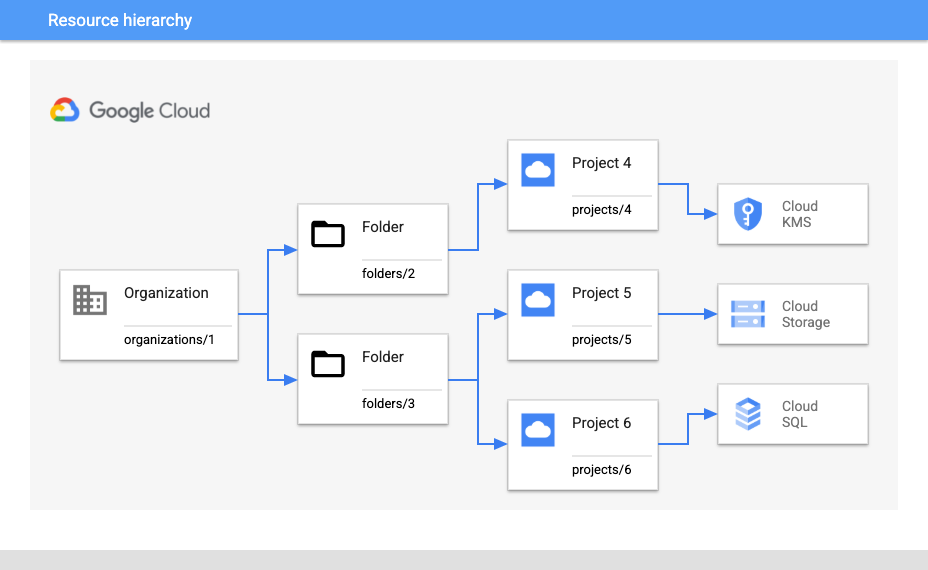
Require CMEK and limit keys for a project
Suppose you want to require CMEK protection for all Cloud Storage resources
under projects/5 and ensure that only keys coming from projects/4 can be
used.
To require CMEK protection for all new Cloud Storage resources, use the following organization policy setting:
- Organization policy:
constraints/gcp.restrictNonCmekServices - Binding at:
projects/5 - Policy type: Deny
- Policy value:
storage.googleapis.com
To ensure only keys from projects/4 are used, use the following configuration:
- Organization policy:
constraints/gcp.restrictCmekCryptoKeyProjects - Binding at:
projects/5 - Policy type: Allow
- Policy value:
projects/4
Require CMEK and limit keys to within a folder
Alternatively, suppose you're expecting to add additional Cloud KMS
projects under folders/2 in the future and want to require CMEK more broadly
within folders/3. For this scenario, you need slightly different
configurations.
To require additional CMEK protection for new Cloud SQL and Cloud Storage
resources anywhere under folders/3:
- Organization policy:
constraints/gcp.restrictNonCmekServices - Binding at:
folders/3 - Policy type: Deny
- Policy values:
sqladmin.googleapis.com,storage.googleapis.com
To ensure only keys from Cloud KMS projects under folders/2 are
used:
- Organization policy:
constraints/gcp.restrictCmekCryptoKeyProjects - Binding at:
folders/3 - Policy type: Allow
- Policy value:
under:folders/2
Require CMEK for an organization
To require CMEK everywhere in the organization (in supported services),
configure the constraints/gcp.restrictNonCmekServices constraint with the
following setting:
- Organization policy:
constraints/gcp.restrictNonCmekServices - Binding at:
organizations/1 - Policy type: Deny
- Policy values: (all supported services)
Limitations
If you use Cloud de Confiance console to create a resource, you might notice that
you can't use any encryption options other than CMEK when
constraints/gcp.restrictNonCmekServices is configured for a project and
service. The CMEK organization policy restriction is only visible when the
customer account has been granted the orgpolicy.policy.get IAM
permission on the project.
What's next
See Introduction to the Organization Policy Service to learn more about the benefits and common use cases for organization policies.
For more examples on creating an organization policy with particular constraints, see Using constraints.