
Viewing Access Transparency logs for Google Workspace
This document explains how you can view and understand the Access Transparency logs generated when S3NS personnel access Customer Data in Google Workspace resources. Customer Data in Google Workspace includes text that you have entered into Gmail, Google Docs, Google Sheets, Google Slides, and other Google Workspace apps.
Before you begin
- Make sure that you have the Logs Viewer (
roles/logging.viewer) Identity and Access Management (IAM) role. For information about granting an IAM role, see Grant a single role.
View Access Transparency logs for Google Workspace
You can use the Logs Explorer in the Cloud de Confiance console to retrieve, view, and analyze Access Transparency logs. For information about using the Logs Explorer, see Using the Logs Explorer.
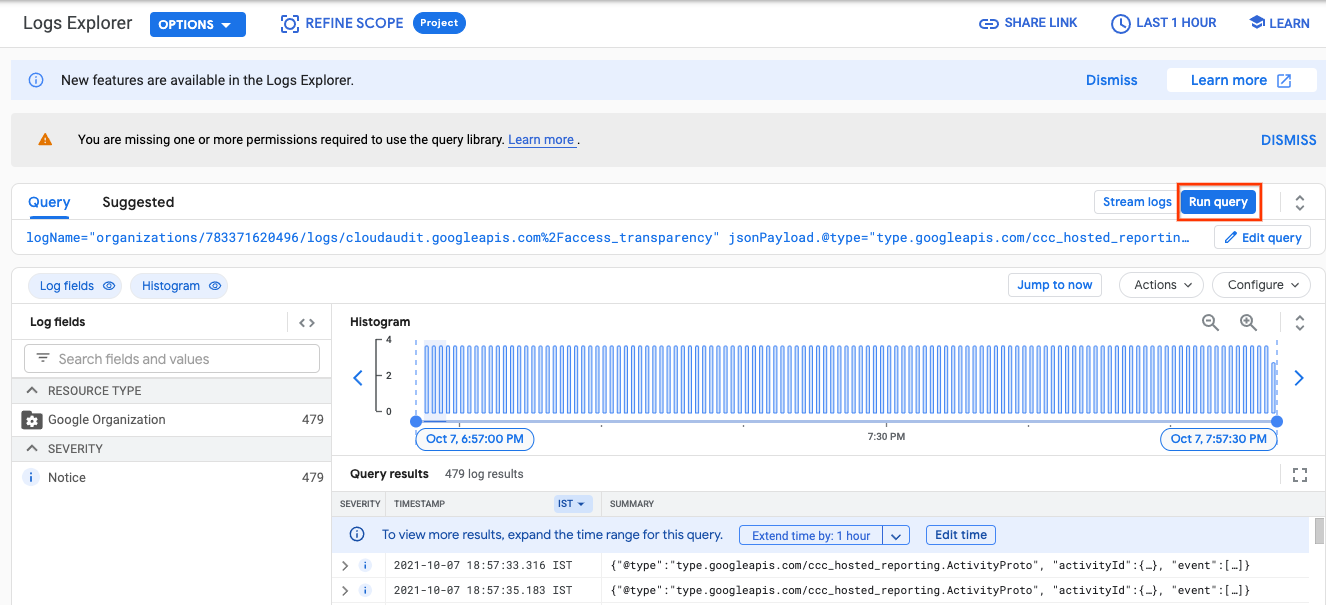
To view Access Transparency logs for Google Workspace using the Logs Explorer, do the following:
Go to the Logs Explorer page in the Cloud de Confiance console.
Enter the following query in the Logs Explorer:
logName="organizations/ORG_ID/logs/cloudaudit.googleapis.com%2Faccess_transparency"
jsonPayload.@type="type.googleapis.com/ccc_hosted_reporting.ActivityProto"
Replace ORG_ID with the unique identifier of your Cloud de Confiance organization.
Click Run query to execute the query.
Sample Access Transparency log for Google Workspace
The following sample is an example of the Access Transparency log for Google Workspace.
{
  "insertId": "-6x8cuqc3rk",
  "jsonPayload": {
    "activityId": {
      "uniqQualifier": "1720950322606095479",
      "timeUsec": "1621441673703908"
    },
    "@type": "type.googleapis.com/ccc_hosted_reporting.ActivityProto",
    "event": [
      {
        "status": {
          "success": true
        },
        "eventType": "GSUITE_RESOURCE",
        "parameter": [
          {
            "multiStrValue": [
              "GMAIL"
            ],
            "name": "GSUITE_PRODUCT_NAME",
          },
          {
            "name": "RESOURCE_NAME",
            "multiStrValue": [
              "//googleapis.com/gmail/users/owner@example.com"
            ],
          },
          {
            "name": "LOG_ID",
            "value": "Qt8v90c0fAEy_SyaOplDvJc",
          },
          {
            "multiStrValue": [
              "Google Initiated Service - For details, please refer to the documentation."
            ],
            "name": "JUSTIFICATIONS",
          },
          {
            "name": "ACTOR_HOME_OFFICE",
            "value": "US",
          },
          {
            "value": "owner@example.net",
            "name": "OWNER_EMAIL",
          }
        ],
        "eventName": "ACCESS"
      }
    ]
  },
  "resource": {
    "type": "organization",
    "labels": {
      "organization_id": "12345"
    }
  },
  "timestamp": "2021-05-19T16:27:53.703908Z",
  "severity": "NOTICE",
  "logName": "organizations/12345/logs/cloudaudit.googleapis.com%2Faccess_transparency",
  "receiveTimestamp": "2021-05-19T16:28:52.867650088Z"
}
For information about the event and parameters that can appear in the
jsonPayload field of the Access Transparency logs generated when S3NS personnel
access Google Workspace resources, see Access Transparency Activity Events.
For information about all the other fields in the Access Transparency logs for Google Workspace, see LogEntry.
What's next
- Learn more about Google Workspace audit logs.