
Cloud NAT rules
This page provides an overview of Cloud NAT rules. NAT rules let you define how Cloud NAT is used to translate IP addresses.
NAT rules
A NAT rule defines a match condition and a corresponding action. When a packet matches the condition, Cloud NAT applies the specified action.
You can match packets by their source or destination IPv4 address. Public NAT supports both rule types, while Private NAT supports only source-based rules (Preview):
- In source-based rules, packets are matched by their source IPv4 address.
- In destination-based rules, packets are matched by their destination IPv4 address.
Key characteristics
The following table summarizes the key characteristics of Cloud NAT rules for Public NAT and Private NAT.
| Characteristic | Public NAT | Private NAT |
|---|---|---|
| Rule types The match criteria that you can use to identify traffic |
Source-based or destination-based | Source-based only |
| Rule type combinations The allowed combinations of match criteria within a single rule |
Only source addresses or only destination addresses | Source addresses (combined with the next hop) |
| IP version The IP protocol version that is supported for matched addresses |
IPv4 only | IPv4 only |
| IP forwarding support Source-based rules only: address translation for forwarded packets |
Yes | Yes |
| Destinations The target networks where translated packets are sent |
Internet | Private networks |
| Unmatched traffic The action applied if a packet doesn't match any of your custom rules |
Translate using the default rule or drop the packet | Drop the packet |
Specifications
The following specifications apply to NAT rules for both Public NAT and Private NAT. These requirements apply to rules on the same Cloud NAT gateway:
- A unique priority number from 0 (highest priority) to 65,000 (lowest priority) identifies each rule. No two rules can have the same priority.
- Rules are evaluated starting with the highest priority (the lowest number). The first matching rule is applied.
- A NAT rule can't use
0.0.0.0/0as its match condition. - NAT IP addresses or subnets must not overlap across NAT rules.
For additional rule specifications, see the specifications for Public NAT and specifications for Private NAT.
NAT rules for Public NAT
By default, when you configure a Cloud NAT gateway for Public NAT, packets that are translated by that NAT gateway use the same set of NAT IP addresses to reach all internet destinations. To assign specific NAT IP addresses based on a packet's source or destination address, you can add NAT rules.
Configuration examples
This section provides configuration examples for source- and destination-based NAT rules for Public NAT.
Source-based rules
You can use source-based NAT rules for any traffic supported by Public NAT. This section shows a configuration example for VM instances with IP forwarding enabled.
By default, when a Cloud NAT gateway is configured for IPv4 traffic in a subnet, the gateway provides NAT for the primary internal IP address and alias IP ranges of any VM instance in that subnet. By using source-based NAT rules, you can also configure NAT for VM instances that forward packets with other source addresses.
In this example, Cloud NAT is configured in Subnet A. In the subnet,
a VM instance with the primary internal IP address 10.1.1.2 and an alias IP
range 10.2.1.0/24 sends traffic to the internet. Consider the following
requirements for the VM instance:
- If a packet originates from IP range
192.168.1.0/24, the VM must use NAT IP address203.0.113.10to send traffic to any internet destination. - If a packet originates from IP range
192.168.2.0/24, the VM must use NAT IP address203.0.113.20to send traffic to any internet destination. - If a packet originates from IP address
10.1.1.2(the VM's primary internal IP address) or IP range10.2.1.0/24(the VM's alias IP range), the VM must use NAT IP address203.0.113.30to send traffic to any internet destination.

To fulfill these requirements, you create two source-based NAT rules for forwarded packets and the default rule for packets from the primary internal IP address and the alias IP range of the VM instance:
- Source-based rule 1: if the source address is
192.168.1.0/24, use203.0.113.10to send traffic to the internet. - Source-based rule 2: if the source address is
192.168.2.0/24, use203.0.113.20to send traffic to the internet. - The default rule: for all other packets, use
203.0.113.30to send traffic to the internet.
If the source address of a packet forwarded by the VM instance doesn't match either rule 1 or rule 2, the packet is dropped. For information about how Cloud NAT allocates ports for VMs with IP forwarding enabled, see Port allocation for IP forwarding.
For more information about how you can use source-based NAT rules, see Cloud WAN under the hood: A closer look at its differentiated networking capabilities.
Destination-based rules
The following example shows how to use NAT rules when your destination allows access from only a few IP addresses. We recommend that the traffic to such destinations from your Cloud de Confiance VMs in private subnets be SNAT-translated with only the permitted IP addresses. We recommend that you not use these IP addresses for other destinations.
Consider the following requirements for VMs in Subnet-1 (10.10.10.0/24),
which is in Region A of the Virtual Private Cloud (VPC) network test:
- The VMs must use NAT IP address
203.0.113.20to send traffic to destination198.51.100.20/30. - The VMs must use NAT IP address
203.0.113.30to send traffic to destination198.51.100.30or198.51.100.31. - The VMs must use NAT IP address
203.0.113.40to send traffic to any other internet destination.
This VPC network also contains two additional subnets in the
same region. These VMs must use NAT IP address 203.0.113.10 to send traffic
to any destination.
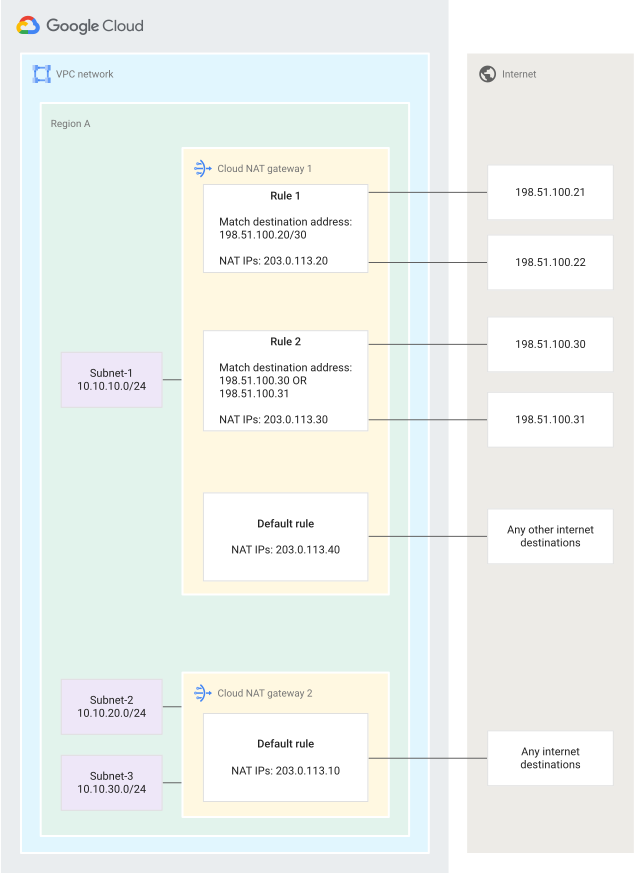
You can use NAT rules for this example, but you need two NAT gateways because
Subnet-1 (10.10.10.0/24) has NAT rules that are different from the other
subnets. To create this configuration, follow these steps:
- Create a gateway called
Cloud NAT Gateway 1forSubnet-1with NAT IP address203.0.113.40and add the following rules:- NAT rule 1 in
Cloud NAT Gateway 1: when the destination is198.51.100.20/30, use203.0.113.20for NAT. - NAT rule 2 in
Cloud NAT Gateway 1: when the destination is198.51.100.30or198.51.100.31, use203.0.113.30for NAT.
- NAT rule 1 in
- Create a gateway called
Cloud NAT Gateway 2for the region's other subnets and assign the NAT IP address as203.0.113.10. No NAT rules are needed in this step.
Specifications
In addition to the common specifications, the following specifications apply to NAT rules for Public NAT:
- Cloud NAT supports source- and destination-based rules. Each rule defines a match condition that is based on the source or destination address, but not both.
- Each NAT configuration has a default rule (rule priority 65,001):
- The default rule is applied if a packet doesn't match any source- or destination-based NAT rule in the same NAT configuration. Exception: the default rule isn't applied to forwarded packets. To use NAT for these packets, your NAT configuration must include a matching source-based rule. For more information, see Source-based rules and Port allocation for IP forwarding.
- The IP address range of the default rule is
0.0.0.0/0. If the NAT configuration has both source- and destination-based rules, any traffic that is eligible for the default rule and doesn't match any of your custom rules is processed by this default rule, using the NAT IP addresses that are assigned to it.
- You can't create a NAT rule with
0.0.0.0/0as the source or destination range because it is used by the default rule. - Cloud NAT rules are supported only when the value of the NAT IP
allocate option is
MANUAL_ONLY. - All NAT IP addresses configured in a given rule must be of the same tier. You can't use a mix of Premium Tier and Standard Tier IP addresses within the same rule (including the default rule).
- IP address ranges in match conditions must not overlap across NAT rules. At most, one rule can apply to any given packet. If a packet matches both a source- and destination-based rule, Cloud NAT applies the rule that has higher priority.
- NAT IP addresses across NAT rules must not overlap.
- A rule must either have a non-empty
Activeor non-emptyDrainIP address. If the rule has an emptyActiveIP address, new connections that match the NAT rule are dropped. - NAT rules cannot be added to a NAT gateway that has endpoint-independent mapping (EIM) enabled. You can't enable EIM on a NAT gateway that has NAT rules in it.
Port allocation
The Cloud NAT gateway uses the minimum ports per VM
(minPortsPerVm) setting
to determine how many source ports to allocate for each VM.
Because a single NAT IP address provides 64,512 usable ports, the value of
minPortsPerVm determines the maximum number of VMs that one NAT IP
address can support. For example, if minPortsPerVm is 1,024 ports, a
single IP address can support up to 63 VMs (64,512 ÷ 1,024).
The value of minPortsPerVm is used to independently calculate port allocation
for each configured NAT rule, including the default rule. If a VM exhausts its
allocated ports from a specific rule, new connections that match that rule
are dropped.
Rule types and port allocation
Cloud NAT allocates ports for NAT rules based on their type:
- Default rule. Ports are allocated to each VM whose primary internal IP address or alias IP ranges are served by the Cloud NAT gateway, even if the VM has IP forwarding enabled. The default rule processes only traffic that originates from primary internal IP addresses or alias IP ranges and doesn't process forwarded traffic.
Source-based rules. Ports are allocated to a VM only if its primary internal IP address or an alias IP range matches the source address that is specified in the NAT rule. For example, assume a Cloud NAT gateway is configured to serve a primary IP address range containing both
10.1.1.1and10.1.1.2. If a source-based rule specifies10.1.1.1for the match condition but a VM sends packets using its primary internal IP address10.1.1.2, Cloud NAT doesn't allocate ports to the VM from that specific rule.Limitation: if a VM has IP forwarding enabled, port allocation operates differently. In this case, Cloud NAT allocates ports to the VM from the default rule and all source-based rules in the NAT configuration simultaneously. For more information, see Port allocation for IP forwarding.
Destination-based rules. For each rule, ports are allocated to each VM whose primary internal IP address or alias IP ranges are served by the Cloud NAT gateway. Each VM receives ports from the default rule and from each destination-based rule.
For example, if the gateway is configured with 1,024 ports per VM and has two destination-based NAT rules in addition to the default NAT rule, each VM is allocated 1,024 ports from each rule.
Port allocation for IP forwarding
To support VMs with IP forwarding enabled, rule matching for these VMs operates differently during port allocation and packet processing:
Port allocation. Because forwarding VMs can emit packets with arbitrary source IP addresses, Cloud NAT treats these VMs as a match for the default rule and all source-based NAT rules in the NAT configuration. Consequently, for every forwarding VM, the Cloud NAT gateway allocates the
minPortsPerVmvalue from the default rule and each source-based rule simultaneously.For example, consider a Cloud NAT gateway configured with a
minPortsPerVmof 1,024, one source-based NAT rule with one NAT IP address, and the default NAT rule with 10 NAT IP addresses. Each forwarding VM is allocated 1,024 ports from both rules. Because the source-based rule has only one NAT IP address, it can support up to 63 forwarding VMs. The Cloud NAT gateway also reserves 64,512 ports (63 VMs × 1,024 ports) for them from the default rule.Packet processing. For actual address translation, a source-based rule processes a packet only if the packet's source IP address matches the source address that is defined in the rule condition. The default rule doesn't process forwarded traffic from VMs with IP forwarding enabled. Packets with arbitrary source IP addresses are dropped if they don't match a source-based rule.
To prevent port exhaustion that results in an error in NAT configurations that include VMs with IP forwarding enabled, make sure that your NAT rules are configured with sufficient port capacity:
- The default rule must have a sufficient number of NAT IP addresses to support all forwarding VMs that are served by the Cloud NAT gateway, in addition to every VM that uses the default rule for traffic from its primary internal IP address or alias IP ranges.
- Each source-based rule must have a sufficient number of NAT IP addresses to support all forwarding VMs served by the gateway. The rule must also have a sufficient number of NAT IP addresses to support every VM that uses that specific source-based rule for traffic from its primary internal IP address or alias IP ranges.
Port capacity
A NAT rule can exhaust its available ports if the rule's IP addresses can't support the required port allocations.
Consider a subnet with 16 VMs and a Cloud NAT gateway configured with 4,096 ports per VM. The gateway has three rules:
- Default NAT rule with two NAT IP addresses
- Destination-based
rule-1with one NAT IP address - Destination-based
rule-2with two NAT IP addresses
Because port allocation is calculated independently per rule, each rule must provide 65,536 ports (16 VMs × 4,096 ports).
The default rule and rule-2 have sufficient capacity. However, rule-1 has
only one IP address (64,512 usable ports), which isn't enough to provide
the full allocation for all 16 VMs. Consequently, traffic matching rule-1
might be dropped for any VM that doesn't receive its full port allocation.
To check if a NAT rule needs more IP addresses, you can use the
minExtraIpsNeeded
field.
This field shows the number of IP addresses that you must
allocate if the existing IP addresses
in the NAT rule can't satisfy the port requirements
for all configured VMs.
Port capacity planning
When planning the port capacity of your NAT rules, consider how Cloud NAT allocates ports for NAT rules:
- Port allocation
- Rule types and port allocation
- Port allocation for IP forwarding (for NAT configurations that include VMs with IP forwarding enabled)
NAT rules for Private NAT
Private NAT translates traffic between private networks—specifically, between VPC networks that are connected through a Network Connectivity Center hub or between VPC networks and on-premises or other cloud provider networks that are connected through Cloud Interconnect or Cloud VPN.
When you create a Cloud NAT gateway for Private NAT, you add a NAT rule to match traffic based on the type of Private NAT that you want to configure. This rule must include the next hop. You can optionally configure NAT rules, including the required rule, to match traffic based on both its source IP address and the next hop (Preview), as described in the following sections.
Configuration example
Consider a scenario where traffic from two source IP addresses,
10.0.0.25 and 10.0.0.26, needs to reach the same
NCC hub, hub-1. You want to translate the source IP address
10.0.0.25 to an IP address from NAT subnet A and 10.0.0.26 to an IP address
from NAT subnet B.
To create this configuration, you add two rules:
- Rule 1 (for example, priority 10): match IP address
10.0.0.25that is destined forhub-1. Assign NAT subnet A to this rule. - Rule 2 (for example, priority 20): match IP address
10.0.0.26that is destined forhub-1. Assign NAT subnet B to this rule.
Specifications
In addition to the common specifications, the following specifications apply to NAT rules for Private NAT:
- Only source-based rules are supported.
- Within a single Cloud NAT gateway for Private NAT, all rules must specify the same destination next hop type, including the NCC hub name.
- The first rule that matches both the source IP address and the next hop is applied.
Limitations
- IP address ranges in match conditions must not overlap or be identical across NAT rules.
- If no rule matches, traffic is dropped.
Rule expressions
NAT rules are written using Common Expression Language syntax.
An expression requires two components:
- Attributes that can be evaluated.
- Operations that can be performed on the attributes.
For example, the following expression uses the inIpRange() operation on the
destination.ip attribute:
inIpRange(destination.ip, "198.51.100.0/24")
The operation returns true if the destination IP address is within the
198.51.100.0/24 range.
Attributes
Attributes represent information from an outgoing packet, such as the source and destination IP address. NAT rules support the following attributes and operations.
Attributes for Public NAT
| Attribute name | Description |
|---|---|
source.ip |
Source IP address of the outgoing packet |
destination.ip |
Destination IP address of the outgoing packet |
Attributes for Private NAT
| Attribute name | Description |
|---|---|
source.ip |
Source IP address of the outgoing packet |
nexthop.hub |
Destination NCC hub |
nexthop.is_hybrid |
Hybrid destinations through Cloud Interconnect or Cloud VPN |
Operations
The following reference describes the operators that you can use with attributes to define rule expressions.
| Operation | Description |
|---|---|
inIpRange(string, string) -> bool |
inIpRange(x, y) returns true
if IP CIDR range y contains IP address
x. |
|| |
x || y returns
true if x or y is
true. |
== |
x == y returns
true if x is equal to
y. |
&& (Private NAT only) |
x && y returns
true if both x and y
are true. |
Example expressions
This section provides example match expressions for NAT rules for Public NAT and Private NAT.
Examples for Public NAT
You can match packets based on either the source or destination address, but not both.
Examples for source-based matching
| Match expressions |
|---|
|
Match packets with source IP address 'source.ip == "10.0.0.25"' |
|
Match packets with source IP address 'source.ip == "10.0.0.25" || source.ip == "10.0.0.26"' |
|
Match packets with source IP address range 'inIpRange(source.ip, "10.0.2.0/24")' |
|
Match packets with source IP address 'source.ip == "10.0.0.25" || inIpRange(source.ip, "10.0.2.0/24")' |
|
Match packets with source IP address range 'inIpRange(source.ip, "10.0.2.0/24") || inIpRange(source.ip, "10.0.3.0/24")' |
Examples for destination-based matching
| Match expressions |
|---|
|
Match packets with destination IP address 'destination.ip == "198.51.100.20"' |
|
Match packets with destination IP address 'destination.ip == "198.51.100.20" || destination.ip == "198.51.100.21"' |
|
Match packets with destination IP address range 'inIpRange(destination.ip, "198.51.100.10/30")' |
|
Match packets with destination IP address 'destination.ip == "198.51.100.20" || inIpRange(destination.ip, "198.51.100.10/30")' |
|
Match packets with destination IP address range 'inIpRange(destination.ip, "198.51.100.10/30") || inIpRange(destination.ip, "198.51.100.20/30")' |
Examples for Private NAT
You can match packets based on both the source IP address and the next hop such as an NCC hub or hybrid connectivity through Cloud Interconnect or Cloud VPN. Specifying the next hop is required.
Examples for Private NAT for NCC spokes
The following examples match outgoing packets to destinations in an
NCC
hub. Replace PROJECT_ID and HUB with the
Cloud de Confiance project and NCC hub names.
| Match expressions |
|---|
|
Match packets with source IP address 'source.ip == "10.0.0.25" && nexthop.hub == "//networkconnectivity.googleapis.com/projects/PROJECT_ID/locations/global/hubs/HUB"' |
|
Match packets with source IP address '(source.ip == "10.0.0.25" || source.ip == "10.0.0.26") && nexthop.hub == "//networkconnectivity.googleapis.com/projects/PROJECT_ID/locations/global/hubs/HUB"' |
|
Match packets with source IP address range 'inIpRange(source.ip, "10.0.2.0/24") && nexthop.hub == "//networkconnectivity.googleapis.com/projects/PROJECT_ID/locations/global/hubs/HUB"' |
|
Match packets with source IP address '(source.ip == "10.0.0.25" || inIpRange(source.ip, "10.0.2.0/24")) && nexthop.hub == "//networkconnectivity.googleapis.com/projects/PROJECT_ID/locations/global/hubs/HUB"' |
|
Match packets with source IP address range '(inIpRange(source.ip, "10.0.2.0/24") || inIpRange(source.ip, "10.0.3.0/24")) && nexthop.hub == "//networkconnectivity.googleapis.com/projects/PROJECT_ID/locations/global/hubs/HUB"' |
Examples for Hybrid NAT
The following examples match outgoing packets to hybrid destinations.
| Match expressions |
|---|
|
Match packets with source IP address 'source.ip == "10.0.0.25" && nexthop.is_hybrid' |
|
Match packets with source IP address '(source.ip == "10.0.0.25" || source.ip == "10.0.0.26") && nexthop.is_hybrid' |
|
Match packets with source IP address range 'inIpRange(source.ip, "10.0.2.0/24") && nexthop.is_hybrid' |
|
Match packets with source IP address '(source.ip == "10.0.0.25" || inIpRange(source.ip, "10.0.2.0/24")) && nexthop.is_hybrid' |
|
Match packets with source IP address range '(inIpRange(source.ip, "10.0.2.0/24") || inIpRange(source.ip, "10.0.3.0/24")) && nexthop.is_hybrid' |
Examples for Private NAT for NCC spokes or Hybrid NAT
The following examples match outgoing packets to either an NCC
hub or hybrid destinations. Replace PROJECT_ID and
HUB with the
Cloud de Confiance project and NCC hub names.
| Match expressions |
|---|
|
Match packets with source IP address 'source.ip == "10.0.0.25" && (nexthop.hub == "//networkconnectivity.googleapis.com/projects/PROJECT_ID/locations/global/hubs/HUB" || nexthop.is_hybrid)' |
|
Match packets with source IP address '(source.ip == "10.0.0.25" || source.ip == "10.0.0.26") && (nexthop.hub == "//networkconnectivity.googleapis.com/projects/PROJECT_ID/locations/global/hubs/HUB" || nexthop.is_hybrid)' |
|
Match packets with source IP address range 'inIpRange(source.ip, "10.0.2.0/24") && (nexthop.hub == "//networkconnectivity.googleapis.com/projects/PROJECT_ID/locations/global/hubs/HUB" || nexthop.is_hybrid)' |
|
Match packets with source IP address '(source.ip == "10.0.0.25" || inIpRange(source.ip, "10.0.2.0/24")) && (nexthop.hub == "//networkconnectivity.googleapis.com/projects/PROJECT_ID/locations/global/hubs/HUB" || nexthop.is_hybrid)' |
|
Match packets with source IP address range '(inIpRange(source.ip, "10.0.2.0/24") || inIpRange(source.ip, "10.0.3.0/24")) && (nexthop.hub == "//networkconnectivity.googleapis.com/projects/PROJECT_ID/locations/global/hubs/HUB" || nexthop.is_hybrid)' |
What's next
- To add rules for Public NAT, see Set up and manage Cloud NAT rules.
- To add rules for Private NAT, see Set up and manage network address translation with Private NAT.