
Cloud Run is a fully managed application platform for running your code, function, or container on top of Google's highly scalable infrastructure.
In short, Cloud Run lets developers spend their time writing their code, and very little time operating, configuring, and scaling their Cloud Run service. You don't have to create a cluster or manage infrastructure to be productive with Cloud Run.
Services and jobs
On Cloud Run, your code can run as a service or job.
The following table provides a high-level look at the options provided by each Cloud Run resource type.
| Resource | Description |
|---|---|
| Service | Responds to HTTP requests sent to a unique and stable endpoint, using stateless container instances that autoscale based on a variety of key metrics, also responds to events and functions. |
| Job | Executes parallelizable tasks that are executed manually, or on a schedule, and run to completion. |
Cloud Run services
A Cloud Run service provides the infrastructure you need to run a reliable HTTPS endpoint. To use this service, you must ensure your code listens on a TCP port and handles incoming HTTP requests.
The following diagram illustrates how a Cloud Run service runs multiple container instances to process web requests and events from a client:

A standard service includes the following features:
- Unique HTTPS endpoint for every service
- Every Cloud Run service has an HTTPS endpoint on a unique subdomain of the
*.s3nsrun.frdomain – and you can configure custom domains as well. Cloud Run manages TLS for you and supports WebSockets, HTTP/2 (end-to-end), and gRPC (end-to-end). - Fast request-based auto scaling
- Cloud Run rapidly scales out to handle all incoming requests or to handle increased CPU utilization outside requests if the billing setting is set to instance-based billing. A service can rapidly scale out to one thousand instances, or even more if you request a quota increase. If demand decreases, Cloud Run removes idle containers. If you're concerned about costs or overloading downstream systems, you can limit the maximum number of instances.
- Optional manual scaling
- By default, Cloud Run automatically scales to more instances to handle more traffic, but you can override this behavior by using manual scaling to control scaling behavior.
- Built-in traffic management
To reduce the risk of deploying a new revision, Cloud Run supports performing a gradual rollout, including routing incoming traffic to the latest revision, rolling back to a previous revision, and splitting traffic to multiple revisions at the same time.
For example, you can start with sending 1% of requests to a new revision, and increase that percentage while monitoring telemetry.
- Public and private services
A Cloud Run service can be reachable from the internet, or you can restrict access in these ways:
- Specify an access policy using Cloud Identity and Access Management (IAM).
- Use ingress settings to restrict network access. This is useful if you want to allow only internal traffic from the VPC and internal services.
- Allow only authenticated users with Identity-Aware Proxy (IAP).
You can serve cacheable assets from an edge location closer to clients by fronting a Cloud Run service with a Content Delivery Network (CDN), such as Firebase Hosting and Cloud CDN.
Scale to zero and minimum instances
By default, if billing is set to instance-based billing, Cloud Run adds and removes instances automatically to handle all incoming requests or to handle increased CPU utilization outside requests.
Scale to zero
If there are no incoming requests to your service, even the last remaining instance will be removed. This behavior is commonly referred to as scale to zero.
When a new request arrives for a service with no active instances, Cloud Run creates a new instance. This process can increase the response time for these initial requests, depending on how quickly your container becomes ready to handle traffic.
Change scaling behavior
You can modify this default behavior using one of the following methods:
- Minimum instances: Configure Cloud Run to keep a minimum amount of instances active so that your service doesn't scale to zero.
- Manual scaling: Use manual scaling to maintain more control over the scaling behavior of your service.
Pay-per-use pricing for services
Scale to zero is attractive for economic reasons since you're charged for the CPU and memory allocated to an instance with a granularity of 100ms. If you don't configure minimum instances, you're not charged if your service is not used. There is a generous free-tier. Refer to pricing for more information.
There are two billing settings you can enable:
- Request-based
- If an instance is not processing requests, you're not charged. You pay a per-request fee.
- Instance-based
- You're charged for the entire lifetime of an instance. There's no per-request fee.
There is a generous free-tier. Refer to pricing for more information, and refer to Billing settings to learn how to enable request-based or instance-based billing for your service.
A disposable container file system
Instances on Cloud Run are disposable. Every container has an in-memory, writable file system overlay, which doesn't persist if the container shuts down. Cloud Run determines when to stop sending request to an instance and shut it down, for example when scaling in.
To receive a warning when Cloud Run is about to shut down an
instance, your application can trap the SIGTERM signal. This enables your code
to flush local buffers and persist local data to an external datastore.
To persist files permanently, integrate with Cloud Storage or mount a network file system (NFS).
When to use Cloud Run services
Cloud Run services are great for code that handles requests, events, or functions. Example use cases include:
- Websites and web applications
- Build your web app using your favorite stack, access your SQL database, and render dynamic HTML pages.
- APIs and microservices
- You can build a REST API, a GraphQL API, or private microservices communicating over HTTP or gRPC.
Cloud Run jobs
If your code performs work and then stops, for example by using a script, you can use a Cloud Run job to run your code. You can execute a job from the command line by using the Google Cloud CLI, by scheduling a recurring job.
Array jobs are a faster way to run jobs
A job can start a single instance to run your code — that's a common way to run a script or a tool.
However, you can also use an array job, starting many identical, independent instances in parallel. Array jobs are a faster way to process jobs that can be split into multiple independent tasks.
The following diagram shows how a job with seven tasks takes longer run sequentially than the same job when four instances can process independent tasks in parallel:
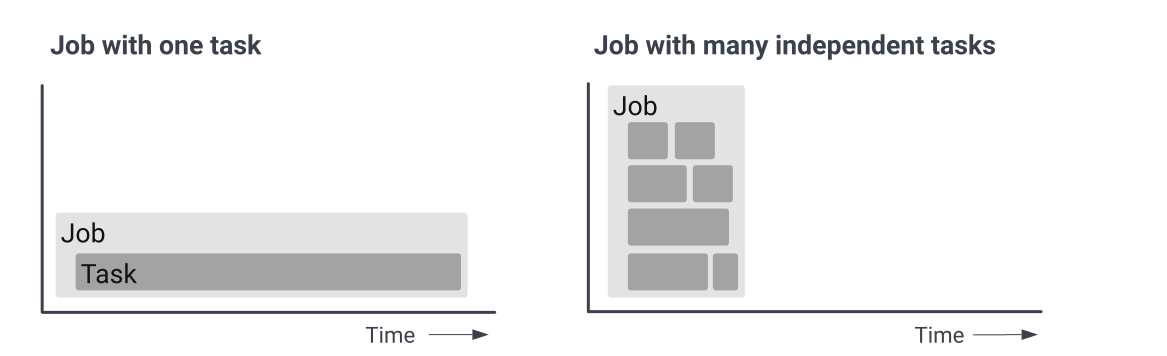
For example, if you are resizing and cropping 1,000 images from Cloud Storage, processing them consecutively is slower than processing them in parallel with many instances, with Cloud Run managing auto scaling.
When to use Cloud Run jobs
Cloud Run jobs are well-suited to run code that performs work (a job) and quits when the work is done. Here are a few examples:
- Script or tool
- Run a script to perform database migrations or other operational tasks.
- Array job
- Perform highly parallelized processing of all files in a Cloud Storage bucket.
- Scheduled job
- Create and send invoices at regular intervals, or save the results of a database query as XML and upload the file every few hours.