
This guide describes how Cloud Run handles deployments, broken down into three areas:
- Deployment types: What you bring to Cloud Run, such as source code or container images.
- Cloud Run resources: What your deployment runs as within Cloud Run (service, job, worker pool, or instance).
- Deployment methods: How you execute the deployment, for example, using the Cloud de Confiance console, gcloud CLI, YAML, or Terraform.
Deployment types
Cloud Run offers multiple deployment options. After deployment, all deployments, executions, or creations run as sandboxed container instances on Cloud Run's fully managed and highly scalable infrastructure. The following table shows the supported deployment options for each resource type:
| Deployment option | Services | Jobs |
|---|---|---|
| Deployable container images. | Supported | Supported |
| Deploy from source code | Supported | Supported |
| Deploy functions1 | Supported | — |
Deploy container images
You can deploy any container image that adheres to Cloud Run's container runtime contract to a Cloud Run service or job
Cloud Run resources
The following sections describe Cloud Run resources in more detail.
Cloud Run resource comparison
| Feature | Services | Jobs |
|---|---|---|
| Primary Use Case | Request-driven (Websites, APIs, Microservices) | Task-driven (Scripts, Data processing, Migrations) |
| Trigger | HTTP/gRPC requests, Eventarc | Execution modes - standard (immediate), delayed. Triggers - Manual execution, using Scheduler, using Workflows |
| Scaling | Automatic/Manual: scales to zero or based on requests | Automatic: Scales to N independent tasks that run sequentially or in parallel. |
| Lifecycle | Ephemeral, scales down when idle | Runs to completion up to 7 days (Short-lived) |
| Addressing | Stable Service URL (load balanced) | No public endpoint. Internal URL for triggers (e.g. scheduler) |
| Inbound Traffic | Public/Internal HTTP/gRPC | None |
| Billing | Request-based or Instance-based | Per-execution duration |
Cloud Run services
A service is the primary resource type in Cloud Run, representing a request-driven workload that automatically scales container instances to handle incoming web traffic, HTTP requests, or events. Each service is located in a specific Cloud de Confiance by S3NS region. To provide redundancy and failover, Cloud Run automatically replicates services across multiple zones within a region. A given Cloud de Confiance project can run many services in different regions.
Each service exposes a unique endpoint. By default, Cloud Run automatically scales to handle incoming requests. You can optionally change the scaling behavior to manual scaling if needed. You can deploy a service from a container, repository, or source code.
The following diagram shows the Cloud Run resource model for services:
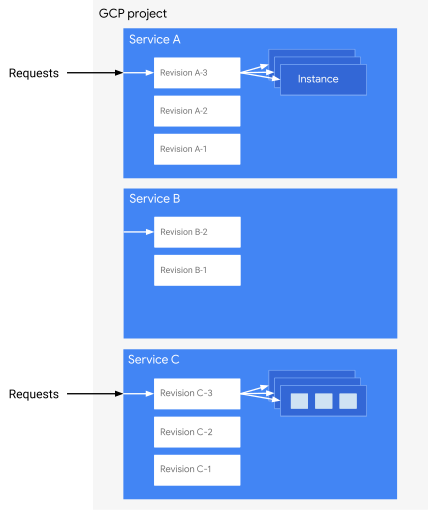
The diagram shows a Cloud de Confiance project containing three Cloud Run services, Service A, Service B and Service C, each of which has several revisions:
- Service A is getting multiple requests so Cloud Run has started multiple instances to handle the load. Each of these instances runs just one container (the application's container).
- Service B has no requests so it is idle and Cloud Run isn't running any instances.
- Service C has requests and has scaled to handle the load by creating multiple instances. In this case, each of these instances runs a set of multiple containers. In each set, only the ingress container receives the request but the other containers help to fulfill the request.
Cloud Run service revisions
Each deployment to a service creates a revision. A revision consists of one or more container images, along with configuration settings such as environment variables, memory limits, or request concurrency value.
You cannot modify a revision after its creation. For example, when you deploy a container image to a new service, Cloud Run creates the first revision. If you then deploy a different container image to that same service, Cloud Run creates a second revision. If you subsequently set an environment variable, Cloud Run creates a third revision. Over time, Cloud Run eventually removes unused revisions.
Cloud Run automatically routes requests as soon as possible to the latest healthy service revision.
Cloud Run service instances
Cloud Run automatically scales each service revision receiving requests to the number of instances needed to handle all these requests. Note that instances can receive many requests at the same time. With the request concurrency setting, you can set the maximum number of requests that can be sent in parallel to each instance of a revision.
Cloud Run jobs
Each job is located in a specific Cloud de Confiance region and consists of one or more job tasks that execute one or more containers to completion. Job tasks are independent and can execute in parallel in a given job execution.
Cloud Run job executions
When you execute a job, Cloud Run creates a job execution and starts all job tasks. All tasks in a job execution must complete successfully for the job execution to be successful. You can set timeouts on task and specify the number of retries in case of task failure.
If any task exceeds its maximum number of retries, Cloud Run marks that task as failed and the job as failed. By default, tasks execute in parallel up to a maximum of 100, but you can specify a lower maximum if any of your backing resources, such as a database, require it.
Cloud Run job tasks
Every job execution executes a number of tasks in parallel, with each task
running one instance. Cloud Run automatically attempts to run
any failed tasks again, depending on the job's configuration for maxRetries.