שימוש בכללים של חומת האש ב-VPC

בדף הזה מוסבר על הפקודות שמשמשות לעבודה עם כללי חומת האש של ענן וירטואלי פרטי (VPC), ומוצגות כמה דוגמאות לשימוש בהן. כללי חומת אש של VPC מאפשרים תעבורה או מונעים אותה ממכונות וירטואליות (VM) ברשת VPC או אליהן, על סמך מספר היציאה, התג או הפרוטוקול.

לפני שמתחילים

למידע נוסף על כללי חומת אש של VPC, כמו כללים משתמעים וכללים שנוצרו על ידי המערכת עבור רשתות ברירת מחדל, אפשר לעיין במאמר כללי חומת אש של VPC.

לפני שמגדירים כללי חומת אש, כדאי לעיין ברכיבים של כללי חומת אש כדי להכיר את רכיבי חומת האש שמשמשים ב- Cloud de Confiance.

יצירת כללים לחומת האש ב-VPC

כללי חומת אש של VPC מוגדרים ברמת הרשת, והם חלים רק על הרשת שבה הם נוצרו. עם זאת, השם שבוחרים לכל אחד מהם צריך להיות ייחודי לפרויקט.

כלל חומת אש יכול להכיל טווחים של כתובות IPv4 או IPv6, אבל לא את שניהם.

כשיוצרים כלל לחומת האש, אפשר להפעיל את האפשרות 'רישום ביומן של כללים לחומת האש'. אם מפעילים את הרישום ביומן, אפשר להשמיט שדות של מטא-נתונים כדי לחסוך בעלויות האחסון. מידע נוסף זמין במאמר בנושא שימוש ברישום ביומן של כללים של חומת אש ב-VPC.

אם רוצים לציין כמה חשבונות שירות בשדה של חשבון השירות של היעד או המקור, צריך להשתמש ב-Google Cloud CLI, ב-API או בספריות הלקוח.

רשת ברירת המחדל מספקת כללים אוטומטיים של חומת אש בזמן היצירה. אם אתם משתמשים במסוף Cloud de Confiance , רשתות בהתאמה אישית ורשתות במצב אוטומטי מאפשרות לכם ליצור בקלות חומות אש דומות במהלך יצירת הרשת. אם אתם משתמשים ב-CLI של gcloud או ב-API ורוצים ליצור כללים דומים של חומת אש לאלה שרשת ברירת המחדל מספקת, כדאי לעיין במאמר הגדרת כללים של חומת אש לתרחישי שימוש נפוצים.

המסוף

  1. נכנסים לדף Firewall policies במסוף Cloud de Confiance .

    לדף Firewall policies

  2. לוחצים על יצירת כלל לחומת האש.

  3. מזינים שם לכלל חומת האש.

    השם הזה חייב להיות ייחודי בפרויקט.

  4. (אופציונלי) אפשר להפעיל רישום ביומן של כללים לחומת האש:

    • לוחצים על יומנים > מופעל.
    • כדי להשמיט מטא-נתונים, לוחצים על הצגת פרטי היומנים ומבטלים את הסימון של תיבת הסימון הכללת מטא-נתונים.
  5. מציינים את הרשת לכלל חומת האש.

  6. מציינים את העדיפות של הכלל.

    ככל שהמספר נמוך יותר, כך העדיפות גבוהה יותר.

  7. בשדה כיוון התנועה, בוחרים באפשרות 'תעבורת נתונים נכנסת' או 'תעבורת נתונים יוצאת'.

  8. בקטע פעולה בהתאמה, בוחרים באפשרות 'אישור' או 'דחייה'.

  9. מציינים את היעדים של הכלל.

    • אם רוצים שהכלל יחול על כל המקרים ברשת, בוחרים באפשרות כל המקרים ברשת.
    • אם רוצים שהכלל יחול על מקרים נבחרים לפי תגי רשת (תגי טירגוט), בוחרים באפשרות תגי טירגוט ספציפיים, ואז בשדה תגי טירגוט מקלידים את התגים שהכלל צריך לחול עליהם.
    • אם רוצים שהכלל יחול על מקרים נבחרים לפי חשבון השירות המשויך, בוחרים באפשרות Specified service account, מציינים אם חשבון השירות נמצא בפרויקט הנוכחי או בפרויקט אחר בשדה Service account scope, ואז בשדה Target service account בוחרים או מקלידים את שם חשבון השירות.
  10. בכלל כניסה, מציינים את מסנן המקור:

    • כדי לסנן תנועה נכנסת לפי טווחי כתובות IPv4 של מקורות, בוחרים באפשרות טווחי כתובות IPv4 ומזינים את בלוקי ה-CIDR בשדה טווחי כתובות IPv4 של מקורות. משתמשים ב-0.0.0.0/0 לכל מקור IPv4.
    • כדי לסנן תנועה נכנסת לפי טווחי כתובות IPv6 של המקור, בוחרים באפשרות טווחי כתובות IPv6 ואז מזינים את בלוקי ה-CIDR בשדה טווחי כתובות IPv6 של המקור. משתמשים ב-::/0 לכל מקור IPv6.
    • כדי לסנן תנועה נכנסת לפי תג רשת, בוחרים באפשרות תגי מקור ומקלידים את תגי הרשת בשדה תגי מקור. במאמר מגבלות לכל רשת מפורטת המגבלה על מספר תגי המקור. סינון לפי תג מקור זמין רק אם היעד לא צוין על ידי חשבון שירות.
    • כדי לסנן תנועה נכנסת לפי חשבון שירות, בוחרים באפשרות חשבון שירות, מציינים אם חשבון השירות נמצא בפרויקט הנוכחי או בפרויקט אחר בהיקף חשבון השירות, ואז בוחרים או מקלידים את שם חשבון השירות בשדה חשבון שירות המקור. סינון לפי חשבון שירות המקור זמין רק אם היעד לא מצוין על ידי תג הרשת.
    • אם רוצים, מציינים מסנן מקור שני. אי אפשר להשתמש באותם קריטריונים של מסנן במסננים של מקור משני כמו במסננים של המקור הראשי. אפשר להשתמש בטווחים של כתובות IP של מקור יחד עם תגי מקור או חשבון שירות של מקור. קבוצת המקורות האפקטיבית היא האיחוד של כתובות ה-IP בטווח המקורות והמופעים שמזוהים על ידי תגי רשת או חשבונות שירות. כלומר, אם טווח כתובות ה-IP של המקור או תגי המקור (או חשבונות השירות של המקור) תואמים לקריטריוני המסנן, המקור נכלל בקבוצת המקורות האפקטיבית.
    • אי אפשר להשתמש בתגי מקור ובחשבון שירות של מקור ביחד.

    מידע נוסף על שימוש בחשבון שירות ובטג רשת זמין במאמר סינון לפי חשבון שירות לעומת סינון לפי טג רשת.

  11. בכלל כניסה, מציינים את מסנן היעד:

    • כדי לסנן תנועה נכנסת לפי טווחי כתובות IPv4 של היעד, בוחרים באפשרות טווחי כתובות IPv4 ומזינים את בלוקי ה-CIDR בשדה טווחי כתובות IPv4 של היעד. אפשר להשתמש ב-0.0.0.0/0 לכל יעד IPv4.
    • כדי לסנן תנועה נכנסת לפי טווחי IPv6 של היעד, בוחרים באפשרות טווחי IPv6 ומזינים את בלוקי ה-CIDR בשדה טווחי IPv6 של היעד. אפשר להשתמש ב-::/0 לכל יעד IPv6.

    מידע נוסף זמין במאמר יעד לכללי תעבורה נכנסת.

  12. בכלל יציאה, מציינים את מסנן היעד:

    • כדי לסנן תנועה יוצאת לפי טווחי כתובות IPv4 של היעד, בוחרים באפשרות טווחי כתובות IPv4 ומזינים את בלוקי ה-CIDR בשדה טווחי כתובות IPv4 של היעד. אפשר להשתמש ב-0.0.0.0/0 לכל יעד IPv4.
    • כדי לסנן תנועה יוצאת לפי טווחי IPv6 של יעד, בוחרים באפשרות טווחי IPv6 ומזינים את בלוקי ה-CIDR בשדה טווחי IPv6 של יעד. אפשר להשתמש ב-::/0 לכל יעד IPv6.

    מידע נוסף זמין במאמר יעד לכללי יציאה.

  13. בכלל לתעבורת נתונים יוצאת (egress), מציינים את מסנן המקור:

    • כדי לסנן תנועה יוצאת לפי טווחי כתובות IPv4 של המקור, בוחרים באפשרות טווחי כתובות IPv4 ומזינים את בלוקי ה-CIDR בשדה טווחי כתובות IPv4 של המקור. משתמשים ב-0.0.0.0/0 לכל מקור IPv4.
    • כדי לסנן תנועה יוצאת לפי טווחי IPv6 של מקורות, בוחרים באפשרות טווחי IPv6 ומזינים את בלוקי ה-CIDR בשדה טווחי IPv6 של מקורות. משתמשים ב-::/0 לכל יעד IPv6.

    מידע נוסף מופיע במאמר מקור לכללי תעבורה יוצאת.

  14. מגדירים את הפרוטוקולים והיציאות שעליהם חל הכלל:

    • כדי שהכלל יחול על כל הפרוטוקולים ויציאות היעד, בוחרים באפשרות Allow all או Deny all, בהתאם לפעולה.
    • כדי להגדיר פרוטוקולים ספציפיים ויציאות יעד, בוחרים באפשרות פרוטוקולים ויציאות ספציפיים:
      • בוחרים באפשרות TCP כדי לכלול את פרוטוקול ה-TCP ויציאות היעד. מזינים all או רשימה של יציאות יעד שמופרדות בפסיקים, כמו 20-22, 80, 8080.
      • בוחרים באפשרות UDP כדי לכלול את פרוטוקול ה-UDP ואת יציאות היעד. מזינים all או רשימה של יציאות יעד שמופרדות בפסיקים, כמו 67-69, 123.
      • בוחרים באפשרות Other (אחר) כדי לכלול פרוטוקולים כמו icmp,‏ sctp או מספר פרוטוקול. לדוגמה, אפשר להשתמש ב-icmp או במספר הפרוטוקול 1 עבור IPv4 ICMP. משתמשים במספר הפרוטוקול 58 עבור IPv6 ICMP.

    מידע נוסף זמין במאמר בנושא פרוטוקולים ויציאות יעד.

  15. (אופציונלי) אתם יכולים ליצור את כלל חומת האש אבל לא לאכוף אותו על ידי הגדרת מצב האכיפה שלו למושבת. לוחצים על השבתת הכלל ואז בוחרים באפשרות מושבת.

  16. לוחצים על יצירה.

gcloud

כדי ליצור כלל לחומת אש של VPC, משתמשים בפקודה gcloud compute firewall-rules create:

gcloud compute firewall-rules create RULE_NAME \
    [--network NETWORK; default="default"] \
    [--priority PRIORITY;default=1000] \
    [--direction (ingress|egress|in|out); default="ingress"] \
    [--action (deny | allow )] \
    [--target-tags TAG[,TAG,...]] \
    [--target-service-accounts=IAM_SERVICE_ACCOUNT[,IAM_SERVICE_ACCOUNT,...]] \
    [--source-ranges CIDR_RANGE[,CIDR_RANGE,...]] \
    [--source-tags TAG[,TAG, ...]] \
    [--source-service-accounts=IAM_SERVICE_ACCOUNT[,IAM_SERVICE_ACCOUNT,...]] \
    [--destination-ranges CIDR_RANGE[,CIDR_RANGE,...]] \
    [--rules (PROTOCOL[:PORT[-PORT]],[PROTOCOL[:PORT[-PORT]],...]] | all ) \
    [--disabled | --no-disabled] \
    [--enable-logging | --no-enable-logging] \
    [--logging-metadata LOGGING_METADATA]

משתמשים בפרמטרים באופן הבא. פרטים נוספים על כל אחת מהשיטות האלה זמינים במסמכי התיעוד של SDK reference.

  • --network הרשת של הכלל. אם לא מציינים רשת, הכלל נוצר ברשת default. אם אין לכם רשת ברירת מחדל או שאתם רוצים ליצור את הכלל ברשת ספציפית, אתם צריכים להשתמש בשדה הזה.
  • --priority ערך מספרי שמציין את העדיפות של הכלל. ככל שהמספר נמוך יותר, כך העדיפות גבוהה יותר.
  • --direction כיוון התנועה, ‏INGRESS או EGRESS.
  • --action הפעולה במקרה של התאמה, allow או deny. חובה להשתמש בדגל --rules.
  • מציינים יעד באחת מהדרכים הבאות:
    • אם הכלל צריך לחול על כל היעדים ברשת, לא צריך לציין את --target-tags ואת --target-service-accounts.
    • משתמשים בדגל --target-tags כדי להגדיר יעדים לפי תגי רשת.
    • משתמשים בדגל --target-service-accounts כדי להגדיר יעדים לפי חשבונות שירות משויכים.
  • כדי לציין טווחים של כתובות IPv4 או IPv6 בפורמט CIDR, משתמשים ב---destination-ranges כדי לחדד עוד יותר את היעד של כלל הכניסה. אם לא מציינים את --destination-ranges, יעד התנועה הנכנסת הוא כל כתובת IPv4, ‏ 0.0.0.0/0. מידע נוסף זמין במאמרים בנושא יעדים לכללי תעבורה נכנסת וכתובות IP ויעדים לכללי תעבורה נכנסת.

  • בכלל לתעבורת נתונים נכנסת (ingress), צריך לציין מקור:

    • --source-ranges משתמשים בדגל הזה כדי לציין טווחים של כתובות IPv4 או IPv6 של מקור בפורמט CIDR.
    • אם לא מציינים את --source-ranges, source-tags ו---source-service-accounts, מקור התנועה הנכנסת הוא כל כתובת IPv4,‏ 0.0.0.0/0.
    • --source-tags משתמשים בדגל הזה כדי לציין מופעי מקור לפי תגי רשת. סינון לפי תג מקור זמין רק אם היעד לא מוגדר על ידי חשבון שירות. מידע נוסף מופיע במאמר בנושא סינון לפי חשבון שירות לעומת תג רשת.
    • אפשר להשתמש ב---source-ranges וב---source-tags ביחד. אם מציינים את שניהם, קבוצת המקור האפקטיבית היא האיחוד של כתובות ה-IP בטווח המקור והמופעים שמזוהים לפי תגי הרשת, גם אם למופעים המתויגים אין כתובות IP בטווח המקור.
    • --source-service-accounts משתמשים בדגל הזה כדי לציין מכונות לפי חשבונות השירות שבהם הן משתמשות. אפשר לסנן לפי חשבון שירות מקור רק אם יעד לא מצוין באמצעות תג רשת. מידע נוסף זמין במאמר בנושא סינון לפי חשבון שירות לעומת תג רשת. אפשר להשתמש ב---source-ranges וב---source-service-accounts ביחד. אם מציינים את שניהם, קבוצת המקור האפקטיבית היא האיחוד של כתובות ה-IP בטווח המקור והמופעים שזוהו על ידי חשבונות השירות של המקור, גם אם למופעים שזוהו על ידי חשבונות השירות של המקור אין כתובות IP בטווח המקור.
  • עבור כלל תעבורת הנתונים היוצאת (egress), כדי לציין את המקור בצורה מדויקת יותר, משתמשים ב---source-ranges בפורמט CIDR כדי להגדיר טווחים של כתובות IPv4 או IPv6. אם לא מציינים את --source-ranges מקור היציאה הוא כל כתובת IPv4,‏ 0.0.0.0/0. מידע נוסף זמין במאמרים בנושא מקורות לכללי תעבורה יוצאת וכתובות IP וכתובות יעד לכללי תעבורה יוצאת.

  • בכלל ליציאת תנועה, מציינים יעד:

    • --destination-ranges משתמשים בדגל הזה כדי לציין טווחים של כתובות יעד מסוג IPv4 או IPv6 בפורמט CIDR.
    • אם לא מציינים את --destination-ranges, יעד היציאה הוא כל כתובת IPv4, ‏ 0.0.0.0/0.
  • --rules רשימה של פרוטוקולים ויציאות יעד שהכלל חל עליהם. משתמשים ב-all כדי שהכלל יחול על כל הפרוטוקולים וכל יציאות היעד. נדרש הדגל --action.

  • כברירת מחדל, כללי חומת האש נוצרים ומאוכפים באופן אוטומטי, אבל אפשר לשנות את ההתנהגות הזו.

    • אם לא מציינים את --disabled וגם לא את --no-disabled, כלל חומת האש נוצר ונאכף.
    • --disabled מוסיפים את הדגל הזה כדי ליצור את הכלל בחומת האש, אבל לא לאכוף אותו. כלל חומת האש יישאר מושבת עד שתעדכנו את כלל חומת האש כדי להפעיל אותו.
    • --no-disabled מוסיפים את הדגל הזה כדי לוודא שכלל חומת האש נאכף.
  • --enable-logging | --no-enable-logging כשיוצרים או מעדכנים כלל, אפשר להפעיל את האפשרות 'רישום ביומן' עבור כללים של חומת האש. רישום ביומן של כללי חומת אש ב-VPC מאפשר לכם לבצע ביקורת, לאמת ולנתח את ההשפעות של כללי חומת האש. פרטים נוספים זמינים במאמר בנושא רישום ביומן של כללי חומת אש ב-VPC.

    • --logging-metadata אם מפעילים את האפשרות 'רישום ביומן', כברירת מחדל, רישום ביומן של כללי חומת האש כולל שדות בסיס ומטא-נתונים. כדי לחסוך בעלויות האחסון, אפשר להשמיט שדות של מטא-נתונים. מידע נוסף זמין במאמר בנושא שימוש ברישום ביומן של כללים של חומת אש ב-VPC.

Terraform

כדי ליצור כלל לחומת האש, אפשר להשתמש במשאב google_compute_firewall.

resource "google_compute_firewall" "rules" {
  name        = "my-firewall-rule"
  network     = "default"
  description = "Creates firewall rule targeting tagged instances"

  allow {
    protocol = "tcp"
    ports    = ["80", "443"]
  }

  source_ranges = ["0.0.0.0/0"]
  target_tags   = ["web"]
}

כדי ללמוד איך להחיל הגדרות ב-Terraform או להסיר אותן, ראו פקודות בסיסיות ב-Terraform.

API

יוצרים כלל לחומת האש ב-VPC.

POST https://compute.googleapis.com/compute/v1/projects/PROJECT_ID/global/firewalls
{
  "name": "RULE_NAME",
  "network": "projects/PROJECT-ID/global/networks/NETWORK",
  ... other fields
}

מחליפים את מה שכתוב בשדות הבאים:

  • PROJECT_ID: מזהה הפרויקט שבו נמצאת רשת ה-VPC.
  • NETWORK: השם של רשת ה-VPC שבה נוצר כלל חומת האש.
  • RULE_NAME: השם של כלל חומת האש.

  • לכלל חומת אש לתעבורת נתונים נכנסת, מציינים את המקור והיעד של התעבורה הנכנסת:

    • משתמשים בשדות sourceRanges, sourceTags או sourceServiceAccounts כדי לציין את מקור הכניסה.

    • sourceRanges יכול להיות טווח של כתובות IPv4 או IPv6, אבל לא שילוב של שניהם. כדי להשתמש בטווח 0.0.0.0/0, לא מציינים שדה.

    • אי אפשר להשתמש בשדות sourceTags ו-sourceServiceAccounts ביחד. עם זאת, אפשר להשתמש ב-sourceRanges עם sourceTags או עם sourceServiceAccounts. אם כן, כדי שכלל חומת האש יחול, החיבור צריך להתאים לאחד מהם.

    • בשדות היעד, אם משתמשים בשדה sourceTags, אי אפשר להשתמש בשדה targetServiceAccounts. חובה להשתמש בשדה targetTags או לא להשתמש בשדה יעד. באופן דומה, אם משתמשים בשדה sourceServiceAccounts, אי אפשר להשתמש בשדה targetTags. אם לא מציינים שדה יעד, הכלל חל על כל היעדים ברשת.

    • משתמשים בשדה destinationRanges כדי לציין את יעד הכניסה. ‫destinationRanges יכול להיות טווח של כתובות IPv4 או IPv6, אבל לא שילוב של שניהם.
      אם לא מציינים יעד, Cloud de Confiance משתמש ב-0.0.0.0/0. מידע נוסף זמין במאמרים בנושא יעדים לכללי תעבורה נכנסת וכתובות IP ויעדים לכללי תעבורה נכנסת.

  • לכלל חומת אש לתעבורת נתונים יוצאת (egress), מציינים את המקור והיעד של התעבורה היוצאת:

    • משתמשים בשדה sourceRanges כדי לציין את מקור היציאה. sourceRange יכול להיות טווח של כתובות IPv4 או IPv6, אבל לא שילוב של שניהם.
      אם לא מציינים מקור, Cloud de Confiance המערכת משתמשת בערך 0.0.0.0/0. מידע נוסף זמין במאמרים בנושא מקורות לכללי תעבורה יוצאת וכתובות IP וכתובות יעד לכללי תעבורה יוצאת.

    • משתמשים בשדה destinationRanges כדי לציין את היעד. ‫destinationRanges יכול להיות טווח של כתובות IPv4 או IPv6, אבל לא שילוב של שניהם.
      אם לא מציינים יעד, Cloud de Confianceהמערכת משתמשת ב-0.0.0.0/0. משתמשים בשדה targetTags או targetServiceAccounts כדי לציין על אילו יעדים הכלל חל. אם לא מציינים שדה יעד, הכלל חל על כל היעדים ברשת.

מידע נוסף ותיאורים של כל שדה זמינים בשיטה firewalls.insert.

C#‎


using Google.Cloud.Compute.V1;
using System.Threading.Tasks;

public class CreateFirewallRuleAsyncSample
{
    public async Task CreateFirewallRuleAsync(
        // TODO(developer): Set your own default values for these parameters or pass different values when calling this method.
        string projectId = "your-project-id",
        string firewallRuleName = "my-test-firewall-rule",
        // Name of the network the rule will be applied to. Some available name formats:
        // projects/{project_id}/global/networks/{network}
        // global/networks/{network}
        string networkName = "global/networks/default")
    {
        Firewall firewallRule = new Firewall
        {
            Name = firewallRuleName,
            Network = networkName,
            Direction = ComputeEnumConstants.Firewall.Direction.Ingress,
            Allowed =
            {
                new Allowed
                {
                    Ports = { "80", "443" },
                    IPProtocol = "tcp"
                }
            },
            TargetTags = { "web" },
            Description = "Allows TCP traffic on port 80 and 443 from anywhere."
        };

        // Note that the default value of priority for the firewall API is 1000.
        // If you check the value of firewallRule.Priority at this point it
        // will be equal to 0, however it is not treated as "set" by the library, and thus
        // the default will be applied to the new rule. If you want to create a rule that
        // has priority == 0, you'll need to explicitly set it: firewallRule.Priority = 0.
        // You can use the firewallRule.HasPriority property to check if the priority has been set.
        // You can use the firewallRule.ClearPriority() method to unset the priority.

        // Initialize client that will be used to send requests. This client only needs to be created
        // once, and can be reused for multiple requests.
        FirewallsClient client = await FirewallsClient.CreateAsync();

        // Create the firewall rule in the specified project.
        var firewallRuleCreation = await client.InsertAsync(projectId, firewallRule);

        // Wait for the operation to complete using client-side polling.
        await firewallRuleCreation.PollUntilCompletedAsync();
    }
}

המשך

import (
	"context"
	"fmt"
	"io"

	compute "cloud.google.com/go/compute/apiv1"
	computepb "cloud.google.com/go/compute/apiv1/computepb"
	"google.golang.org/protobuf/proto"
)

// createFirewallRule creates a firewall rule allowing for incoming HTTP and HTTPS access from the entire Internet.
func createFirewallRule(w io.Writer, projectID, firewallRuleName, networkName string) error {
	// projectID := "your_project_id"
	// firewallRuleName := "europe-central2-b"
	// networkName := "global/networks/default"

	ctx := context.Background()
	firewallsClient, err := compute.NewFirewallsRESTClient(ctx)
	if err != nil {
		return fmt.Errorf("NewInstancesRESTClient: %w", err)
	}
	defer firewallsClient.Close()

	firewallRule := &computepb.Firewall{
		Allowed: []*computepb.Allowed{
			{
				IPProtocol: proto.String("tcp"),
				Ports:      []string{"80", "443"},
			},
		},
		Direction: proto.String(computepb.Firewall_INGRESS.String()),
		Name:      &firewallRuleName,
		TargetTags: []string{
			"web",
		},
		Network:     &networkName,
		Description: proto.String("Allowing TCP traffic on port 80 and 443 from Internet."),
	}

	// Note that the default value of priority for the firewall API is 1000.
	// If you check the value of `firewallRule.GetPriority()` at this point it
	// will be equal to 0, however it is not treated as "set" by the library and thus
	// the default will be applied to the new rule. If you want to create a rule that
	// has priority == 0, you need to explicitly set it so:

	// firewallRule.Priority = proto.Int32(0)

	req := &computepb.InsertFirewallRequest{
		Project:          projectID,
		FirewallResource: firewallRule,
	}

	op, err := firewallsClient.Insert(ctx, req)
	if err != nil {
		return fmt.Errorf("unable to create firewall rule: %w", err)
	}

	if err = op.Wait(ctx); err != nil {
		return fmt.Errorf("unable to wait for the operation: %w", err)
	}

	fmt.Fprintf(w, "Firewall rule created\n")

	return nil
}

Java


import com.google.cloud.compute.v1.Allowed;
import com.google.cloud.compute.v1.Firewall;
import com.google.cloud.compute.v1.Firewall.Direction;
import com.google.cloud.compute.v1.FirewallsClient;
import com.google.cloud.compute.v1.InsertFirewallRequest;
import java.io.IOException;
import java.util.UUID;
import java.util.concurrent.ExecutionException;
import java.util.concurrent.TimeUnit;
import java.util.concurrent.TimeoutException;

public class CreateFirewallRule {

  public static void main(String[] args)
      throws IOException, ExecutionException, InterruptedException, TimeoutException {
    // TODO(developer): Replace these variables before running the sample
    /* project: project ID or project number of the Cloud project you want to use.
       firewallRuleName: name of the rule that is created.
       network: name of the network the rule will be applied to. Available name formats:
        * https://www.googleapis.com/compute/v1/projects/{project_id}/global/networks/{network}
        * projects/{project_id}/global/networks/{network}
        * global/networks/{network} */
    String project = "your-project-id";
    String firewallRuleName = "firewall-rule-name-" + UUID.randomUUID();
    String network = "global/networks/default";

    // The rule will be created with default priority of 1000.
    createFirewall(project, firewallRuleName, network);
  }

  // Creates a simple firewall rule allowing for incoming HTTP and 
  // HTTPS access from the entire Internet.
  public static void createFirewall(String project, String firewallRuleName, String network)
      throws IOException, ExecutionException, InterruptedException, TimeoutException {
    /* Initialize client that will be used to send requests. This client only needs to be created
       once, and can be reused for multiple requests. After completing all of your requests, call
       the `firewallsClient.close()` method on the client to safely
       clean up any remaining background resources. */
    try (FirewallsClient firewallsClient = FirewallsClient.create()) {

      // The below firewall rule is created in the default network.
      Firewall firewallRule = Firewall.newBuilder()
          .setName(firewallRuleName)
          .setDirection(Direction.INGRESS.toString())
          .addAllowed(
              Allowed.newBuilder().addPorts("80").addPorts("443").setIPProtocol("tcp").build())
          .addSourceRanges("0.0.0.0/0")
          .setNetwork(network)
          .addTargetTags("web")
          .setDescription("Allowing TCP traffic on port 80 and 443 from Internet.")
          .build();

      /* Note that the default value of priority for the firewall API is 1000.
         If you check the value of `firewallRule.getPriority()` at this point it
         will be equal to 0, however it is not treated as "set" by the library and thus
         the default will be applied to the new rule. If you want to create a rule that
         has priority == 0, you'll need to explicitly set it so: setPriority(0) */

      InsertFirewallRequest insertFirewallRequest = InsertFirewallRequest.newBuilder()
          .setFirewallResource(firewallRule)
          .setProject(project).build();

      firewallsClient.insertAsync(insertFirewallRequest).get(3, TimeUnit.MINUTES);

      System.out.println("Firewall rule created successfully -> " + firewallRuleName);
    }
  }
}

Node.js

/**
 * TODO(developer): Uncomment and replace these variables before running the sample.
 */
// const projectId = 'YOUR_PROJECT_ID';
// const firewallRuleName = 'YOUR_FIREWALL_RULE_NAME'
// const networkName = 'global/networks/default'

const compute = require('@google-cloud/compute');
const computeProtos = compute.protos.google.cloud.compute.v1;

async function createFirewallRule() {
  const firewallsClient = new compute.FirewallsClient();
  const operationsClient = new compute.GlobalOperationsClient();

  const firewallRule = new computeProtos.Firewall();
  firewallRule.name = firewallRuleName;
  firewallRule.direction = 'INGRESS';
  firewallRule.allowed = [
    {
      IPProtocol: 'tcp',
      ports: ['80', '443'],
    },
  ];
  firewallRule.targetTags = ['web'];
  firewallRule.network = networkName;
  firewallRule.description =
    'Allowing TCP traffic on port 80 and 443 from Internet.';

  // Note that the default value of priority for the firewall API is 1000.
  // If you check the value of `firewallRule.priority` at this point it
  // will be equal to null, however it is not treated as "set" by the library and thus
  // the default will be applied to the new rule. If you want to create a rule that
  // has priority == 0, you need to explicitly set it so:

  // firewallRule.priority = 0

  const [response] = await firewallsClient.insert({
    project: projectId,
    firewallResource: firewallRule,
  });
  let operation = response.latestResponse;

  // Wait for the create operation to complete.
  while (operation.status !== 'DONE') {
    [operation] = await operationsClient.wait({
      operation: operation.name,
      project: projectId,
    });
  }

  console.log('Firewall rule created');
}

createFirewallRule();

PHP

use Google\Cloud\Compute\V1\Allowed;
use Google\Cloud\Compute\V1\Client\FirewallsClient;
use Google\Cloud\Compute\V1\Firewall;
use Google\Cloud\Compute\V1\Firewall\Direction;
use Google\Cloud\Compute\V1\InsertFirewallRequest;

/**
 * Creates a simple firewall rule allowing incoming HTTP and HTTPS access from the entire internet.
 *
 * @param string $projectId Project ID or project number of the Cloud project you want to create a rule for.
 * @param string $firewallRuleName Name of the rule that is created.
 * @param string $network Name of the network the rule will be applied to. Available name formats:
 *                        https://www.googleapis.com/compute/v1/projects/{project_id}/global/networks/{network}
 *                        projects/{project_id}/global/networks/{network}
 *                        global/networks/{network}
 *
 * @throws \Google\ApiCore\ApiException if the remote call fails.
 * @throws \Google\ApiCore\ValidationException if local error occurs before remote call.
 */

function create_firewall_rule(string $projectId, string $firewallRuleName, string $network = 'global/networks/default')
{
    $firewallsClient = new FirewallsClient();
    $allowedPorts = (new Allowed())
      ->setIPProtocol('tcp')
      ->setPorts(['80', '443']);
    $firewallResource = (new Firewall())
      ->setName($firewallRuleName)
      ->setDirection(Direction::name(Direction::INGRESS))
      ->setAllowed([$allowedPorts])
      ->setSourceRanges(['0.0.0.0/0'])
      ->setTargetTags(['web'])
      ->setNetwork($network)
      ->setDescription('Allowing TCP traffic on ports 80 and 443 from Internet.');

    /**
    * Note that the default value of priority for the firewall API is 1000.
    * If you check the value of its priority at this point it will be
    * equal to 0, however it is not treated as "set" by the library and thus
    * the default will be applied to the new rule. If you want to create a rule
    * that has priority == 0, you need to explicitly set it so:
    *
    *   $firewallResource->setPriority(0);
    */

    //Create the firewall rule using Firewalls Client.
    $request = (new InsertFirewallRequest())
        ->setFirewallResource($firewallResource)
        ->setProject($projectId);
    $operation = $firewallsClient->insert($request);

    // Wait for the operation to complete.
    $operation->pollUntilComplete();
    if ($operation->operationSucceeded()) {
        printf('Created rule %s.' . PHP_EOL, $firewallRuleName);
    } else {
        $error = $operation->getError();
        printf('Firewall rule creation failed: %s' . PHP_EOL, $error?->getMessage());
    }
}

Python

from __future__ import annotations

import sys
from typing import Any

from google.api_core.extended_operation import ExtendedOperation
from google.cloud import compute_v1


def wait_for_extended_operation(
    operation: ExtendedOperation, verbose_name: str = "operation", timeout: int = 300
) -> Any:
    """
    Waits for the extended (long-running) operation to complete.

    If the operation is successful, it will return its result.
    If the operation ends with an error, an exception will be raised.
    If there were any warnings during the execution of the operation
    they will be printed to sys.stderr.

    Args:
        operation: a long-running operation you want to wait on.
        verbose_name: (optional) a more verbose name of the operation,
            used only during error and warning reporting.
        timeout: how long (in seconds) to wait for operation to finish.
            If None, wait indefinitely.

    Returns:
        Whatever the operation.result() returns.

    Raises:
        This method will raise the exception received from `operation.exception()`
        or RuntimeError if there is no exception set, but there is an `error_code`
        set for the `operation`.

        In case of an operation taking longer than `timeout` seconds to complete,
        a `concurrent.futures.TimeoutError` will be raised.
    """
    result = operation.result(timeout=timeout)

    if operation.error_code:
        print(
            f"Error during {verbose_name}: [Code: {operation.error_code}]: {operation.error_message}",
            file=sys.stderr,
            flush=True,
        )
        print(f"Operation ID: {operation.name}", file=sys.stderr, flush=True)
        raise operation.exception() or RuntimeError(operation.error_message)

    if operation.warnings:
        print(f"Warnings during {verbose_name}:\n", file=sys.stderr, flush=True)
        for warning in operation.warnings:
            print(f" - {warning.code}: {warning.message}", file=sys.stderr, flush=True)

    return result


def create_firewall_rule(
    project_id: str, firewall_rule_name: str, network: str = "global/networks/default"
) -> compute_v1.Firewall:
    """
    Creates a simple firewall rule allowing for incoming HTTP and HTTPS access from the entire Internet.

    Args:
        project_id: project ID or project number of the Cloud project you want to use.
        firewall_rule_name: name of the rule that is created.
        network: name of the network the rule will be applied to. Available name formats:
            * https://www.googleapis.com/compute/v1/projects/{project_id}/global/networks/{network}
            * projects/{project_id}/global/networks/{network}
            * global/networks/{network}

    Returns:
        A Firewall object.
    """
    firewall_rule = compute_v1.Firewall()
    firewall_rule.name = firewall_rule_name
    firewall_rule.direction = "INGRESS"

    allowed_ports = compute_v1.Allowed()
    allowed_ports.I_p_protocol = "tcp"
    allowed_ports.ports = ["80", "443"]

    firewall_rule.allowed = [allowed_ports]
    firewall_rule.source_ranges = ["0.0.0.0/0"]
    firewall_rule.network = network
    firewall_rule.description = "Allowing TCP traffic on port 80 and 443 from Internet."

    firewall_rule.target_tags = ["web"]

    # Note that the default value of priority for the firewall API is 1000.
    # If you check the value of `firewall_rule.priority` at this point it
    # will be equal to 0, however it is not treated as "set" by the library and thus
    # the default will be applied to the new rule. If you want to create a rule that
    # has priority == 0, you need to explicitly set it so:
    # TODO: Uncomment to set the priority to 0
    # firewall_rule.priority = 0

    firewall_client = compute_v1.FirewallsClient()
    operation = firewall_client.insert(
        project=project_id, firewall_resource=firewall_rule
    )

    wait_for_extended_operation(operation, "firewall rule creation")

    return firewall_client.get(project=project_id, firewall=firewall_rule_name)

Ruby


require "google/cloud/compute/v1"

# Creates a simple firewall rule allowing for incoming HTTP and HTTPS access from the entire Internet.
#
# @param [String] project project ID or project number of the Cloud project you want to use.
# @param [String] name: name of the rule that is created.
# @param network: name of the network the rule will be applied to. Available name formats:
#         * https://www.googleapis.com/compute/v1/projects/{project_id}/global/networks/{network}
#         * projects/{project_id}/global/networks/{network}
#         * global/networks/{network}
def create_firewall_rule project:, name:, network: "global/networks/default"
  rule = {
    name: name,
    direction: "INGRESS",
    allowed: [{
      I_p_protocol: "tcp",
      ports: ["80", "443"]
    }],
    source_ranges: ["0.0.0.0/0"],
    network: network,
    description: "Allowing TCP traffic on port 80 and 443 from Internet.",
    target_tags: ["web"]
  }

  # Note that the default value of priority for the firewall API is 1000.
  # If you want to create a rule that has priority == 0, you need to explicitly set it:
  #   rule[:priority] = 0
  # Use `rule.has_key? :priority` to check if the priority has been set.
  # Use `rule.delete :priority` method to unset the priority.

  request = {
    firewall_resource: rule,
    project: project
  }

  client = ::Google::Cloud::Compute::V1::Firewalls::Rest::Client.new
  operation = client.insert request

  wait_until_done operation: operation
end

עדכון כללים של חומת אש ב-VPC

אפשר לשנות רכיבים מסוימים של כלל חומת אש של VPC, כמו הפרוטוקולים שצוינו ויציאות היעד של תנאי ההתאמה. אי אפשר לשנות את השם, הרשת, הפעולה במקרה של התאמה וכיוון התנועה של כלל חומת אש.

אם אתם צריכים לשנות את השם, הרשת או רכיב הפעולה או הכיוון, תצטרכו למחוק את הכלל וליצור כלל חדש במקום.

אם רוצים להוסיף או להסיר כמה חשבונות שירות, צריך להשתמש ב-CLI של gcloud, ב-API או בספריות הלקוח. אי אפשר להשתמש במסוף Cloud de Confiance כדי לציין כמה חשבונות שירות של יעד או כמה חשבונות שירות של מקור.

המסוף

  1. נכנסים לדף Firewall policies במסוף Cloud de Confiance .

    לדף Firewall policies

  2. לוחצים על כלל חומת האש שרוצים לשנות.

  3. לוחצים על Edit.

  4. משנים את הרכיבים שניתנים לעריכה לפי הצורך.

  5. לוחצים על Save.

gcloud

כדי לעדכן את הכללים של חומת האש ב-VPC, משתמשים בפקודה gcloud compute firewall-rules update:

gcloud compute firewall-rules update RULE_NAME \
    [--priority=PRIORITY] \
    [--description=DESCRIPTION] \
    [--target-tags=TAG,...] \
    [--target-service-accounts=IAM_SERVICE_ACCOUNT,_] \
    [--source-ranges=CIDR_RANGE,...] \
    [--source-tags=TAG,...] \
    [--source-service-accounts=IAM_SERVICE_ACCOUNT,_] \
    [--destination-ranges=CIDR_RANGE,...] \
    [--rules=[PROTOCOL[:PORT[-PORT]],…]] \
    [--disabled | --no-disabled] \
    [--enable-logging | --no-enable-logging]

התיאורים של כל דגל זהים לתיאורים של יצירת כללי חומת אש, ופרטים נוספים על כל דגל זמינים במסמכי העזר של SDK.

API

משתמשים ב-PATCH כדי לעדכן את השדות הבאים: allowed,‏ description,‏ sourceRanges,‏ sourceTags או targetTags. משתמשים ב-PUT או ב-POST לכל שאר השדות.

(PATCH|(POST|PUT)) https://www.googleapis.com/compute/v1/projects/PROJECT_ID/global/firewalls/RULE_NAME
{
  "name": "RULE_NAME",
  "network": "projects/PROJECT-ID/global/networks/NETWORK",
  ... other fields
}

מחליפים את מה שכתוב בשדות הבאים:

  • PROJECT_ID: מזהה הפרויקט שבו נמצאת רשת ה-VPC.
  • NETWORK: השם של רשת ה-VPC שבה נמצא כלל חומת האש.
  • RULE_NAME: השם של כלל חומת האש שרוצים לעדכן.

מידע נוסף ותיאורים של כל שדה זמינים בשיטה firewalls.patch או firewalls.update.

C#‎


using Google.Cloud.Compute.V1;
using System.Threading.Tasks;

public class PatchFirewallRuleAsyncSample
{
    public async Task PatchFirewallRuleAsync(
        // TODO(developer): Set your own default values for these parameters or pass different values when calling this method.
        string projectId = "your-project-id",
        string firewallRuleName = "my-test-firewall-rule",
        int newPriority = 10)
    {
        // The patch operation doesn't require the full definition of a Firewall object.
        // It will only update the values that were set in it,
        // in this case it will only change the priority.
        Firewall firewallRule = new Firewall
        {
            Priority = newPriority
        };

        // Initialize client that will be used to send requests. This client only needs to be created
        // once, and can be reused for multiple requests.
        FirewallsClient client = await FirewallsClient.CreateAsync();

        // Patch the firewall rule in the specified project.
        var firewallRulePatching = await client.PatchAsync(projectId, firewallRuleName, firewallRule);

        // Wait for the operation to complete using client-side polling.
        await firewallRulePatching.PollUntilCompletedAsync();
    }
}

המשך

import (
	"context"
	"fmt"
	"io"

	compute "cloud.google.com/go/compute/apiv1"
	computepb "cloud.google.com/go/compute/apiv1/computepb"
	"google.golang.org/protobuf/proto"
)

// patchFirewallPriority modifies the priority of a given firewall rule.
func patchFirewallPriority(w io.Writer, projectID, firewallRuleName string, priority int32) error {
	// projectID := "your_project_id"
	// firewallRuleName := "europe-central2-b"
	// priority := 10

	ctx := context.Background()
	firewallsClient, err := compute.NewFirewallsRESTClient(ctx)
	if err != nil {
		return fmt.Errorf("NewInstancesRESTClient: %w", err)
	}
	defer firewallsClient.Close()

	firewallRule := &computepb.Firewall{
		Priority: proto.Int32(priority),
	}

	req := &computepb.PatchFirewallRequest{
		Project:          projectID,
		Firewall:         firewallRuleName,
		FirewallResource: firewallRule,
	}

	// The patch operation doesn't require the full definition of a Firewall interface. It will only update
	// the values that were set in it, in this case it will only change the priority.
	op, err := firewallsClient.Patch(ctx, req)
	if err != nil {
		return fmt.Errorf("unable to patch firewall rule: %w", err)
	}

	if err = op.Wait(ctx); err != nil {
		return fmt.Errorf("unable to wait for the operation: %w", err)
	}

	fmt.Fprintf(w, "Firewall rule updated\n")

	return nil
}

Java


import com.google.api.gax.longrunning.OperationFuture;
import com.google.cloud.compute.v1.Firewall;
import com.google.cloud.compute.v1.FirewallsClient;
import com.google.cloud.compute.v1.Operation;
import com.google.cloud.compute.v1.PatchFirewallRequest;
import java.io.IOException;
import java.util.UUID;
import java.util.concurrent.ExecutionException;
import java.util.concurrent.TimeUnit;
import java.util.concurrent.TimeoutException;

public class PatchFirewallRule {

  public static void main(String[] args)
      throws IOException, ExecutionException, InterruptedException, TimeoutException {
    // TODO(developer): Replace these variables before running the sample
    // project: project ID or project number of the Cloud project you want to use.
    // firewallRuleName: name of the rule you want to modify.
    // priority: the new priority to be set for the rule.
    String project = "your-project-id";
    String firewallRuleName = "firewall-rule-name-" + UUID.randomUUID();
    int priority = 10;

    patchFirewallPriority(project, firewallRuleName, priority);
  }

  // Modifies the priority of a given firewall rule.
  public static void patchFirewallPriority(String project, String firewallRuleName, int priority)
      throws IOException, ExecutionException, InterruptedException, TimeoutException {
    /* Initialize client that will be used to send requests. This client only needs to be created
       once, and can be reused for multiple requests. After completing all of your requests, call
       the `firewallsClient.close()` method on the client to safely
       clean up any remaining background resources. */
    try (FirewallsClient firewallsClient = FirewallsClient.create()) {

      /* The patch operation doesn't require the full definition of a Firewall object. It will only 
         update the values that were set in it, in this case it will only change the priority. */
      Firewall firewall = Firewall.newBuilder()
          .setPriority(priority).build();

      PatchFirewallRequest patchFirewallRequest = PatchFirewallRequest.newBuilder()
          .setProject(project)
          .setFirewall(firewallRuleName)
          .setFirewallResource(firewall).build();

      OperationFuture<Operation, Operation> operation = firewallsClient.patchAsync(
          patchFirewallRequest);
      operation.get(3, TimeUnit.MINUTES);
      System.out.println("Firewall Patch applied successfully ! ");
    }
  }
}

Node.js

/**
 * TODO(developer): Uncomment and replace these variables before running the sample.
 */
// const projectId = 'YOUR_PROJECT_ID';
// const firewallRuleName = 'FIREWALL_RULE_NAME';
// const priority = 10;

const compute = require('@google-cloud/compute');
const computeProtos = compute.protos.google.cloud.compute.v1;

async function patchFirewallPriority() {
  const firewallsClient = new compute.FirewallsClient();
  const operationsClient = new compute.GlobalOperationsClient();

  const firewallRule = new computeProtos.Firewall();
  firewallRule.priority = priority;

  // The patch operation doesn't require the full definition of a Firewall object. It will only update
  // the values that were set in it, in this case it will only change the priority.
  const [response] = await firewallsClient.patch({
    project: projectId,
    firewall: firewallRuleName,
    firewallResource: firewallRule,
  });
  let operation = response.latestResponse;

  // Wait for the create operation to complete.
  while (operation.status !== 'DONE') {
    [operation] = await operationsClient.wait({
      operation: operation.name,
      project: projectId,
    });
  }

  console.log('Firewall rule updated');
}

patchFirewallPriority();

PHP

use Google\Cloud\Compute\V1\Client\FirewallsClient;
use Google\Cloud\Compute\V1\Firewall;
use Google\Cloud\Compute\V1\PatchFirewallRequest;

/**
 * Modifies the priority of a given firewall rule.
 *
 * @param string $projectId Project ID or project number of the Cloud project you want to patch a rule from.
 * @param string $firewallRuleName Name of the rule that you want to modify.
 * @param int $priority The new priority to be set for the rule.
 *
 * @throws \Google\ApiCore\ApiException if the remote call fails.
 * @throws \Google\ApiCore\ValidationException if local error occurs before remote call.
 */
function patch_firewall_priority(string $projectId, string $firewallRuleName, int $priority)
{
    $firewallsClient = new FirewallsClient();
    $firewallResource = (new Firewall())->setPriority($priority);

    // The patch operation doesn't require the full definition of a Firewall object. It will only update
    // the values that were set in it, in this case it will only change the priority.
    $request = (new PatchFirewallRequest())
        ->setFirewall($firewallRuleName)
        ->setFirewallResource($firewallResource)
        ->setProject($projectId);
    $operation = $firewallsClient->patch($request);

    // Wait for the operation to complete.
    $operation->pollUntilComplete();
    if ($operation->operationSucceeded()) {
        printf('Patched %s priority to %d.' . PHP_EOL, $firewallRuleName, $priority);
    } else {
        $error = $operation->getError();
        printf('Patching failed: %s' . PHP_EOL, $error?->getMessage());
    }
}

Python

from __future__ import annotations

import sys
from typing import Any

from google.api_core.extended_operation import ExtendedOperation
from google.cloud import compute_v1


def wait_for_extended_operation(
    operation: ExtendedOperation, verbose_name: str = "operation", timeout: int = 300
) -> Any:
    """
    Waits for the extended (long-running) operation to complete.

    If the operation is successful, it will return its result.
    If the operation ends with an error, an exception will be raised.
    If there were any warnings during the execution of the operation
    they will be printed to sys.stderr.

    Args:
        operation: a long-running operation you want to wait on.
        verbose_name: (optional) a more verbose name of the operation,
            used only during error and warning reporting.
        timeout: how long (in seconds) to wait for operation to finish.
            If None, wait indefinitely.

    Returns:
        Whatever the operation.result() returns.

    Raises:
        This method will raise the exception received from `operation.exception()`
        or RuntimeError if there is no exception set, but there is an `error_code`
        set for the `operation`.

        In case of an operation taking longer than `timeout` seconds to complete,
        a `concurrent.futures.TimeoutError` will be raised.
    """
    result = operation.result(timeout=timeout)

    if operation.error_code:
        print(
            f"Error during {verbose_name}: [Code: {operation.error_code}]: {operation.error_message}",
            file=sys.stderr,
            flush=True,
        )
        print(f"Operation ID: {operation.name}", file=sys.stderr, flush=True)
        raise operation.exception() or RuntimeError(operation.error_message)

    if operation.warnings:
        print(f"Warnings during {verbose_name}:\n", file=sys.stderr, flush=True)
        for warning in operation.warnings:
            print(f" - {warning.code}: {warning.message}", file=sys.stderr, flush=True)

    return result


def patch_firewall_priority(
    project_id: str, firewall_rule_name: str, priority: int
) -> None:
    """
    Modifies the priority of a given firewall rule.

    Args:
        project_id: project ID or project number of the Cloud project you want to use.
        firewall_rule_name: name of the rule you want to modify.
        priority: the new priority to be set for the rule.
    """
    firewall_rule = compute_v1.Firewall()
    firewall_rule.priority = priority

    # The patch operation doesn't require the full definition of a Firewall object. It will only update
    # the values that were set in it, in this case it will only change the priority.
    firewall_client = compute_v1.FirewallsClient()
    operation = firewall_client.patch(
        project=project_id, firewall=firewall_rule_name, firewall_resource=firewall_rule
    )

    wait_for_extended_operation(operation, "firewall rule patching")

Ruby


require "google/cloud/compute/v1"

# Modifies the priority of a given firewall rule.
#
# @param [String] project project ID or project number of the Cloud project you want to use.
# @param [String] name name of the rule you want to modify.
# @param [Google::Protobuf::RepeatedField] allowed the repeated instances of the Allowed field in the rule.
#         Compute errors out if allowed is empty.
# @param [Integer] priority the new priority to be set for the rule.
def patch_firewall_priority project:, name:, allowed:, priority:
  allowed_arr = allowed.map do |instance|
    {
      I_p_protocol: instance.I_p_protocol,
      ports: instance.ports.to_a
    }
  end.to_a

  rule = {
    priority: priority,
    allowed: allowed_arr
  }

  request = {
    project: project,
    firewall: name,
    firewall_resource: rule
  }

  # The patch operation doesn't require the full definition of a Firewall object. It will only update
  # the values that were set in it, in this case it will only change the priority.
  client = ::Google::Cloud::Compute::V1::Firewalls::Rest::Client.new
  operation = client.patch request

  wait_until_done operation: operation
end

הצגת רשימה של כללי חומת אש של VPC לרשת VPC

אתם יכולים להציג רשימה של כל כללי חומת האש ב-VPC בפרויקט או ברשת VPC מסוימת. לכל כלל חומת אש, Cloud de Confiance מוצגים פרטים כמו סוג הכלל, יעדים ומסננים.

אם מפעילים רישום ביומן של כללי חומת האש ב-VPC , התכונה 'תובנות לגבי חומת האש' יכולה לספק תובנות לגבי כללי חומת האש, כדי לעזור לכם להבין אותם טוב יותר ולבצע אופטימיזציה של ההגדרות שלהם בצורה בטוחה. לדוגמה, תוכלו לראות אילו כללי allow לא היו בשימוש ב-6 השבועות האחרונים. מידע נוסף זמין במאמר שימוש במסך הפרטים של כללי חומת האש במסמכי התיעוד של תובנות לגבי חומת האש.

המסוף

כדי להציג את כל כללי חומת האש ב-VPC עבור כל הרשתות בפרויקט:

כדי להציג את כללי חומת האש של VPC ברשת מסוימת:

  1. נכנסים לדף VPC networks במסוף Cloud de Confiance .

    מעבר לרשתות VPC

  2. לוחצים על Name (שם) של רשת VPC כדי לעבור לדף הפרטים שלה.

  3. בדף הפרטים של הרשת, לוחצים על הכרטיסייה Firewalls.

  4. מרחיבים את האפשרות vpc-firewall-rules.

gcloud

כדי ליצור רשימה ממוינת של כללי חומת אש של VPC ברשת נתונה, משתמשים בפקודה gcloud compute firewall-rules list:

gcloud compute firewall-rules list --filter network=NETWORK \
    --sort-by priority \
    --format="table(
        name,
        network,
        direction,
        priority,
        sourceRanges.list():label=SRC_RANGES,
        destinationRanges.list():label=DEST_RANGES,
        allowed[].map().firewall_rule().list():label=ALLOW,
        denied[].map().firewall_rule().list():label=DENY,
        sourceTags.list():label=SRC_TAGS,
        targetTags.list():label=TARGET_TAGS
        )"

מחליפים את NETWORK בשם הרשת שרוצים להציג את כללי חומת האש שלה.

API

הצגת רשימה של כל כללי חומת האש ב-VPC עבור רשת נתונה.

GET https://compute.googleapis.com/compute/v1/projects/PROJECT_ID/global/firewalls/?filter=network="NETWORK"

מחליפים את מה שכתוב בשדות הבאים:

  • PROJECT_ID: מזהה הפרויקט שבו נמצאת רשת ה-VPC.
  • NETWORK: השם של רשת ה-VPC שמכילה את כללי חומת האש שרוצים להציג.

מידע נוסף זמין במאמר על השיטה firewalls.list.

C#‎


using Google.Cloud.Compute.V1;
using System;
using System.Collections.Generic;
using System.Threading.Tasks;

public class ListFirewallRulesAsyncSample
{
    public async Task ListFirewallRulesAsync(
        // TODO(developer): Set your own default values for these parameters or pass different values when calling this method.
        string projectId = "your-project-id")
    {
        // Initialize client that will be used to send requests. This client only needs to be created
        // once, and can be reused for multiple requests.
        FirewallsClient client = await FirewallsClient.CreateAsync();

        // Make the request to list all firewall rules.
        await foreach (var firewallRule in client.ListAsync(projectId))
        {
            // The result is a Firewall sequence that you can iterate over.
            Console.WriteLine($"Firewal Rule: {firewallRule.Name}");
        }
    }
}

המשך

import (
	"context"
	"fmt"
	"io"

	compute "cloud.google.com/go/compute/apiv1"
	computepb "cloud.google.com/go/compute/apiv1/computepb"
	"google.golang.org/api/iterator"
)

// listFirewallRules prints the list of firewall names and their descriptions in specified project
func listFirewallRules(w io.Writer, projectID string) error {
	// projectID := "your_project_id"

	ctx := context.Background()
	firewallsClient, err := compute.NewFirewallsRESTClient(ctx)
	if err != nil {
		return fmt.Errorf("NewInstancesRESTClient: %w", err)
	}
	defer firewallsClient.Close()

	req := &computepb.ListFirewallsRequest{
		Project: projectID,
	}

	it := firewallsClient.List(ctx, req)
	for {
		firewallRule, err := it.Next()
		if err == iterator.Done {
			break
		}
		if err != nil {
			return err
		}
		fmt.Fprintf(w, "- %s: %s\n", firewallRule.GetName(), firewallRule.GetDescription())
	}

	return nil
}

Java


import com.google.cloud.compute.v1.Firewall;
import com.google.cloud.compute.v1.FirewallsClient;
import com.google.cloud.compute.v1.FirewallsClient.ListPagedResponse;
import java.io.IOException;

public class ListFirewallRules {

  public static void main(String[] args) throws IOException {
    // TODO(developer): Replace these variables before running the sample
    // project: project ID or project number of the Cloud project you want to use.
    String project = "your-project-id";
    listFirewallRules(project);
  }

  // Return a list of all the firewall rules in specified project.
  // Also prints the list of firewall names and their descriptions.
  public static ListPagedResponse listFirewallRules(String project)
      throws IOException {
    /* Initialize client that will be used to send requests. This client only needs to be created
       once, and can be reused for multiple requests. After completing all of your requests, call
       the `firewallsClient.close()` method on the client to safely
       clean up any remaining background resources. */
    try (FirewallsClient firewallsClient = FirewallsClient.create()) {
      ListPagedResponse firewallResponse = firewallsClient.list(project);
      for (Firewall firewall : firewallResponse.iterateAll()) {
        System.out.println(firewall.getName());
      }
      return firewallResponse;
    }
  }
}

Node.js

/**
 * TODO(developer): Uncomment and replace these variables before running the sample.
 */
// const projectId = 'YOUR_PROJECT_ID';

const compute = require('@google-cloud/compute');

async function listFirewallRules() {
  const firewallsClient = new compute.FirewallsClient();

  const [firewallRules] = await firewallsClient.list({
    project: projectId,
  });

  for (const rule of firewallRules) {
    console.log(` - ${rule.name}: ${rule.description}`);
  }
}

listFirewallRules();

PHP

use Google\Cloud\Compute\V1\Client\FirewallsClient;
use Google\Cloud\Compute\V1\ListFirewallsRequest;

/**
 * Return a list of all the firewall rules in specified project. Also prints the
 * list of firewall names and their descriptions.
 *
 * @param string $projectId Project ID or project number of the Cloud project you want to list rules from.
 *
 * @throws \Google\ApiCore\ApiException if the remote call fails.
 */
function list_firewall_rules(string $projectId)
{
    // List all firewall rules defined for the project using Firewalls Client.
    $firewallClient = new FirewallsClient();
    $request = (new ListFirewallsRequest())
        ->setProject($projectId);
    $firewallList = $firewallClient->list($request);

    print('--- Firewall Rules ---' . PHP_EOL);
    foreach ($firewallList->iterateAllElements() as $firewall) {
        printf(' -  %s : %s : %s' . PHP_EOL, $firewall->getName(), $firewall->getDescription(), $firewall->getNetwork());
    }
}

Python

from __future__ import annotations

from collections.abc import Iterable

from google.cloud import compute_v1


def list_firewall_rules(project_id: str) -> Iterable[compute_v1.Firewall]:
    """
    Return a list of all the firewall rules in specified project. Also prints the
    list of firewall names and their descriptions.

    Args:
        project_id: project ID or project number of the Cloud project you want to use.

    Returns:
        A flat list of all firewall rules defined for given project.
    """
    firewall_client = compute_v1.FirewallsClient()
    firewalls_list = firewall_client.list(project=project_id)

    for firewall in firewalls_list:
        print(f" - {firewall.name}: {firewall.description}")

    return firewalls_list

Ruby


require "google/cloud/compute/v1"

# Return a list of all the firewall rules in specified project. Also prints the
# list of firewall names and their descriptions.
#
# @param [String] project project ID or project number of the project you want to use.
# @return [Array<::Google::Cloud::Compute::V1::Firewall>]
#     A list of all firewall rules defined for the given project.
def list_firewall_rules project:
  client = ::Google::Cloud::Compute::V1::Firewalls::Rest::Client.new
  firewalls = client.list project: project

  firewall_list = []
  firewalls.each do |firewall|
    puts " - #{firewall.name}: #{firewall.description}"
    firewall_list << firewall
  end

  firewall_list
end

הצגת רשימה של כללי חומת אש של VPC לממשק רשת של מכונה וירטואלית

בכל ממשק רשת, Cloud de Confiance במסוף מופיעות כללי חומת האש של VPC שחלים על הממשק והכללים שבשימוש בפועל בממשק. כללי חומת אש יכולים להסתיר כללים אחרים, כך שלא בטוח שכל הכללים שחלים על ממשק מסוים ישמשו את הממשק בפועל.

כללי חומת אש משויכים למכונות וירטואליות ומוחלים עליהן באמצעות פרמטר היעד של הכלל. כשרואים את כל הכללים שהוחלו, אפשר לבדוק אם כלל מסוים חל על ממשק.

אם מפעילים רישום ביומן של כללים במדיניות חומת האש, אפשר לקבל תובנות לגבי הכללים של חומת האש בעזרת Firewall Insights. כך אפשר להבין טוב יותר את ההגדרות ולבצע אופטימיזציה שלהן בצורה בטוחה. לדוגמה, אפשר לראות אילו כללים בממשק הופעלו ב-6 השבועות האחרונים. מידע נוסף זמין במאמר שימוש במסך הפרטים של ממשק הרשת של מכונה וירטואלית במסמכי התיעוד של תובנות לגבי חומת האש.

המסוף

כדי לראות את כללי ה-VPC שחלים על ממשק רשת ספציפי של מכונה וירטואלית:

  1. נכנסים לדף VM instances במסוף Cloud de Confiance .

    כניסה לדף VM instances

  2. מאתרים את המופע שרוצים לראות.

  3. בתפריט more actions (פעולות נוספות) של המופע (), בוחרים באפשרות View network details (הצגת פרטי הרשת).

  4. אם למופע יש כמה ממשקי רשת, בוחרים את ממשק הרשת שרוצים להציג בשדה Selected network interface.

  5. בקטע Firewall and routes details, בוחרים בכרטיסייה Firewalls.

  6. מרחיבים את האפשרות vpc-firewall-rules.

  7. מעיינים בטבלה כדי לקבוע אם התנועה אל כתובת IP ספציפית או ממנה מותרת.

הצגת פרטים של כלל חומת אש ב-VPC

אפשר לבדוק כלל של חומת אש ב-VPC כדי לראות את השם שלו, את הרשת הרלוונטית ורכיבים, כולל אם הכלל מופעל או מושבת.

המסוף

  1. מציגים את הכללים של חומת האש. אפשר להציג רשימה של כל הכללים או רק של הכללים ברשת מסוימת.
  2. לוחצים על הכלל כדי לראות אותו.

gcloud

הפקודה הבאה מתארת כלל ספציפי של חומת אש ב-VPC. שמות של כללי חומת אש הם ייחודיים לפרויקט, ולכן לא צריך לציין רשת כשמתארים כלל חומת אש קיים.

gcloud compute firewall-rules describe RULE_NAME

מחליפים את RULE_NAME בשם של כלל חומת האש.

API

מתארים כלל נתון של חומת אש ב-VPC.

GET https://compute.googleapis.com/compute/v1/projects/PROJECT_ID/global/firewalls/RULE_NAME

מחליפים את ה-placeholders בערכים תקינים:

  • PROJECT_ID: מזהה הפרויקט שבו נמצא כלל חומת האש.
  • RULE_NAME: השם של כלל חומת האש שרוצים לתאר.

מידע נוסף זמין במאמר על השיטה firewalls.get.

מחיקת כללים של חומת אש ב-VPC

המסוף

  1. מפרטים את הכללים של חומת האש ב-VPC. אתם יכולים לראות רשימה של כל הכללים או רק של הכללים ברשת מסוימת.
  2. לוחצים על הכלל שרוצים למחוק.
  3. לוחצים על Delete.
  4. כדי לאשר, לוחצים שוב על מחיקה.

gcloud

כדי למחוק כלל של חומת אש ב-VPC, משתמשים בפקודה gcloud compute firewall-rules delete:

gcloud compute firewall-rules delete RULE_NAME

מחליפים את RULE_NAME בשם הכלל שרוצים למחוק.

API

מחיקת כלל חומת אש ב-VPC.

DELETE https://compute.googleapis.com/compute/v1/projects/PROJECT_ID/global/firewalls/RULE_NAME

מחליפים את מה שכתוב בשדות הבאים:

  • PROJECT_ID: המזהה של הפרויקט שבו נמצא כלל חומת האש.
  • RULE_NAME: השם של כלל חומת האש שרוצים למחוק.

מידע נוסף זמין במאמר בנושא השיטה firewalls.delete.

C#‎


using Google.Cloud.Compute.V1;
using System.Threading.Tasks;

public class DeleteFirewallRuleAsyncSample
{
    public async Task DeleteFirewallRuleAsync(
        // TODO(developer): Set your own default values for these parameters or pass different values when calling this method.
        string projectId = "your-project-id",
        string firewallRuleName = "my-test-firewall-rule")
    {

        // Initialize client that will be used to send requests. This client only needs to be created
        // once, and can be reused for multiple requests.
        FirewallsClient client = await FirewallsClient.CreateAsync();

        // Make the request to delete the firewall rule.
        var firewallRuleDeletion = await client.DeleteAsync(projectId, firewallRuleName);

        // Wait for the operation to complete using client-side polling.
        await firewallRuleDeletion.PollUntilCompletedAsync();
    }
}

המשך

import (
	"context"
	"fmt"
	"io"

	compute "cloud.google.com/go/compute/apiv1"
	computepb "cloud.google.com/go/compute/apiv1/computepb"
)

// deleteFirewallRule deletes a firewall rule from the project.
func deleteFirewallRule(w io.Writer, projectID, firewallRuleName string) error {
	// projectID := "your_project_id"
	// firewallRuleName := "europe-central2-b"

	ctx := context.Background()
	firewallsClient, err := compute.NewFirewallsRESTClient(ctx)
	if err != nil {
		return fmt.Errorf("NewInstancesRESTClient: %w", err)
	}
	defer firewallsClient.Close()

	req := &computepb.DeleteFirewallRequest{
		Project:  projectID,
		Firewall: firewallRuleName,
	}

	op, err := firewallsClient.Delete(ctx, req)
	if err != nil {
		return fmt.Errorf("unable to delete firewall rule: %w", err)
	}

	if err = op.Wait(ctx); err != nil {
		return fmt.Errorf("unable to wait for the operation: %w", err)
	}

	fmt.Fprintf(w, "Firewall rule deleted\n")

	return nil
}

Java


import com.google.api.gax.longrunning.OperationFuture;
import com.google.cloud.compute.v1.FirewallsClient;
import com.google.cloud.compute.v1.Operation;
import java.io.IOException;
import java.util.UUID;
import java.util.concurrent.ExecutionException;
import java.util.concurrent.TimeUnit;
import java.util.concurrent.TimeoutException;

public class DeleteFirewallRule {

  public static void main(String[] args)
      throws IOException, ExecutionException, InterruptedException, TimeoutException {
    // TODO(developer): Replace these variables before running the sample
    // project: project ID or project number of the Cloud project you want to use.
    // firewallRuleName: name of the firewall rule you want to delete.
    String project = "your-project-id";
    String firewallRuleName = "firewall-rule-name-" + UUID.randomUUID();
    deleteFirewallRule(project, firewallRuleName);
  }


  // Deletes a firewall rule from the project.
  public static void deleteFirewallRule(String project, String firewallRuleName)
      throws IOException, ExecutionException, InterruptedException, TimeoutException {
    /* Initialize client that will be used to send requests. This client only needs to be created
       once, and can be reused for multiple requests. After completing all of your requests, call
       the `firewallsClient.close()` method on the client to safely
       clean up any remaining background resources. */
    try (FirewallsClient firewallsClient = FirewallsClient.create()) {

      OperationFuture<Operation, Operation> operation = firewallsClient.deleteAsync(project,
          firewallRuleName);
      operation.get(3, TimeUnit.MINUTES);

      System.out.println("Deleted firewall rule -> " + firewallRuleName);
    }
  }
}

Node.js

/**
 * TODO(developer): Uncomment and replace these variables before running the sample.
 */
// const projectId = 'YOUR_PROJECT_ID';
// const firewallRuleName = 'FIREWALL_RULE_NAME';

const compute = require('@google-cloud/compute');

async function deleteFirewallRule() {
  const firewallsClient = new compute.FirewallsClient();
  const operationsClient = new compute.GlobalOperationsClient();

  const [response] = await firewallsClient.delete({
    project: projectId,
    firewall: firewallRuleName,
  });
  let operation = response.latestResponse;

  // Wait for the create operation to complete.
  while (operation.status !== 'DONE') {
    [operation] = await operationsClient.wait({
      operation: operation.name,
      project: projectId,
    });
  }

  console.log('Firewall rule deleted');
}

deleteFirewallRule();

PHP

use Google\Cloud\Compute\V1\Client\FirewallsClient;
use Google\Cloud\Compute\V1\DeleteFirewallRequest;

/**
 * Delete a firewall rule from the specified project.
 *
 * @param string $projectId Project ID or project number of the Cloud project you want to delete a rule for.
 * @param string $firewallRuleName Name of the rule that is deleted.
 *
 * @throws \Google\ApiCore\ApiException if the remote call fails.
 * @throws \Google\ApiCore\ValidationException if local error occurs before remote call.
 */
function delete_firewall_rule(string $projectId, string $firewallRuleName)
{
    $firewallsClient = new FirewallsClient();

    // Delete the firewall rule using Firewalls Client.
    $request = (new DeleteFirewallRequest())
        ->setFirewall($firewallRuleName)
        ->setProject($projectId);
    $operation = $firewallsClient->delete($request);

    // Wait for the operation to complete.
    $operation->pollUntilComplete();
    if ($operation->operationSucceeded()) {
        printf('Rule %s deleted successfully!' . PHP_EOL, $firewallRuleName);
    } else {
        $error = $operation->getError();
        printf('Failed to delete firewall rule: %s' . PHP_EOL, $error?->getMessage());
    }
}

Python

from __future__ import annotations

import sys
from typing import Any

from google.api_core.extended_operation import ExtendedOperation
from google.cloud import compute_v1


def wait_for_extended_operation(
    operation: ExtendedOperation, verbose_name: str = "operation", timeout: int = 300
) -> Any:
    """
    Waits for the extended (long-running) operation to complete.

    If the operation is successful, it will return its result.
    If the operation ends with an error, an exception will be raised.
    If there were any warnings during the execution of the operation
    they will be printed to sys.stderr.

    Args:
        operation: a long-running operation you want to wait on.
        verbose_name: (optional) a more verbose name of the operation,
            used only during error and warning reporting.
        timeout: how long (in seconds) to wait for operation to finish.
            If None, wait indefinitely.

    Returns:
        Whatever the operation.result() returns.

    Raises:
        This method will raise the exception received from `operation.exception()`
        or RuntimeError if there is no exception set, but there is an `error_code`
        set for the `operation`.

        In case of an operation taking longer than `timeout` seconds to complete,
        a `concurrent.futures.TimeoutError` will be raised.
    """
    result = operation.result(timeout=timeout)

    if operation.error_code:
        print(
            f"Error during {verbose_name}: [Code: {operation.error_code}]: {operation.error_message}",
            file=sys.stderr,
            flush=True,
        )
        print(f"Operation ID: {operation.name}", file=sys.stderr, flush=True)
        raise operation.exception() or RuntimeError(operation.error_message)

    if operation.warnings:
        print(f"Warnings during {verbose_name}:\n", file=sys.stderr, flush=True)
        for warning in operation.warnings:
            print(f" - {warning.code}: {warning.message}", file=sys.stderr, flush=True)

    return result


def delete_firewall_rule(project_id: str, firewall_rule_name: str) -> None:
    """
    Deletes a firewall rule from the project.

    Args:
        project_id: project ID or project number of the Cloud project you want to use.
        firewall_rule_name: name of the firewall rule you want to delete.
    """
    firewall_client = compute_v1.FirewallsClient()
    operation = firewall_client.delete(project=project_id, firewall=firewall_rule_name)

    wait_for_extended_operation(operation, "firewall rule deletion")

Ruby


require "google/cloud/compute/v1"

# Deletes a firewall rule from the project.
#
# @param [String] project project ID or project number of the Cloud project you want to use.
# @param [String] name name of the firewall rule you want to delete.
def delete_firewall_rule project:, name:
  client = ::Google::Cloud::Compute::V1::Firewalls::Rest::Client.new
  operation = client.delete project: project, firewall: name

  wait_until_done operation: operation
end

מעקב אחרי כללי חומת אש ב-VPC

אפשר להפעיל רישום ביומן לכללי חומת אש של VPC כדי לראות איזה כלל אפשר או חסם תנועה מסוימת. הוראות מפורטות מופיעות במאמר בנושא שימוש ברישום ביומן של כללי חומת אש ב-VPC.

הגדרת כללים של חומת אש ב-VPC לתרחישי שימוש נפוצים

בקטעים הבאים מפורטות דוגמאות לשימוש ב-CLI של gcloud וב-API כדי ליצור מחדש את כללי חומת האש המוגדרים מראש של VPC שנוצרו עבור רשתות ברירת מחדל. אתם יכולים להשתמש בדוגמאות כדי ליצור כללים דומים לרשתות שלכם במצב מותאם אישית ובמצב אוטומטי. כל כלל חומת אש יכול לכלול טווחי כתובות IPv4 או IPv6, אבל לא את שניהם.

התרת חיבורי כניסה פנימיים בין מכונות וירטואליות

בדוגמאות הבאות נוצר כלל של חומת אש שמאפשר חיבורים פנימיים מסוג TCP,‏ UDP ו-ICMP למכונות הווירטואליות, בדומה לכלל allow-internal ברשתות ברירת המחדל.

gcloud

משתמשים בפקודה gcloud compute firewall-rules create:

gcloud compute firewall-rules create RULE_NAME \
    --action=ALLOW \
    --direction=INGRESS \
    --network=NETWORK \
    --priority=1000 \
    --rules=tcp:0-65535,udp:0-65535,ICMP_PROTOCOL \
    --source-ranges=SUBNET_RANGES

מחליפים את מה שכתוב בשדות הבאים:

  • RULE_NAME: השם של כלל חומת האש הזה.
  • NETWORK: השם של הרשת שאליה חל כלל חומת האש הזה. ערך ברירת המחדל הוא default.
  • ICMP_PROTOCOL: סוג פרוטוקול ה-ICMP. מציינים ICMPv4 באמצעות שם הפרוטוקול icmp או מספר הפרוטוקול 1. מציינים ICMPv6 באמצעות מספר הפרוטוקול 58.
  • SUBNET_RANGES: טווח אחד או יותר של כתובות IP. הכללת טווח כתובות IP פירושה שתעבורת נתונים מהטווח הזה יכולה להגיע לכל יעד של מכונת VM ברשת ה-VPC. אפשר לציין טווחי IPv4 או IPv6 בכלל נתון של חומת אש.

    טווחי תת-רשתות IPv4:

    • רשתות VPC במצב אוטומטי משתמשות בטווחי כתובות IP שנמצאים בתוך 10.128.0.0/9.
    • ברשתות במצב מותאם אישית אפשר להשתמש בכל טווח IPv4 תקין. אם אתם לא משתמשים בטווחים רציפים של כתובות IP עבור רשתות המשנה ברשת ה-VPC, יכול להיות שתצטרכו לציין כמה טווחים.
    • אפשר להשתמש ב-10.0.0.0/8,172.16.0.0/12,192.168.0.0/16 כדי לאפשר תעבורה מכל טווחי כתובות ה-IPv4 הפרטיות (טווחים של RFC 1918).

    טווחי רשתות משנה של IPv6:

    • אם הקציתם טווח של כתובות IPv6 פנימיות לרשת ה-VPC, תוכלו להשתמש בטווח הזה כטווח מקור. שימוש בטווח הפנימי של IPv6 ברשת ה-VPC אומר שכלל חומת האש כולל את כל טווחי רשתות המשנה הפנימיות של IPv6, גם אלה שקיימים וגם אלה שייווצרו בעתיד. אפשר למצוא את טווח ה-IPv6 הפנימי של רשת ה-VPC באמצעות הפקודה הבאה:

      gcloud compute networks describe NETWORK \
        --format="flattened(internalIpv6Range)"
      

      אפשר גם לציין טווחים ספציפיים של רשתות משנה פנימיות של IPv6.

    • כדי לאפשר תנועה מטווחים של תת-רשתות IPv6 חיצוניות, צריך לציין את טווח כתובות ה-IPv6 של כל תת-רשת שרוצים לכלול.

API

POST https://www.googleapis.com/compute/v1/projects/PROJECT_ID/global/firewalls
{
  "kind": "compute#firewall",
  "name": "RULE_NAME",
  "network": "projects/PROJECT_ID/global/networks/NETWORK",
  "direction": "INGRESS",
  "priority": 1000,
  "targetTags": [],
  "allowed": [
    {
      "IPProtocol": "tcp",
      "ports": [
        "0-65535"
      ]
    },
    {
      "IPProtocol": "udp",
      "ports": [
        "0-65535"
      ]
    },
    {
      "IPProtocol": "ICMP_PROTOCOL"
    }
  ],
  "sourceRanges": [
    "SUBNET_RANGES"
  ]
}

מחליפים את מה שכתוב בשדות הבאים:

  • PROJECT_ID: מזהה הפרויקט שבו נמצאת רשת ה-VPC.
  • RULE_NAME: השם של כלל חומת האש.
  • NETWORK: השם של רשת ה-VPC שבה נוצר כלל חומת האש. ערך ברירת המחדל הוא default.
  • ICMP_PROTOCOL: סוג פרוטוקול ה-ICMP. מציינים ICMPv4 באמצעות שם הפרוטוקול icmp או מספר הפרוטוקול 1. מציינים ICMPv6 באמצעות מספר הפרוטוקול 58.
  • INTERNAL_SOURCE_RANGES: טווח אחד או יותר של כתובות IP. כדי לאפשר תנועה פנימית בכל רשתות המשנה ברשתות ה-VPC, צריך לציין את טווחי כתובות ה-IP שמשמשים ברשת ה-VPC. אפשר לציין טווחי IPv4 או IPv6 בכלל נתון של חומת אש.

    טווחי תת-רשתות IPv4:

    • רשתות VPC במצב אוטומטי משתמשות בטווחי כתובות IP שנמצאים בתוך 10.128.0.0/9.
    • ברשתות במצב מותאם אישית אפשר להשתמש בכל טווח IPv4 תקין. אם אתם לא משתמשים בטווחים רציפים של כתובות IP עבור רשתות המשנה ברשת ה-VPC, יכול להיות שתצטרכו לציין כמה טווחים.
    • אפשר להשתמש ב-10.0.0.0/8,172.16.0.0/12,192.168.0.0/16 כדי לאפשר תעבורה מכל טווחי כתובות ה-IPv4 הפרטיות (טווחים של RFC 1918).

    טווחי רשתות משנה של IPv6:

    • אם הקציתם טווח של כתובות IPv6 פנימיות לרשת ה-VPC, תוכלו להשתמש בטווח הזה כטווח מקור. שימוש בטווח הפנימי של IPv6 ברשת ה-VPC אומר שכלל חומת האש כולל את כל טווחי רשתות המשנה הפנימיות של IPv6, גם אלה שקיימים וגם אלה שיווצרו בעתיד. אפשר למצוא את טווח ה-IPv6 הפנימי של רשת ה-VPC באמצעות הפקודה הבאה:

      gcloud compute networks describe NETWORK \
        --format="flattened(internalIpv6Range)"
      

      אפשר גם לציין טווחים ספציפיים של רשתות משנה פנימיות של IPv6.

    • כדי לאפשר תנועה מטווחים של תת-רשתות IPv6 חיצוניות, צריך לציין את טווח כתובות ה-IPv6 של כל תת-רשת שרוצים לכלול.

אישור חיבורי SSH נכנסים למכונות וירטואליות

בדוגמאות הבאות נוצר כלל חומת אש שמאפשר חיבורי SSH למכונות הווירטואליות, בדומה לכלל allow-ssh ברשתות ברירת המחדל.

gcloud

משתמשים בפקודה gcloud compute firewall-rules create:

gcloud compute firewall-rules create RULE_NAME \
    --action=ALLOW \
    --direction=INGRESS \
    --network=NETWORK \
    --priority=1000 \
    --rules=tcp:22 \
    --source-ranges=RANGES_OUTSIDE_VPC_NETWORK

מחליפים את מה שכתוב בשדות הבאים:

  • RULE_NAME: השם של כלל חומת האש הזה.
  • NETWORK: השם של הרשת שאליה חל כלל חומת האש הזה. ערך ברירת המחדל הוא default.
  • RANGES_OUTSIDE_VPC_NETWORK: טווח אחד או יותר של כתובות IP. אפשר לציין טווחים של IPv4 או IPv6 בכלל כלל של חומת אש. השיטה המומלצת היא לציין את טווחי כתובות ה-IP הספציפיים שמהם רוצים לאפשר גישה, ולא את כל המקורות של IPv4 או IPv6.

    • הכללת 35.235.240.0/20 בטווחים של המקורות מאפשרת חיבורי SSH באמצעות העברת TCP של שרת Proxy לאימות זהויות (IAP), אם מתקיימות כל הדרישות המוקדמות האחרות. מידע נוסף זמין במאמר שימוש ב-IAP להעברת TCP.
    • שימוש ב-0.0.0.0/0 כטווח מקורות מאפשר תנועה מכל מקורות ה-IPv4, כולל מקורות מחוץ ל- Cloud de Confiance.
    • השימוש ב-::/0 כטווח מקור מאפשר תנועה מכל המקורות של IPv6, כולל מקורות מחוץ ל- Cloud de Confiance.

API

POST https://www.googleapis.com/compute/v1/projects/PROJECT_ID/global/firewalls
{
  "kind": "compute#firewall",
  "name": "RULE_NAME",
  "network": "projects/PROJECT_ID/global/networks/NETWORK",
  "direction": "INGRESS",
  "priority": 1000,
  "targetTags": [],
  "allowed": [
    {
      "IPProtocol": "tcp",
      "ports": [
        "22"
      ]
    }
  ],
  "sourceRanges": [
    "RANGES_OUTSIDE_VPC_NETWORK"
  ]
}

מחליפים את מה שכתוב בשדות הבאים:

  • PROJECT_ID: מזהה הפרויקט שבו נמצאת רשת ה-VPC.
  • RULE_NAME: השם של כלל חומת האש.
  • NETWORK: השם של רשת ה-VPC שבה נוצר כלל חומת האש.
  • RANGES_OUTSIDE_VPC_NETWORK: טווח אחד או יותר של כתובות IP. אפשר לציין טווחים של IPv4 או IPv6 בכלל כלל של חומת אש. השיטה המומלצת היא לציין את טווחי כתובות ה-IP הספציפיים שמהם רוצים לאפשר גישה, ולא את כל המקורות של IPv4 או IPv6.

    • הכללת 35.235.240.0/20 בטווחים של המקורות מאפשרת חיבורי SSH באמצעות העברת TCP של שרת Proxy לאימות זהויות (IAP), אם מתקיימות כל הדרישות המוקדמות האחרות. מידע נוסף זמין במאמר שימוש ב-IAP להעברת TCP.
    • שימוש ב-0.0.0.0/0 כטווח מקורות מאפשר תנועה מכל מקורות ה-IPv4, כולל מקורות מחוץ ל- Cloud de Confiance.
    • השימוש ב-::/0 כטווח מקור מאפשר תנועה מכל המקורות של IPv6, כולל מקורות מחוץ ל- Cloud de Confiance.

אישור חיבורי RDP נכנסים למכונות וירטואליות

בדוגמאות הבאות נוצר כלל חומת אש שמאפשר חיבורים של פרוטוקול שולחן עבודה מרוחק (RDP) של מיקרוסופט למכונות וירטואליות, בדומה לכלל allow-rdp ברשתות ברירת מחדל.

gcloud

משתמשים בפקודה gcloud compute firewall-rules create:

gcloud compute firewall-rules create RULE_NAME \
    --action=ALLOW \
    --direction=INGRESS \
    --network=NETWORK \
    --priority=1000 \
    --rules=tcp:3389 \
    --source-ranges=RANGES_OUTSIDE_VPC_NETWORK

מחליפים את מה שכתוב בשדות הבאים:

  • RULE_NAME: השם של כלל חומת האש הזה.
  • NETWORK: השם של הרשת שאליה חל כלל חומת האש הזה. ערך ברירת המחדל הוא default.
  • RANGES_OUTSIDE_VPC_NETWORK: טווח אחד או יותר של כתובות IP. אפשר לציין טווחים של IPv4 או IPv6 בכלל כלל של חומת אש. השיטה המומלצת היא לציין את טווחי כתובות ה-IP הספציפיים שמהם רוצים לאפשר גישה, ולא את כל המקורות של IPv4 או IPv6.

    • הכללת 35.235.240.0/20 בטווחים של המקור מאפשרת חיבורי RDP באמצעות העברת TCP של שרת Proxy לאימות זהויות (IAP), אם מתקיימות כל הדרישות המוקדמות האחרות. מידע נוסף זמין במאמר שימוש ב-IAP להעברת TCP.
    • שימוש ב-0.0.0.0/0 כטווח מקורות מאפשר תנועה מכל מקורות ה-IPv4, כולל מקורות מחוץ ל- Cloud de Confiance.
    • השימוש ב-::/0 כטווח מקור מאפשר תנועה מכל המקורות של IPv6, כולל מקורות מחוץ ל- Cloud de Confiance.

API

POST https://www.googleapis.com/compute/v1/projects/PROJECT_ID/global/firewalls
{
  "kind": "compute#firewall",
  "name": "RULE_NAME",
  "network": "projects/PROJECT_ID/global/networks/NETWORK",
  "direction": "INGRESS",
  "priority": 1000,
  "allowed": [
    {
      "IPProtocol": "tcp",
      "ports": [
        "3389"
      ]
    }
  ],
  "sourceRanges": [
    "EXTERNAL_SOURCE_RANGES"
  ]
}

מחליפים את מה שכתוב בשדות הבאים:

  • PROJECT_ID: מזהה הפרויקט שבו נמצאת רשת ה-VPC.
  • RULE_NAME: השם של כלל חומת האש.
  • NETWORK: השם של רשת ה-VPC שבה נוצר כלל חומת האש.
  • RANGES_OUTSIDE_VPC_NETWORK: טווח אחד או יותר של כתובות IP. אפשר לציין טווחים של IPv4 או IPv6 בכלל כלל של חומת אש. השיטה המומלצת היא לציין את טווחי כתובות ה-IP הספציפיים שמהם רוצים לאפשר גישה, ולא את כל המקורות של IPv4 או IPv6.

    • הכללת 35.235.240.0/20 בטווחים של המקור מאפשרת חיבורי RDP באמצעות העברת TCP של שרת Proxy לאימות זהויות (IAP), אם מתקיימות כל הדרישות המוקדמות האחרות. מידע נוסף זמין במאמר שימוש ב-IAP להעברת TCP.
    • שימוש ב-0.0.0.0/0 כטווח מקורות מאפשר תנועה מכל מקורות ה-IPv4, כולל מקורות מחוץ ל- Cloud de Confiance.
    • השימוש ב-::/0 כטווח מקור מאפשר תנועה מכל המקורות של IPv6, כולל מקורות מחוץ ל- Cloud de Confiance.

אישור חיבורי ICMP נכנסים למכונות וירטואליות

בדוגמאות הבאות נוצר כלל חומת אש שמאפשר חיבורי ICMP למכונות הווירטואליות, בדומה לכלל allow-icmp ברשתות ברירת המחדל.

gcloud

משתמשים בפקודה gcloud compute firewall-rules create:

gcloud compute firewall-rules create RULE_NAME \
    --action=ALLOW \
    --direction=INGRESS \
    --network=NETWORK \
    --priority=1000 \
    --rules=ICMP_PROTOCOL \
    --source-ranges=RANGES_OUTSIDE_VPC_NETWORK

מחליפים את מה שכתוב בשדות הבאים:

  • RULE_NAME: השם של כלל חומת האש.
  • NETWORK: השם של הרשת שאליה חל כלל חומת האש הזה. ערך ברירת המחדל הוא default.
  • ICMP_PROTOCOL: סוג פרוטוקול ה-ICMP. מציינים ICMPv4 באמצעות שם הפרוטוקול icmp או מספר הפרוטוקול 1. מציינים ICMPv6 באמצעות מספר הפרוטוקול 58.
  • RANGES_OUTSIDE_VPC_NETWORK: טווח אחד או יותר של כתובות IP. אפשר לציין טווחים של IPv4 או IPv6 בכלל כלל של חומת אש. השיטה המומלצת היא לציין את טווחי כתובות ה-IP הספציפיים שמהם רוצים לאפשר גישה, ולא את כל המקורות של IPv4 או IPv6.

    • שימוש ב-0.0.0.0/0 כטווח מקורות מאפשר תנועה מכל מקורות ה-IPv4, כולל מקורות מחוץ ל- Cloud de Confiance.
    • השימוש ב-::/0 כטווח מקור מאפשר תנועה מכל המקורות של IPv6, כולל מקורות מחוץ ל- Cloud de Confiance.

API

POST https://www.googleapis.com/compute/v1/projects/PROJECT_ID/global/firewalls
{
  "kind": "compute#firewall",
  "name": "RULE_NAME",
  "network": "projects/PROJECT_ID/global/networks/NETWORK",
  "direction": "INGRESS",
  "priority": 1000,
  "targetTags": [],
  "allowed": [
    {
      "IPProtocol": "ICMP_PROTOCOL"
    }
  ],
  "sourceRanges": [
    "RANGES_OUTSIDE_VPC_NETWORK"
  ]
}

מחליפים את מה שכתוב בשדות הבאים:

  • PROJECT_ID: מזהה הפרויקט שבו נמצאת רשת ה-VPC.
  • RULE_NAME: השם של כלל חומת האש.
  • NETWORK: השם של רשת ה-VPC שבה נוצר כלל חומת האש.
  • ICMP_PROTOCOL: סוג פרוטוקול ה-ICMP שבו רוצים להשתמש. מציינים ICMPv4 באמצעות שם הפרוטוקול icmp או מספר הפרוטוקול 1. מציינים ICMPv6 באמצעות מספר הפרוטוקול 58.
  • RANGES_OUTSIDE_VPC_NETWORK: טווח אחד או יותר של כתובות IP. אפשר לציין טווחים של IPv4 או IPv6 בכלל כלל של חומת אש. השיטה המומלצת היא לציין את טווחי כתובות ה-IP הספציפיים שמהם רוצים לאפשר גישה, ולא את כל המקורות של IPv4 או IPv6.

    • שימוש ב-0.0.0.0/0 כטווח מקורות מאפשר תנועה מכל מקורות ה-IPv4, כולל מקורות מחוץ ל- Cloud de Confiance.
    • השימוש ב-::/0 כטווח מקור מאפשר תנועה מכל המקורות של IPv6, כולל מקורות מחוץ ל- Cloud de Confiance.

דוגמאות נוספות להגדרות

איור 1 מתאר דוגמה להגדרה של רשת VPC בשם my-network. הרשת מכילה את הפריטים הבאים:

  • תת-רשת בשם subnet1, עם טווח כתובות IP‏ 10.240.10.0/24 ומופע יחיד
  • תת-רשת בשם subnet2, עם טווח כתובות IP‏ 192.168.1.0/24
  • מופע בשם vm1 ב-subnet2 עם תג webserver וכתובת IP פנימית 192.168.1.2
  • מופע בשם vm2 ב-subnet2 עם תג database וכתובת IP פנימית 192.168.1.3
רשת ה-VPC הזו מכילה שתי תת-רשתות, וכל אחת מהן מכילה מכונות וירטואליות. תת-רשת 2 מכילה מכונות וירטואליות שהוקצו להן תגי רשת.
איור 1. רשת ה-VPC הזו מכילה שתי תת-רשתות, וכל אחת מהן מכילה מכונות וירטואליות. תת-רשת 2 מכילה מכונות וירטואליות שהוקצו להן תגי רשת (אפשר ללחוץ כדי להגדיל).

דוגמה 1: דחיית כל חיבורי ה-TCP של תעבורת נתונים נכנסת (ingress) חוץ מאלה ליציאה 80 מתת-רשת1

בדוגמה הזו נוצרת קבוצה של כללי חומת אש של VPC שדוחים את כל חיבורי ה-TCP הנכנסים, למעט חיבורים שמיועדים ליציאה 80 מ-subnet1.

gcloud

  1. יוצרים כלל חומת אש שדוחה את כל תעבורת הנתונים הנכנסת (ingress) מסוג TCP אל המכונות שתויגו באמצעות התג webserver.

    gcloud compute firewall-rules create deny-subnet1-webserver-access \
        --network NETWORK_NAME \
        --action deny \
        --direction INGRESS \
        --rules tcp \
        --source-ranges 0.0.0.0/0 \
        --priority 1000 \
        --target-tags webserver
    

    מחליפים את NETWORK_NAME בשם הרשת.

  2. יוצרים כלל חומת אש שמאפשר לכל כתובות ה-IP בטווח subnet1 (10.240.10.0/24) לגשת ליציאת TCP‏ 80 במכונות שתויגו באמצעות webserver.

    gcloud compute firewall-rules create vm1-allow-ingress-tcp-port80-from-subnet1 \
        --network NETWORK_NAME \
        --action allow \
        --direction INGRESS \
        --rules tcp:80 \
        --source-ranges 10.240.10.0/24 \
        --priority 50 \
        --target-tags webserver
    

    מחליפים את NETWORK_NAME בשם הרשת.

דוגמה 2: דחייה של כל חיבורי ה-TCP של תעבורת נתונים יוצאת (egress) חוץ מאלה ליציאה 80 של vm1

gcloud

  1. יוצרים כלל חומת אש שדוחה את כל תעבורת הנתונים היוצאת (egress) מסוג TCP.

    gcloud compute firewall-rules create deny-all-access \
        --network NETWORK_NAME \
        --action deny \
        --direction EGRESS \
        --rules tcp \
        --destination-ranges 0.0.0.0/0 \
        --priority 1000
    

    מחליפים את NETWORK_NAME בשם הרשת.

  2. יוצרים כלל חומת אש שמאפשר תעבורת TCP שמיועדת ליציאה 80 בכתובת vm1.

    gcloud compute firewall-rules create vm1-allow-egress-tcp-port80-to-vm1 \
        --network NETWORK_NAME \
        --action allow \
        --direction EGRESS \
        --rules tcp:80 \
        --destination-ranges 192.168.1.2/32 \
        --priority 60
    

    מחליפים את NETWORK_NAME בשם הרשת.

דוגמה 3: מתירים חיבורי TCP יוצאים ליציאה 443 של מארח חיצוני

יוצרים כלל של חומת אש שמאפשר למכונות שתויגו באמצעות webserver לשלוח תעבורת TCP יוצאת ליציאה 443 של כתובת IP חיצונית לדוגמה, 192.0.2.5.

gcloud

gcloud compute firewall-rules create vm1-allow-egress-tcp-port443-to-192-0-2-5 \
    --network NETWORK_NAME \
    --action allow \
    --direction EGRESS \
    --rules tcp:443 \
    --destination-ranges 192.0.2.5/32 \
    --priority 70 \
    --target-tags webserver

מחליפים את NETWORK_NAME בשם הרשת.

דוגמה 4: מתן הרשאה לחיבורי SSH ממכונה וירטואלית vm2 למכונה וירטואלית vm1

יוצרים כלל חומת אש שמאפשר לתעבורת SSH ממכונות עם התג database (vm2) להגיע למכונות עם התג webserver (vm1).

gcloud

gcloud compute firewall-rules create vm1-allow-ingress-tcp-ssh-from-vm2 \
    --network NETWORK_NAME \
    --action allow \
    --direction INGRESS \
    --rules tcp:22 \
    --source-tags database \
    --priority 80 \
    --target-tags webserver

מחליפים את NETWORK_NAME בשם הרשת.

דוגמה 5: מתן הרשאה ל-TCP:1443 משרת אינטרנט למסד נתונים באמצעות חשבונות שירות

מידע נוסף על חשבונות שירות ותפקידים זמין במאמר הקצאת תפקידים לחשבונות שירות.

בתרחיש שמוצג באיור 2, יש שתי אפליקציות שמתבצעת בהן שינוי אוטומטי של קנה המידה באמצעות תבניות: אפליקציית שרת אינטרנט שמשויכת לחשבון שירות my-sa-webserver ואפליקציית מסד נתונים שמשויכת לחשבון שירות my-sa-database. אדמין אבטחה רוצה לאפשר תעבורת TCP ממכונות וירטואליות עם חשבון השירות my-sa-webserver ליציאת היעד 1443 של מכונות וירטואליות עם חשבון השירות my-sa-database.
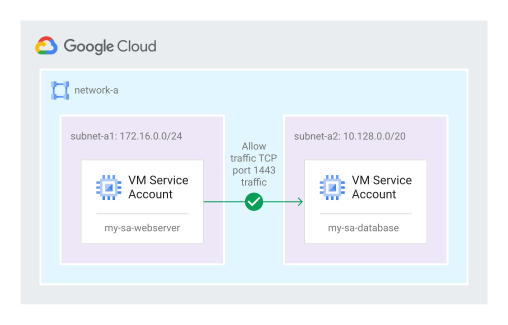
כלל חומת האש מאפשר תעבורה ממכונה וירטואלית עם חשבון השירות my-sa-webserver ליציאה 1443 של מכונה וירטואלית עם חשבון השירות my-sa-database.
איור 2. כלל חומת אש מאפשר תעבורה ממכונה וירטואלית עם חשבון השירות my-sa-webserver ליציאה 1443 של מכונה וירטואלית עם חשבון השירות my-sa-database (לחצו להגדלה).

השלבים להגדרה, כולל יצירת חשבונות השירות, מפורטים בהמשך.

gcloud

  1. משתמש עם הרשאת עריכה או בעלות על הפרויקט יוצר את חשבונות השירות my-sa-webserver ו-my-sa-database.

    gcloud iam service-accounts create my-sa-webserver \
        --display-name "webserver service account"
    
    gcloud iam service-accounts create my-sa-database \
        --display-name "database service account"
    
  2. בעל הפרויקט מקצה למפתח שרת האינטרנט web-dev@example.com את התפקיד Service Account User (serviceAccountUser) בחשבון השירות my-sa-webserver באמצעות הגדרת מדיניות של ניהול זהויות והרשאות גישה (IAM).

    gcloud iam service-accounts add-iam-policy-binding \
    my-sa-webserver@my-project.s3ns.iam.gserviceaccount.com \
        --member='user:web-dev@example.com' \
        --role='roles/iam.serviceAccountUser'
    
  3. בעל הפרויקט מקצה למפתח מסד הנתונים db-dev@example.com את התפקיד משתמש בחשבון שירות (serviceAccountUser) בחשבון השירות my-sa-database באמצעות הגדרת מדיניות IAM.

    gcloud iam service-accounts add-iam-policy-binding \
    my-sa-database@my-project.s3ns.iam.gserviceaccount.com \
        --member='user:db-dev@example.com' \
        --role='roles/iam.serviceAccountUser'
    
  4. המפתח web-dev@example.com, שיש לו את התפקיד Instance admin, יוצר תבנית של הגדרות מכונה של שרת אינטרנט ומאשר למכונות להריץ את חשבון השירות my-sa-webserver.

    gcloud compute instance-templates create INSTANCE_TEMPLATE_NAME \
        --service-account my-sa-webserver@my-project-123.s3ns.iam.gserviceaccount.com
    
  5. Developer db-dev@example.com, שיש לו את התפקיד 'אדמין מכונות', יוצר את תבנית של הגדרות מכונה של מסד הנתונים ומאשר למכונות להפעיל את חשבון השירות my-sa-database.

    gcloud compute instance-templates create INSTANCE_TEMPLATE_NAME \
        --service-account my-sa-database@my-project-123.s3ns.iam.gserviceaccount.com
    
  6. אדמין האבטחה יוצר כלל חומת אש שמאפשר תעבורת TCP ממכונות וירטואליות עם חשבון השירות my-sa-webserver להגיע ליציאה 1443 של מכונות וירטואליות עם חשבון השירות my-sa-database.

    gcloud compute firewall-rules create RULE_NAME \
        --network network_a \
        --allow TCP:1443 \
        --source-service-accounts my-sa-webserver@my-project.s3ns.iam.gserviceaccount.com \
        --target-service-accounts my-sa-database@my-project.s3ns.iam.gserviceaccount.com
    

פתרון בעיות

הודעות שגיאה כשיוצרים או מעדכנים כלל לחומת אש של VPC

יכול להיות שתופיע אחת מהודעות השגיאה הבאות:

  • Should not specify destination range for ingress direction.

    טווחים של כתובות יעד הם לא פרמטרים תקינים לכללי חומת אש של תעבורת נכנסת. כללי חומת אש נחשבים לכללי תנועה נכנסת, אלא אם מצוין כיוון ספציפי של EGRESS. אם יוצרים כלל שלא מצוין בו כיוון, הוא נוצר ככלל כניסה שלא מאפשר טווח יעד. בנוסף, טווחים של מקורות הם לא פרמטרים תקינים לכללי יציאה.

  • Firewall direction cannot be changed once created.

    אי אפשר לשנות את הכיוון של כלל חומת אש קיים. צריך ליצור כלל חדש עם הפרמטרים הנכונים, ואז למחוק את הכלל הישן.

  • Firewall traffic control action cannot be changed once created.

    אי אפשר לשנות את הפעולה של כלל חומת אש קיים. צריך ליצור כלל חדש עם הפרמטרים הנכונים, ואז למחוק את הכלל הישן.

  • Service accounts must be valid RFC 822 email addresses. חשבון השירות שצוין בכלל חומת האש צריך להיות כתובת אימייל בפורמט שמוגדר ב-RFC 822.

    gcloud compute firewall-rules create bad --allow tcp --source-service-accounts invalid-email
    
    Creating firewall...failed.
    ERROR: (gcloud.compute.firewall-rules.create) Could not fetch resource:
    – Invalid value for field 'resource.sourceServiceAccounts[0]': 'invalid-email'. Service accounts must be valid RFC 822 email addresses.
    
  • ServiceAccounts and Tags are mutually exclusive and can't be combined in the same firewall rule. אי אפשר לציין גם חשבונות שירות וגם תגים באותו כלל.

    gcloud compute firewall-rules create bad --allow tcp --source-service-accounts test@google.com --target-tags target
    
    Creating firewall...failed.
     ERROR: (gcloud.compute.firewall-rules.create) Could not fetch resource:
    – ServiceAccounts and Tags are mutually exclusive and can't be combined in the same firewall rule.
    

השגיאה 'המשאב לא נמצא'

כשמוחקים רשת VPC או כלל חומת אש, יכול להיות שתופיע הודעה דומה להודעה הבאה: The resource "aet-uscentral1-subnet--1-egrfw" was not found.

השגיאה הזו יכולה למנוע מכם למחוק כלל חומת אש משתמע או לצפות בפרטים שלו. כלל חומת אש שנמצא במצב הזה יכול גם לחסום אתכם ממחיקת רשת VPC.

כדי למחוק כלל חומת אש או רשת שנחסמו בצורה הזו, צריך קודם למחוק את מחבר הגישה ל-VPC ללא שרתים שמשויך אליהם, ואז לנסות שוב. מידע נוסף על מחיקה של מחבר Serverless VPC Access

שגיאה: יש יותר מדי חומות אש גדולות

יכול להיות שתופיע הודעת השגיאה הבאה: Google Compute Engine: The network contains too many large firewalls.

כדי לשמור על הבטיחות ועל הביצועים, יש מגבלה על המורכבות ועל מספר כללי חומת האש שאפשר להטמיע ברשת VPC. אם הודעת השגיאה הזו מוצגת, צריך לבקש מצוות ניהול החשבון לפשט או לאחד את הכללים של חומת האש.

אי אפשר להתחבר למכונת VM

אם אתם לא מצליחים להתחבר למופע של מכונה וירטואלית, כדאי לבדוק את כללי חומת האש.

gcloud

  1. אם אתם יוזמים את החיבור ממופע אחר של מכונת VM, עליכם לרשום את כללי חומת האש ליציאה של המופע הזה.

    gcloud compute firewall-rules list --filter network=NETWORK_NAME \
      --filter EGRESS \
      --sort-by priority \
      --format="table(
          name,
          network,
          direction,
          priority,
          sourceRanges.list():label=SRC_RANGES,
          destinationRanges.list():label=DEST_RANGES,
          allowed[].map().firewall_rule().list():label=ALLOW,
          denied[].map().firewall_rule().list():label=DENY,
          sourceTags.list():label=SRC_TAGS,
          sourceServiceAccounts.list():label=SRC_SVC_ACCT,
          targetTags.list():label=TARGET_TAGS,
          targetServiceAccounts.list():label=TARGET_SVC_ACCT
          )"
    

    מחליפים את NETWORK_NAME בשם הרשת.

  2. בודקים אם כתובת ה-IP של היעד נדחית על ידי כללי יציאה. הכלל עם העדיפות הגבוהה ביותר (מספר העדיפות הנמוך ביותר) מבטל כללים עם עדיפות נמוכה יותר. אם לשני כללים יש אותה עדיפות, כלל הדחייה מקבל עדיפות.

  3. בודקים את כלל חומת האש של התנועה הנכנסת ברשת שמכילה את מופע המכונה הווירטואלית של היעד.

    gcloud compute firewall-rules list --filter network=NETWORK_NAME \
      --filter INGRESS \
      --sort-by priority \
      --format="table(
          name,
          network,
          direction,
          priority,
          sourceRanges.list():label=SRC_RANGES,
          destinationRanges.list():label=DEST_RANGES,
          allowed[].map().firewall_rule().list():label=ALLOW,
          denied[].map().firewall_rule().list():label=DENY,
          sourceTags.list():label=SRC_TAGS,
          sourceServiceAccounts.list():label=SRC_SVC_ACCT,
          targetTags.list():label=TARGET_TAGS,
          targetServiceAccounts.list():label=TARGET_SVC_ACCT
          )"
    

    מחליפים את NETWORK_NAME בשם הרשת.

    פלט לדוגמה. הפלט שתקבלו יהיה תלוי ברשימת הכללים של חומת האש.

    NAME                    NETWORK  DIRECTION  PRIORITY  SRC_RANGES    DEST_RANGES  ALLOW                         DENY  SRC_TAGS  SRC_SVC_ACCT      TARGET_TAGS  TARGET_SVC_ACCT
    default-allow-icmp      default  INGRESS    65534     0.0.0.0/0                  icmp
    default-allow-internal  default  INGRESS    65534     10.128.0.0/9               tcp:0-65535,udp:0-65535,icmp
    default-allow-rdp       default  INGRESS    65534     0.0.0.0/0                  tcp:3389
    default-allow-ssh       default  INGRESS    65534     0.0.0.0/0                  tcp:22
    firewall-with-sa        default  INGRESS    1000                                 tcp:10000                                     test1@google.com               target@google.com
    
  4. אפשר גם להריץ בדיקות קישוריות אל מכונות וירטואליות ברשת VPC או מרשת VPC לרשת ענן אחרת שאינה של Google, כדי לפתור בעיות שקשורות לתעבורת נתונים שנחסמת על ידי כללים של חומת האש לתעבורה נכנסת או יוצאת. במאמר הרצת בדיקות קישוריות מוסבר איך להריץ את בדיקות הקישוריות כדי לפתור בעיות בתרחישים שונים.

האם כלל חומת האש ב-VPC מופעל או מושבת?

כדי לראות אם כלל של חומת אש מופעל או מושבת, אפשר לעיין בפרטים של כללי חומת האש.

ב Cloud de Confiance console, מחפשים את האפשרות מופעל או מושבת בקטע אכיפה.

בפלט של ה-CLI של gcloud, מחפשים את השדה disabled. אם מופיע הערך disabled:false, הכלל מופעל ונאכף. אם כתוב disabled: true, הכלל מושבת.

איזה כלל מוחל על מכונה וירטואלית?

אחרי שיוצרים כלל, אפשר לבדוק אם הוא מוחל בצורה נכונה על מופע מסוים. מידע נוסף זמין במאמר בנושא הצגת הכללים של חומת האש לממשק רשת של מופע VM.

כללי חומת אש ב-VPC עם תגי מקור לא נכנסים לתוקף באופן מיידי

יכול להיות שיעבור זמן עד שכללי חומת אש לתעבורת נתונים נכנסת שמשתמשים בתגי מקור יופצו. פרטים נוספים זמינים במאמר בנושא שיקולים שקשורים לתגי מקור עבור כללי חומת אש של תעבורת נכנסת.

המאמרים הבאים