
Virtual Private Cloud (VPC) firewall rules generate log entries when they apply to traffic. While a packet flow can generate multiple log entries, a VPC firewall rule generates at most one log entry per connection from a virtual machine (VM) instance. The following examples show how VPC firewall rules logging works in different scenarios.
Egress deny example
This example shows logging for an egress-deny VPC firewall rule that blocks traffic between two VM instances in the same VPC network.
In this example, traffic flows between VM instances in the example-net
VPC network in the example-proj project.
The two VM instances are:
- VM1 in zone
us-west1-awith IP address10.10.0.99in thewest-subnet(us-west1region). - VM2 in zone
us-east1-bwith IP address10.20.0.99in theeast-subnet(us-east1region).
- VM1 in zone
Rule A: An egress deny firewall rule has a target of all instances in the network, a destination of
10.20.0.99(VM2), and applies to TCP port80. Logging is enabled for this rule.Rule B: An ingress allow firewall rule has a target of all instances in the network, a source of
10.10.0.99(VM1), and applies to TCP port80. Logging is also enabled for this rule.
To create the VPC firewall rules, use the following gcloud
commands:
Rule A: egress deny rule for TCP port
80, applicable to all instances, destination10.20.0.99:gcloud compute firewall-rules create rule-a \ --network example-net \ --action deny \ --direction EGRESS \ --rules tcp:80 \ --destination-ranges 10.20.0.99/32 \ --priority 10 \ --enable-loggingRule B: ingress allow rule for TCP port
80, applicable to all instances, source10.10.0.99:gcloud compute firewall-rules create rule-b \ --network example-net \ --action allow \ --direction INGRESS \ --rules tcp:80 \ --source-ranges 10.10.0.99/32 \ --priority 10 \ --enable-logging
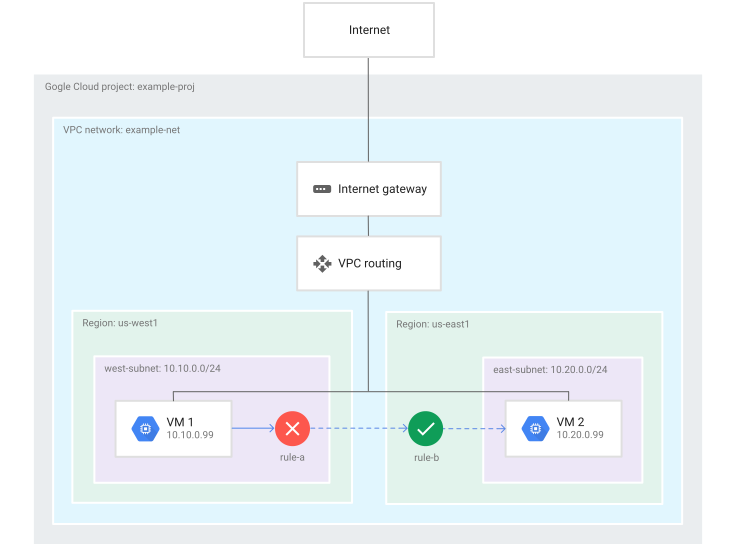
In a scenario where VM1 attempts to connect to VM2 on TCP port 80,
the following happens:
- A log entry for rule A from the perspective of VM1 is generated while VM1
attempts to connect to
10.20.0.99(VM2). - Because rule A blocks the traffic, rule B isn't considered, so there is no log entry for rule B from the perspective of VM2.
VM1 reports the following VPC firewall rule log record:
| Field | Values |
|---|---|
connection |
src_ip=10.10.0.99 src_port=[EPHEMERAL_PORT] dest_ip=10.20.0.99 dest_port=80 protocol=6 |
disposition |
DENIED |
rule_details |
reference = "network:example-net/firewall:rule-a" priority = 10 action = DENY destination_range = 10.20.0.99/32 ip_port_info = tcp:80 direction = egress |
instance |
project_id="example-proj" instance_name=VM1 region=us-west1 zone=us-west1-a |
vpc |
project_id="example-proj" vpc_name=example-net subnetwork_name=west-subnet |
remote_instance |
project_id="example-proj" instance_name=VM2 region=us-east1 zone=us-east1-b |
remote_vpc |
project_id="example-proj" vpc_name=example-net subnetwork_name=east-subnet |
remote_location |
No information. This field is only used if the destination is outside your VPC network. |
Egress allow, ingress allow example
This example shows logging for an egress-allow VPC firewall rule and an ingress-allow VPC firewall rule that together permit traffic between two VM instances in the same VPC network.
In this example, traffic flows between VM instances in the
example-net VPC network in the example-proj project.
The two VM instances are:
- VM1 in zone
us-west1-awith IP address10.10.0.99in thewest-subnet(us-west1region). - VM2 in zone
us-east1-bwith IP address10.20.0.99in theeast-subnet(us-east1region).
- VM1 in zone
Rule A: An egress allow firewall rule has a target of all instances in the network, a destination of
10.20.0.99(VM2), and applies to TCP port80. Logging is enabled for this rule.Rule B: An ingress allow firewall rule has a target of all instances in the network, a source of
10.10.0.99(VM1), and applies to TCP port80. Logging is also enabled for this rule.
To create the VPC firewall rules, use the following gcloud
commands:
Rule A: egress allow rule for TCP port
80, applicable to all instances, destination10.20.0.99(VM2):gcloud compute firewall-rules create rule-a \ --network example-net \ --action allow \ --direction EGRESS \ --rules tcp:80 \ --destination-ranges 10.20.0.99/32 \ --priority 10 \ --enable-loggingRule B: ingress allow rule for TCP port
80, applicable to all instances, source10.10.0.99(VM1):gcloud compute firewall-rules create rule-b \ --network example-net \ --action allow \ --direction INGRESS \ --rules tcp:80 \ --source-ranges 10.10.0.99/32 \ --priority 10 \ --enable-logging
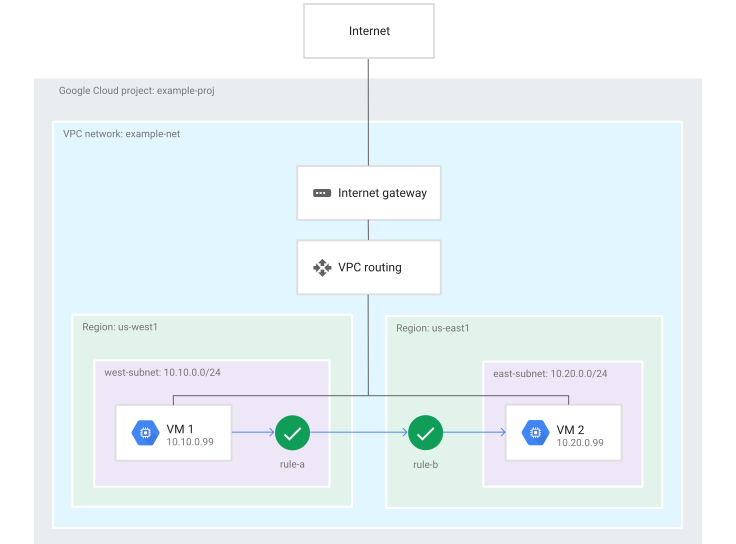
In a scenario where VM1 attempts to connect to VM2 on TCP port 80,
the following happens:
- A log entry for rule A from the perspective of VM1 is generated while VM1
connects to
10.20.0.99(VM2). - A log entry for rule B from the perspective of VM2 is generated while VM2 allows
incoming connections from
10.10.0.99(VM1).
VM1 reports the following VPC firewall rule log record:
| Field | Values |
|---|---|
connection |
src_ip=10.10.0.99 src_port=[EPHEMERAL_PORT] dest_ip=10.20.0.99 dest_port=80 protocol=6 |
disposition |
ALLOWED |
rule_details |
reference = "network:example-net/firewall:rule-a" priority = 10 action = ALLOW destination_range = 10.20.0.99/32 ip_port_info = tcp:80 direction = egress |
instance |
project_id="example-proj" instance_name=VM1 region=us-west1 zone=us-west1-a |
vpc |
project_id="example-proj" vpc_name=example-net subnetwork_name=west-subnet |
remote_instance |
project_id="example-proj" instance_name=VM2 region=us-east1 zone=us-east1-b |
remote_vpc |
project_id="example-proj" vpc_name=example-net subnetwork_name=east-subnet |
remote_location |
No information. This field is only used if the destination is outside your VPC network. |
VM2 reports the following VPC firewall rule log record:
| Field | Values |
|---|---|
connection |
src_ip=10.10.0.99 src_port=[EPHEMERAL_PORT] dest_ip=10.20.0.99 dest_port=80 protocol=6 |
disposition |
ALLOWED |
rule_details |
reference = "network:example-net/firewall:rule-b" priority = 10 action = ALLOW source_range = 10.10.0.99/32 ip_port_info = tcp:80 direction = ingress |
instance |
project_id="example-proj" instance_name=VM2 region=us-east1 zone=us-east1-b |
vpc |
project_id="example-proj" vpc_name=example-net subnetwork_name=east-subnet |
remote_instance |
project_id="example-proj" instance_name=VM1 region=us-west1 zone=us-west1-a |
remote_vpc |
project_id="example-proj" vpc_name=example-net subnetwork_name=west-subnet |
remote_location |
No information. This field is only used if the destination is outside your VPC network. |
Internet ingress example
This example shows logging for an ingress-allow firewall rule that permits traffic from the internet to a VM instance. It also shows how stateful firewall behavior affects an egress-deny rule.
In this example, traffic flows from an external resource to a VM instance
within the example-net VPC network. The network is
in the example-proj project.
- The system on the internet has IP address
203.0.113.114. - VM1 in zone
us-west1-ahas IP address10.10.0.99in thewest-subnet(us-west1region). - Rule C: An ingress allow firewall rule has a target of all instances in the
network, a source of any IP address (
0.0.0.0/0), and applies to TCP port80. Logging is enabled for this rule. - Rule D: An egress deny firewall rule has a target of all instances in the
network, a destination of any IP address (
0.0.0.0/0), and applies to all protocols. Logging is enabled for this rule.
To create the VPC firewall rules, use the following gcloud
commands:
Rule C: ingress allow rule for TCP port
80, applicable to all instances, any source:gcloud compute firewall-rules create rule-c \ --network example-net \ --action allow \ --direction INGRESS \ --rules tcp:80 \ --source-ranges 0.0.0.0/0 \ --priority 10 \ --enable-loggingRule D: egress deny rule for all protocols, applicable to all instances, any destination:
gcloud compute firewall-rules create rule-d \
    --network example-net \
    --action deny \
    --direction EGRESS \
    --rules all \
    --destination-ranges 0.0.0.0/0 \
    --priority 10 \
    --enable-logging
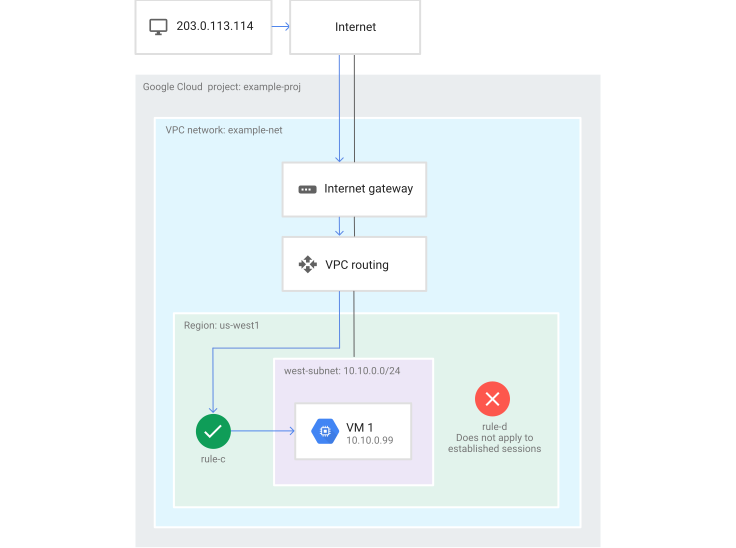
In a scenario where system with IP address 203.0.113.114 attempts to
connect to VM1 on TCP port 80, the following happens:
- VM1 generates a log entry for rule C while it accepts traffic from
203.0.113.114. - Despite rule D, VM1 can reply to the incoming request because Cloud de Confiance firewall rules are stateful. If the incoming request is allowed, no egress rule can block established responses.
- Because rule D doesn't apply, the system doesn't consider it, so there is no log entry for rule D.
VM1 reports the following VPC firewall rule log record:
| Field | Values |
|---|---|
connection |
src_ip=203.0.113.114 src_port=[EPHEMERAL_PORT] dest_ip=10.10.0.99 dest_port=80 protocol=6 |
disposition |
ALLOWED |
rule_details |
reference = "network:my-vpc/firewall:rule-c" priority = 10 action = ALLOW source_range = 0.0.0.0/0 ip_port_info = tcp:80 direction = ingress |
instance |
project_id="example-proj" instance_name=VM1 region=us-west1 zone=us-west1-a |
vpc |
project_id="example-proj" vpc_name=example-net subnetwork_name=west-subnet |
remote_location |
continent country region city |