
This page outlines recommended practices for configuring encryption at rest with customer-managed encryption keys (CMEKs) on your Cloud de Confiance resources. This guide is intended for cloud architects and security teams and outlines recommended practices and decisions that you must make while you design your CMEK architecture.
This guide assumes that you're already familiar with Cloud Key Management Service (Cloud KMS) and customer-managed encryption keys.Choose where to use CMEK
Google recommends that you use customer-managed encryption keys where you want a cryptographic boundary around your or your customers' data in the cloud. For more information, see Customer-managed encryption keys (CMEK).
You can use CMEKs in compatible services to help you implement the following goals:Own your encryption keys.
Control and manage your encryption keys, including choice of location, protection level, creation, access control, rotation, use, and destruction.
Generate key material in Cloud KMS or import key material that is maintained outside of Cloud de Confiance.
Set policy regarding where your keys must be used.
Selectively delete data protected by your keys in the case of off-boarding or to remediate security events (crypto-shredding).
Create and use keys that are unique to a customer, establishing a cryptographic boundary around your data.
Log administrative and data access to encryption keys.
Meet current or future regulation that requires any of these goals.
Google also recommends that you consider compliance frameworks that apply to your business needs. Different compliance frameworks have different requirements for encryption and key management. A compliance framework typically outlines the high-level principles and objectives of encryption key management, but is not prescriptive about the particular product or configuration that achieves compliance. It's your responsibility to understand the requirements of your compliance framework and how your controls, including key management, can help you meet those requirements.
For guidance about how Cloud de Confiance services can help meet the requirements of different compliance frameworks, see the following resources:
Choose the source of your key material
When you create a key, you must either allow Cloud KMS to generate the key material for you or manually import key material that was generated outside of Cloud de Confiance. When possible, we recommend that you choose to generate key material in Cloud KMS. This option doesn't risk exposing the raw key material outside of Cloud KMS and automatically creates new key versions based on the key rotation period that you choose. If you must import your own key material, we recommend that you assess the following operational considerations and risks of using the bring-your-own-key (BYOK) approach:
Can you implement automation to consistently import new key versions? This includes both Cloud KMS settings to restrict key versions to import only, and automation outside of Cloud KMS to consistently generate and import key material. What is the impact if your automation fails to create a new key version at the expected time?
How do you intend to securely store or escrow the original key material?
How can you mitigate the risk of your key import process leaking the raw key material?
What would the impact be to re-import a previously destroyed key because the raw key material was retained outside of Cloud de Confiance?
Does the benefit of importing key material yourself justify the increased operational overhead and risk?
Choose your key governance and key storage models
When you're designing your CMEK architecture, you must decide where and how your keys will be managed. Ideally, you'll choose a key governance model and a key storage model that align. The governance model and storage model that you choose influence critical configurations like enforcing separation of duties.
Key governance
Key governance describes who in an organization is responsible for managing the lifecycle of your Cloud KMS resources and maintaining guardrails to control how Cloud KMS is used. Key governance approaches exist on a spectrum from centralized governance to delegated governance:
- Centralized governance: A dedicated security or platform team is responsible for managing the lifecycle of all cryptographic keys across the organization. This model is often chosen by highly regulated enterprises with strict compliance requirements.
- Delegated governance: A central security team uses guardrails to mandate encryption standards, but delegates the responsibility for key lifecycle operations to application owners within their projects. These guardrails can include organization policies using managed constraints and custom constraints and IAM grants and deny policies. This eliminates central operational bottlenecks.
Key storage
Key storage describes where Cloud KMS resources are created within an organization. There are two main approaches to key storage: dedicated-project key storage and same-project key storage.
Dedicated-project key storage: A dedicated key project contains keys used for multiple applications. Usually, each environment folder has its own key project. You can use Autokey with dedicated-project key storage. For more information about the dedicated-project key storage model, see Dedicated-project key storage.
Same-project key storage: Keys are stored in the same Cloud de Confiance project as the resources that they protect. This is sometimes described as "the key follows the data." You can use Autokey with same-project key storage. For more information about the same-project key storage model, see Same-project key storage.
Align governance and storage
The following matrix provides examples of how these governance and storage models can be combined to meet different organization needs:
| Governance Model | Dedicated-project key storage | Same-project key storage |
|---|---|---|
| Centralized governance | Fully centralized approach Recommended use: Organizations with strict regulatory requirements that mandate project boundary isolation. Operational impact: High setup complexity. Requires robust automation (such as a "project factory") to prevent operational delays for development teams. |
Governed ownership Recommended use: Organizations that require central security oversight but want to maximize developer velocity. Operational impact: Low setup complexity. Central security enforces policy by using guardrails, while keys are co-located with the resources that they protect for ease of management. |
| Delegated governance | Not recommended Introducing cross-project IAM complexity defeats the purpose of delegating key management to application teams. |
Autonomous DevOps Recommended use: High-velocity, decentralized organizations with a strong DevOps culture. Operational impact: Minimal setup complexity. Application teams have full autonomy over both resources and keys within their project boundaries. |
Use a consistent architecture across your environments
We recommend that for any given application, you use the same key storage pattern across development, testing, and production environments. This architectural consistency helps to ensure that your IAM permissions, deployment pipelines, and security controls are thoroughly tested in lower environments before you deploy them to production. If you choose different architectures for your environments, you introduce the risk of configuration drift that can cause deployment failures.
Dedicated-project key storage
In a dedicated-project key storage model, all keys for a specific environment folder (e.g., Production) are stored in a centralized, shared key project. Key management permissions are granted to a shared security team, who typically also manage key lifecycle operations and guardrails like CMEK organization policies and IAM policies and role grants.
Use case
We recommend using the dedicated-project key storage model if your organization prioritizes strict, central control over encryption keys, often driven by regulatory requirements, or when keys are hosted on an external HSM.
If your organization is subject to a compliance framework that requires a Cryptographic Officer or Key Custodian, such as PCI DSS or BSI C5, then this model is a good choice. By isolating all keys for an application in a single, dedicated key project, you can grant the Cloud KMS Admin role to only a small, audited group of security administrators. This can simplify compliance audits by limiting the number of projects where key administration access policies must be reviewed.
Considerations
This approach can introduce cross-project IAM complexities and potential bottlenecks for development teams. To help mitigate this, you can implement automated project provisioning—sometimes called a "Project Factory"—to automate key creation and permission assignment.
Example
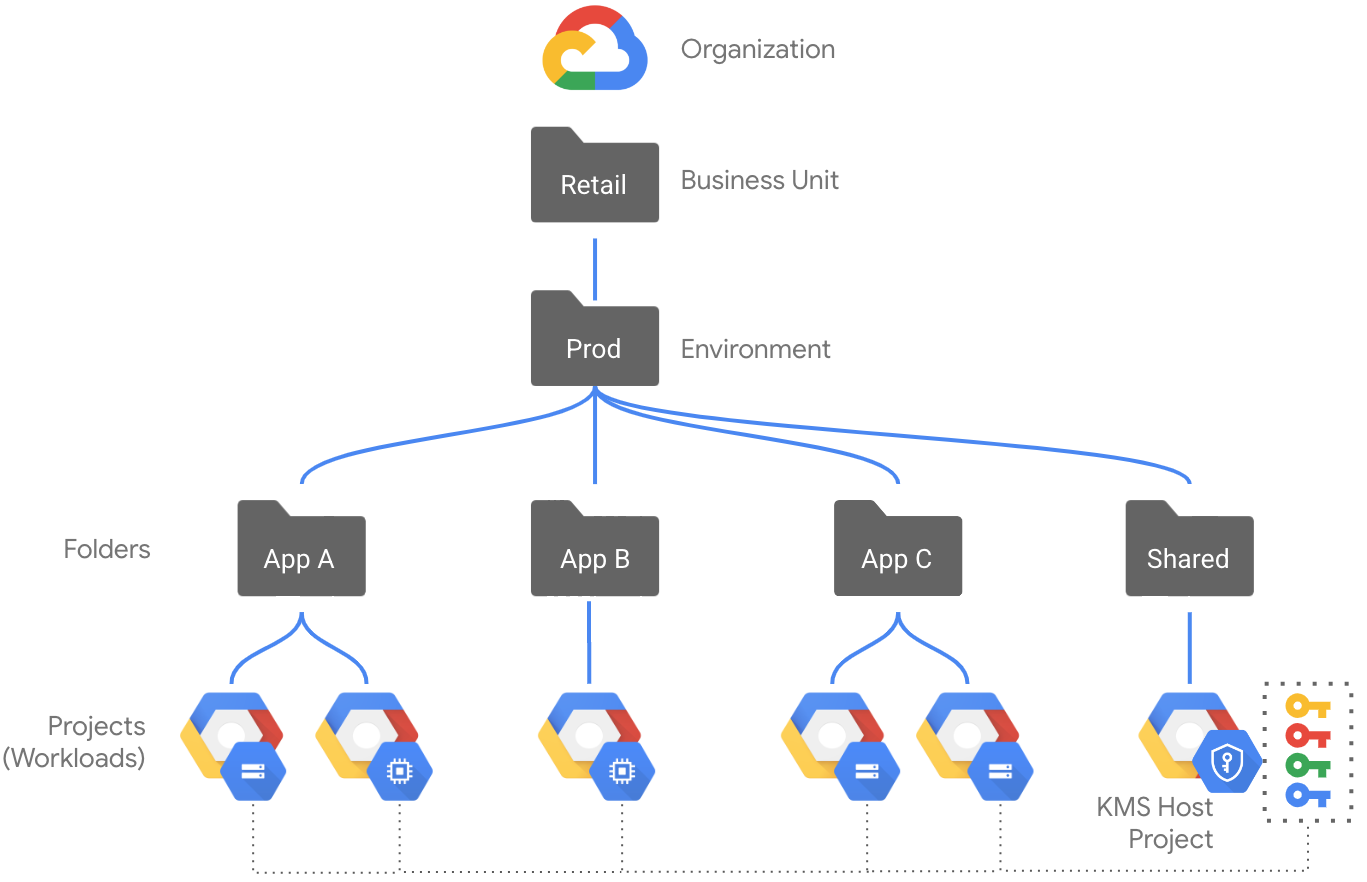
The following diagram shows an example resource hierarchy for a production environment using the dedicated-project key storage model:
- The Prod folder contains individual folders and projects for different applications, plus a Shared folder.
- The application projects contain a variety of different resources, such as Compute Engine instances and Cloud Storage buckets, but they don't contain any Cloud KMS keys.
- The Shared folder contains resources that are shared between the different applications.
- Within the Shared folder, there is a dedicated key project where the Cloud KMS API is enabled. This project contains all keys used to protect resources within the Prod folder.
- Organization-level and folder-level guardrails like organization policy constraints and IAM policies enforce separation of duties and other practices.
- Developers can have elevated privileges such as the Project Owner role within an individual application folder or project without granting them privileges on the key project.
Same-project key storage
In this model, keys are stored in the same project as the resources that they protect. Key management guardrails are usually implemented by a core security team, even if developers manage the key lifecycle for their own applications.
Use case
We recommend using the same-project key storage model if your priority is developer velocity, agility, and clear accountability. Co-locating keys with the resources they protect aligns key ownership with data ownership: the key follows the data. This model facilitates delegation of key management responsibilities to workload owners, who can take on responsibility for aligning with CMEK organization policies and managing key lifecycle operations within their projects.
Considerations
While this model empowers application teams, it requires diligent auditing of IAM roles within each project to enforce least privilege. This model may increase operational complexity for organizations implementing bring-your-own-key (BYOK) or using Cloud EKM keys because of the overhead to coordinate across systems.
Example
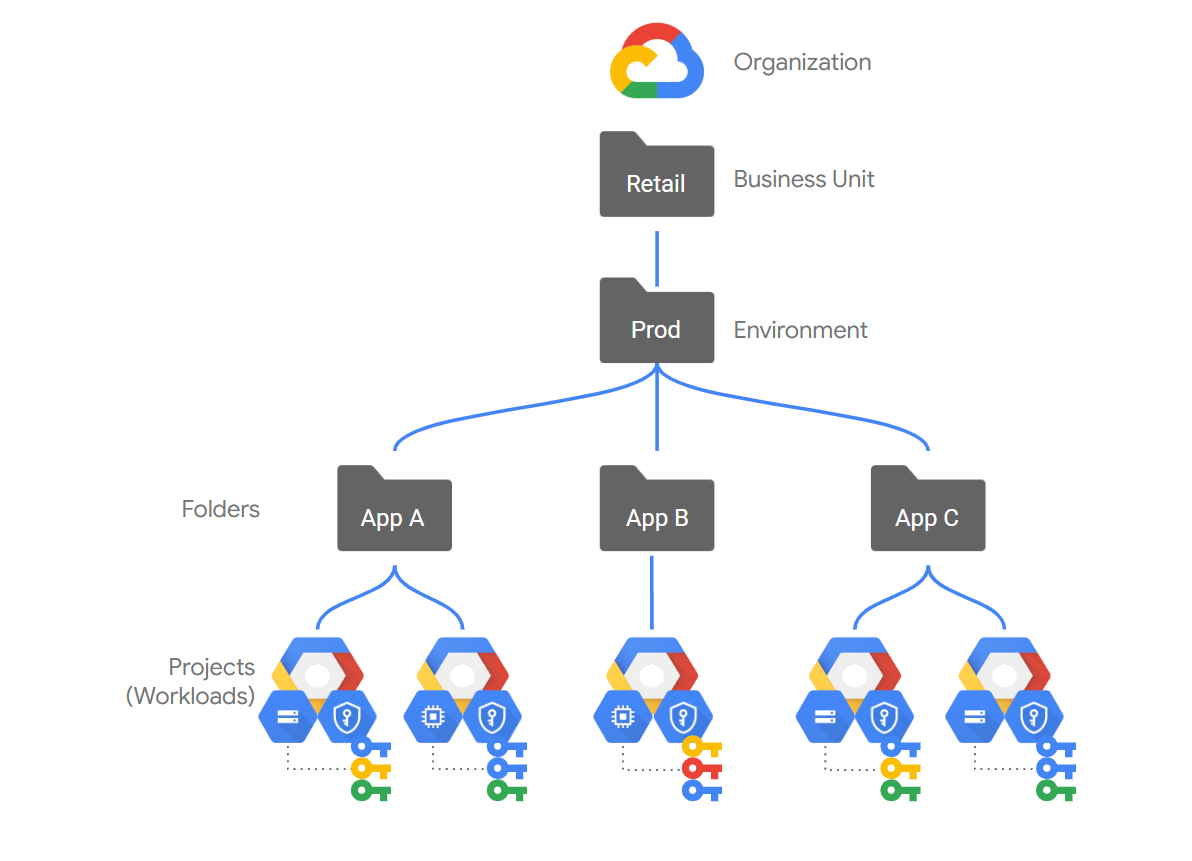
The following diagram shows an example resource hierarchy for a production environment using the same-project key storage model:
- The Prod folder contains individual folders and projects for different applications.
- The application projects contain a variety of different resources, such as Compute Engine instances and Cloud Storage buckets, including any Cloud KMS keys that protect those resources.
- Organization-level and folder-level guardrails like organization policy constraints and IAM policies enforce separation of duties and other practices, but enforcing separation of duties might require more careful configuration.
- Developers need elevated Cloud KMS privileges on the resource project to be able to create and manage keys.
Enforce separation of duties
Regardless of your storage model, you must maintain separate principals and permissions for those who administer your encryption keys and those who use them. To enforce the principle of least privilege and strict separation of duties, grant IAM roles based on specific operational responsibilities.
The following table summarizes the recommended role separation for Cloud KMS:
| Responsibility | Recommended role | Permission summary |
|---|---|---|
Key administration, e.g. key lifecycles and governance This can include human administrators and IaC principals that need elevated privileges. |
Cloud KMS Admin (roles/cloudkms.admin) |
|
Resource provisioning, e.g. creating CMEK-protected resources This can include human developers and IaC principals without elevated privileges. |
Service-specific administration or editor roles such as the following:
|
Select keys during resource creation. |
Key usage, e.g. encryption and decryption Grant this role only to service agents. For keys used in CMEK integrations, human principals don't need these permissions. |
Cloud KMS CryptoKey Encrypter/Decrypter
(roles/cloudkms.cryptoKeyEncrypterDecrypter) |
Encrypt and decrypt data using the key. |
Apply least privilege escalation for IaC pipelines
Many organizations automate resource provisioning using infrastructure as code (IaC) pipelines such as Terraform runners. How you architect your key storage directly impacts the security posture of these pipelines.
To automate Cloud KMS key provisioning, your IaC pipelines must be granted highly privileged administrative roles to generate keys and modify IAM policies. If an attacker compromises the IaC pipeline, they could gain full administrative control over your key management plane.
- If you use dedicated-project key storage, then the pipeline requires administrative access to the central Cloud KMS project. A compromise of the pipeline has the potential to expose the key management plane for your entire organization.
- If you use same-project key storage, then the pipeline only requires administrative access to the resource project. This limits the scope of the potential risk to the specific application, but still requires managing elevated privileges within the project.
Cloud KMS Autokey addresses this risk by delegating key provisioning to a secure, Google-managed service agent, so you can implement a least-privilege pipeline for ongoing key provisioning:
- Low-privilege pipelines: The IaC pipeline only requires the
low-privilege Cloud KMS Autokey User role (
roles/cloudkms.autokeyUser) to request a key by creating aKeyHandleresource. - Automated provisioning: The actual key creation and IAM policy updates are handled behind the scenes by the Google-managed Cloud KMS service agent.
- Limited scope of risk: By minimizing the permissions granted to your pipeline, this design avoids granting your deployment pipelines elevated key-creation or security-admin privileges, or the ability to assign helper roles, which significantly reduces the risk of a pipeline compromise.
An IaC pipeline that enables Autokey requires a more permissive
role like Cloud KMS Autokey Admin (roles/cloudkms.autokeyAdmin), so if you use
IaC pipelines to manage Autokey enablement, then you must apply
separation of duties to individual IaC principals as well.
Align with recommended key management practices
Google recommends practices for key location, protection level, rotation schedule, granularity, and permissions. You can see how well your keys align with these practices by using the Encryption metrics dashboard. You can detect violations of separation of duties by using Security Command Center vulnerability findings.
Key location
You must create Cloud KMS key rings in the locations where you plan to deploy Cloud de Confiance resources that are encrypted with CMEK. You must do this before you can create the keys.- Regional and zonal resources must use a key ring and key in the same region
as the resource or in the
globallocation. - Global resources must use a key ring and key in the
globallocation.
In most cases, these restrictions are enforced by the Cloud de Confiance service.
Enforcing the use of regional keys is one piece of a successful data regionalization strategy. By enforcing the use of key rings and keys in a defined region, you also enforce that resources must match the region of the key ring.
Choose a key granularity strategy
Granularity refers to the scale and scope of each key's intended usage. For example, a key that protects several resources is said to be less granular than a key that protects only one resource. Choosing a suitable key granularity strategy helps you align with the NIST recommendation that each key has a specific purpose.
In general, we recommend that each key is used as follows:
- Used for a single Cloud de Confiance project.
- Used in a single location—for example,
us-central1. - Used in a single service or product—for example, BigQuery.
- Wherever possible, used for a single resource—for example, a single Cloud Storage bucket.
For most organizations, this strategy provides a good balance between the overhead of maintaining many highly granular keys and the potential risks of using less granular keys that are shared between many projects, services, or resources.
Following these granularity guidelines makes it easier to safely disable or destroy key versions and limits the risks of accidental or malicious key destruction.
Choose the protection level for keys
When creating a key, it's your responsibility to select the protection level
that is appropriate for each key based on your requirements for the data and
workloads encrypted with CMEK.
* If you require that your key material is stored outside of
Cloud de Confiance, then use Cloud EKM keys. We recommend the
EXTERNAL_VPC protection level for better availability.
* If you're not required to store your key material outside of
Cloud de Confiance, then we recommend using software-backed keys.
Choose a rotation period
Cloud KMS supports automatic key rotation of software-backed and hardware-backed symmetric keys like those used for CMEK. For software-backed keys, we recommend that you use the industry-standard rotation period of 90 days. For Cloud HSM keys, we recommend the industry-standard rotation period of 365 days. External keys must be rotated manually according to your chosen schedule.
We recommend that you assess the appropriate key rotation period for your needs. The frequency of key rotation depends on the requirements of your workloads based on sensitivity or compliance. For example, key rotation might be required at least once yearly to meet certain compliance standards, or you might choose a more frequent rotation period for highly sensitive workloads.
Frequent key rotation helps limit the number of messages encrypted with the same key version, which helps to reduce the risk and consequences of a key becoming compromised.
Apply the principle of least privilege
When granting IAM roles, follow the principle of least privilege.
We strongly recommend that you avoid using basic roles like
Owner, Editor, and Viewer. Instead, grant predefined Cloud KMS
roles to mitigate risks of security incidents related to
over-privileged access. For example, if a principal only needs to import key
material, grant the Cloud KMS Importer role (roles/cloudkms.importer) instead
of the more permissive Cloud KMS Admin role (roles/cloudkms.admin).
Set operational guardrails
The following sections describe controls that you can implement to help mitigate risks like inconsistent key usage or accidental deletion or destruction.
Enforce project liens
We recommend that you protect projects with liens (Preview) to help prevent accidental deletion of your Cloud KMS projects and the keys that they contain. While a project lien is enforced, the project is blocked from deletion until the lien is removed. For projects that contain Cloud KMS keys, this prevents one possible cause of accidental key deletion.
Require CMEK keys
We recommend that you enforce CMEK usage across your environment using organization policy constraints.
Use constraints/gcp.restrictNonCmekServices to block
requests to create certain resource types without specifying a CMEK key.
Require a minimum scheduled for destruction duration
We recommend that you set a minimum scheduled for destruction duration. Key destruction is an irreversible operation that can result in permanent data loss. By default, Cloud KMS uses a scheduled for destruction duration (sometimes called a soft delete period) of 30 days before key material is irrecoverably destroyed. This provides some time to restore a key in the event of accidental destruction. However, it is possible for someone with the Cloud KMS Admin role to create a key with a scheduled for destruction duration as low as 24 hours, which might not be sufficient time for you to detect an issue and restore the key. The scheduled for destruction duration can only be set during key creation.
While a key is scheduled for destruction, it can't be used for cryptographic operations, and any requests to use the key fail. During this time, monitor audit logs to check that the key is not in use. If you want to use the key again, you must restore the key before the end of the scheduled for destruction period.
To ensure that all keys created adhere to a minimum scheduled for destruction
duration, we recommend that you configure the organization policy constraint
constraints/cloudkms.minimumDestroyScheduledDuration
with a minimum of 30 days, or your preferred
duration. This organization policy prevents users from creating keys with a
scheduled for destruction duration less than the value specified in the
policy.
Enforce allowed protection levels for CMEKs
We recommend that you enforce your requirements for key protection levels consistently across your environment using organization policy constraints.
Use constraints/cloudkms.allowedProtectionLevels
to enforce that new keys, key versions, and import jobs must use the protection
levels that you allow.
Configure detective controls for CMEKs
Cloud de Confiance provides various detective controls for CMEKs. The following sections introduce how to enable and use the controls which are relevant for Cloud KMS.
Enable and aggregate audit logging
We recommend that you aggregate Cloud KMS Admin Activity audit logs in a centralized location for all resources in your organization. This lets a security team or auditor review all activity related to creating or modifying Cloud KMS resources at once. For guidance on configuring aggregated log sinks, see aggregate and store your organization's logs.
Optionally, you can enable data access logs to log operations that use the keys, including encrypt and decrypt operations. When using CMEKs, this can generate substantial log volume and impact your costs because every operation from every service that uses CMEKs will create data access logs. Before enabling data access logs, we recommend that you define a clear use case for the additional logs and assess how your logging costs will increase.
Summary of best practices
The following table summarizes the best practices recommended in this document:
| Topic | Task |
|---|---|
| Cloud KMS key projects | Use one centralized key project for each environment. Don't create Cloud KMS resources in the same project as the Cloud de Confiance resources the keys protect. |
| Cloud KMS key rings | Create Cloud KMS key rings for each location where you want to protect Cloud de Confiance resources. |
| Key granularity | Choose a pattern of key granularity that meets your needs for risk tolerance, cost, and operational overhead. |
| Protection level | Choose Cloud EKM if your key material must be stored outside of Cloud de Confiance or if you need a FIPS 140-2 certification of level 2 or level 3. Otherwise, choose software keys. Review the guidance for selecting a protection level. |
| Key material | For key material hosted on Cloud de Confiance, use Cloud de Confiance-generated key material when possible. If you use imported key material, implement automation and procedures to mitigate risks. |
| Key purpose and algorithm | All CMEK keys must use the symmetric ENCRYPT_DECRYPT key
purpose and the GOOGLE_SYMMETRIC_ENCRYPTION algorithm. |
| Rotation period | Use automatic key rotation to ensure that your keys are rotated on schedule. Choose and apply a rotation period that meets your needs, ideally no less than once per year. Use more frequent key rotation for sensitive workloads. |
| Least privilege | Grant the most limited predefined roles that allow your principals to complete their tasks. Don't use basic roles. |
| Separation of duties | Maintain separate permissions for key administrators and principals that use keys. |
| Project liens | Use project liens to prevent accidental deletion of your key projects. |
| Require CMEKs | Use the constraints/gcp.restrictNonCmekServices
constraint. |
| Require a minimum scheduled for destruction duration | Use the
constraints/cloudkms.minimumDestroyScheduledDuration
constraint. |
| Enforce allowed protection levels for CMEKs | Use the constraints/cloudkms.allowedProtectionLevels
constraint. |
| Enable and aggregate audit logging | Aggregate administrative activity audit logs for all resources in your organization. Consider whether you want to enable logging of operations using keys. |
| Assess compliance requirements | Review your Cloud KMS architecture and compare with any compliance requirements that you must adhere to. |