
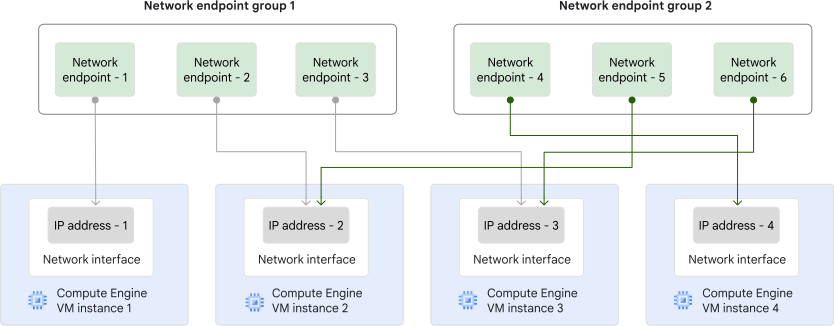
A network endpoint group (NEG) is a collection of network endpoints. Every endpoint in a NEG must point to a unique IP address of a VM's network interface. A network endpoint belongs to exactly one network endpoint group. A single IP address cannot be referenced by more than one endpoint in a NEG. However, a single IP address can be referenced by endpoints in different NEGs. The following diagram presents a stylized representation of this concept. In the diagram, "IP address - 2" and "IP address - 3" are referenced by network endpoints that are located in different network endpoint groups.
Zonal NEGs are zonal resources that represent collections of either IP addresses or IP address and port combinations for Cloud de Confiance resources within a single VPC subnet. Zonal NEGs let you do the following:
Route packets to any network interface of a VM instance, including interfaces other than
nic0. This lets you create logical groupings of IP addresses and ports representing software services instead of entire VMs.Create a flexible set of unique endpoint IP addresses or IP addresses and ports.
There are two types of zonal NEGs, depending on the type of network endpoints that make up the NEG. The two types of zonal NEGs support different use cases and load balancer types.
Zonal NEGs with
GCE_VM_IPendpoints are supported as backends for the following load balancers:Zonal NEGs with
GCE_VM_IP_PORTendpoints are supported as backends for the following proxy-based load balancers:
NEGs with GCE_VM_IP endpoints
These zonal NEGs contain one or more GCE_VM_IP endpoints with each endpoint
having one of the following IP addresses:
- The primary internal IPv4 address of a Compute Engine VM's network interface.
- The first IPv6 address (
/128) from a/96range assigned to a Compute Engine VM's network interface.
With a GCE_VM_IP endpoint, you select the primary internal IPv4 address or the
first IPv6 address of a network interface, which provides a level of
granularity similar to selecting a network interface directly.
A GCE_VM_IP endpoint can't point
to an IP address from an alias IPv4 range.
The network interface referenced by the GCE_VM_IP endpoint must be in the
same subnet as the NEG.
As depicted in the following table, GCE_VM_IP endpoints can reference a VM's
network interface whose stack type can be IPv4-only, IPv6-only,
or dual-stack.
You cannot add an endpoint that is
simultaneously IPv4 and IPv6 (a dual-stack endpoint)
to a GCE_VM_IP zonal NEG. In other words, you can only use a single
IP address when creating a GCE_VM_IP endpoint.
| Network endpoint | Compatible VM network interface |
|---|---|
| IPv4 endpoint (primary) | IPv4-only interface |
| IPv4 endpoint (primary) | Dual-stack interface |
| IPv6 endpoint (first in range) (Preview) | IPv6-only interface |
| IPv6 endpoint (first in range) (Preview) | Dual-stack interface |
Because a GCE_VM_IP endpoint identifies a network interface, you cannot
specify a port with a GCE_VM_IP endpoint.
These types of endpoints can only be used as backends in backend services for internal passthrough Network Load Balancers and regional external passthrough Network Load Balancers.
NEGs with GCE_VM_IP_PORT endpoints
These zonal NEGs contain one or more GCE_VM_IP_PORT endpoints with each
endpoint having one of the following IP address combinations along with the
destination port:
Primary IPv4 address + port: the primary internal IPv4 address of a VM network interface plus a destination port number
Alias IPv4 address + port: an internal IPv4 address from the alias IP address range assigned to a VM network interface plus a destination port number
Primary IPv4 address + any IPv6 address + port: the primary internal IPv4 address of a VM network interface and any IPv6 address (
/128) from a/96range assigned to a VM network interface plus a destination port numberAlias IPv4 address + any IPv6 address + port: an internal IPv4 address from the alias IP address range assigned to a VM network interface and any IPv6 address (
/128) from a/96range assigned to a VM network interface plus a destination port numberIPv6 address + port: any IPv6 address (
/128) from a/96range assigned to a VM network interface plus a destination port number
Compared to a GCE_VM_IP endpoint, with a GCE_VM_IP_PORT endpoint you can
select not only the primary IP address of a network interface but any IP
address, so the level of granularity that a GCE_VM_IP_PORT endpoint
provides is greater than just selecting a network interface.
The network interface referenced by the GCE_VM_IP_PORT endpoint must be in the
same subnet as the NEG. When you omit a port number from a
GCE_VM_IP_PORT endpoint, Cloud de Confiance uses the NEG's default port number
for the endpoint.
As depicted in the following table, GCE_VM_IP_PORT endpoints can reference a
VM's network interface whose stack type can be IPv4-only, IPv6-only,
or dual-stack.
| Network endpoint | Compatible VM network interface |
|---|---|
| IPv4 endpoint (primary or alias) | IPv4-only interface |
| IPv4 endpoint (primary or alias) | Dual-stack interface |
IPv6 endpoint (any from a /96 range) (Preview) |
IPv6-only interface |
IPv6 endpoint (any from a /96 range) (Preview) |
Dual-stack interface |
IPv4 (primary or alias) and IPv6 (any from a Also referred to as a dual-stack endpoint |
Dual-stack interface |
Because these zonal NEG backends let you specify IP addresses and ports,
you can distribute traffic in a granular fashion among applications or
containers running within VM instances—container-native load balancing.
GKE uses GCE_VM_IP_PORT endpoints for:
You can create self-managed load balancers that use zonal NEGs whose
GCE_VM_IP_PORT endpoints are managed by GKE.
For more information, see
Container-native load balancing through standalone zonal NEGs.
Application Load Balancers and proxy Network Load Balancers support zonal NEGs with
GCE_VM_IP_PORT endpoints.
Endpoint specifications
When you create a NEG, you select a zone, a network, and a subnet.
If the network you select is an auto mode VPC network, you can omit specifying the subnet. However, a subnet is still associated with the zonal NEG. If you specify an auto mode VPC network but don't specify a subnet when creating a zonal NEG, the subnet it uses is the automatically created subnet in the region that contains the zone that you selected for the zonal NEG.
When you add an endpoint to a NEG, the corresponding instance network interface must reside in the NEG's subnet. If you specify only the instance name, the system automatically selects the instance's interface in that subnet. If you also specify an IP address, it must belong to that specific interface. For multi-NIC instances, you must use a NEG associated with the subnet of the interface through which you want to receive traffic. In all cases, the attachment succeeds only if the interface in the NEG's subnet is a load balancer target interface.
The type of zonal NEG you create is specified when you create the NEG
(either GCE_VM_IP or GCE_VM_IP_PORT). This determines what types of
endpoints the NEG supports.
GCE_VM_IP zonal NEGs
Within a given NEG, each GCE_VM_IP endpoint
actually represents a network interface.
The following must be true for GCE_VM_IP zonal NEGs:
You must specify the VM name for each endpoint.
Each endpoint VM must be located in the same zone as the NEG.
Every endpoint in a
GCE_VM_IPNEG must be a unique IP address. A unique endpoint IP address can be referenced by more than one NEG.Each
GCE_VM_IPNEG is always associated with a network and a subnetwork. The IP address from any network interface of a multi-NIC VM instance can be added to a NEG as long as it is in the same subnet as the NEG.Each NEG supports up to the maximum number of endpoints per NEG. The endpoints must be distributed among all unique VMs. Multiple endpoints can't be located on a single VM because a VM can't have more than one network interface associated with the same subnet.
When adding an endpoint for a GCE_VM_IP NEG, you can choose whether to specify
the IP address or not:
If the IP address is specified, it must be set to the primary internal IPv4 address or the first IPv6 address (
/128) of the VM's network interface.If you omit the IP address, the IP address is selected based on the network interface that is in the NEG's subnet. If the endpoint references an IPv4-only or a dual-stack network interface, the primary internal IPv4 address of the VM's network interface is selected as the endpoint IP address. If the endpoint references an IPv6-only network interface, the first IPv6 address (
/128) of the VM's network interface is selected as the endpoint IP address.
GCE_VM_IP_PORT zonal NEGs
Within a given NEG, each GCE_VM_IP_PORT endpoint can
represent not only the primary IP address of a network interface but any IP
address of a network interface.
The following must be true for GCE_VM_IP_PORT zonal NEGs:
You must specify the VM name for each endpoint.
Each endpoint VM must be located in the same zone as the NEG.
Every endpoint in the NEG must be a unique IP address and port combination. A unique endpoint IP address and port combination can be referenced by more than one NEG.
Each endpoint VM must have a network interface in the same VPC network as the NEG. Endpoint IP addresses must be associated with the same subnet specified as the NEG.
Each NEG supports up to the maximum number of endpoints per NEG. The endpoints can be distributed among that many unique VMs or all located on one VM.
When adding an endpoint for a GCE_VM_IP_PORT NEG, you can choose to specify
an IP address and port, just an IP address, or neither:
If you specify an IP address and port, the IP address can be an IPv4 address, an IPv6 address, or both an IPv4 and IPv6 address. The port used is of your choice. The different combinations of IP addresses and ports are outlined in the NEGs with
GCE_VM_IP_PORTendpoints section of this document.The IPv4 address can be the primary internal or an internal IPv4 address from the alias IP address range on the network interface. The IPv6 address can be any IPv6 address (
/128) from a/96range assigned to a VM network interface. The port used is of your choice.If you specify just an IP address, the IP address can be an IPv4 address, an IPv6 address, or both an IPv4 and IPv6 address. The port used is the NEG's default port number for the endpoint.
The IPv4 address can be the primary internal or an internal IPv4 address from the alias IP address range on the network interface. The IPv6 address can be any IPv6 address (
/128) address from a/96range assigned to a VM network interface. The port used is the NEG's default port number for the endpoint.If you omit both the IP address and port, the IP address is selected based on the network interface that is in the NEG's subnet. If the endpoint references an IPv4-only or a dual-stack network interface, the primary internal IPv4 address of the VM's network interface is selected as the endpoint IP address. If the endpoint references an IPv6-only network interface, the first IPv6 address (
/128) of the VM's network interface is selected as the endpoint IP address.For the port, Cloud de Confiance uses the NEG's default port number for the endpoint.
Load balancing with zonal NEGs
Zonal NEGs can be used as backend groups connected to a backend
service in a load balancer. When you use
a zonal NEG as a backend group, the backend service's other backend groups must
be zonal NEGs with the same type of endpoints (either all GCE_VM_IP or
GCE_VM_IP_PORT). You cannot use both instance groups and zonal NEGs as backend
groups on the same backend service.
You can add the same network endpoint to more than one zonal NEG. You can also use the same zonal NEG as a backend for more than one backend service.
Zonal NEGs with GCE_VM_IP_PORT endpoints are supported by proxy-based
load balancers with the balancing modes as defined in
Balancing modes for Application Load Balancers and Cloud Service Mesh and
Balancing modes for Proxy Network Load Balancers.
Zonal NEGs with GCE_VM_IP endpoints are are supported by passthrough Network Load Balancers,
with the balancing modes as defined in
Balancing modes for passthrough Network Load Balancers.
Flexible endpoint grouping
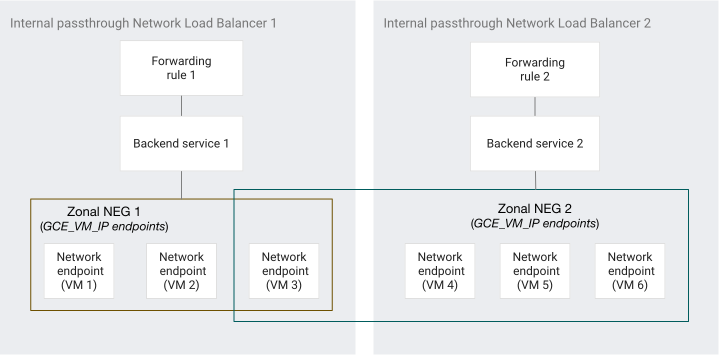
Like instance groups, you can use the same NEG as a backend for multiple passthrough Network Load Balancers. Unlike instance groups, a NEG endpoint can be a member of multiple NEGs, and each of those NEGs can be used as a backend for one or more passthrough Network Load Balancers. Compared to instance groups, you aren't constrained by the fact that a VM instance can only be a part of a single instance group.
The following figure shows a sample internal passthrough Network Load Balancer architecture with a shared VM.
Load balanced network interfaces and endpoints
Zonal NEGs support distributing load-balanced traffic to nic0 vNICs,
non-nic0 vNICs, and Dynamic NICs.
For more information, see load balancer target interfaces.
For information about using zonal NEGs with passthrough Network Load Balancers, see the following documents:
Zonal NEG backends and network interfaces for global external passthrough Network Load Balancers
Zonal NEG backends and network interfaces for regional external passthrough Network Load Balancers
Zonal NEG backends and network interfaces for internal passthrough Network Load Balancers
GKE and zonal NEGs
GKE uses zonal NEGs with GCE_VM_IP and
GCE_VM_IP_PORT endpoints:
GKE creates a unique
GCE_VM_IPNEG in each zone for each LoadBalancer Service. These NEGs contain cluster node VMs as endpoints, which GKE selects based on theexternalTrafficPolicyof the service and the number of nodes in the cluster. For more information, see Node grouping in About LoadBalancer Services document.GKE Gateway and Ingress controllers use
GCE_VM_IP_PORTNEGs to route traffic directly to Pods (container-native load balancing). Each endpoint in aGCE_VM_IP_PORTNEG contains a Pod's IP address and container port (targetPort). The way GKE creates these NEGs depends on the Gateway or Ingress resource that you use:Internal and external Gateway: GKE creates
GCE_VM_IP_PORTNEGs automatically for each referenced Service. See About Gateway API.Internal Ingress: GKE creates
GCE_VM_IP_PORTNEGs automatically for each referenced Service. See Configure Ingress for internal Application Load Balancer.External Ingress: GKE creates
GCE_VM_IP_PORTNEGs for each referenced Service that includes thecloud.google.com/neg: '{"ingress": true}'annotation. See Configure Ingress for external Application Load Balancer.
You can instruct GKE to create standalone
GCE_VM_IP_PORTNEGs and maintain their Pod endpoints so that you can attach those NEGs as backends to Application Load Balancers and proxy Network Load Balancers that you manage yourself. For more information, see Container-native load balancing through standalone zonal NEGs.
Limitations
- You cannot use zonal NEGs with legacy networks.
- The
default-portproperty is not supported forGCE_VM_IPzonal NEGs.
Quotas
- For information about NEG quotas—such as NEGs per project, NEGs per backend service, and endpoints per NEG—see the load balancing quotas page.
What's next
- For information about configuring zonal NEGs, see Set up zonal network endpoint groups.
- For information about using zonal NEGs in Google Kubernetes Engine, see Container-native load balancing through Ingress.