
You can use object enrichments to automatically generate structured metadata without building custom machine learning pipelines. Object enrichments applies Google's pre-trained machine learning models directly to your stored objects to help you search, curate, and govern your unstructured data at scale.
To start generating metadata for your objects, see Configure object enrichments.
How it works
To use object enrichments, you work with the following parts of the system:
- Feature configuration (
FeatureConfig): You create a feature configuration to specify which buckets or projects Cloud Storage monitors. - Machine learning models: In your configuration, you choose the models that you want to apply, such as models that detect objects, label images, analyze faces, or categorize PDF documents.
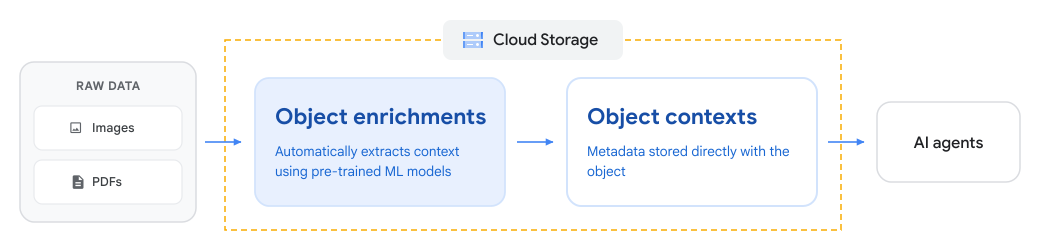
- Object enrichments (metadata): Cloud Storage scans your objects asynchronously and evaluates eligible objects with your selected models. Cloud Storage then attaches the resulting metadata directly to your objects as object contexts.
After Cloud Storage attaches the enrichment metadata to your objects, the metadata is ready to use. You can inspect individual object enrichments, or use Storage Insights datasets to analyze metadata across millions of objects by using SQL in BigQuery.
The following diagram shows how Cloud Storage uses object enrichments to extract context from unstructured data and store it as object contexts for downstream AI and analytics workflows:
Supported models
When you create a feature configuration, you select the machine learning models
that best fit your data and analysis goals. Cloud Storage evaluates
eligible objects by using your chosen models and generates structured metadata
under contexts.custom.
The supported models table lists each model, what it detects, and sample output data. For detailed schema definitions and context keys, see Supported models and schemas.
| Model | Description | Sample output data |
|---|---|---|
| Object detection | Detects multiple objects within an image and provides their positions and rectangular boundaries. | Product, Animal, Person |
| Image labeling | Detects and extracts information about entities in an image across a broad group of categories, such as objects, locations, and activities. | Landscape, Urban, Night |
| Face detection | Detects faces in images, including bounding polygons, facial landmarks (eyes, nose, mouth), orientation angles, and expression likelihoods. | Face count, Roll and tilt angle |
| Explicit content detection | Evaluates images for sensitive or inappropriate content, including adult or violent material. | Adult and violent content likelihood ratings |
| PDF classification | Classifies PDF documents into standard business and industry categories based on their content. | Finance, Taxes, Invoice (categories and scores) |
Use cases
You can use object enrichments to streamline unstructured data management and prepare objects for the following downstream analytics and AI workflows:
- Organize and catalog unorganized objects: Automatically classify collections of PDF documents (such as invoices, bank statements, and tax forms) and images. You can use these classifications to build searchable data catalogs across your buckets without writing custom code.
- Ground AI agents and improve search: Turn disorganized document repositories into structured knowledge bases. You can use document categories and image labels to improve retrieval during retrieval-augmented generation (RAG) and ground your generative AI applications.
- Sample and prepare data for generative AI: Differentiate between document types to perform stratified sampling before routing content to large language models (LLMs) or human review.
- Curate machine learning training datasets: Filter and segment images and documents by taxonomy or visual labels to assemble domain-specific training datasets for model fine-tuning.
- Scan for sensitive or explicit content: Automatically inspect uploaded images for inappropriate material to support your content moderation and safety policies.
- Enhance multimodal prompts: Pass structured metadata—such as bounding boxes and document categories—as context when prompting multimodal models like Gemini.
- Simplify data architectures: Eliminate custom ingestion pipelines and compute infrastructure by generating metadata directly in Cloud Storage.
Query and analyze your metadata
Cloud Storage attaches object enrichments directly to your objects as object contexts. Depending on your scale and workflow, you can access and analyze this metadata in the following ways:
- Inspect individual objects: Use the Cloud de Confiance console or the Cloud Storage APIs to inspect enrichments for specific objects. For instructions, see Manage object enrichments.
- Analyze at scale with SQL: Use Storage Insights datasets to export
metadata across millions or billions of objects directly into
BigQuery. After Storage Insights exports the metadata, you can
query the
object_contexts_catalog_viewview by using standard SQL. For example, you can search for labels, filter by category, or find objects that have high confidence scores.
To get started with SQL queries and sample recipes, see Analyze object enrichments in BigQuery.
Considerations and limitations
Before you configure object enrichments, review the following operational considerations:
Processing location
Object enrichments processes data in three geographic locations:
us, eu, and asia. When selecting a processing location, keep the
following considerations in mind:
- Compliance: Make sure that your chosen processing location meets your regulatory and data sovereignty requirements.
- Performance: Choose the processing location closest to your bucket's storage region.
- Cost: To avoid duplicate charges, configure only one processing location for each bucket and model. If you configure multiple locations for the same bucket and model, Cloud Storage processes your objects in each location and bills you for every run.
Processing and performance
Review the following constraints on content types, object sizes, and processing timelines:
Asynchronous processing: Cloud Storage processes objects asynchronously.
Object size limit: Objects (both images and PDFs) must be 20 MiB or smaller.
Supported content types: Cloud Storage uses the
Content-Typemetadata field set on an object to determine whether to evaluate it. If an object has an invalid or missingContent-Type, Cloud Storage doesn't process the object even if the underlying data is a valid image or PDF. To make sure that Cloud Storage processes the object, update theContent-Typemetadata to one of the following supported types:- Images: BMP, GIF, ICO, JPEG, PNG, TIFF, and WEBP.
- Documents: PDF (
application/pdf).
Unsupported features
Object enrichments is incompatible with the following bucket types and operations:
- Bucket relocation: Object enrichments is incompatible with bucket relocation. Remove the bucket from your feature configurations before relocating the bucket.
- Unsupported bucket types: You can't enable object enrichments on Rapid buckets or buckets that have hierarchical namespace enabled.
Configuration and scope management
When you define and maintain target buckets in your feature configurations, the following requirements apply:
- Bucket scoping: Specify exact bucket names in your feature configuration. Cloud Storage doesn't support regular expressions or wildcard patterns.
- Bucket lifecycle: Cloud Storage doesn't automatically add newly created, recreated, or relocated buckets to existing configurations. You must update your feature configuration to include these buckets.
Costs and security
Review the following operational details regarding encryption keys and data access charges:
- Customer-supplied keys (CSEK): Object enrichments doesn't support objects encrypted with customer-supplied encryption keys.
- Storage access and Autoclass: To generate metadata, object enrichments reads your object data. These read operations incur standard data access charges. Additionally, if your bucket has Autoclass enabled, these reads trigger storage class transitions.
Pricing
Using object enrichments incurs charges for model inference, metadata storage, data access operations, and networking. For more information, see Pricing.
Monitor and troubleshoot
To track metadata generation progress and resolve issues when configuring object enrichments, use the following resources:
- Monitor operations: To track pending objects, model execution counts, and processing status in Cloud Monitoring, see Monitor object enrichments metrics.
- Resolve issues: If enrichments are missing or you encounter permission errors, see Troubleshooting object enrichments.