

Storage Intelligence provides centralized visibility and control over your Cloud Storage data at scale. Instead of managing individual buckets with custom scripts, you can govern storage across your entire resource hierarchy to identify cost savings, analyze usage trends, and automate bulk operations.
To get started, see Configure and manage Storage Intelligence.
Storage Intelligence use cases
Storage Intelligence helps you accomplish two primary operational tasks:
Analyze and optimize your storage
To evaluate your data distribution, track usage trends, and discover cost savings, you can do the following:
- Track storage trends and recommendations: Use Storage Intelligence advisor to monitor capacity growth, detect usage anomalies, and identify cost-saving opportunities, such as idle buckets and unoptimized storage classes, across your organization, folders, or projects.
- Query metadata and activity using SQL: Use Storage Insights datasets to generate queryable metadata and activity indexes provided as BigQuery linked datasets. You can analyze data distribution, audit access patterns, and evaluate storage costs across your entire resource hierarchy.
- Ask questions using AI: Use data storage insights with Gemini Cloud Assist to ask natural-language questions about your storage environment. When you configure Storage Insights datasets, you can prompt Gemini to identify your largest buckets without Autoclass enabled or list objects in the Standard storage storage class smaller than 50 MB.
- Audit bucket inventory: Use inventory reports to generate per-bucket reports that catalog objects and metadata. A Storage Intelligence subscription includes inventory reports and covers all object scan fees.
Manage and automate storage operations at scale
To manage buckets across regions and run operations at scale without custom scripts, you can do the following:
Relocate buckets across regions: Use bucket relocation to move buckets between geographic locations with minimal downtime, preserving bucket names, object metadata, and storage classes.
Execute operations across billions of objects: Use Storage batch operations to automate bulk tasks, such as updating metadata, transforming storage classes, or deleting expired objects—across large collections of objects without writing custom scripts.
Configuration options
When you configure Storage Intelligence, you make three decisions:
- Choose a resource level in your Cloud de Confiance resource hierarchy.
- Apply bucket filters to include or exclude specific buckets by location or name.
- Select an edition configuration to control activation for each resource.
Choose a resource
You can configure Storage Intelligence at different levels of your Cloud de Confiance resource hierarchy. The configuration automatically applies to all buckets and objects within that resource:
- Organization: Applies to the entire organization. All current and new folders and projects inherit this configuration unless overridden.
- Folder: Applies to all current and new projects in the folder unless overridden.
- Project: Applies to all current and new buckets in the project. Configuring at the project level is ideal for teams that manage storage independently.
Apply bucket filters
Bucket filters let you control which buckets Storage Intelligence manages, helping you focus analysis on relevant data and reduce processing costs:
- Filter by location: Include or exclude specific Cloud de Confiance locations to focus on high-activity regions or omit regulated data.
- Filter by name: Include or exclude buckets that match a regular expression pattern, such as environment prefixes or department identifiers.
For instructions on applying filters, see Configure Storage Intelligence.
Select an edition configuration
The edition configuration controls whether Storage Intelligence capabilities are active for a resource:
INHERIT: Inherits the edition configuration of the parent resource.STANDARD: Enables Storage Intelligence capabilities.STANDARDis the default edition when you configure Storage Intelligence for a resource.DISABLED: Disables Storage Intelligence for the specified resource. Child resources inherit the disabled state unless explicitly configured withSTANDARDorINHERIT.TRIAL: Activates the 30-day introductory trial for Storage Intelligence.
Figure 1 shows an example of edition configurations across different levels of the resource hierarchy:
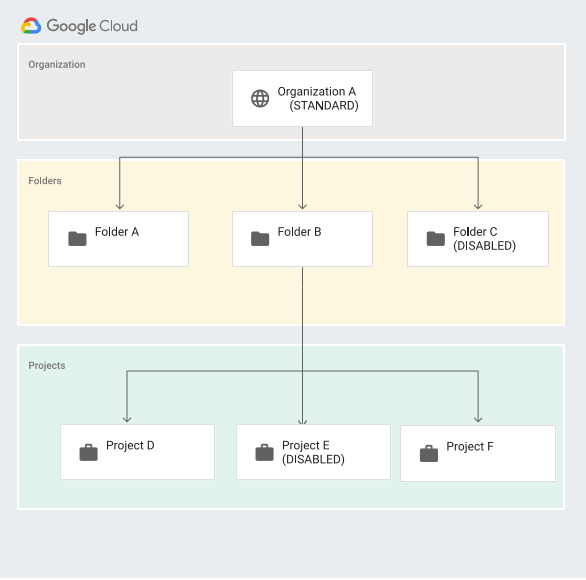
Table 1 describes how edition configurations apply across your Cloud de Confiance by S3NS resources:
| Resource | Edition configuration | Storage Intelligence status | Description |
|---|---|---|---|
| Organization A | STANDARD | Enabled | Enables Storage Intelligence for the entire organization. By default, all folders and projects in Organization A inherit this configuration. |
| Folder C | DISABLED | Disabled | Disables Storage Intelligence for Folder C and its child
projects, overriding the inherited STANDARD configuration from
Organization A. |
| Project E | DISABLED | Disabled | Disables Storage Intelligence for Project E, overriding the inherited configuration from its parent folder or organization. |
Pricing
Pricing for Storage Intelligence depends on the capabilities you use and the volume of data you manage. For details, see Storage Intelligence pricing.
What's next
- Configure and manage Storage Intelligence.
- Review storage trends and recommendations with Storage Intelligence advisor.
- Analyze metadata and activity with Storage Insights datasets.
- Generate inventory reports for your buckets.
- Relocate a bucket to another region.
- Run batch operations on objects at scale.
- Activate the 30-day introductory trial for Storage Intelligence.