

與圖表對話
您可以使用對話式數據分析詢問圖表相關問題。代理程式可以撰寫 SQL 查詢,並提供輸出內容的視覺化呈現方式。代理程式也可以使用圖表上定義的說明、同義詞和度量,提高結果品質。如果您使用的是 Enterprise 或 Enterprise Plus 版本,代理程式就能對圖形執行 GQL 查詢。如果您採用隨選價格,代理程式可以呼叫 GRAPH_EXPAND 函式,在圖表上執行 SQL 查詢。
圖表會編碼資料表之間的關係。向代理提供圖表,可消除資料表關係的模糊不清之處。這項功能可減少生成錯誤資訊,並提升對話效率。
舉例來說,如要詢問代理程式公開的 Look 電子商務圖表,請按照下列步驟操作:
前往 Cloud de Confiance 控制台的 BigQuery Agents 頁面。
選取「代理程式目錄」分頁。
在「Google 提供的範例代理程式」部分,點按「The Look Graph」。
系統會開啟對話。您可以輸入有關
bigquery-public-data.thelook_ecommerce.graph圖表的問題。
限制
- 每個代理程式或對話最多只能使用一個圖譜做為資料來源。
- 您無法將表格和圖表合併為資料來源。
與圖表對話
如要與圖表對話,您可以建立資料代理,並將圖表設為資料來源,也可以直接與圖表對話。如果不確定要問什麼,請嘗試詢問 What questions can I ask about this data? 舉例來說,如果您詢問 Look Ecommerce 圖表,回覆內容會包含圖表結構定義的總覽和建議問題。回覆中可能會出現下列問題:
業務成效
What is the total revenue for each product category, sorted from highest to lowest?What are the top 5 brands by total revenue among users from 'Brasil'?Rank the product categories based on their total revenue for each product department (Men/Women).
使用者與物流洞察
How many users do we have in each country?What is the distribution of user ages in the United States?Which distribution centers handle the most orders with a 'Complete' status?
關係分析
Show the connection between users and the distribution centers their products are shipped from.Find all products that have been ordered by users who came from a 'Search' traffic source.
建立圖形查詢和視覺化內容
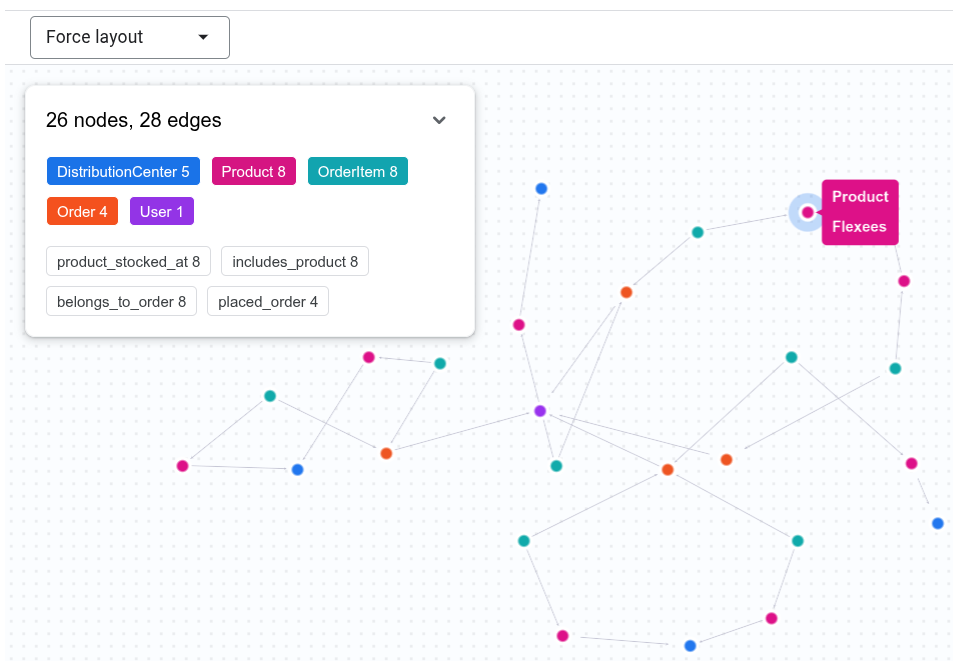
對話式分析功能可以編寫 GQL 查詢,回答有關圖表的問題,並以視覺化方式顯示輸出內容。舉例來說,你可以在即時通訊中輸入 Show the connection between Tina Fletcher's orders and distribution centers。代理程式可能會執行類似下列的 GQL 查詢:
GRAPH `bigquery-public-data.thelook_ecommerce.graph`
MATCH p = (u:User {id: 32})
          <-[:placed_order]-(o:`Order`)
          <-[:belongs_to_order]-(oi:OrderItem)
          -[:includes_product]->(pr:Product)
          -[:product_stocked_at]->(dc:DistributionCenter)
RETURN TO_JSON(p) AS path;
代理程式也可能會提供互動式視覺化資料。
使用圖表指標
對話式數據分析可使用圖表上定義的指標,準確回答涉及匯總的問題。舉例來說,你可以向 Look Graph 代理程式提出下列問題:
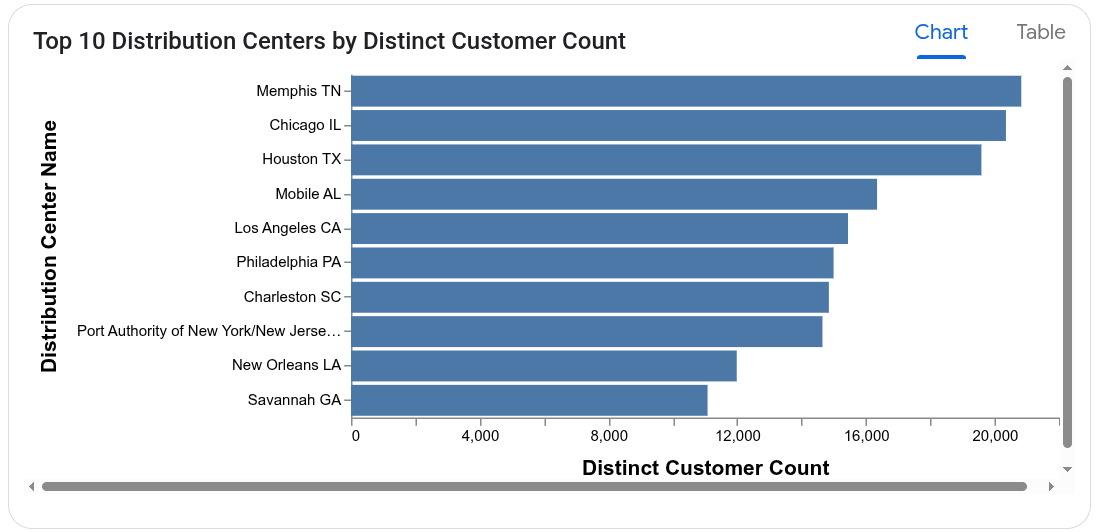
Which distribution centers process orders from the largest number of distinct customers?
代理會在 User 節點上使用 user_count 測量,避免重複計算顧客人數。用於計算回應的查詢可能如下所示:
SELECT
  DistributionCenter_id,
  DistributionCenter_name,
  AGG(User_user_count) AS distinct_customer_count
FROM
  GRAPH_EXPAND("bigquery-public-data.thelook_ecommerce.graph")
GROUP BY
  DistributionCenter_id,
  DistributionCenter_name
ORDER BY
  distinct_customer_count DESC;
代理人也可能會提供圖表。
後續步驟
- 進一步瞭解對話式數據分析。
- 進一步瞭解如何撰寫圖表查詢。
- 進一步瞭解如何設計圖表結構定義。
- 進一步瞭解如何以視覺化方式呈現圖表。