
Monitor BigQuery reservations
As a BigQuery administrator, you can monitor reservations in your project by viewing the project and reservation slot usage and also view your capacity-based bill.
View project and reservation slot usage
You can view the project and reservation slot usage in the following ways:
INFORMATION_SCHEMAviews. To retrieve project and reservation usage information, query theINFORMATION_SCHEMA.JOBS*views.The
reservation_idfield in theINFORMATION_SCHEMA.JOBS*views contains the reservation name.Cloud de Confiance console. The Cloud de Confiance console includes charts that display slot usage. For more information, see Use administrative resource charts.
Jobs explorer. You can use the jobs explorer to group jobs by reservation across your organization and view summary statistics, including slot time, active jobs, and queued jobs.
Audit logs. Use audit logs to view metrics about slot usage.
The
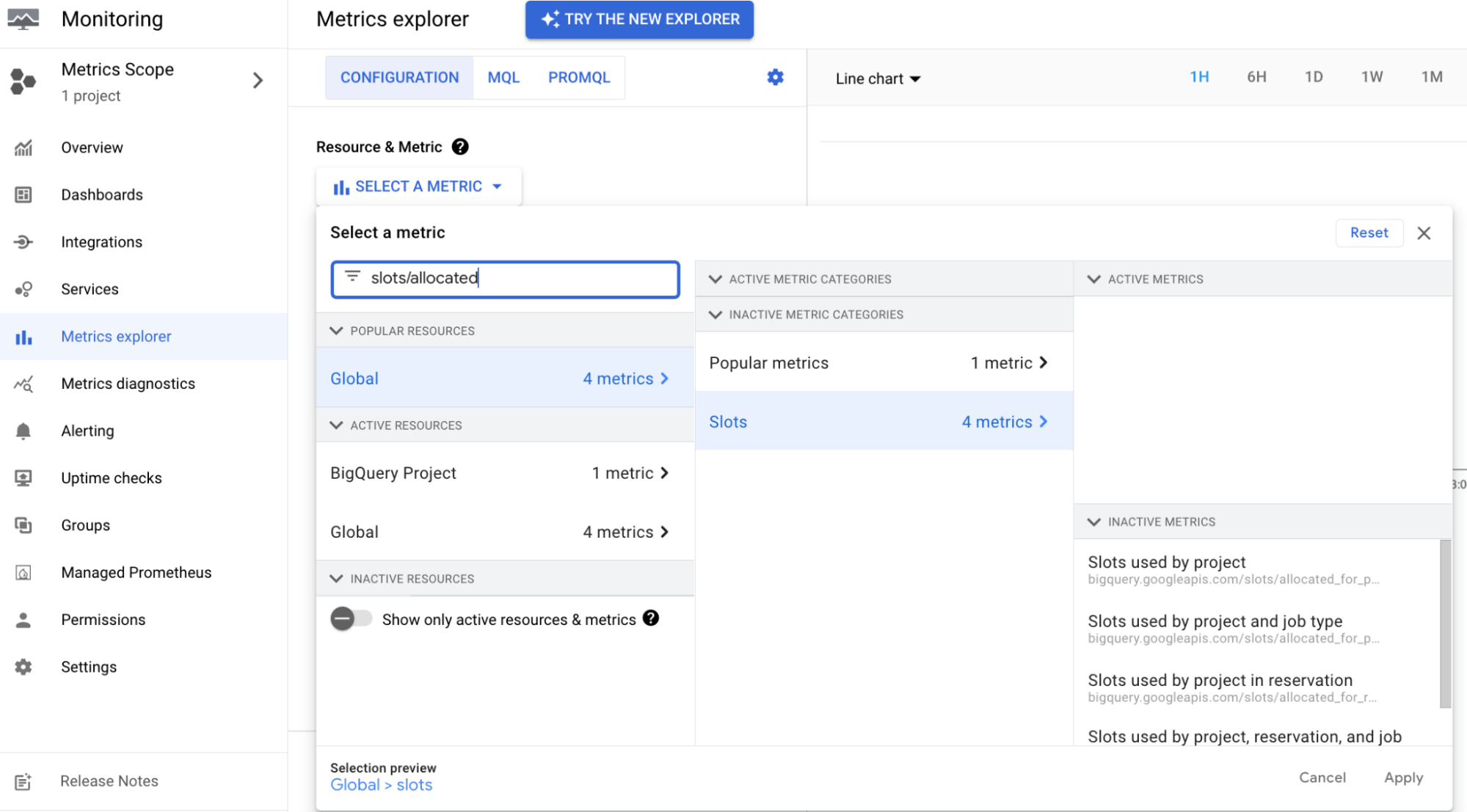
Jobsmethod. Use theJobsAPI method to view metrics about slot usage for a job.Cloud Monitoring. You can use Cloud Monitoring to create dashboards to monitor your allocated slots. With a Cloud Monitoring dashboard, you can view your slot usage for each reservation and for each job type, across all projects within the reservation. To view slot usage metrics for all projects consuming from a reservation, you must explicitly add those consuming projects to the metrics scope of the project where you are monitoring the metrics. For more information about the metrics available for the Cloud Monitoring dashboard, see Metrics available for visualization.
Understand slot metrics
To monitor and manage BigQuery compute capacity effectively, you must distinguish between allocated slots and utilized slots:
- Allocated slots
- The capacity dedicated to your project through baseline slots and active capacity commitments. Allocated slots impact your quota and billing.
- Utilized slots
- The capacity actively consumed by running jobs during query execution. Utilized slots appear in the Resource utilization charts.
Because baseline slots are dedicated resources, they are reported as "used" by the quota system even when no queries are actively executing. Consequently, the quota usage reported on the Quotas & System Limits page can be higher than the actual slot usage shown on the Monitoring page.
Slot metrics comparison
The following table compares how slot metrics are calculated and displayed across the Cloud de Confiance console:
| Cloud de Confiance console page | Metric shown | What it counts | Discrepancy source |
|---|---|---|---|
| Quotas & System Limits | Used quota (Total number of slots; see quota usage charts) | Allocated slots: reservation baseline slots and active commitments. | Includes idle baseline slots and inactive failover reservations in secondary regions. Doesn't count autoscaling slots. |
| Monitoring | Slot usage (Resource utilization charts) | Utilized slots: compute units actively consumed by running jobs. | Includes autoscaling bursts actively processing jobs. Excludes idle baseline slots and inactive failover reservations. |
Common causes for slot usage discrepancies
When reconciling slot metrics between the Quotas & System Limits page and the Monitoring page, consider the following common causes for discrepancies:
- Idle baseline slots: You have reserved baseline slots that are not actively running any queries. Because baseline slots are dedicated capacity, the quota system treats them as used, but utilization charts show only the slots actively executing workloads.
- Failover reservations: If you configure managed disaster recovery, the baseline slots for a failover reservation are allocated in the secondary region. These slots appear as used quota in the secondary region even when the reservation is idle and no failover has occurred. For more information, see Quota considerations for failover reservations.
- Autoscaling bursts: The resource utilization charts include autoscaling slots that are actively processing jobs. In contrast, the Quotas & System Limits page reflects only static allocated capacity (baseline and commitments) and doesn't count autoscaling slots.
View your capacity-based bill
To view your capacity-based bill in real time, follow these steps:
In the Cloud de Confiance console, go to the Billing page.
Select the billing account project for which you want to view the bill.
Navigate to the Reports section and then in the Filters section, do the following:
- From the Services list, select BigQuery and select all that's applicable.
- Select All SKUs from the SKUs list.
Attribute compute costs to individual projects
By default, in BigQuery editions capacity-based pricing, all compute charges are billed to the central administration project that manages reservations and capacity commitments.
To help you estimate project-level budgets and perform internal chargebacks, BigQuery provides two ways to track resource consumption across the individual query projects that use the reservation:
- Informational slot attribution (default): an informational line item in your billing report that shows the slot hours used per project. Actual compute charges remain billed to the administration project.
- Billed cost attribution (Preview): an opt-in feature that shifts the actual billed compute charges from the administration project directly to the individual query projects based on their slot usage.
Informational slot attribution
By default, the query projects where SQL jobs execute show $0 for compute spend. However, all BigQuery Reservations API customers have an Analysis Slots Attribution line item in their Cloud Billing data. This line item is included on the Billing page in the Cloud de Confiance console and in the Cloud Billing export.
This line item shows the slot hours used per project. It incurs no cost and doesn't affect your invoice totals.
Billed cost attribution
Billed compute cost attribution shifts the actual compute charges from the administration project directly to the individual query projects (also known as consumption projects) based on the slot hours consumed by queries. You can use billed compute cost attribution to do the following:
- Track project-level costs: view project-level consumption directly within
Cloud Billing reports and data exports (
BigQueryservice >All SKUs). - Perform internal chargebacks: process internal chargebacks across departments and teams without building custom data engineering pipelines.
- Attribute autoscaler usage: attribute autoscaler charges to the specific projects proportionally based on their autoscaler slots consumption.
Required IAM roles
To get the permission that
you need to enable compute cost attribution,
ask your administrator to grant you the
BigQuery Administrator (roles/bigquery.admin) IAM role on the administration project.
For more information about granting roles, see Manage access to projects, folders, and organizations.
This predefined role contains the
bigquery.reservations.update
permission,
which is required to
enable compute cost attribution.
You might also be able to get this permission with custom roles or other predefined roles.
Enable compute cost attribution
To enable compute cost attribution across your query projects, run the
ALTER PROJECT SET OPTIONS
data definition language (DDL) statement with the reservation_attribution_mode
option.
In the Cloud de Confiance console, go to the BigQuery page.
In the query editor, enter the following statement:
ALTER PROJECT `ADMIN_PROJECT_ID`
SET OPTIONS (
  `region-LOCATION.reservation_attribution_mode` = 'RESERVATION_ATTRIBUTION_MODE_PROJECT_LEVEL'
);
Replace the following:
ADMIN_PROJECT_ID: the project ID of your administration project.LOCATION: the location of your reservation.
Click Run.
After you enable compute cost attribution, shifts in cost allocation begin
appearing in individual query projects on the next billing day (billing days
start at 00:00 in the America/Los_Angeles time zone). The changes are also
reflected in daily Cloud Billing reports within approximately one day.
Attribution rules and behavior
When compute cost attribution is active, cost distribution follows these rules:
- Autoscaler allocation: autoscaler slot charges are attributed strictly to
the query projects that triggered and consumed autoscaled capacity during that
window. Projects running queries that consume only idle slots or baseline
commitment slots accrue
$0in autoscaler charges. - Administration project retention: unused baseline capacity, unassigned capacity commitments, and unused autoscaler slots (from 50-slot scaling increments and the one-minute cool-down window) charges remain attributed to the administration project.
- Single billing account requirement: compute cost attribution requires both the administration project and the query projects to belong to the exact same Cloud Billing account. If a query project is linked to a separate billing account, its compute costs are not moved across billing accounts and remain in the administration project.
- Storage costs: storage costs continue to be billed directly to the individual projects where the datasets reside.
Audit logs
Creating, deleting, and updating resources related to BigQuery reservations are recorded in the project owner's audit logs. For more information, see Audit log.
Monitor autoscaling with information schema
You can use the following SQL scripts to check the billed slot seconds for a
particular edition. You must run these scripts in the same project the
reservations were created. The first script shows billed slot seconds covered by
commitment_plan while the second script shows billed slot seconds that aren't
covered by a commitment.
You only need to set the value of three variables to run these scripts:
start_timeend_timeedition_to_check
These scripts are subject to the following caveats:
Deleted reservations and capacity commitments are removed from information schema views at the end of the data retention period. Specify a recent window of time which doesn't contain deleted reservations and commitments for correct results.
The result of the scripts may not exactly match the bill due to small rounding errors.
The following script aggregates autoscaling slots per edition.
Expand to see the script to calculate autoscale slot seconds per edition.
SELECT
  edition,
  SUM(s.autoscale_current_slots) AS autoscale_slot_seconds
FROM
  `region-us.INFORMATION_SCHEMA.RESERVATIONS_TIMELINE` m
JOIN
  m.per_second_details s
WHERE
  period_start BETWEEN '2025-09-28'
  AND '2025-09-29'
GROUP BY
  edition
ORDER BY
  edition
The following script aggregates autoscaling slots per reservation.
Expand to see the script to calculate autoscale slot seconds per reservation.
select reservation_id, sum(s.autoscale_current_slots) as autoscale_slot_seconds
from `region-us.INFORMATION_SCHEMA.RESERVATIONS_TIMELINE` m
LEFT JOIN m.per_second_details s
WHERE period_start between '2025-09-28' and '2025-09-29'
group by reservation_id
order by reservation_id
Expand to see the script to calculate slot seconds from commitments.
DECLARE start_time,end_time TIMESTAMP;

DECLARE
  edition_to_check STRING;

/* Google uses Pacific Time to calculate the billing period for all customers,
regardless of their time zone. Use the following format if you want to match the
billing report. Change the start_time and end_time values to match the desired
window. */

/* The following three variables (start_time, end_time, and edition_to_check)
are the only variables that you need to set in the script.

During daylight savings time, the start_time and end_time variables should
follow this format: 2024-02-20 00:00:00-08. */

SET start_time = "2023-07-20 00:00:00-07";
SET end_time = "2023-07-28 00:00:00-07";
SET edition_to_check = 'ENTERPRISE';

/* The following function returns the slot seconds for the time window between
two capacity changes. For example, if there are 100 slots between (2023-06-01
10:00:00, 2023-06-01 11:00:00), then during that window the total slot seconds
will be 100 * 3600.

This script calculates a specific window (based on the preceding variables),
which is why the following script includes script_start_timestamp_unix_millis
and script_end_timestamp_unix_millis. */

CREATE TEMP FUNCTION
GetSlotSecondsBetweenChanges(
  slots FLOAT64,
  range_begin_timestamp_unix_millis FLOAT64,
  range_end_timestamp_unix_millis FLOAT64,
  script_start_timestamp_unix_millis FLOAT64,
  script_end_timestamp_unix_millis FLOAT64)
RETURNS INT64
LANGUAGE js
AS r"""
    if (script_end_timestamp_unix_millis < range_begin_timestamp_unix_millis || script_start_timestamp_unix_millis > range_end_timestamp_unix_millis) {
      return 0;
    }
    var begin = Math.max(script_start_timestamp_unix_millis, range_begin_timestamp_unix_millis)
    var end = Math.min(script_end_timestamp_unix_millis, range_end_timestamp_unix_millis)
    return slots * Math.ceil((end - begin) / 1000.0)
""";

/*
Sample CAPACITY_COMMITMENT_CHANGES data (unrelated columns ignored):
+---------------------+------------------------+-----------------+--------+------------+--------+
|  change_timestamp   | capacity_commitment_id | commitment_plan | state  | slot_count | action |
+---------------------+------------------------+-----------------+--------+------------+--------+
| 2023-07-20 19:30:27 | 12954109101902401697   | ANNUAL          | ACTIVE |        100 | CREATE |
| 2023-07-27 22:29:21 | 11445583810276646822   | FLEX            | ACTIVE |        100 | CREATE |
| 2023-07-27 23:10:06 | 7341455530498381779    | MONTHLY         | ACTIVE |        100 | CREATE |
| 2023-07-27 23:11:06 | 7341455530498381779    | FLEX            | ACTIVE |        100 | UPDATE |

The last row indicates a special change from MONTHLY to FLEX, which happens
because of commercial migration.

*/

WITH
  /*
  Information containing which commitment might have plan
  updated (e.g. renewal or commercial migration). For example:
  +------------------------+------------------+--------------------+--------+------------+--------+-----------+----------------------------+
  |  change_timestamp   | capacity_commitment_id | commitment_plan | state  | slot_count | action | next_plan | next_plan_change_timestamp |
  +---------------------+------------------------+-----------------+--------+------------+--------+-----------+----------------------------+
  | 2023-07-20 19:30:27 | 12954109101902401697   | ANNUAL          | ACTIVE |        100 | CREATE | ANNUAL    |        2023-07-20 19:30:27 |
  | 2023-07-27 22:29:21 | 11445583810276646822   | FLEX            | ACTIVE |        100 | CREATE | FLEX      |        2023-07-27 22:29:21 |
  | 2023-07-27 23:10:06 | 7341455530498381779    | MONTHLY         | ACTIVE |        100 | CREATE | FLEX      |        2023-07-27 23:11:06 |
  | 2023-07-27 23:11:06 | 7341455530498381779    | FLEX            | ACTIVE |        100 | UPDATE | FLEX      |        2023-07-27 23:11:06 |
  */
  commitments_with_next_plan AS (
    SELECT
      *,
      IFNULL(
        LEAD(commitment_plan)
          OVER (
            PARTITION BY capacity_commitment_id ORDER BY change_timestamp ASC
          ),
        commitment_plan)
        next_plan,
      IFNULL(
        LEAD(change_timestamp)
          OVER (
            PARTITION BY capacity_commitment_id ORDER BY change_timestamp ASC
          ),
        change_timestamp)
        next_plan_change_timestamp
    FROM
      `region-us.INFORMATION_SCHEMA.CAPACITY_COMMITMENT_CHANGES_BY_PROJECT`
  ),

  /*
  Insert a 'DELETE' action for those with updated plans. The FLEX commitment
  '7341455530498381779' is has no 'CREATE' action, and is instead labeled as an
  'UPDATE' action.

  For example:
  +---------------------+------------------------+-----------------+--------+------------+--------+
  |  change_timestamp   | capacity_commitment_id | commitment_plan | state  | slot_count | action |
  +---------------------+------------------------+-----------------+--------+------------+--------+
  | 2023-07-20 19:30:27 | 12954109101902401697   | ANNUAL          | ACTIVE |        100 | CREATE |
  | 2023-07-27 22:29:21 | 11445583810276646822   | FLEX            | ACTIVE |        100 | CREATE |
  | 2023-07-27 23:10:06 | 7341455530498381779    | MONTHLY         | ACTIVE |        100 | CREATE |
  | 2023-07-27 23:11:06 | 7341455530498381779    | FLEX            | ACTIVE |        100 | UPDATE |
  | 2023-07-27 23:11:06 | 7341455530498381779    | MONTHLY         | ACTIVE |        100 | DELETE |
  */

  capacity_changes_with_additional_deleted_event_for_changed_plan AS (
    SELECT
      next_plan_change_timestamp AS change_timestamp,
      project_id,
      project_number,
      capacity_commitment_id,
      commitment_plan,
      state,
      slot_count,
      'DELETE' AS action,
      commitment_start_time,
      commitment_end_time,
      failure_status,
      renewal_plan,
      user_email,
      edition,
      is_flat_rate,
    FROM commitments_with_next_plan
    WHERE commitment_plan <> next_plan
    UNION ALL
    SELECT * FROM `region-us.INFORMATION_SCHEMA.CAPACITY_COMMITMENT_CHANGES_BY_PROJECT`
  ),

  /*
  The committed_slots change the history. For example:
  +---------------------+------------------------+------------------+-----------------+
  |  change_timestamp   | capacity_commitment_id | slot_count_delta | commitment_plan |
  +---------------------+------------------------+------------------+-----------------+
  | 2023-07-20 19:30:27 | 12954109101902401697   |              100 | ANNUAL          |
  | 2023-07-27 22:29:21 | 11445583810276646822   |              100 | FLEX            |
  | 2023-07-27 23:10:06 | 7341455530498381779    |              100 | MONTHLY         |
  | 2023-07-27 23:11:06 | 7341455530498381779    |             -100 | MONTHLY         |
  | 2023-07-27 23:11:06 | 7341455530498381779    |              100 | FLEX            |
  */

  capacity_commitment_slot_data AS (
    SELECT
      change_timestamp,
      capacity_commitment_id,
      CASE
        WHEN action = "CREATE" OR action = "UPDATE"
          THEN
            IFNULL(
              IF(
                LAG(action)
                  OVER (
                    PARTITION BY capacity_commitment_id ORDER BY change_timestamp ASC, action ASC
                  )
                  IN UNNEST(['CREATE', 'UPDATE']),
                slot_count - LAG(slot_count)
                  OVER (
                    PARTITION BY capacity_commitment_id ORDER BY change_timestamp ASC, action ASC
                  ),
                slot_count),
              slot_count)
        ELSE
          IF(
            LAG(action)
              OVER (PARTITION BY capacity_commitment_id ORDER BY change_timestamp ASC, action ASC)
              IN UNNEST(['CREATE', 'UPDATE']),
            -1 * slot_count,
            0)
        END
        AS slot_count_delta,
      commitment_plan
    FROM
      capacity_changes_with_additional_deleted_event_for_changed_plan
    WHERE
      state = "ACTIVE"
      AND edition = edition_to_check
      AND change_timestamp <= end_time
  ),

  /*
  The total_committed_slots history for each plan. For example:
  +---------------------+---------------+-----------------+
  |  change_timestamp   | capacity_slot | commitment_plan |
  +---------------------+---------------+-----------------+
  | 2023-07-20 19:30:27 |           100 | ANNUAL          |
  | 2023-07-27 22:29:21 |           100 | FLEX            |
  | 2023-07-27 23:10:06 |           100 | MONTHLY         |
  | 2023-07-27 23:11:06 |             0 | MONTHLY         |
  | 2023-07-27 23:11:06 |           200 | FLEX            |
  */

  running_capacity_commitment_slot_data AS (
    SELECT
      change_timestamp,
      SUM(slot_count_delta)
        OVER (
          PARTITION BY commitment_plan
          ORDER BY change_timestamp
          RANGE BETWEEN UNBOUNDED PRECEDING AND CURRENT ROW
        )
        AS capacity_slot,
      commitment_plan,
    FROM
      capacity_commitment_slot_data
  ),

  /*

  The slot_seconds between each changes, partitioned by each plan. For example:
  +---------------------+--------------+-----------------+
  |  change_timestamp   | slot_seconds | commitment_plan |
  +---------------------+--------------+-----------------+
  | 2023-07-20 19:30:27 |     64617300 | ANNUAL          |
  | 2023-07-27 22:29:21 |       250500 | FLEX            |
  | 2023-07-27 23:10:06 |         6000 | MONTHLY         |
  | 2023-07-27 23:11:06 |            0 | MONTHLY         |
  | 2023-07-27 23:11:06 |      5626800 | FLEX            |
  */

  slot_seconds_data AS (
    SELECT
      change_timestamp,
      GetSlotSecondsBetweenChanges(
        capacity_slot,
        UNIX_MILLIS(change_timestamp),
        UNIX_MILLIS(
          IFNULL(
            LEAD(change_timestamp)
              OVER (PARTITION BY commitment_plan ORDER BY change_timestamp ASC),
            CURRENT_TIMESTAMP())),
        UNIX_MILLIS(start_time),
        UNIX_MILLIS(end_time)) AS slot_seconds,
      commitment_plan,
    FROM
      running_capacity_commitment_slot_data
    WHERE
      change_timestamp <= end_time
  )

/*

The final result is similar to the following:
+-----------------+--------------------+
| commitment_plan | total_slot_seconds |
+-----------------+--------------------+
| ANNUAL          |           64617300 |
| MONTHLY         |               6000 |
| FLEX            |            5877300 |
*/

SELECT
  commitment_plan,
  SUM(slot_seconds) AS total_slot_seconds
FROM
  slot_seconds_data
GROUP BY
  commitment_plan
The following script checks the slot usage not covered by commitments for a particular edition. This usage contains two types of slots, scaled slots and baseline slots not covered by commitments.
Expand to see the script to calculate slot seconds not covered by commitments
/*
This script has several parts:
1. Calculate the baseline and scaled slots for reservations
2. Calculate the committed slots
3. Join the two preceding results to calculate the baseline not covered by committed
   slots
4. Aggregate the number
*/

-- variables
DECLARE start_time, end_time TIMESTAMP;

DECLARE
  edition_to_check STRING;

/* Google uses Pacific Time to calculate the billing period for all customers,
regardless of their time zone. Use the following format if you want to match the
billing report. Change the start_time and end_time values to match the desired
window. */

/* The following three variables (start_time, end_time, and edition_to_check)
are the only variables that you need to set in the script.

During daylight savings time, the start_time and end_time variables should
follow this format: 2024-02-20 00:00:00-08. */

SET start_time = "2023-07-20 00:00:00-07";
SET end_time = "2023-07-28 00:00:00-07";
SET edition_to_check = 'ENTERPRISE';

/*
The following function returns the slot seconds for the time window between
two capacity changes. For example, if there are 100 slots between (2023-06-01
10:00:00, 2023-06-01 11:00:00), then during that window the total slot seconds
will be 100 * 3600.

This script calculates a specific window (based on the preceding variables),
which is why the following script includes script_start_timestamp_unix_millis
and script_end_timestamp_unix_millis. */

CREATE TEMP FUNCTION GetSlotSecondsBetweenChanges(
  slots FLOAT64,
  range_begin_timestamp_unix_millis FLOAT64,
  range_end_timestamp_unix_millis FLOAT64,
  script_start_timestamp_unix_millis FLOAT64,
  script_end_timestamp_unix_millis FLOAT64)
RETURNS INT64
LANGUAGE js
AS r"""
    if (script_end_timestamp_unix_millis < range_begin_timestamp_unix_millis || script_start_timestamp_unix_millis > range_end_timestamp_unix_millis) {
      return 0;
    }
    var begin = Math.max(script_start_timestamp_unix_millis, range_begin_timestamp_unix_millis)
    var end = Math.min(script_end_timestamp_unix_millis, range_end_timestamp_unix_millis)
    return slots * Math.ceil((end - begin) / 1000.0)
""";
/*
Sample RESERVATION_CHANGES data (unrelated columns ignored):
+---------------------+------------------+--------+---------------+---------------+
|  change_timestamp   | reservation_name | action | slot_capacity | current_slots |
+---------------------+------------------+--------+---------------+---------------+
| 2023-07-27 22:24:15 | res1             | CREATE |           300 |             0 |
| 2023-07-27 22:25:21 | res1             | UPDATE |           300 |           180 |
| 2023-07-27 22:39:14 | res1             | UPDATE |           300 |           100 |
| 2023-07-27 22:40:20 | res2             | CREATE |           300 |             0 |
| 2023-07-27 22:54:18 | res2             | UPDATE |           300 |           120 |
| 2023-07-27 22:55:23 | res1             | UPDATE |           300 |             0 |

Sample CAPACITY_COMMITMENT_CHANGES data (unrelated columns ignored):
+---------------------+------------------------+-----------------+--------+------------+--------+
|  change_timestamp   | capacity_commitment_id | commitment_plan | state  | slot_count | action |
+---------------------+------------------------+-----------------+--------+------------+--------+
| 2023-07-20 19:30:27 | 12954109101902401697   | ANNUAL          | ACTIVE |        100 | CREATE |
| 2023-07-27 22:29:21 | 11445583810276646822   | FLEX            | ACTIVE |        100 | CREATE |
| 2023-07-27 23:10:06 | 7341455530498381779    | MONTHLY         | ACTIVE |        100 | CREATE |
*/

WITH
  /*
  The scaled_slots & baseline change history:
  +---------------------+------------------+------------------------------+---------------------+
  |  change_timestamp   | reservation_name | autoscale_current_slot_delta | baseline_slot_delta |
  +---------------------+------------------+------------------------------+---------------------+
  | 2023-07-27 22:24:15 | res1             |                            0 |                 300 |
  | 2023-07-27 22:25:21 | res1             |                          180 |                   0 |
  | 2023-07-27 22:39:14 | res1             |                          -80 |                   0 |
  | 2023-07-27 22:40:20 | res2             |                            0 |                 300 |
  | 2023-07-27 22:54:18 | res2             |                          120 |                   0 |
  | 2023-07-27 22:55:23 | res1             |                         -100 |                   0 |
  */
  reservation_slot_data AS (
    SELECT
      change_timestamp,
      reservation_name,
      CASE action
        WHEN "CREATE" THEN autoscale.current_slots
        WHEN "UPDATE"
          THEN
            IFNULL(
              autoscale.current_slots - LAG(autoscale.current_slots)
                OVER (
                  PARTITION BY project_id, reservation_name
                  ORDER BY change_timestamp ASC, action ASC
                ),
              IFNULL(
                autoscale.current_slots,
                IFNULL(
                  -1 * LAG(autoscale.current_slots)
                    OVER (
                      PARTITION BY project_id, reservation_name
                      ORDER BY change_timestamp ASC, action ASC
                    ),
                  0)))
        WHEN "DELETE"
          THEN
            IF(
              LAG(action)
                OVER (
                  PARTITION BY project_id, reservation_name
                  ORDER BY change_timestamp ASC, action ASC
                )
                IN UNNEST(['CREATE', 'UPDATE']),
              -1 * autoscale.current_slots,
              0)
        END
        AS autoscale_current_slot_delta,
      CASE action
        WHEN "CREATE" THEN slot_capacity
        WHEN "UPDATE"
          THEN
            IFNULL(
              slot_capacity - LAG(slot_capacity)
                OVER (
                  PARTITION BY project_id, reservation_name
                  ORDER BY change_timestamp ASC, action ASC
                ),
              IFNULL(
                slot_capacity,
                IFNULL(
                  -1 * LAG(slot_capacity)
                    OVER (
                      PARTITION BY project_id, reservation_name
                      ORDER BY change_timestamp ASC, action ASC
                    ),
                  0)))
        WHEN "DELETE"
          THEN
            IF(
              LAG(action)
                OVER (
                  PARTITION BY project_id, reservation_name
                  ORDER BY change_timestamp ASC, action ASC
                )
                IN UNNEST(['CREATE', 'UPDATE']),
              -1 * slot_capacity,
              0)
        END
        AS baseline_slot_delta,
    FROM
      `region-us.INFORMATION_SCHEMA.RESERVATION_CHANGES`
    WHERE
      edition = edition_to_check
      AND change_timestamp <= end_time
  ),

  -- Convert the preceding data to a running total
  /*
  +---------------------+-------------------------+----------------+
  |  change_timestamp   | autoscale_current_slots | baseline_slots |
  +---------------------+-------------------------+----------------+
  | 2023-07-27 22:24:15 |                       0 |            300 |
  | 2023-07-27 22:25:21 |                     180 |            300 |
  | 2023-07-27 22:39:14 |                     100 |            300 |
  | 2023-07-27 22:40:20 |                     100 |            600 |
  | 2023-07-27 22:54:18 |                     220 |            600 |
  | 2023-07-27 22:55:23 |                     120 |            600 |
  */
  running_reservation_slot_data AS (
    SELECT
      change_timestamp,
      SUM(autoscale_current_slot_delta)
        OVER (ORDER BY change_timestamp RANGE BETWEEN UNBOUNDED PRECEDING AND CURRENT ROW)
        AS autoscale_current_slots,
      SUM(baseline_slot_delta)
        OVER (ORDER BY change_timestamp RANGE BETWEEN UNBOUNDED PRECEDING AND CURRENT ROW)
        AS baseline_slots,
    FROM
      reservation_slot_data
  ),

  /*
  The committed_slots change history. For example:
  +---------------------+------------------------+------------------+
  |  change_timestamp   | capacity_commitment_id | slot_count_delta |
  +---------------------+------------------------+------------------+
  | 2023-07-20 19:30:27 | 12954109101902401697   |              100 |
  | 2023-07-27 22:29:21 | 11445583810276646822   |              100 |
  | 2023-07-27 23:10:06 | 7341455530498381779    |              100 |
  */
  capacity_commitment_slot_data AS (
    SELECT
      change_timestamp,
      capacity_commitment_id,
      CASE
        WHEN action = "CREATE" OR action = "UPDATE"
          THEN
            IFNULL(
              IF(
                LAG(action)
                  OVER (
                    PARTITION BY capacity_commitment_id ORDER BY change_timestamp ASC, action ASC
                  )
                  IN UNNEST(['CREATE', 'UPDATE']),
                slot_count - LAG(slot_count)
                  OVER (
                    PARTITION BY capacity_commitment_id ORDER BY change_timestamp ASC, action ASC
                  ),
                slot_count),
              slot_count)
        ELSE
          IF(
            LAG(action)
              OVER (PARTITION BY capacity_commitment_id ORDER BY change_timestamp ASC, action ASC)
              IN UNNEST(['CREATE', 'UPDATE']),
            -1 * slot_count,
            0)
        END
        AS slot_count_delta
    FROM
      `region-us.INFORMATION_SCHEMA.CAPACITY_COMMITMENT_CHANGES_BY_PROJECT`
    WHERE
      state = "ACTIVE"
      AND edition = edition_to_check
      AND change_timestamp <= end_time
  ),

  /*
  The total_committed_slots history. For example:
  +---------------------+---------------+
  |  change_timestamp   | capacity_slot |
  +---------------------+---------------+
  | 2023-07-20 19:30:27 |           100 |
  | 2023-07-27 22:29:21 |           200 |
  | 2023-07-27 23:10:06 |           300 |
  */
  running_capacity_commitment_slot_data AS (
    SELECT
      change_timestamp,
      SUM(slot_count_delta)
        OVER (ORDER BY change_timestamp RANGE BETWEEN UNBOUNDED PRECEDING AND CURRENT ROW)
        AS capacity_slot
    FROM
      capacity_commitment_slot_data
  ),

  /* Add next_change_timestamp to the preceding data,
   which will be used when joining with reservation data. For example:
  +---------------------+-----------------------+---------------+
  |  change_timestamp   | next_change_timestamp | capacity_slot |
  +---------------------+-----------------------+---------------+
  | 2023-07-20 19:30:27 |   2023-07-27 22:29:21 |           100 |
  | 2023-07-27 22:29:21 |   2023-07-27 23:10:06 |           200 |
  | 2023-07-27 23:10:06 |   2023-07-31 00:14:37 |           300 |
  */
  running_capacity_commitment_slot_data_with_next_change AS (
    SELECT
      change_timestamp,
      IFNULL(LEAD(change_timestamp) OVER (ORDER BY change_timestamp ASC), CURRENT_TIMESTAMP())
        AS next_change_timestamp,
      capacity_slot
    FROM
      running_capacity_commitment_slot_data
  ),

  /*
  Whenever we have a change in reservations or commitments,
  the scaled_slots_and_baseline_not_covered_by_commitments will be changed.
  Hence we get a collection of all the change_timestamp from both tables.
  +---------------------+
  |  change_timestamp   |
  +---------------------+
  | 2023-07-20 19:30:27 |
  | 2023-07-27 22:24:15 |
  | 2023-07-27 22:25:21 |
  | 2023-07-27 22:29:21 |
  | 2023-07-27 22:39:14 |
  | 2023-07-27 22:40:20 |
  | 2023-07-27 22:54:18 |
  | 2023-07-27 22:55:23 |
  | 2023-07-27 23:10:06 |
  */
  merged_timestamp AS (
    SELECT
      change_timestamp
    FROM
      running_reservation_slot_data
    UNION DISTINCT
    SELECT
      change_timestamp
    FROM
      running_capacity_commitment_slot_data
  ),

  /*
  Change running reservation-slots and make sure we have one row when commitment changes.
  +---------------------+-------------------------+----------------+
  |  change_timestamp   | autoscale_current_slots | baseline_slots |
  +---------------------+-------------------------+----------------+
  | 2023-07-20 19:30:27 |                       0 |              0 |
  | 2023-07-27 22:24:15 |                       0 |            300 |
  | 2023-07-27 22:25:21 |                     180 |            300 |
  | 2023-07-27 22:29:21 |                     180 |            300 |
  | 2023-07-27 22:39:14 |                     100 |            300 |
  | 2023-07-27 22:40:20 |                     100 |            600 |
  | 2023-07-27 22:54:18 |                     220 |            600 |
  | 2023-07-27 22:55:23 |                     120 |            600 |
  | 2023-07-27 23:10:06 |                     120 |            600 |
  */
  running_reservation_slot_data_with_merged_timestamp AS (
    SELECT
      change_timestamp,
      IFNULL(
        autoscale_current_slots,
        IFNULL(
          LAST_VALUE(autoscale_current_slots IGNORE NULLS) OVER (ORDER BY change_timestamp ASC), 0))
        AS autoscale_current_slots,
      IFNULL(
        baseline_slots,
        IFNULL(LAST_VALUE(baseline_slots IGNORE NULLS) OVER (ORDER BY change_timestamp ASC), 0))
        AS baseline_slots
    FROM
      running_reservation_slot_data
    RIGHT JOIN
      merged_timestamp
      USING (change_timestamp)
  ),

  /*
  Join the preceding data to determine the baseline not covered by commitments.
  +---------------------+-----------------------+-------------------------+------------------------------------+
  |  change_timestamp   | next_change_timestamp | autoscale_current_slots | baseline_not_covered_by_commitment |
  +---------------------+-----------------------+-------------------------+------------------------------------+
  | 2023-07-20 19:30:27 |   2023-07-27 22:24:15 |                       0 |                                  0 |
  | 2023-07-27 22:24:15 |   2023-07-27 22:25:21 |                       0 |                                200 |
  | 2023-07-27 22:25:21 |   2023-07-27 22:29:21 |                     180 |                                200 |
  | 2023-07-27 22:29:21 |   2023-07-27 22:39:14 |                     180 |                                100 |
  | 2023-07-27 22:39:14 |   2023-07-27 22:40:20 |                     100 |                                100 |
  | 2023-07-27 22:40:20 |   2023-07-27 22:54:18 |                     100 |                                400 |
  | 2023-07-27 22:54:18 |   2023-07-27 22:55:23 |                     220 |                                400 |
  | 2023-07-27 22:55:23 |   2023-07-27 23:10:06 |                     120 |                                400 |
  | 2023-07-27 23:10:06 |   2023-07-31 00:16:07 |                     120 |                                300 |
  */
  scaled_slots_and_baseline_not_covered_by_commitments AS (
    SELECT
      r.change_timestamp,
      IFNULL(LEAD(r.change_timestamp) OVER (ORDER BY r.change_timestamp ASC), CURRENT_TIMESTAMP())
        AS next_change_timestamp,
      r.autoscale_current_slots,
      IF(
        r.baseline_slots - IFNULL(c.capacity_slot, 0) > 0,
        r.baseline_slots - IFNULL(c.capacity_slot, 0),
        0) AS baseline_not_covered_by_commitment
    FROM
      running_reservation_slot_data_with_merged_timestamp r
    LEFT JOIN
      running_capacity_commitment_slot_data_with_next_change c
      ON
        r.change_timestamp >= c.change_timestamp
        AND r.change_timestamp < c.next_change_timestamp
  ),

  /*
  The slot_seconds between each changes. For example:
  +---------------------+--------------------+
  |  change_timestamp   | slot_seconds |
  +---------------------+--------------+
  | 2023-07-20 19:30:27 |            0 |
  | 2023-07-27 22:24:15 |        13400 |
  | 2023-07-27 22:25:21 |        91580 |
  | 2023-07-27 22:29:21 |       166320 |
  | 2023-07-27 22:39:14 |        13200 |
  | 2023-07-27 22:40:20 |       419500 |
  | 2023-07-27 22:54:18 |        40920 |
  | 2023-07-27 22:55:23 |       459160 |
  | 2023-07-27 23:10:06 |     11841480 |
  */
  slot_seconds_data AS (
    SELECT
      change_timestamp,
      GetSlotSecondsBetweenChanges(
        autoscale_current_slots + baseline_not_covered_by_commitment,
        UNIX_MILLIS(change_timestamp),
        UNIX_MILLIS(next_change_timestamp),
        UNIX_MILLIS(start_time),
        UNIX_MILLIS(end_time)) AS slot_seconds
    FROM
      scaled_slots_and_baseline_not_covered_by_commitments
    WHERE
      change_timestamp <= end_time AND next_change_timestamp > start_time
  )

/*
Final result for this example:
+--------------------+
| total_slot_seconds |
+--------------------+
|           13045560 |
*/
SELECT
  SUM(slot_seconds) AS total_slot_seconds
FROM
  slot_seconds_data
Troubleshoot reservation monitoring
The following sections describe how to resolve common issues when monitoring BigQuery reservations and slot usage.
Slot usage metrics don't match INFORMATION_SCHEMA
If you encounter discrepancies between slot usage metrics in resource charts
and INFORMATION_SCHEMA data, try the following:
- Reduce granularity. Change the chart granularity to 1-second intervals instead of 1-hour intervals.
- Align aggregation. Make sure that you're using aggregation methods that
align between resource charts and
INFORMATION_SCHEMAdata. For example, to better reflect peak usage in resource charts, change the metric aggregation to p99 or p90 consistently.
Borrowed slots appear when idle slots are disabled
Your monitoring charts might show a non-zero value for borrowed_slots even if
ignore_idle_slots=true is set for one or more reservations. This setting
prevents a reservation from borrowing idle slots, but doesn't prevent it
from lending its unused slots to other reservations.
These borrowed slots appear in the following cases:
Lending to other reservations. A reservation with
ignore_idle_slots=truecan lend its unused baseline slots to other reservations in the same administration project, region, and edition that do allow idle slot borrowing (ignore_idle_slots=false). If all reservations in an administration project, region, and edition haveignore_idle_slots=true, then idle slots aren't shared between them.For example, assume Reservation A has 100 slots, 0 usage, and is configured with
ignore_idle_slots=true. Reservation B is in the same administration project, region, and edition, has 100 slots, needs 150 slots for its workload, and is configured withignore_idle_slots=false. Reservation B can borrow 50 idle slots from Reservation A to meet its needs. When this occurs, monitoring charts report 50lent_slotsfor Reservation A and 50borrowed_slotsfor Reservation B.Usage exceeding capacity. If a reservation's slot usage temporarily exceeds its capacity (baseline + autoscaled slots), monitoring charts show this difference as
borrowed_slots. This behavior can occur even for reservations withignore_idle_slots=true.
Slot usage can occasionally exceed the sum of your baseline plus scaled slots. You aren't billed for slot usage that's greater than your baseline plus scaled slots.
Borrowed slots appear before a reservation is fully used
Monitoring dashboards use sampled data, which might not accurately reflect the precise timing of slot usage within a sampling interval.
For a more accurate analysis of slot usage, query columns related to idle
slots, such as the borrowed_slots and lent_slots columns in the
INFORMATION_SCHEMA.RESERVATIONS_TIMELINE view.
What's next
- Learn about capacity commitment plans.
- Learn how to use administrative resource charts.
- Learn about BigQuery pricing.