

監控 BigQuery 預留項目
BigQuery 管理員可以查看專案和預留項目運算單元用量,監控專案中的預留項目,以及查看依據容量計算的帳單。
查看專案和預留項目運算單元用量
您可以透過下列方式查看專案和預留項目運算單元用量:
INFORMATION_SCHEMA次觀看。如要擷取專案和預留項目用量資訊,請查詢INFORMATION_SCHEMA.JOBS*檢視表。INFORMATION_SCHEMA.JOBS*檢視表中的reservation_id欄位包含預留項目名稱。Cloud de Confiance 控制台。 Cloud de Confiance 控制台包含顯示運算單元用量的圖表。詳情請參閱「使用管理資源圖表」。
工作探索工具。您可以使用工作探索工具,依預留項目將整個組織的工作分組,並查看摘要統計資料,包括運算單元時間、進行中的工作和排入佇列的工作。
稽核記錄。使用稽核記錄查看運算單元用量指標。
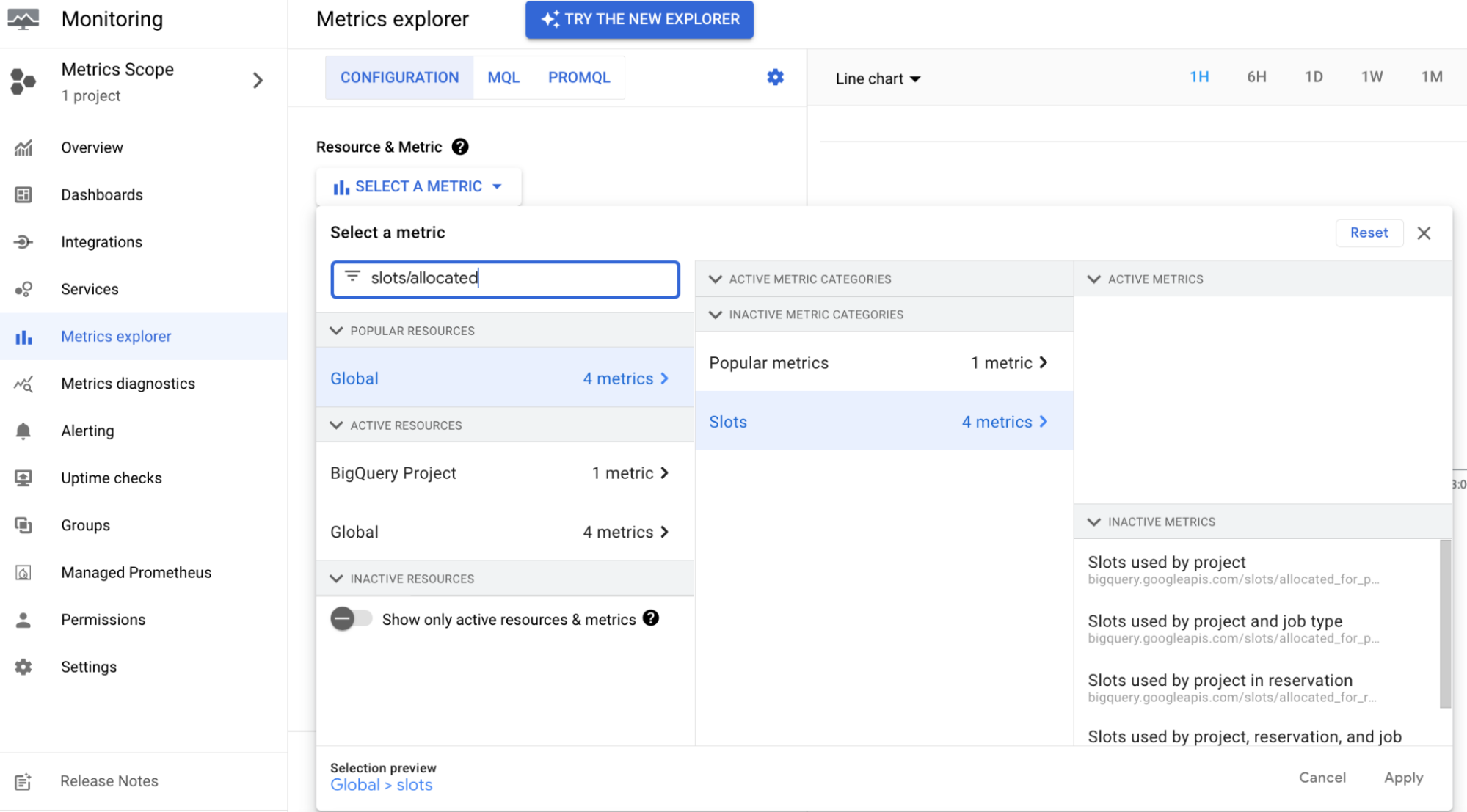
Jobs方法。使用JobsAPI 方法,查看工作的運算單元用量指標。Cloud Monitoring:您可以使用 Cloud Monitoring 建立資訊主頁,監控分配到的運算單元。透過 Cloud Monitoring 資訊主頁,您可以查看預留項目中所有專案的各項預留項目和工作類型的運算單元用量。如要查看所有使用預留項目的專案運算單元用量指標,您必須明確將這些使用專案新增至監控指標的專案指標範圍。如要進一步瞭解 Cloud Monitoring 資訊主頁提供的指標,請參閱「可視化的指標」。
瞭解運算單元指標
如要有效監控及管理 BigQuery 運算資源,請務必區分「分配到的運算單元」和「已使用的運算單元」:
- 分配到的運算單元
- 透過基準運算單元和有效運算資源承諾使用合約,專門提供給專案的運算資源。分配到的運算單元會影響配額和帳單。
- 已使用的運算單元
- 執行查詢時,執行中工作實際耗用的運算資源。已使用的運算單元會顯示在資源使用率圖表中。
基準運算單元是專用資源,因此即使沒有主動執行的查詢,配額系統也會回報為「已使用」。因此,「配額與系統限制」頁面回報的配額用量,可能會高於「監控」頁面顯示的實際運算單元用量。
運算單元指標比較
下表比較 Cloud de Confiance 控制台計算及顯示運算單元指標的方式:
| Cloud de Confiance 控制台頁面 | 顯示的指標 | 計算內容 | 差異來源 |
|---|---|---|---|
| 配額與系統限制 | 已使用的配額 (運算單元總數;請參閱配額用量圖表) | 分配到的運算單元:預留項目基準運算單元和有效承諾使用合約。 | 包括閒置的基準運算單元,以及次要區域中未啟用的容錯移轉預留項目。不計入自動調度資源運算單元。 |
| 監控 | 運算單元用量 (資源使用率圖表) | 已使用的運算單元:執行中的工作主動耗用的運算單元。 | 包括主動處理工作的自動調度資源。不含閒置的基準運算單元和未啟用的容錯移轉預留項目。 |
運算單元用量不一致的常見原因
在「配額與系統限制」頁面和「Monitoring」頁面之間核對運算單元指標時,請考量下列常見的差異原因:
- 閒置基準運算單元:您已預留基準運算單元,但未主動執行任何查詢。由於基準運算單元是專屬運算資源,配額系統會將其視為已使用,但使用率圖表只會顯示正在執行工作負載的運算單元。
- 容錯移轉預留項目:如果您設定代管災難復原,系統會在次要區域分配容錯移轉預留項目的基準運算單元。即使預留項目處於閒置狀態且未發生容錯移轉,這些運算單元仍會顯示為次要區域中的已用配額。詳情請參閱「容錯移轉預留項目的配額注意事項」。
- 自動調度資源高載:資源使用率圖表包含正在處理工作的自動調度資源運算單元。相較之下,「配額與系統限制」頁面只會反映靜態分配的容量 (基準和承諾使用合約),不會計入自動調度資源運算單元。
查看依容量計費的帳單
如要即時查看依用量計費的帳單,請按照下列步驟操作:
前往 Cloud de Confiance 控制台的「Billing」(帳單) 頁面。
選取要查看帳單的帳單帳戶專案。
前往「Reports」(報表) 部分,然後在「Filters」(篩選器) 部分執行下列操作:
- 從「Services」(服務) 清單中選取「BigQuery」,然後選取所有適用項目。
- 從「SKU」清單中選取「All SKUs」。
將運算費用歸因於個別專案
根據預設,在 BigQuery 版本的運算資源計價模式中,所有運算費用都會計入管理預留項目和運算資源承諾使用合約的中央管理專案。
為協助您預估專案層級預算及執行內部交易退單,BigQuery 提供兩種方法,可追蹤使用預留項目的個別查詢專案資源消耗量:
- 資訊版位歸因 (預設):帳單報表中的資訊委刊項,顯示每項專案使用的版位時數。實際運算費用仍會向管理專案收取。
- 已計費用歸因 (預先發布版):這項功能可選擇加入,啟用後,系統會根據運算單元用量,將實際計費的運算費用從管理專案直接轉移至個別查詢專案。
資訊版位歸因
根據預設,執行 SQL 工作的查詢專案會顯示 $0 的運算支出。不過,所有 BigQuery Reservations API 客戶的 Cloud Billing 資料中,都有「Analysis Slots Attribution」(分析運算單元歸因) 委刊項。這項明細項目會顯示在 Cloud de Confiance 控制台的「帳單」頁面和 Cloud Billing 匯出內容中。
這個明細項目會顯示每項專案使用的運算單元時數。這項服務不會產生費用,也不會影響月結單總額。
已計費用歸因
計費運算費用歸因會根據查詢消耗的運算單元時數,將實際運算費用從管理專案直接轉移至個別查詢專案 (也稱為消耗專案)。您可以使用計費運算成本歸因功能執行下列操作:
- 追蹤專案層級費用:直接在 Cloud Billing 帳單報表和資料匯出作業中,查看專案層級的用量 (
BigQuery服務 >All SKUs)。 - 執行內部交易退單:在各部門和團隊之間處理內部交易退單,不必建構自訂資料工程管道。
- 屬性自動配置器用量:根據自動配置器運算單元消耗量,按比例將自動配置器費用歸屬至特定專案。
必要的 IAM 角色
如要取得啟用運算費用歸因所需的權限,請要求管理員授予您管理專案的 BigQuery 管理員 (roles/bigquery.admin) IAM 角色。如要進一步瞭解如何授予角色,請參閱「管理專案、資料夾和組織的存取權」。
這個預先定義的角色具備 bigquery.reservations.update 權限,可啟用運算費用歸因功能。
啟用運算費用歸因
如要啟用查詢專案的運算費用歸因功能,請執行 ALTER PROJECT SET OPTIONS 資料定義語言 (DDL) 陳述式,並加上 reservation_attribution_mode 選項。
前往 Cloud de Confiance 控制台的「BigQuery」頁面。
在查詢編輯器中輸入下列陳述式:
ALTER PROJECT `ADMIN_PROJECT_ID`
SET OPTIONS (
  `region-LOCATION.reservation_attribution_mode` = 'RESERVATION_ATTRIBUTION_MODE_PROJECT_LEVEL'
);
更改下列內容:
ADMIN_PROJECT_ID:管理專案的專案 ID。LOCATION:預留項目的位置。
按一下「 執行」。
啟用運算費用歸因功能後,費用分配的變化會在下一個帳單日開始顯示在個別查詢專案中 (帳單日從 America/Los_Angeles 時區的 00:00 開始)。這些變更也會在約一天內反映在每日 Cloud Billing 帳單報表中。
歸因規則和行為
啟用運算成本歸因功能後,成本分配會遵循下列規則:
- 自動配置器分配:自動配置器運算單元費用會嚴格歸因於在該時間範圍內觸發並耗用自動調度資源容量的查詢專案。如果專案執行的查詢只會耗用閒置的運算單元或基準承諾使用合約運算單元,則會產生
$0的自動配置器費用。 - 管理專案保留:未使用的基準運算單元、未指派的運算單元承諾使用合約,以及未使用的自動調度資源運算單元 (來自 50 個運算單元的擴充增量和一分鐘的冷卻時間),這些費用仍會歸入管理專案。
- 單一帳單帳戶規定:運算費用歸因功能要求管理專案和查詢專案必須屬於同一個 Cloud Billing 帳戶。如果查詢專案連結至其他帳單帳戶,其運算費用不會跨帳單帳戶轉移,而是會保留在管理專案中。
- 儲存費用:儲存費用會繼續直接向資料集所在的個別專案收取。
稽核記錄
建立、刪除及更新與 BigQuery 預留項目相關的資源時,系統會將這些動作記錄在專案擁有者的稽核記錄中。詳情請參閱「稽核記錄」。
使用資訊結構定義監控自動調度資源
您可以使用下列 SQL 指令碼,查看特定版本的計費運算單元秒數。您必須在建立預留項目的專案中執行這些指令碼。第一個指令碼會顯示 commitment_plan 涵蓋的計費運算單元秒數,第二個指令碼則會顯示未涵蓋在承諾使用合約中的計費運算單元秒數。
您只需要設定三個變數的值,即可執行這些指令碼:
start_timeend_timeedition_to_check
這些指令碼有下列注意事項:
資料保留期限結束後,已刪除的預留項目和運算資源承諾使用合約會從資訊結構定義檢視表中移除。請指定不含已刪除預留項目和承諾使用合約的近期時間範圍,以取得正確結果。
由於四捨五入誤差,指令碼的結果可能與帳單不完全相符。
下列指令碼會依版本匯總自動擴充運算單元。
展開即可查看指令碼,用於計算各版本自動擴充運算單元秒數。
SELECT
  edition,
  SUM(s.autoscale_current_slots) AS autoscale_slot_seconds
FROM
  `region-us.INFORMATION_SCHEMA.RESERVATIONS_TIMELINE` m
JOIN
  m.per_second_details s
WHERE
  period_start BETWEEN '2025-09-28'
  AND '2025-09-29'
GROUP BY
  edition
ORDER BY
  edition
下列指令碼會匯總每個預留項目的自動調度資源運算單元。
展開即可查看指令碼,計算每個預留項目的自動調度資源運算單元秒數。
select reservation_id, sum(s.autoscale_current_slots) as autoscale_slot_seconds
from `region-us.INFORMATION_SCHEMA.RESERVATIONS_TIMELINE` m
LEFT JOIN m.per_second_details s
WHERE period_start between '2025-09-28' and '2025-09-29'
group by reservation_id
order by reservation_id
展開即可查看指令碼,計算承諾使用合約的運算單元秒數。
DECLARE start_time,end_time TIMESTAMP;

DECLARE
  edition_to_check STRING;

/* Google uses Pacific Time to calculate the billing period for all customers,
regardless of their time zone. Use the following format if you want to match the
billing report. Change the start_time and end_time values to match the desired
window. */

/* The following three variables (start_time, end_time, and edition_to_check)
are the only variables that you need to set in the script.

During daylight savings time, the start_time and end_time variables should
follow this format: 2024-02-20 00:00:00-08. */

SET start_time = "2023-07-20 00:00:00-07";
SET end_time = "2023-07-28 00:00:00-07";
SET edition_to_check = 'ENTERPRISE';

/* The following function returns the slot seconds for the time window between
two capacity changes. For example, if there are 100 slots between (2023-06-01
10:00:00, 2023-06-01 11:00:00), then during that window the total slot seconds
will be 100 * 3600.

This script calculates a specific window (based on the preceding variables),
which is why the following script includes script_start_timestamp_unix_millis
and script_end_timestamp_unix_millis. */

CREATE TEMP FUNCTION
GetSlotSecondsBetweenChanges(
  slots FLOAT64,
  range_begin_timestamp_unix_millis FLOAT64,
  range_end_timestamp_unix_millis FLOAT64,
  script_start_timestamp_unix_millis FLOAT64,
  script_end_timestamp_unix_millis FLOAT64)
RETURNS INT64
LANGUAGE js
AS r"""
    if (script_end_timestamp_unix_millis < range_begin_timestamp_unix_millis || script_start_timestamp_unix_millis > range_end_timestamp_unix_millis) {
      return 0;
    }
    var begin = Math.max(script_start_timestamp_unix_millis, range_begin_timestamp_unix_millis)
    var end = Math.min(script_end_timestamp_unix_millis, range_end_timestamp_unix_millis)
    return slots * Math.ceil((end - begin) / 1000.0)
""";

/*
Sample CAPACITY_COMMITMENT_CHANGES data (unrelated columns ignored):
+---------------------+------------------------+-----------------+--------+------------+--------+
|  change_timestamp   | capacity_commitment_id | commitment_plan | state  | slot_count | action |
+---------------------+------------------------+-----------------+--------+------------+--------+
| 2023-07-20 19:30:27 | 12954109101902401697   | ANNUAL          | ACTIVE |        100 | CREATE |
| 2023-07-27 22:29:21 | 11445583810276646822   | FLEX            | ACTIVE |        100 | CREATE |
| 2023-07-27 23:10:06 | 7341455530498381779    | MONTHLY         | ACTIVE |        100 | CREATE |
| 2023-07-27 23:11:06 | 7341455530498381779    | FLEX            | ACTIVE |        100 | UPDATE |

The last row indicates a special change from MONTHLY to FLEX, which happens
because of commercial migration.

*/

WITH
  /*
  Information containing which commitment might have plan
  updated (e.g. renewal or commercial migration). For example:
  +------------------------+------------------+--------------------+--------+------------+--------+-----------+----------------------------+
  |  change_timestamp   | capacity_commitment_id | commitment_plan | state  | slot_count | action | next_plan | next_plan_change_timestamp |
  +---------------------+------------------------+-----------------+--------+------------+--------+-----------+----------------------------+
  | 2023-07-20 19:30:27 | 12954109101902401697   | ANNUAL          | ACTIVE |        100 | CREATE | ANNUAL    |        2023-07-20 19:30:27 |
  | 2023-07-27 22:29:21 | 11445583810276646822   | FLEX            | ACTIVE |        100 | CREATE | FLEX      |        2023-07-27 22:29:21 |
  | 2023-07-27 23:10:06 | 7341455530498381779    | MONTHLY         | ACTIVE |        100 | CREATE | FLEX      |        2023-07-27 23:11:06 |
  | 2023-07-27 23:11:06 | 7341455530498381779    | FLEX            | ACTIVE |        100 | UPDATE | FLEX      |        2023-07-27 23:11:06 |
  */
  commitments_with_next_plan AS (
    SELECT
      *,
      IFNULL(
        LEAD(commitment_plan)
          OVER (
            PARTITION BY capacity_commitment_id ORDER BY change_timestamp ASC
          ),
        commitment_plan)
        next_plan,
      IFNULL(
        LEAD(change_timestamp)
          OVER (
            PARTITION BY capacity_commitment_id ORDER BY change_timestamp ASC
          ),
        change_timestamp)
        next_plan_change_timestamp
    FROM
      `region-us.INFORMATION_SCHEMA.CAPACITY_COMMITMENT_CHANGES_BY_PROJECT`
  ),

  /*
  Insert a 'DELETE' action for those with updated plans. The FLEX commitment
  '7341455530498381779' is has no 'CREATE' action, and is instead labeled as an
  'UPDATE' action.

  For example:
  +---------------------+------------------------+-----------------+--------+------------+--------+
  |  change_timestamp   | capacity_commitment_id | commitment_plan | state  | slot_count | action |
  +---------------------+------------------------+-----------------+--------+------------+--------+
  | 2023-07-20 19:30:27 | 12954109101902401697   | ANNUAL          | ACTIVE |        100 | CREATE |
  | 2023-07-27 22:29:21 | 11445583810276646822   | FLEX            | ACTIVE |        100 | CREATE |
  | 2023-07-27 23:10:06 | 7341455530498381779    | MONTHLY         | ACTIVE |        100 | CREATE |
  | 2023-07-27 23:11:06 | 7341455530498381779    | FLEX            | ACTIVE |        100 | UPDATE |
  | 2023-07-27 23:11:06 | 7341455530498381779    | MONTHLY         | ACTIVE |        100 | DELETE |
  */

  capacity_changes_with_additional_deleted_event_for_changed_plan AS (
    SELECT
      next_plan_change_timestamp AS change_timestamp,
      project_id,
      project_number,
      capacity_commitment_id,
      commitment_plan,
      state,
      slot_count,
      'DELETE' AS action,
      commitment_start_time,
      commitment_end_time,
      failure_status,
      renewal_plan,
      user_email,
      edition,
      is_flat_rate,
    FROM commitments_with_next_plan
    WHERE commitment_plan <> next_plan
    UNION ALL
    SELECT * FROM `region-us.INFORMATION_SCHEMA.CAPACITY_COMMITMENT_CHANGES_BY_PROJECT`
  ),

  /*
  The committed_slots change the history. For example:
  +---------------------+------------------------+------------------+-----------------+
  |  change_timestamp   | capacity_commitment_id | slot_count_delta | commitment_plan |
  +---------------------+------------------------+------------------+-----------------+
  | 2023-07-20 19:30:27 | 12954109101902401697   |              100 | ANNUAL          |
  | 2023-07-27 22:29:21 | 11445583810276646822   |              100 | FLEX            |
  | 2023-07-27 23:10:06 | 7341455530498381779    |              100 | MONTHLY         |
  | 2023-07-27 23:11:06 | 7341455530498381779    |             -100 | MONTHLY         |
  | 2023-07-27 23:11:06 | 7341455530498381779    |              100 | FLEX            |
  */

  capacity_commitment_slot_data AS (
    SELECT
      change_timestamp,
      capacity_commitment_id,
      CASE
        WHEN action = "CREATE" OR action = "UPDATE"
          THEN
            IFNULL(
              IF(
                LAG(action)
                  OVER (
                    PARTITION BY capacity_commitment_id ORDER BY change_timestamp ASC, action ASC
                  )
                  IN UNNEST(['CREATE', 'UPDATE']),
                slot_count - LAG(slot_count)
                  OVER (
                    PARTITION BY capacity_commitment_id ORDER BY change_timestamp ASC, action ASC
                  ),
                slot_count),
              slot_count)
        ELSE
          IF(
            LAG(action)
              OVER (PARTITION BY capacity_commitment_id ORDER BY change_timestamp ASC, action ASC)
              IN UNNEST(['CREATE', 'UPDATE']),
            -1 * slot_count,
            0)
        END
        AS slot_count_delta,
      commitment_plan
    FROM
      capacity_changes_with_additional_deleted_event_for_changed_plan
    WHERE
      state = "ACTIVE"
      AND edition = edition_to_check
      AND change_timestamp <= end_time
  ),

  /*
  The total_committed_slots history for each plan. For example:
  +---------------------+---------------+-----------------+
  |  change_timestamp   | capacity_slot | commitment_plan |
  +---------------------+---------------+-----------------+
  | 2023-07-20 19:30:27 |           100 | ANNUAL          |
  | 2023-07-27 22:29:21 |           100 | FLEX            |
  | 2023-07-27 23:10:06 |           100 | MONTHLY         |
  | 2023-07-27 23:11:06 |             0 | MONTHLY         |
  | 2023-07-27 23:11:06 |           200 | FLEX            |
  */

  running_capacity_commitment_slot_data AS (
    SELECT
      change_timestamp,
      SUM(slot_count_delta)
        OVER (
          PARTITION BY commitment_plan
          ORDER BY change_timestamp
          RANGE BETWEEN UNBOUNDED PRECEDING AND CURRENT ROW
        )
        AS capacity_slot,
      commitment_plan,
    FROM
      capacity_commitment_slot_data
  ),

  /*

  The slot_seconds between each changes, partitioned by each plan. For example:
  +---------------------+--------------+-----------------+
  |  change_timestamp   | slot_seconds | commitment_plan |
  +---------------------+--------------+-----------------+
  | 2023-07-20 19:30:27 |     64617300 | ANNUAL          |
  | 2023-07-27 22:29:21 |       250500 | FLEX            |
  | 2023-07-27 23:10:06 |         6000 | MONTHLY         |
  | 2023-07-27 23:11:06 |            0 | MONTHLY         |
  | 2023-07-27 23:11:06 |      5626800 | FLEX            |
  */

  slot_seconds_data AS (
    SELECT
      change_timestamp,
      GetSlotSecondsBetweenChanges(
        capacity_slot,
        UNIX_MILLIS(change_timestamp),
        UNIX_MILLIS(
          IFNULL(
            LEAD(change_timestamp)
              OVER (PARTITION BY commitment_plan ORDER BY change_timestamp ASC),
            CURRENT_TIMESTAMP())),
        UNIX_MILLIS(start_time),
        UNIX_MILLIS(end_time)) AS slot_seconds,
      commitment_plan,
    FROM
      running_capacity_commitment_slot_data
    WHERE
      change_timestamp <= end_time
  )

/*

The final result is similar to the following:
+-----------------+--------------------+
| commitment_plan | total_slot_seconds |
+-----------------+--------------------+
| ANNUAL          |           64617300 |
| MONTHLY         |               6000 |
| FLEX            |            5877300 |
*/

SELECT
  commitment_plan,
  SUM(slot_seconds) AS total_slot_seconds
FROM
  slot_seconds_data
GROUP BY
  commitment_plan
下列指令碼會檢查特定版本未涵蓋在承諾使用合約中的運算單元用量。這項用量包含兩種運算單元:擴充運算單元和未涵蓋在承諾使用合約中的基準運算單元。
展開即可查看指令碼,計算未涵蓋在承諾使用合約中的運算單元秒數
/*
This script has several parts:
1. Calculate the baseline and scaled slots for reservations
2. Calculate the committed slots
3. Join the two preceding results to calculate the baseline not covered by committed
   slots
4. Aggregate the number
*/

-- variables
DECLARE start_time, end_time TIMESTAMP;

DECLARE
  edition_to_check STRING;

/* Google uses Pacific Time to calculate the billing period for all customers,
regardless of their time zone. Use the following format if you want to match the
billing report. Change the start_time and end_time values to match the desired
window. */

/* The following three variables (start_time, end_time, and edition_to_check)
are the only variables that you need to set in the script.

During daylight savings time, the start_time and end_time variables should
follow this format: 2024-02-20 00:00:00-08. */

SET start_time = "2023-07-20 00:00:00-07";
SET end_time = "2023-07-28 00:00:00-07";
SET edition_to_check = 'ENTERPRISE';

/*
The following function returns the slot seconds for the time window between
two capacity changes. For example, if there are 100 slots between (2023-06-01
10:00:00, 2023-06-01 11:00:00), then during that window the total slot seconds
will be 100 * 3600.

This script calculates a specific window (based on the preceding variables),
which is why the following script includes script_start_timestamp_unix_millis
and script_end_timestamp_unix_millis. */

CREATE TEMP FUNCTION GetSlotSecondsBetweenChanges(
  slots FLOAT64,
  range_begin_timestamp_unix_millis FLOAT64,
  range_end_timestamp_unix_millis FLOAT64,
  script_start_timestamp_unix_millis FLOAT64,
  script_end_timestamp_unix_millis FLOAT64)
RETURNS INT64
LANGUAGE js
AS r"""
    if (script_end_timestamp_unix_millis < range_begin_timestamp_unix_millis || script_start_timestamp_unix_millis > range_end_timestamp_unix_millis) {
      return 0;
    }
    var begin = Math.max(script_start_timestamp_unix_millis, range_begin_timestamp_unix_millis)
    var end = Math.min(script_end_timestamp_unix_millis, range_end_timestamp_unix_millis)
    return slots * Math.ceil((end - begin) / 1000.0)
""";
/*
Sample RESERVATION_CHANGES data (unrelated columns ignored):
+---------------------+------------------+--------+---------------+---------------+
|  change_timestamp   | reservation_name | action | slot_capacity | current_slots |
+---------------------+------------------+--------+---------------+---------------+
| 2023-07-27 22:24:15 | res1             | CREATE |           300 |             0 |
| 2023-07-27 22:25:21 | res1             | UPDATE |           300 |           180 |
| 2023-07-27 22:39:14 | res1             | UPDATE |           300 |           100 |
| 2023-07-27 22:40:20 | res2             | CREATE |           300 |             0 |
| 2023-07-27 22:54:18 | res2             | UPDATE |           300 |           120 |
| 2023-07-27 22:55:23 | res1             | UPDATE |           300 |             0 |

Sample CAPACITY_COMMITMENT_CHANGES data (unrelated columns ignored):
+---------------------+------------------------+-----------------+--------+------------+--------+
|  change_timestamp   | capacity_commitment_id | commitment_plan | state  | slot_count | action |
+---------------------+------------------------+-----------------+--------+------------+--------+
| 2023-07-20 19:30:27 | 12954109101902401697   | ANNUAL          | ACTIVE |        100 | CREATE |
| 2023-07-27 22:29:21 | 11445583810276646822   | FLEX            | ACTIVE |        100 | CREATE |
| 2023-07-27 23:10:06 | 7341455530498381779    | MONTHLY         | ACTIVE |        100 | CREATE |
*/

WITH
  /*
  The scaled_slots & baseline change history:
  +---------------------+------------------+------------------------------+---------------------+
  |  change_timestamp   | reservation_name | autoscale_current_slot_delta | baseline_slot_delta |
  +---------------------+------------------+------------------------------+---------------------+
  | 2023-07-27 22:24:15 | res1             |                            0 |                 300 |
  | 2023-07-27 22:25:21 | res1             |                          180 |                   0 |
  | 2023-07-27 22:39:14 | res1             |                          -80 |                   0 |
  | 2023-07-27 22:40:20 | res2             |                            0 |                 300 |
  | 2023-07-27 22:54:18 | res2             |                          120 |                   0 |
  | 2023-07-27 22:55:23 | res1             |                         -100 |                   0 |
  */
  reservation_slot_data AS (
    SELECT
      change_timestamp,
      reservation_name,
      CASE action
        WHEN "CREATE" THEN autoscale.current_slots
        WHEN "UPDATE"
          THEN
            IFNULL(
              autoscale.current_slots - LAG(autoscale.current_slots)
                OVER (
                  PARTITION BY project_id, reservation_name
                  ORDER BY change_timestamp ASC, action ASC
                ),
              IFNULL(
                autoscale.current_slots,
                IFNULL(
                  -1 * LAG(autoscale.current_slots)
                    OVER (
                      PARTITION BY project_id, reservation_name
                      ORDER BY change_timestamp ASC, action ASC
                    ),
                  0)))
        WHEN "DELETE"
          THEN
            IF(
              LAG(action)
                OVER (
                  PARTITION BY project_id, reservation_name
                  ORDER BY change_timestamp ASC, action ASC
                )
                IN UNNEST(['CREATE', 'UPDATE']),
              -1 * autoscale.current_slots,
              0)
        END
        AS autoscale_current_slot_delta,
      CASE action
        WHEN "CREATE" THEN slot_capacity
        WHEN "UPDATE"
          THEN
            IFNULL(
              slot_capacity - LAG(slot_capacity)
                OVER (
                  PARTITION BY project_id, reservation_name
                  ORDER BY change_timestamp ASC, action ASC
                ),
              IFNULL(
                slot_capacity,
                IFNULL(
                  -1 * LAG(slot_capacity)
                    OVER (
                      PARTITION BY project_id, reservation_name
                      ORDER BY change_timestamp ASC, action ASC
                    ),
                  0)))
        WHEN "DELETE"
          THEN
            IF(
              LAG(action)
                OVER (
                  PARTITION BY project_id, reservation_name
                  ORDER BY change_timestamp ASC, action ASC
                )
                IN UNNEST(['CREATE', 'UPDATE']),
              -1 * slot_capacity,
              0)
        END
        AS baseline_slot_delta,
    FROM
      `region-us.INFORMATION_SCHEMA.RESERVATION_CHANGES`
    WHERE
      edition = edition_to_check
      AND change_timestamp <= end_time
  ),

  -- Convert the preceding data to a running total
  /*
  +---------------------+-------------------------+----------------+
  |  change_timestamp   | autoscale_current_slots | baseline_slots |
  +---------------------+-------------------------+----------------+
  | 2023-07-27 22:24:15 |                       0 |            300 |
  | 2023-07-27 22:25:21 |                     180 |            300 |
  | 2023-07-27 22:39:14 |                     100 |            300 |
  | 2023-07-27 22:40:20 |                     100 |            600 |
  | 2023-07-27 22:54:18 |                     220 |            600 |
  | 2023-07-27 22:55:23 |                     120 |            600 |
  */
  running_reservation_slot_data AS (
    SELECT
      change_timestamp,
      SUM(autoscale_current_slot_delta)
        OVER (ORDER BY change_timestamp RANGE BETWEEN UNBOUNDED PRECEDING AND CURRENT ROW)
        AS autoscale_current_slots,
      SUM(baseline_slot_delta)
        OVER (ORDER BY change_timestamp RANGE BETWEEN UNBOUNDED PRECEDING AND CURRENT ROW)
        AS baseline_slots,
    FROM
      reservation_slot_data
  ),

  /*
  The committed_slots change history. For example:
  +---------------------+------------------------+------------------+
  |  change_timestamp   | capacity_commitment_id | slot_count_delta |
  +---------------------+------------------------+------------------+
  | 2023-07-20 19:30:27 | 12954109101902401697   |              100 |
  | 2023-07-27 22:29:21 | 11445583810276646822   |              100 |
  | 2023-07-27 23:10:06 | 7341455530498381779    |              100 |
  */
  capacity_commitment_slot_data AS (
    SELECT
      change_timestamp,
      capacity_commitment_id,
      CASE
        WHEN action = "CREATE" OR action = "UPDATE"
          THEN
            IFNULL(
              IF(
                LAG(action)
                  OVER (
                    PARTITION BY capacity_commitment_id ORDER BY change_timestamp ASC, action ASC
                  )
                  IN UNNEST(['CREATE', 'UPDATE']),
                slot_count - LAG(slot_count)
                  OVER (
                    PARTITION BY capacity_commitment_id ORDER BY change_timestamp ASC, action ASC
                  ),
                slot_count),
              slot_count)
        ELSE
          IF(
            LAG(action)
              OVER (PARTITION BY capacity_commitment_id ORDER BY change_timestamp ASC, action ASC)
              IN UNNEST(['CREATE', 'UPDATE']),
            -1 * slot_count,
            0)
        END
        AS slot_count_delta
    FROM
      `region-us.INFORMATION_SCHEMA.CAPACITY_COMMITMENT_CHANGES_BY_PROJECT`
    WHERE
      state = "ACTIVE"
      AND edition = edition_to_check
      AND change_timestamp <= end_time
  ),

  /*
  The total_committed_slots history. For example:
  +---------------------+---------------+
  |  change_timestamp   | capacity_slot |
  +---------------------+---------------+
  | 2023-07-20 19:30:27 |           100 |
  | 2023-07-27 22:29:21 |           200 |
  | 2023-07-27 23:10:06 |           300 |
  */
  running_capacity_commitment_slot_data AS (
    SELECT
      change_timestamp,
      SUM(slot_count_delta)
        OVER (ORDER BY change_timestamp RANGE BETWEEN UNBOUNDED PRECEDING AND CURRENT ROW)
        AS capacity_slot
    FROM
      capacity_commitment_slot_data
  ),

  /* Add next_change_timestamp to the preceding data,
   which will be used when joining with reservation data. For example:
  +---------------------+-----------------------+---------------+
  |  change_timestamp   | next_change_timestamp | capacity_slot |
  +---------------------+-----------------------+---------------+
  | 2023-07-20 19:30:27 |   2023-07-27 22:29:21 |           100 |
  | 2023-07-27 22:29:21 |   2023-07-27 23:10:06 |           200 |
  | 2023-07-27 23:10:06 |   2023-07-31 00:14:37 |           300 |
  */
  running_capacity_commitment_slot_data_with_next_change AS (
    SELECT
      change_timestamp,
      IFNULL(LEAD(change_timestamp) OVER (ORDER BY change_timestamp ASC), CURRENT_TIMESTAMP())
        AS next_change_timestamp,
      capacity_slot
    FROM
      running_capacity_commitment_slot_data
  ),

  /*
  Whenever we have a change in reservations or commitments,
  the scaled_slots_and_baseline_not_covered_by_commitments will be changed.
  Hence we get a collection of all the change_timestamp from both tables.
  +---------------------+
  |  change_timestamp   |
  +---------------------+
  | 2023-07-20 19:30:27 |
  | 2023-07-27 22:24:15 |
  | 2023-07-27 22:25:21 |
  | 2023-07-27 22:29:21 |
  | 2023-07-27 22:39:14 |
  | 2023-07-27 22:40:20 |
  | 2023-07-27 22:54:18 |
  | 2023-07-27 22:55:23 |
  | 2023-07-27 23:10:06 |
  */
  merged_timestamp AS (
    SELECT
      change_timestamp
    FROM
      running_reservation_slot_data
    UNION DISTINCT
    SELECT
      change_timestamp
    FROM
      running_capacity_commitment_slot_data
  ),

  /*
  Change running reservation-slots and make sure we have one row when commitment changes.
  +---------------------+-------------------------+----------------+
  |  change_timestamp   | autoscale_current_slots | baseline_slots |
  +---------------------+-------------------------+----------------+
  | 2023-07-20 19:30:27 |                       0 |              0 |
  | 2023-07-27 22:24:15 |                       0 |            300 |
  | 2023-07-27 22:25:21 |                     180 |            300 |
  | 2023-07-27 22:29:21 |                     180 |            300 |
  | 2023-07-27 22:39:14 |                     100 |            300 |
  | 2023-07-27 22:40:20 |                     100 |            600 |
  | 2023-07-27 22:54:18 |                     220 |            600 |
  | 2023-07-27 22:55:23 |                     120 |            600 |
  | 2023-07-27 23:10:06 |                     120 |            600 |
  */
  running_reservation_slot_data_with_merged_timestamp AS (
    SELECT
      change_timestamp,
      IFNULL(
        autoscale_current_slots,
        IFNULL(
          LAST_VALUE(autoscale_current_slots IGNORE NULLS) OVER (ORDER BY change_timestamp ASC), 0))
        AS autoscale_current_slots,
      IFNULL(
        baseline_slots,
        IFNULL(LAST_VALUE(baseline_slots IGNORE NULLS) OVER (ORDER BY change_timestamp ASC), 0))
        AS baseline_slots
    FROM
      running_reservation_slot_data
    RIGHT JOIN
      merged_timestamp
      USING (change_timestamp)
  ),

  /*
  Join the preceding data to determine the baseline not covered by commitments.
  +---------------------+-----------------------+-------------------------+------------------------------------+
  |  change_timestamp   | next_change_timestamp | autoscale_current_slots | baseline_not_covered_by_commitment |
  +---------------------+-----------------------+-------------------------+------------------------------------+
  | 2023-07-20 19:30:27 |   2023-07-27 22:24:15 |                       0 |                                  0 |
  | 2023-07-27 22:24:15 |   2023-07-27 22:25:21 |                       0 |                                200 |
  | 2023-07-27 22:25:21 |   2023-07-27 22:29:21 |                     180 |                                200 |
  | 2023-07-27 22:29:21 |   2023-07-27 22:39:14 |                     180 |                                100 |
  | 2023-07-27 22:39:14 |   2023-07-27 22:40:20 |                     100 |                                100 |
  | 2023-07-27 22:40:20 |   2023-07-27 22:54:18 |                     100 |                                400 |
  | 2023-07-27 22:54:18 |   2023-07-27 22:55:23 |                     220 |                                400 |
  | 2023-07-27 22:55:23 |   2023-07-27 23:10:06 |                     120 |                                400 |
  | 2023-07-27 23:10:06 |   2023-07-31 00:16:07 |                     120 |                                300 |
  */
  scaled_slots_and_baseline_not_covered_by_commitments AS (
    SELECT
      r.change_timestamp,
      IFNULL(LEAD(r.change_timestamp) OVER (ORDER BY r.change_timestamp ASC), CURRENT_TIMESTAMP())
        AS next_change_timestamp,
      r.autoscale_current_slots,
      IF(
        r.baseline_slots - IFNULL(c.capacity_slot, 0) > 0,
        r.baseline_slots - IFNULL(c.capacity_slot, 0),
        0) AS baseline_not_covered_by_commitment
    FROM
      running_reservation_slot_data_with_merged_timestamp r
    LEFT JOIN
      running_capacity_commitment_slot_data_with_next_change c
      ON
        r.change_timestamp >= c.change_timestamp
        AND r.change_timestamp < c.next_change_timestamp
  ),

  /*
  The slot_seconds between each changes. For example:
  +---------------------+--------------------+
  |  change_timestamp   | slot_seconds |
  +---------------------+--------------+
  | 2023-07-20 19:30:27 |            0 |
  | 2023-07-27 22:24:15 |        13400 |
  | 2023-07-27 22:25:21 |        91580 |
  | 2023-07-27 22:29:21 |       166320 |
  | 2023-07-27 22:39:14 |        13200 |
  | 2023-07-27 22:40:20 |       419500 |
  | 2023-07-27 22:54:18 |        40920 |
  | 2023-07-27 22:55:23 |       459160 |
  | 2023-07-27 23:10:06 |     11841480 |
  */
  slot_seconds_data AS (
    SELECT
      change_timestamp,
      GetSlotSecondsBetweenChanges(
        autoscale_current_slots + baseline_not_covered_by_commitment,
        UNIX_MILLIS(change_timestamp),
        UNIX_MILLIS(next_change_timestamp),
        UNIX_MILLIS(start_time),
        UNIX_MILLIS(end_time)) AS slot_seconds
    FROM
      scaled_slots_and_baseline_not_covered_by_commitments
    WHERE
      change_timestamp <= end_time AND next_change_timestamp > start_time
  )

/*
Final result for this example:
+--------------------+
| total_slot_seconds |
+--------------------+
|           13045560 |
*/
SELECT
  SUM(slot_seconds) AS total_slot_seconds
FROM
  slot_seconds_data
預留項目監控疑難排解
以下各節說明如何解決監控 BigQuery 預留項目和運算單元用量時的常見問題。
運算單元用量指標與 INFORMATION_SCHEMA 不符
如果資源圖表中的運算單元用量指標與 INFORMATION_SCHEMA 資料不一致,請嘗試下列做法:
- 降低精細程度。將圖表精細程度變更為 1 秒間隔,而非 1 小時間隔。
- 調整匯總。請務必使用資源圖表和
INFORMATION_SCHEMA資料一致的匯總方法。舉例來說,如要更準確地反映資源圖表中的用量高峰,請將指標匯總方式一律變更為 p99 或 p90。
停用閒置的運算單元時,會顯示借用的運算單元
即使一或多個預留項目已設定 ignore_idle_slots=true,監控圖表仍可能顯示非零的 borrowed_slots 值。這項設定會禁止預留項目「借用」閒置的運算單元,但不會禁止預留項目將未使用的運算單元「借給」其他預留項目。
這些借用的運算單元會顯示在下列情況:
借給其他預留項目。如果預留項目設為
ignore_idle_slots=true,則可將未使用的基準運算單元,借給相同管理專案、區域和版本中允許借用閒置的運算單元 (ignore_idle_slots=false) 的其他預留項目。如果管理專案、區域和版本中的所有預留項目都設為ignore_idle_slots=true,則不會共用閒置的運算單元。舉例來說,假設預留項目 A 有 100 個運算單元,用量為 0,並設有
ignore_idle_slots=true。預留項目 B 位於相同的管理專案、區域和版本,有 100 個運算單元,工作負載需要 150 個運算單元,並設定為ignore_idle_slots=false。預留項目 B 可從預留項目 A 借用 50 個閒置的運算單元,以滿足需求。發生這種情況時,監控圖表會回報預留項目 A 的 50lent_slots和預留項目 B 的 50borrowed_slots。用量超過容量。如果預留項目的運算單元用量暫時超過容量 (基準 + 自動調度運算單元),監控圖表會將這項差異顯示為
borrowed_slots。即使預留項目含有ignore_idle_slots=true,也可能發生這種情況。
運算單元用量有時可能會超過基準和擴充運算單元的總和。如果運算單元用量超過基準加上擴充運算單元,您不需支付費用。
預留項目用盡前,會先顯示借用的運算單元
監控資訊主頁會使用樣本資料,可能無法準確反映取樣間隔內運算單元用量的精確時間。
如要更準確地分析運算單元用量,請查詢與閒置運算單元相關的資料欄,例如 INFORMATION_SCHEMA.RESERVATIONS_TIMELINE 檢視表中的 borrowed_slots 和 lent_slots 資料欄。
後續步驟
- 瞭解容量承諾使用方案。
- 瞭解如何使用管理資源圖表。
- 瞭解 BigQuery 定價。