
As agents scale from initial prototypes to enterprise deployments, the need to integrate internal controls, proprietary data pipelines, and enterprise security policies grows rapidly. Sometimes, complex authorization decisions cannot be readily expressed using standard IAM policies alone.
To address these requirements, Agent Gateway introduces a new policy framework that lets you support enforcement with Google services, custom authorization engines, or third-party security platforms, applying the same policies universally across your gateways. This document outlines key agentic risk use cases and explains how to configure extensible policies.
Policy extensibility use-cases for agentic risks
Standard deterministic controls are often insufficient for probabilistic AI workloads. Extensible service pipelines help organizations inject advanced logic tailored to unique agentic risks:
- Content Sanitization & Safety Guardrails: Protection against prompt injections, jailbreaks, toxic outputs, and loss of confidential information (for example, using Model Armor).
- Data Loss Prevention (DLP): Real-time monitoring of payloads and streaming chunks to prevent data leakage of proprietary code or PII to external systems.
- Zero-Trust Identity Governance: Validating credentials and enforcing access controls before an agent is allowed to access sensitive backends or external tools (for example, using IAP).
- Bespoke Enterprise Compliance: Enforcing custom data redaction rules, token translation, or compliance mechanisms specific to internal architectures.
Framework for policy extensibility on Agent Gateway
Agent Gateway lets you attach extension bindings to delegate authorization decisions to specialized policy engines, such as identity providers, content safety filters, or custom third-party security platforms.
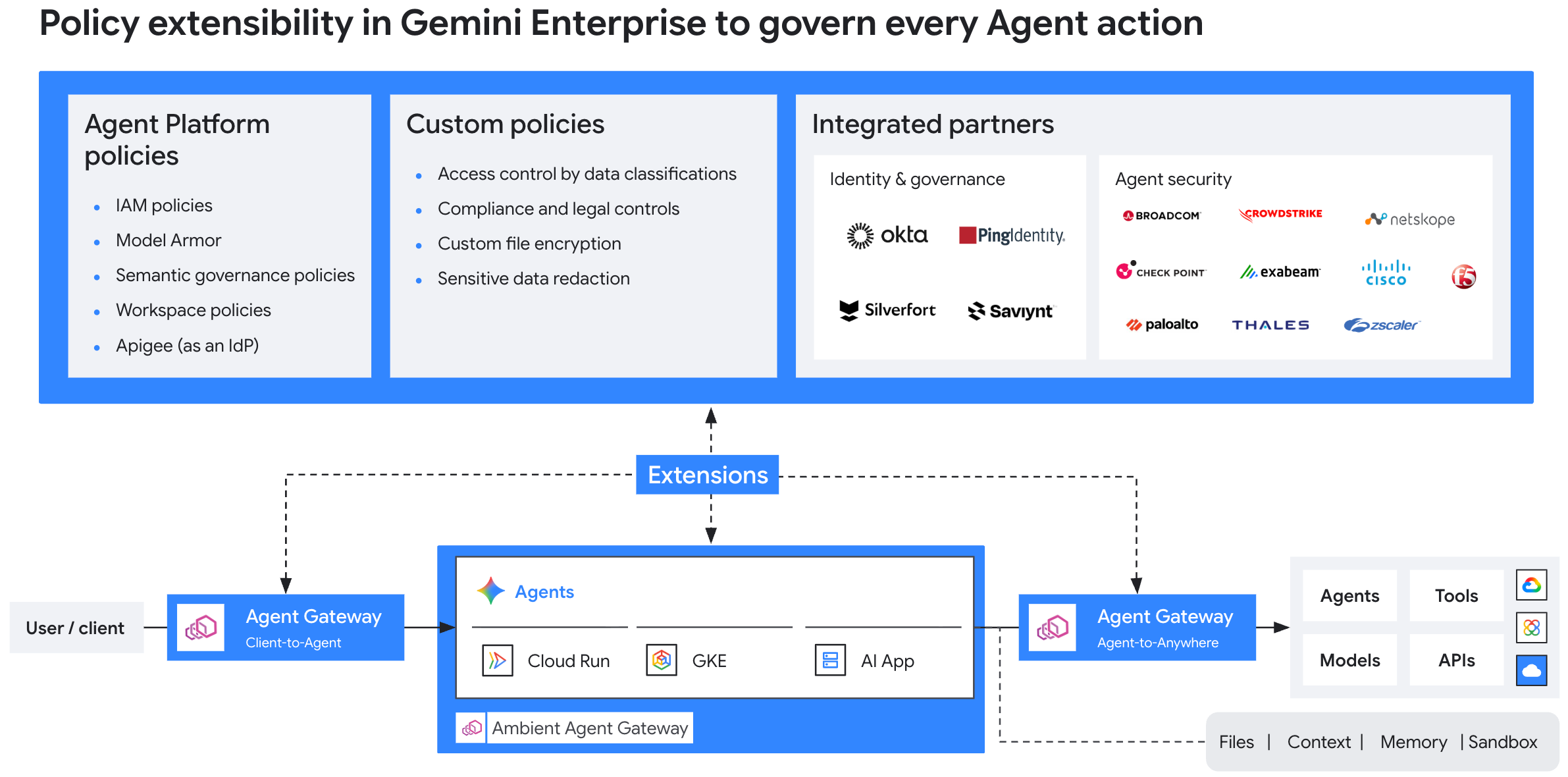
The policy extensibility framework operates on a separation between roles and resources:
Consumers: Agent Gateway operators who want to add security and governance extensions to their gateways with minimal configuration effort.
Producers: Internal platform teams, 1P Google services (such as IAP and Model Armor), and third-party ISV partners who build and publish service extensions for others to consume.
ExtensionBinding: A resource created by the consumer that binds aProducerExtensionto a target Agent Gateway, along with match conditions that determine when the extension is invoked. This is the only resource a consumer needs to create to start using an extension.ProducerExtension: A resource created by the producer that packages anext_proccompatible authorization engine into a single managed unit. It encapsulates all underlying execution parameters and connectivity settings so consumers don't need to configure low-level data plane mechanics.
Built-in 1P Google extensions
First-party (1P) Google services, such as IAP and Model Armor, offer pre-packaged extension capabilities with a streamlined operational model.
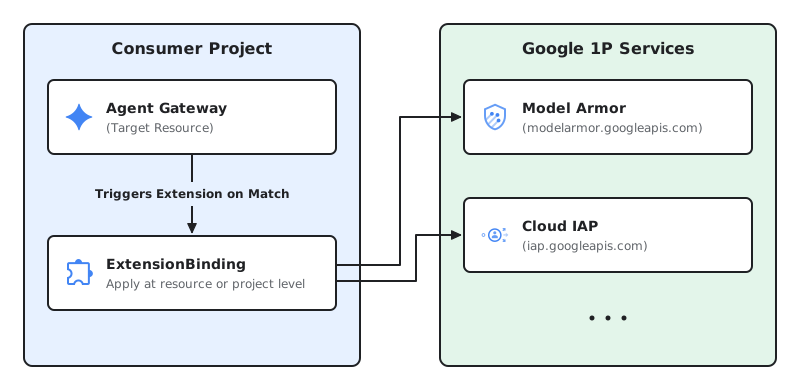
- Consumer: Application developers and security operators act as
consumers. To enable zero-trust authentication or prompt-injection
protection, you create an
ExtensionBindingresource targeting Google's predefined service endpoint URIs directly from your consumer project. - Producer: Google acts as the producer. Google builds, hosts, and manages
the underlying service infrastructure and extension endpoints globally (such
as
iap.googleapis.comormodelarmor.us.rep.googleapis.com). You don't need to create or manage aProducerExtensionresource.
Enterprise and partner (2P/3P) extensions
For custom governance logic, policy extensibility enables a flexible two-sided integration model across enterprise teams and security partners.
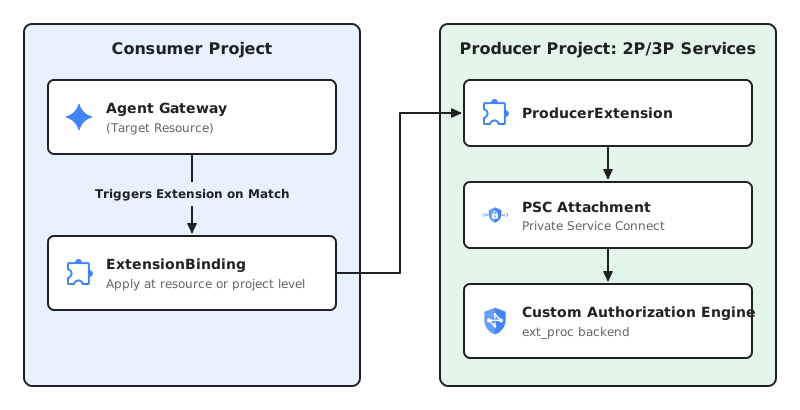
Producer: Internal platform engineering teams (2P) or third-party ISV security vendors (3P) act as producers. The producer builds a gRPC service compatible with Envoy's
ext_procprotocol, hosts it in a dedicated producer project (such as a Cloud Run service behind an Application Load Balancer), exposes it using a Private Service Connect (PSC) Service Attachment, and publishes aProducerExtensionresource.Consumer: Application developers and security administrators across consumer projects act as consumers. Once granted access by using PSC by the producer, consumers create an
ExtensionBindingin their project referencing the specificProducerExtensionresource URI to enforce custom controls (such as Semantic Governance Policies or third-party firewall rules) on their workloads.
Deployment patterns
Extension Bindings support flexible deployment patterns to enforce consistent
governance across all traffic paths to ensure that your governance policies act
identically, regardless of where your agents are deployed. The
ExtensionBinding API applies uniformly across all
Agent Gateway deployment
models.
End-to-end traffic interception paths
You can apply Extension Bindings to intercept traffic across the following communication paths within your agentic ecosystem:
- User → Agent (Ingress): Intercepts incoming requests from end users or client applications targeting the Agent Gateway to enforce user authentication, identity governance, or prompt-injection sanitization.
- Agent → Tool / MCP (Egress): Intercepts outbound calls from agents to Model Context Protocol (MCP) servers or external APIs to validate permissions and sanitize tool inputs.
- Agent → LLM Model (Egress): Scans prompts before they reach foundation models and filters model responses to prevent data loss or toxic output.
Agent → Agent (A2A Egress): Controls inter-agent communication and enforces policy boundaries when autonomous agents collaborate across projects.
Client-to-Agent
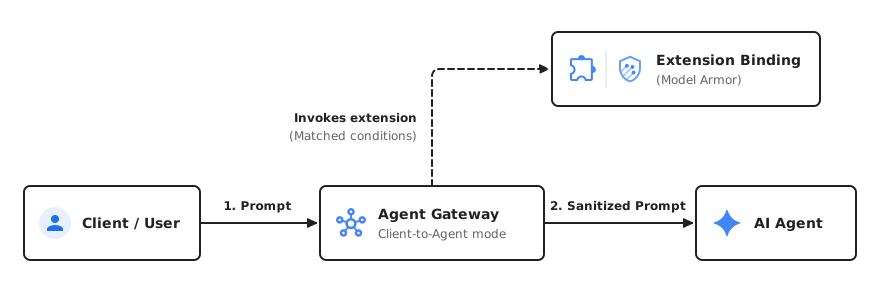
Agent-to-Anywhere
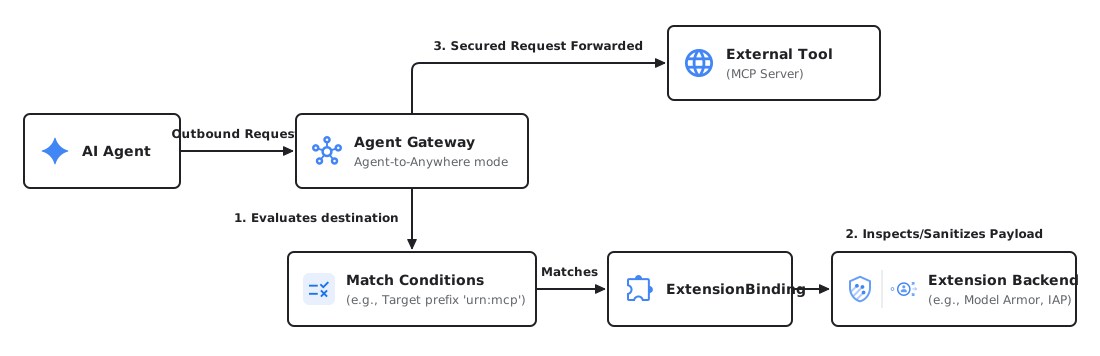
Consumers: Bind extensions to Agent Gateways
Consumers (such as application developers or security operators) attach
governance and security logic to their
Agent Gateways by creating an ExtensionBinding. This resource
binds the target workload to an extension and declares match conditions to
define exactly when the extension should be invoked (for example, intercepting
traffic bound to specific external tools or MCP servers). You can specify match
conditions directly inline (as shown in the examples in this section) or in a
separate YAML file.
Depending on the extension provider, consumption follows one of two paths:
1P Consumer configuration
For Google services like IAP (IAP) or
Model Armor, Google manages the backend infrastructure and
registration globally. As a consumer, you do not need to target a specific
ProducerExtension resource URI. You can directly bind these services to your
workloads by passing their predefined endpoint strings (e.g.,
iap.googleapis.com or modelarmor.us.rep.googleapis.com) as the target in
your ExtensionBinding.
Bind an IAP extension to an Agent Gateway
The following example demonstrates an ExtensionBinding resource that binds a
1P Google service (IAP) to an Agent Gateway in a
consumer project. Based on the matchConditions field specified, this
extension is invoked when traffic is sent to an MCP server.
Create a YAML file with the following configuration:
name: EXTENSION_BINDING_NAME
target:
  resources:
  - "projects/PROJECT_ID/locations/LOCATION/agentGateways/AGENT_GATEWAY_NAME"
matchConditions:
- to:
    destination:
      resources:
      - prefix: "urn:mcp"
producerExtension: "iap.googleapis.com"
Replace the following:
EXTENSION_BINDING_NAME: the name of the extension binding resource.PROJECT_ID: your Cloud de Confiance by S3NS project ID.LOCATION: the location of the gateway and extension binding.AGENT_GATEWAY_NAME: the name of the target Agent Gateway.
Import the extension binding configuration:
gcloud beta service-extensions extension-bindings import EXTENSION_BINDING_NAME \
 --location=LOCATION \
 --source=EXTENSION_BINDING_FILE_PATH
Replace
EXTENSION_BINDING_FILE_PATHwith the path to the YAML configuration file.
Bind a Model Armor extension to an Agent Gateway
To protect your agents from prompt injection, toxic content, and sensitive data
leakage, you can bind Model Armor directly to your workload.
Based on the matchConditions field specified, this extension is invoked when
traffic is sent to an MCP server.
Create a YAML file with the following configuration:
name: EXTENSION_BINDING_NAME
target:
  resources:
  - "projects/PROJECT_ID/locations/LOCATION/agentGateways/AGENT_GATEWAY_NAME"
matchConditions:
- to:
    destination:
      resources:
      - prefix: "urn:mcp"
producerExtension: "modelarmor.us.rep.googleapis.com"
failOpen: true
producerMetadata:
  model_armor_settings: '[{
    "request_template_id": "projects/TEMPLATE_PROJECT_ID/locations/LOCATION/templates/REQUEST_TEMPLATE_ID",
    "response_template_id": "projects/TEMPLATE_PROJECT_ID/locations/LOCATION/templates/RESPONSE_TEMPLATE_ID"
  }]'
Replace the following:
EXTENSION_BINDING_NAME: the name of the extension binding resource.PROJECT_ID: your Cloud de Confiance project ID.LOCATION: the location of the resources.AGENT_GATEWAY_NAME: the name of the target Agent Gateway.TEMPLATE_PROJECT_ID: the project ID where your Model Armor templates are located.REQUEST_TEMPLATE_ID: the ID of the Model Armor template used to evaluate requests.RESPONSE_TEMPLATE_ID: the ID of the Model Armor template used to evaluate responses.
Import the extension binding configuration:
gcloud beta service-extensions extension-bindings import EXTENSION_BINDING_NAME \
 --location=LOCATION \
 --source=EXTENSION_BINDING_FILE_PATH
Replace
EXTENSION_BINDING_FILE_PATHwith the path to the YAML configuration file.
2P/3P Consumer configuration
As a consumer of a service extension created by another internal team (2P) or
external third-party vendor (3P), your responsibility is to ensure that your
consumer project has been explicitly granted access to use the service.
Access is controlled by the producer using their
Private Service Connect Service Attachment configuration. Once
you are granted access, bind the workload by referencing the specific
ProducerExtension resource URI provided by the producer in your
ExtensionBinding.
Bind custom authorization engines
The following example demonstrates an ExtensionBinding resource that binds a
custom extension from a 2P/3P producer project to an Agent Gateway in a consumer
project. Based on the matchConditions field specified, this extension is
invoked when traffic is sent to an agent.
Create a YAML file with the following configuration:
name: EXTENSION_BINDING_NAME
target:
  resources:
  - "projects/CONSUMER_PROJECT_ID/locations/LOCATION/agentGateways/AGENT_GATEWAY_NAME"
matchConditions:
- to:
    destination:
      resources:
      - prefix: "urn:agent"
producerExtension: "projects/PRODUCER_PROJECT_ID/locations/LOCATION/producerExtensions/PRODUCER_EXTENSION_NAME"
Replace the following:
EXTENSION_BINDING_NAME: the name of the extension binding resource.CONSUMER_PROJECT_ID: the project ID of the consumer project hosting the Agent Gateway.LOCATION: the location of the resources.AGENT_GATEWAY_NAME: the name of the target Agent Gateway.PRODUCER_PROJECT_ID: the project ID of the producer project hosting theProducerExtension.PRODUCER_EXTENSION_NAME: the name of theProducerExtensionresource.
Import the extension binding configuration:
gcloud beta service-extensions extension-bindings import EXTENSION_BINDING_NAME \
 --location=LOCATION \
 --source=EXTENSION_BINDING_FILE_PATH
Replace
EXTENSION_BINDING_FILE_PATHwith the path to the YAML configuration file.
Extension binding attachment points
Extension bindings can be configured across different levels of your resource hierarchy depending on your governance requirements:
- Agent Gateway level: Attach policies directly to an Agent Gateway resource to govern all traffic passing through the gateway.
- Project level: Create
ExtensionBindingsthat apply globally to all resources of a given type within a project, simplifying management for enterprise administrators enforcing project-wide compliance.
Bind a Model Armor extension to all Agent Gateways in a project
Create a YAML file with the following configuration:
name: EXTENSION_BINDING_NAME
target:
  scope:
    parent: "projects/PROJECT_NUMBER"
    resourceTypes: "AGENT_GATEWAY"
matchConditions:
- to:
    destination:
      resources:
      - prefix: "urn:mcp"
producerExtension: "modelarmor.us.rep.googleapis.com"
failOpen: true
producerMetadata:
  model_armor_settings: '[{
    "request_template_id": "projects/TEMPLATE_PROJECT_ID/locations/LOCATION/templates/REQUEST_TEMPLATE_ID",
    "response_template_id": "projects/TEMPLATE_PROJECT_ID/locations/LOCATION/templates/RESPONSE_TEMPLATE_ID"
  }]'
Replace the following:
EXTENSION_BINDING_NAME: the name of the extension binding resource.PROJECT_NUMBER: the project number of your Cloud de Confiance project.TEMPLATE_PROJECT_ID: the project ID where your Model Armor templates are located.LOCATION: the location of the resources.REQUEST_TEMPLATE_ID: the ID of the Model Armor template used to evaluate requests.RESPONSE_TEMPLATE_ID: the ID of the Model Armor template used to evaluate responses.
Import the extension binding configuration:
gcloud beta service-extensions extension-bindings import EXTENSION_BINDING_NAME \
 --location=LOCATION \
 --source=EXTENSION_BINDING_FILE_PATH
Replace
EXTENSION_BINDING_FILE_PATHwith the path to the YAML configuration file.
For requests matching a specific workload, both the project-level and any resource-level extension bindings are executed. If the same extension is configured at both the resource level and project level, it will be invoked twice.
Match conditions to invoke extensions
Match conditions determine when your extension is invoked. You can specify match conditions directly inline (as shown in the preceding examples on this page) or in a YAML file.
This section provides sample YAML file configurations for common situations based on traffic flow, target resource URNs, or destination hosts:
Egress to MCP tool servers (Agent → Tool): Intercepts traffic sent from an agent to remote Model Context Protocol (MCP) tool servers:
# Invoke extension for all agent traffic to remote MCP servers
- to:
    destination:
      resources:
      - prefix: "urn:mcp"
Ingress traffic (User → Agent): Intercepts incoming requests from end users or client applications targeting agents governed by the Agent Gateway (for example, to enforce end-user authentication or prompt-injection sanitization on ingress):
# Invoke extension on incoming user requests targeting agents
- to:
    destination:
      resources:
      - prefix: "urn:agent"
Egress to LLM models (Agent → LLM Model): Intercepts requests sent from agents to foundation LLM models or model servers by matching on the destination host:
# Invoke extension on traffic sent to a specific model server
- to:
    destination:
      hosts:
      - exact: "myexamplemodelserver.com"
Producers: Build and publish extensions
As a custom (2P or 3P) producer, host your ext_proc based service extension
implementation behind a Private Service Connect Attachment.
Once your attachment is ready, create a ProducerExtension resource
specifying the request processing phase where your extension operates, the
authority to use, and the URI to the PSC attachment for your ext_proc service:
gcloud beta service-extensions producer-extensions create PRODUCER_EXTENSION_NAME \
  --phase authz \
  --extension-settings=service=projects/PRODUCER_PROJECT_ID/regions/REGION/serviceAttachments/PSC_ATTACHMENT_NAME,authority="example.provider.net"
Replace the following:
PRODUCER_EXTENSION_NAME: the name of theProducerExtensionresource.PRODUCER_PROJECT_ID: the project ID of the producer project.REGION: the region of the Private Service Connect Service Attachment.PSC_ATTACHMENT_NAME: the name of the Private Service Connect Service Attachment.
Host custom extensions on Cloud Run
For producers who want to run their custom ext_proc gRPC service without
managing dedicated clusters or VMs, Cloud Run is an ideal, serverless
alternative.
To publish your serverless extension as a ProducerExtension, expose it using
Private Service Connect (PSC). Because ProducerExtension resources
require a PSC Service Attachment URI, and Service Attachments target load
balancer forwarding rules rather than Cloud Run services
directly, place an Application Load Balancer (using a Serverless NEG backend) in
front of your Cloud Run service.
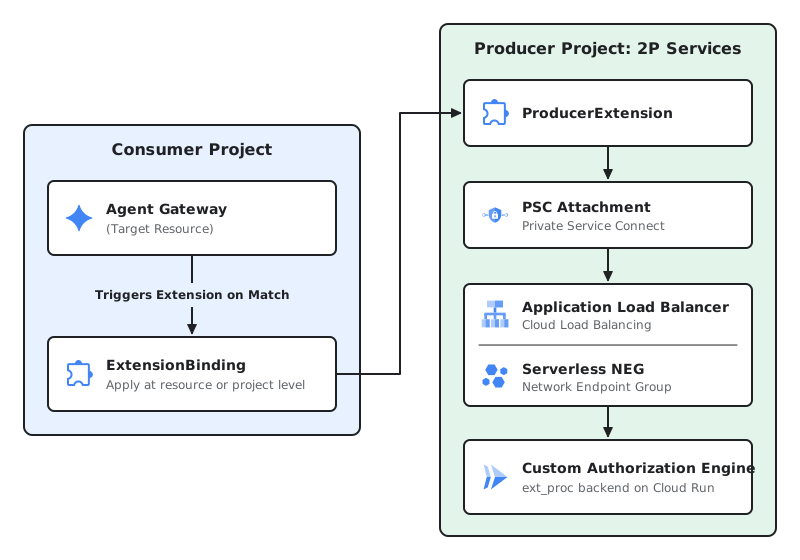
Here is the high-level deployment workflow for hosting your extension on Cloud Run:
Deploy your extension on Cloud Run: Host your custom
ext_procgRPC extension as a containerized service on Cloud Run.Create a Serverless NEG: Deploy a Serverless Network Endpoint Group (NEG) that points to the extension running on Cloud Run.
Set up a Load Balancer with the Serverless NEG backend: Set up a regional Application Load Balancer inside your VPC network, with the Serverless NEG as its backend.
Publish your Service with PSC: Create a Private Service Connect Service Attachment pointing directly at the load balancer forwarding rule. This generates a unique Service Attachment URI (for example,
projects/.../regions/.../serviceAttachments/...).Create your Producer Extension: Use this generated URI to instantiate your
ProducerExtensionresource.Bind consumer workloads: Consumers can now bind their gateways to your extension by referencing the
ProducerExtensionresource URI.
Appendix: Contextual metadata for custom extensions
To help your custom extensions make context-aware authorization and processing
decisions, Cloud de Confiance data planes pass lifecycle and resource context
directly to ext_proc servers.
This information is bundled as untyped metadata within the
metadata_context
field of the ext_proc gRPC ProcessingRequest. This metadata resides under
the com.google.serviceextensions.invocation_info namespace and uses the
standard google.protobuf.Struct format.
You can decode or convert this metadata into JSON for downstream processing. An example JSON format for a request targeting an Agent Gateway with traffic bound to an MCP server is outlined as follows:
{
 "binding_selector" : {
   "target" : "//networkservices.googleapis.com/projects/PROJECT_ID/locations/LOCATION/agentGateways/AGENT_GATEWAY_NAME",
   "project_number" : PROJECT_NUMBER,
   "to_resource": "urn:mcp:projects-PROJECT_NUMBER:projects:PROJECT_NUMBER:locations:LOCATION:agentregistry:services:SERVER_ID"
 }
}
The schema of the JSON is as follows:
message ServiceExtensionsInvocationInfo {
  message ExtensionBindingSelector {
    // The target (gateway ID, etc) in fully qualified name format.
    // For example:
    // "//networkservices.googleapis.com/projects/PROJECT_ID/locations/LOCATION/agentGateways/AGENT_GATEWAY_NAME"
    string target = 1;
    // Project number associated with the target.
    uint64 project_number = 2;
    // The destination resource within the Agent Registry that traffic is directed to.
    string to_resource = 3;
  }
  ExtensionBindingSelector binding_selector = 1;
}