
Overview
Token management policies let you monitor and accurately attribute large language model (LLM) token usage, and enforce shared token budgets across your enterprise AI agents and applications.
When AI agents interact with LLMs, request-count rate limiting such as requests per second or requests per minute isn't sufficient to control spend or capacity. A single HTTP request to an LLM can consume anywhere from a dozen to over 100,000 tokens. Without token-level governance, a single runaway agent loop can exhaust shared enterprise model quotas and cause unexpected cost spikes. To manage AI spend, enterprises also need to set model quota budgets for users and departments across their organization.
With token management policies, you can do the following:
- Calculate token usage for input, output, and cached tokens across all agent-to-model interactions.
- Attribute token consumption and estimated cost to business-relevant groups, AI applications, and individual agent identities across models hosted on Gemini Enterprise Agent Platform or any other model hosting platform.
- Enforce shared token budgets in real time, emitting threshold alerts or
returning HTTP
429 Too Many Requestswhen a token pool's budget is exhausted. - Export granular observability telemetry to Cloud Monitoring and aggregate token usage alerting in Cloud Logging.
How it works
Figure 1 shows how token management policies evaluate LLM requests and responses at the gateway layer.
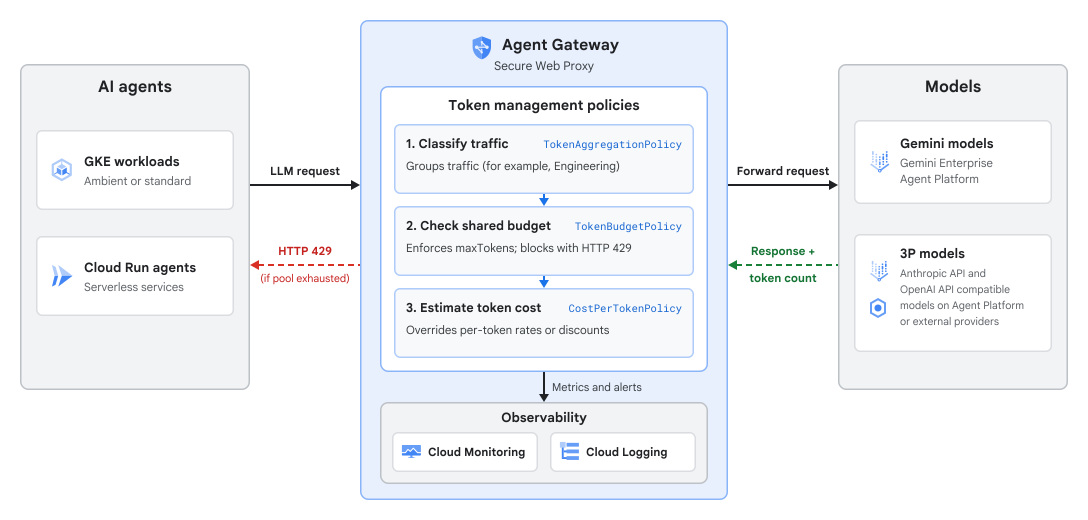
Token management uses three policy resources that work together to classify traffic, enforce token budgets, and customize cost calculations:
- Token aggregation policy (
TokenAggregationPolicy): Classifies incoming agent-to-model requests and aggregates their token consumption into logical token groups. Groupings can be based on resource hierarchy (project scope), AI applications, individual agents, destination models, or custom tags passed in HTTP request headers (including API keys). - Token budget policy (
TokenBudgetPolicy): Defines the token pools that apply token quotas across one or more token groups identified by your token aggregation policy. Each token pool specifies a maximum token count, a periodic reset window (hourly or daily), an optional list of target models, an alert threshold, and an enforcement mode. - Cost-per-token policy (
CostPerTokenPolicy): Overrides the default per-model token pricing used to calculate thegcp.token_management.token.estimated_costmetric in Monitoring. You can configure either a percentage discount on the default model price or custom per-token rates in USD for input, output, and cached tokens.
Policy dependency and creation order
Token management enforces a strict dependency hierarchy across policy resources attached to the same target scope in the following order:
TokenAggregationPolicymust be created first to classify requests into token groups for the target scope. This policy is the minimum requirement to get granular, agent-level observability into token usage.- (Optional)
TokenBudgetPolicymust be configured to limit token usage against the token groups identified in theTokenAggregationPolicy. - (Optional)
CostPerTokenPolicycan only be created after a correspondingTokenBudgetPolicyexists for the target scope.
When deleting policies, delete them in reverse order: CostPerTokenPolicy first,
then TokenBudgetPolicy, and then TokenAggregationPolicy.
Rule evaluation and default matching
Within a TokenAggregationPolicy, rules are evaluated in the order in
which they're listed, and the first matching rule wins:
- Matched traffic: When an agent request matches a rule's source criteria
(AI application or agent identity) and destination criteria (HTTP headers or
model provider endpoints), its token usage is assigned to that rule's token
group (
tokenGroup). - Catch-all rule: You can place a rule with an empty match block at the
end of your rules list to assign all remaining traffic to a default token
group, such as
Default. - Unmatched traffic: If you don't include a catch-all rule and a request
doesn't match any rule in the policy, its token consumption is recorded
under the system
unmatchedgroup in Monitoring. - Undefined pool traffic: If a
TokenPoolin your token budget policy (TokenBudgetPolicy) restricts enforcement to specific models, requests to models outside that list aren't blocked and are recorded with the pool name set toundefinedin Monitoring.
Supported environments and models
Token management policies support the following agent runtimes, Agent Gateway deployments, and models:
| Component | Supported options |
|---|---|
| AI agent runtimes |
|
| Agent Gateway deployments | Secure Web Proxy in your Cloud de Confiance by S3NS project: Enforces egress token governance for all agent-to-model requests. |
| Models |
Gemini, Anthropic, and OpenAI API compatible models across any model provider:
|
| Aggregation groupings |
|
Policy enforcement flow
With standard rate limiting, every request counts as one unit before it reaches the backend. With LLM calls, the total number of input and output tokens is known only after the model responds. To handle this, Agent Gateway processes each request in two phases:
- Pre-flight budget check (request path):
- An agent sends an inference request to an LLM endpoint through Agent Gateway.
- The gateway evaluates the request against your
TokenAggregationPolicyto identify the matchingtokenGroupand looks up the associatedTokenPoolin yourTokenBudgetPolicy. - If the pool's token budget is exhausted and strict enforcement is
enabled, the gateway rejects the request immediately with an HTTP
429status code. If the pool has remaining budget or is configured for alert-only mode, the gateway forwards the request to the LLM.
- Token reconciliation and telemetry (response path):
- When the LLM endpoint returns the completion response, the gateway
extracts the actual
input,output, andcachedtoken counts from the response payload. - Token management reconciles the consumed tokens against the pool's
maxTokensquota. - If the updated consumption crosses your warning threshold or reaches 100% of the budget, the gateway writes a warning to Logging.
- The gateway exports per-agent token consumption
(
gen_ai.client.token.usage) and estimated token cost (gcp.token_management.token.estimated_cost) metrics to Monitoring.
- When the LLM endpoint returns the completion response, the gateway
extracts the actual
Note that the output token counts are recorded only after an LLM response
completes. As a result, concurrent requests admitted before a pool reaches
maxTokens can exceed the limit before later requests are blocked with
HTTP 429. To avoid unexpected throttling, set an alertThreshold such as
0.6 or 0.8 to test new policies with validateOnly: true before
enabling strict enforcement.
Related governance controls
The following table shows how token management policies work with other Agent Platform and Cloud de Confiance governance controls:
| Governance layer | Policy or mechanism | Purpose |
|---|---|---|
| Access control | Identity and Access Management (IAM) access policies | Controls which agent identities (SPIFFE IDs) are authorized to connect to specific MCP servers, tools, and model endpoints. |
| Intent and business rules | Semantic governance policies | Evaluates proposed tool calls against natural language constraints (NLC) and user intent before execution. |
| Content safety | Model Armor | Scans prompts and responses for prompt injection, jailbreaks, and sensitive data. |
| Request-count rate limiting | Service rate limiting (RateLimitPolicy) |
Protects ingress load balancers and proxies from volumetric request
floods by limiting HTTP requests per second or minute
(countLimit). |
| LLM token and cost governance | Token management policies
(TokenAggregationPolicy, TokenBudgetPolicy,
CostPerTokenPolicy) |
Monitors and attributes LLM token usage, and enforces shared token
budgets (maxTokens) and cost overrides across agent
groups and model providers. |
Limitations
Token management policies have the following limitations:
- You can attach at most one
TokenAggregationPolicy, oneTokenBudgetPolicy, and oneCostPerTokenPolicyto a given project target scope. - Each
TokenAggregationPolicysupports up to 10 aggregation rules (rules), and eachTokenBudgetPolicysupports up to 10 token pools. - Token pools support
HOURLYandDAILYreset periods; daily budgets reset at midnight Pacific Time. - Logging generates log entries only when a token pool crosses
its configured
alertThresholdor reaches 100% ofmaxTokens(token_management_alert_logs).