Delete a dataset or annotation set
An Annotation set contains the labels associated with the uploaded source
files within a Dataset. An Annotation set is associated with a data type and an
objective.
When you no longer need a particular annotation set, you can use the
Cloud de Confiance console to delete it.
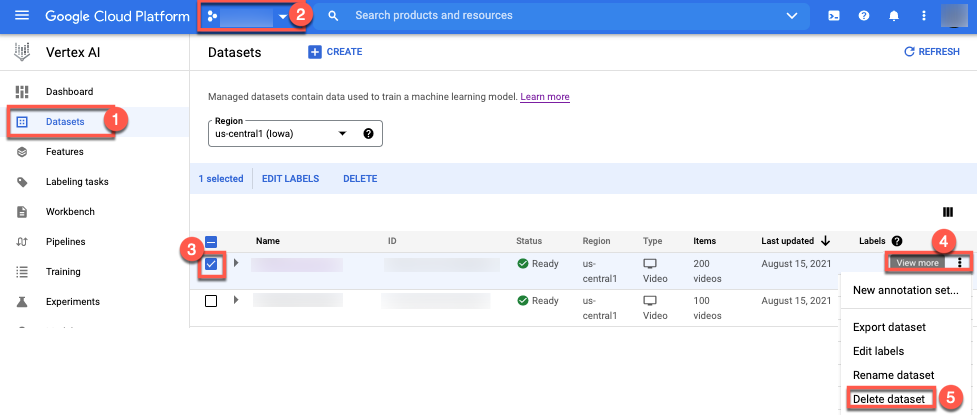
- In the Agent Platform section, go to
the Datasets page.
Go to the Datasets page
- Select your project.
- Select the checkbox corresponding to the dataset or annotation set you
want to remove.
- Click more_vert View more.
List of options appears.
- Select Delete dataset.
Except as otherwise noted, the content of this page is licensed under the Creative Commons Attribution 4.0 License, and code samples are licensed under the Apache 2.0 License. For details, see the Google Developers Site Policies. Java is a registered trademark of Oracle and/or its affiliates.
Last updated 2026-10-15 UTC.
[[["Easy to understand","easyToUnderstand","thumb-up"],["Solved my problem","solvedMyProblem","thumb-up"],["Other","otherUp","thumb-up"]],[["Missing the information I need","missingTheInformationINeed","thumb-down"],["Too complicated / too many steps","tooComplicatedTooManySteps","thumb-down"],["Out of date","outOfDate","thumb-down"],["Samples / code issue","samplesCodeIssue","thumb-down"],["Other","otherDown","thumb-down"]],["Last updated 2026-10-15 UTC."],[],[]]
