Create a Cloud de Confiance by S3NS account
If you don't have a Cloud de Confiance by S3NS account, go to https://console.cloud.s3nscloud.fr/ to create one.
Create a Cloud de Confiance project
If you have a Cloud de Confiance project that you want to use for this tutorial, you can skip this step and continue with Find your project ID. Otherwise, follow the steps in Set up a project. For more information, see Creating and managing projects.
Find your Cloud de Confiance project ID
A Cloud de Confiance project ID is a unique string used to differentiate your project from all others in Cloud de Confiance by S3NS. You use your Cloud de Confiance project ID in this tutorial to initialize the Agent Platform SDK for Python. If you know your Cloud de Confiance project ID, you can skip this step.
To locate your Cloud de Confiance project ID:
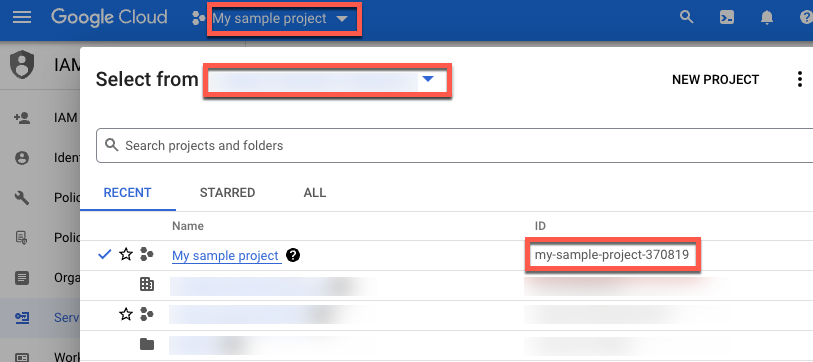
In the Cloud de Confiance console, click the list of projects in the top menu.
In the dialog that appears, locate your project. If you don't see your project, you might need to choose a different organization. Select No organization to view projects that aren't associated with an organization or that are associated with an organization that you don't have access to view.
To find a Cloud de Confiance project that you haven't accessed recently, you might need to click All instead of Recent or Starred.
After you locate your project, make a note of its Cloud de Confiance project ID in the ID column.