
הערכה ושיפור של מודלים לסיווג תמונות ב-AutoML

בדף הזה מוסבר איך להעריך את המודלים של AutoML לסיווג תמונות, כדי שתוכלו לשפר את המודל.

ב-Gemini Enterprise Agent Platform יש מדדים להערכת מודלים, כמו מדדי דיוק וזכירה, שעוזרים לכם לקבוע את הביצועים של המודלים. פלטפורמת Agent מחשבת את מדדי ההערכה באמצעות קבוצת הנתונים לבדיקה.

איך משתמשים במדדים להערכת מודלים

מדדי הערכת המודל מספקים מדידות כמותיות של ביצועי המודל בקבוצת הבדיקה. האופן שבו אתם מפרשים את המדדים האלה ומשתמשים בהם תלוי בצרכים העסקיים שלכם ובבעיה שהמודל שלכם אומן לפתור. לדוגמה, יכול להיות שאתם מוכנים לקבל יותר תוצאות שליליות מוטעות מאשר תוצאות חיוביות מוטעות, או להיפך. התשובות לשאלות האלה משפיעות על המדדים שבהם תתמקדו.

למידע נוסף על שיפור המודל, ראו שיפור המודל.

מדדי הערכה שמוחזרים על ידי Agent Platform

פלטפורמת Agent מחזירה כמה מדדי הערכה שונים, כמו דיוק, זיכרון וספי סמך. המדדים שמוחזרים על ידי Agent Platform תלויים ביעד של המודל. לדוגמה, Agent Platform מספקת מדדי הערכה שונים למודל סיווג תמונות בהשוואה למודל זיהוי אובייקטים בתמונות.

קובץ סכימה, שאפשר להוריד ממיקום ב-Cloud Storage, קובע אילו מדדי הערכה Agent Platform מספקת לכל מטרה. בכרטיסיות הבאות יש קישורים לקובצי הסכימה ותיאור של מדדי ההערכה לכל יעד של המודל.

אפשר לראות ולהוריד קובצי סכימה מהמיקום הבא ב-Cloud Storage:
gs://google-cloud-aiplatform/schema/modelevaluation/

  • ‫AuPRC: השטח מתחת לעקומת הדיוק-אחזור (PR), שנקרא גם דיוק ממוצע. הערך הזה נע בין אפס לאחד, וככל שהערך גבוה יותר, כך המודל איכותי יותר.
  • ‫Log loss: האנטרופיה המשותפת בין ההסקה של המודל לבין ערכי היעד. הערך נע בין אפס לאינסוף, וככל שהערך נמוך יותר, כך המודל איכותי יותר.
  • סף מהימנות: ציון מהימנות שקובע אילו הסקות יוחזרו. המודל מחזיר הסקות שהערך שלהן שווה לערך הזה או גבוה ממנו. סף סמך גבוה יותר מגדיל את הדיוק אבל מקטין את ה-recall. פלטפורמת Agent מחזירה מדדי סמך בערכי סף שונים כדי להראות איך הסף משפיע על הדיוק ועל האחזור.
  • אחזור: החלק של ההסקות עם המחלקה הזו שהמודל חזה בצורה נכונה. נקרא גם שיעור החיוביים האמיתיים.
  • דיוק: החלק של הסקות הסיווג שנוצרו על ידי המודל שהיו נכונות.
  • מטריצת טעויות: מטריצת טעויות מראה באיזו תדירות המודל חזה תוצאה בצורה נכונה. במקרים של חיזוי שגוי, המטריצה מראה מה המודל חזה במקום זאת. מטריצת הטעויות עוזרת להבין איפה המודל "מתבלבל" בין שתי תוצאות.

קבלת מדדי הערכה

אתם יכולים לקבל קבוצה מצטברת של מדדי הערכה למודל, ובמטרות מסוימות, מדדי הערכה לסיווג או לתווית מסוימים. מדדי הערכה של מחלקה או תווית מסוימת נקראים גם פרוסת הערכה. בקטע הבא מוסבר איך לקבל מדדי הערכה מצטברים ופרוסות הערכה באמצעות מסוף Cloud de Confiance או ה-API.

מסוף Cloud de Confiance

  1. במסוף Cloud de Confiance , בקטע Agent Platform, נכנסים לדף Models.

    כניסה לדף Models

  2. בתפריט הנפתח Region, בוחרים את האזור שבו נמצא המודל.

  3. ברשימת המודלים, לוחצים על המודל כדי לפתוח את הכרטיסייה Evaluate.

    בכרטיסייה Evaluate אפשר לראות את מדדי ההערכה המצטברים של המודל, כמו Average precision ו-Recall.

    אם ליעד המודל יש פרוסות הערכה, במסוף תוצג רשימה של תוויות. אפשר ללחוץ על תווית כדי לראות את מדדי ההערכה שלה, כמו בדוגמה הבאה:
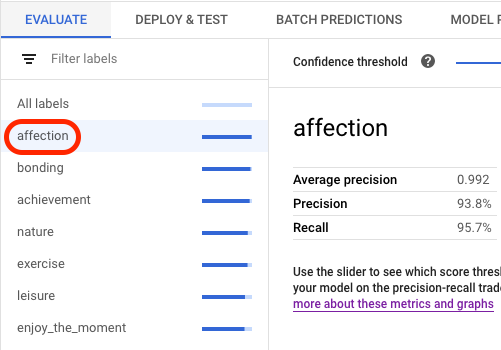
    בחירת תווית במסוף

    (תצוגה מקדימה) לכל תווית אפשר לראות תמונות חזויות שמקובצות כתוצאות חיוביות אמיתיות, תוצאות חיוביות שגויות ותוצאות שליליות שגויות. לכל תמונה יש מדד מרחק בריבוע L2, שמודד את מידת הדמיון של התמונה לתמונות האימון. תמונה שמתויגת בתג חריגה שונה יחסית מכל תמונות האימון. כדי לשפר את ביצועי המודל, כדאי להוסיף עוד תמונות לאימון שדומות לערכים החריגים.

API

בקשות ה-API לקבלת מדדי הערכה זהות לכל סוג נתונים ויעד, אבל הפלט שונה. בדוגמאות הבאות מוצגת אותה בקשה אבל עם תשובות שונות.

קבלת מדדי הערכה מצטברים של המודל

מדדי ההערכה המצטברים של המודל מספקים מידע על המודל כולו. כדי לראות מידע על פלח ספציפי, צריך להציג את הפלחים של הערכת המודל.

כדי לראות את המדדים המצטברים להערכת המודל, משתמשים ב-method‏ projects.locations.models.evaluations.get.

‫Agent Platform מחזירה מערך של מדדי רמת סמך. כל רכיב מציג מדדי הערכה בערך confidenceThreshold שונה (החל מ-0 ועד 1). כשמציגים ערכי סף שונים, אפשר לראות איך הסף משפיע על מדדים אחרים כמו דיוק ו-recall.

בוחרים כרטיסייה שמתאימה לשפה או לסביבה:

REST

לפני שמשתמשים בנתוני הבקשה, צריך להחליף את הנתונים הבאים:

  • ‫LOCATION: האזור שבו המודל מאוחסן.
  • ‫PROJECT: מזהה הפרויקט. .
  • ‫MODEL_ID: המזהה של משאב המודל.
  • ‫PROJECT_NUMBER: מספר הפרויקט שנוצר באופן אוטומטי.
  • ‫EVALUATION_ID: המזהה של הערכת המודל (מופיע בתשובה).

ה-method של ה-HTTP וכתובת ה-URL:

GET https://LOCATION-aiplatform.googleapis.com/v1/projects/PROJECT/locations/LOCATION/models/MODEL_ID/evaluations

כדי לשלוח את הבקשה אתם צריכים לבחור אחת מהאפשרויות הבאות:

curl

מריצים את הפקודה הבאה:

curl -X GET \
-H "Authorization: Bearer $(gcloud auth print-access-token)" \
"https://LOCATION-aiplatform.googleapis.com/v1/projects/PROJECT/locations/LOCATION/models/MODEL_ID/evaluations"

PowerShell

מריצים את הפקודה הבאה:

$cred = gcloud auth print-access-token
$headers = @{ "Authorization" = "Bearer $cred" }

Invoke-WebRequest `
-Method GET `
-Headers $headers `
-Uri "https://LOCATION-aiplatform.googleapis.com/v1/projects/PROJECT/locations/LOCATION/models/MODEL_ID/evaluations" | Select-Object -Expand Content

אתם אמורים לקבל תגובת JSON שדומה לזו:

Java

לפני שמנסים את הדוגמה הזו, צריך לפעול לפי הוראות ההגדרה של Java במדריך למתחילים של Agent Platform באמצעות ספריות לקוח.

כדי לבצע אימות ב-Agent Platform, צריך להגדיר את Application Default Credentials. למידע נוסף, ראו הגדרת אימות לסביבת פיתוח מקומית.

לפני שמריצים דוגמאות קוד, צריך להגדיר את משתנה הסביבה GOOGLE_CLOUD_UNIVERSE_DOMAIN לערך s3nsapis.fr.


import com.google.cloud.aiplatform.v1.ModelEvaluation;
import com.google.cloud.aiplatform.v1.ModelEvaluationName;
import com.google.cloud.aiplatform.v1.ModelServiceClient;
import com.google.cloud.aiplatform.v1.ModelServiceSettings;
import java.io.IOException;

public class GetModelEvaluationImageClassificationSample {

  public static void main(String[] args) throws IOException {
    // TODO(developer): Replace these variables before running the sample.
    // To obtain evaluationId run the code block below after setting modelServiceSettings.
    //
    // try (ModelServiceClient modelServiceClient = ModelServiceClient.create(modelServiceSettings))
    // {
    //   String location = "us-central1";
    //   ModelName modelFullId = ModelName.of(project, location, modelId);
    //   ListModelEvaluationsRequest modelEvaluationsrequest =
    //   ListModelEvaluationsRequest.newBuilder().setParent(modelFullId.toString()).build();
    //   for (ModelEvaluation modelEvaluation :
    //     modelServiceClient.listModelEvaluations(modelEvaluationsrequest).iterateAll()) {
    //       System.out.format("Model Evaluation Name: %s%n", modelEvaluation.getName());
    //   }
    // }
    String project = "YOUR_PROJECT_ID";
    String modelId = "YOUR_MODEL_ID";
    String evaluationId = "YOUR_EVALUATION_ID";
    getModelEvaluationImageClassificationSample(project, modelId, evaluationId);
  }

  static void getModelEvaluationImageClassificationSample(
      String project, String modelId, String evaluationId) throws IOException {
    ModelServiceSettings modelServiceSettings =
        ModelServiceSettings.newBuilder()
            .setEndpoint("us-central1-aiplatform.googleapis.com:443")
            .build();

    // Initialize client that will be used to send requests. This client only needs to be created
    // once, and can be reused for multiple requests. After completing all of your requests, call
    // the "close" method on the client to safely clean up any remaining background resources.
    try (ModelServiceClient modelServiceClient = ModelServiceClient.create(modelServiceSettings)) {
      String location = "us-central1";
      ModelEvaluationName modelEvaluationName =
          ModelEvaluationName.of(project, location, modelId, evaluationId);

      ModelEvaluation modelEvaluation = modelServiceClient.getModelEvaluation(modelEvaluationName);

      System.out.println("Get Model Evaluation Image Classification Response");
      System.out.format("Model Name: %s\n", modelEvaluation.getName());
      System.out.format("Metrics Schema Uri: %s\n", modelEvaluation.getMetricsSchemaUri());
      System.out.format("Metrics: %s\n", modelEvaluation.getMetrics());
      System.out.format("Create Time: %s\n", modelEvaluation.getCreateTime());
      System.out.format("Slice Dimensions: %s\n", modelEvaluation.getSliceDimensionsList());
    }
  }
}

Node.js

לפני שמנסים את הדוגמה הזו, צריך לפעול לפי הוראות ההגדרה של Node.js במדריך למתחילים של Agent Platform באמצעות ספריות לקוח.

כדי לבצע אימות ב-Agent Platform, צריך להגדיר את Application Default Credentials. למידע נוסף, ראו הגדרת אימות לסביבת פיתוח מקומית.

לפני שמריצים דוגמאות קוד, צריך להגדיר את משתנה הסביבה GOOGLE_CLOUD_UNIVERSE_DOMAIN לערך s3nsapis.fr.

/**
 * TODO(developer): Uncomment these variables before running the sample
 * (not necessary if passing values as arguments). To obtain evaluationId,
 * instantiate the client and run the following the commands.
 */
// const parentName = `projects/${project}/locations/${location}/models/${modelId}`;
// const evalRequest = {
//   parent: parentName
// };
// const [evalResponse] = await modelServiceClient.listModelEvaluations(evalRequest);
// console.log(evalResponse);

// const modelId = 'YOUR_MODEL_ID';
// const evaluationId = 'YOUR_EVALUATION_ID';
// const project = 'YOUR_PROJECT_ID';
// const location = 'YOUR_PROJECT_LOCATION';

// Imports the Google Cloud Model Service Client library
const {ModelServiceClient} = require('@google-cloud/aiplatform');

// Specifies the location of the api endpoint
const clientOptions = {
  apiEndpoint: 'us-central1-aiplatform.googleapis.com',
};

// Instantiates a client
const modelServiceClient = new ModelServiceClient(clientOptions);

async function getModelEvaluationImageClassification() {
  // Configure the name resources
  const name = `projects/${project}/locations/${location}/models/${modelId}/evaluations/${evaluationId}`;
  const request = {
    name,
  };

  // Create get model evaluation request
  const [response] = await modelServiceClient.getModelEvaluation(request);

  console.log('Get model evaluation image classification response');
  console.log(`\tName : ${response.name}`);
  console.log(`\tMetrics schema uri : ${response.metricsSchemaUri}`);
  console.log(`\tMetrics : ${JSON.stringify(response.metrics)}`);
  console.log(`\tCreate time : ${JSON.stringify(response.createTime)}`);
  console.log(`\tSlice dimensions : ${response.sliceDimensions}`);

  const modelExplanation = response.modelExplanation;
  if (modelExplanation === null) {
    console.log(`\tModel explanation: ${JSON.stringify(modelExplanation)}`);
  } else {
    const meanAttributions = modelExplanation.meanAttributions;
    for (const meanAttribution of meanAttributions) {
      console.log('\t\tMean attribution');
      console.log(
        `\t\t\tBaseline output value : \
           ${meanAttribution.baselineOutputValue}`
      );
      console.log(
        `\t\t\tInstance output value : \
           ${meanAttribution.instanceOutputValue}`
      );
      console.log(
        `\t\t\tFeature attributions : \
           ${JSON.stringify(meanAttribution.featureAttributions)}`
      );
      console.log(`\t\t\tOutput index : ${meanAttribution.outputIndex}`);
      console.log(
        `\t\t\tOutput display name : \
           ${meanAttribution.outputDisplayName}`
      );
      console.log(
        `\t\t\tApproximation error : \
           ${meanAttribution.approximationError}`
      );
    }
  }
}
getModelEvaluationImageClassification();

Python

במאמר התקנת Vertex AI SDK ל-Python מוסבר איך להתקין או לעדכן את Vertex AI SDK ל-Python. מידע נוסף מופיע ב מאמרי העזרה של ה-API מבוסס-Python.

from google.cloud import aiplatform


def get_model_evaluation_image_classification_sample(
    project: str,
    model_id: str,
    evaluation_id: str,
    location: str = "us-central1",
    api_endpoint: str = "us-central1-aiplatform.googleapis.com",
):
    """
    To obtain evaluation_id run the following commands where LOCATION
    is the region where the model is stored, PROJECT is the project ID,
    and MODEL_ID is the ID of your model.

    model_client = aiplatform.gapic.ModelServiceClient(
        client_options={
            'api_endpoint':'LOCATION-aiplatform.googleapis.com'
            }
        )
    evaluations = model_client.list_model_evaluations(parent='projects/PROJECT/locations/LOCATION/models/MODEL_ID')
    print("evaluations:", evaluations)
    """
    # The AI Platform services require regional API endpoints.
    client_options = {"api_endpoint": api_endpoint}
    # Initialize client that will be used to create and send requests.
    # This client only needs to be created once, and can be reused for multiple requests.
    client = aiplatform.gapic.ModelServiceClient(client_options=client_options)
    name = client.model_evaluation_path(
        project=project, location=location, model=model_id, evaluation=evaluation_id
    )
    response = client.get_model_evaluation(name=name)
    print("response:", response)

רשימה של כל פרוסות ההערכה

ה-method‏ projects.locations.models.evaluations.slices.list מציגה את כל פרוסות ההערכה של המודל. כדי לעשות את זה, אתם צריכים את מזהה ההערכה של המודל, שאותו אפשר לקבל כשמציגים את מדדי ההערכה המצטברים.

אתם יכולים להשתמש בפרוסות של הערכת המודל כדי לקבוע את הביצועים של המודל בתווית ספציפית. השדה value מציין לאיזו תווית המדדים מתייחסים.

‫Agent Platform מחזירה מערך של מדדי רמת סמך. כל רכיב מציג מדדי הערכה בערך confidenceThreshold שונה (החל מ-0 ועד 1). כשמציגים ערכי סף שונים, אפשר לראות איך הסף משפיע על מדדים אחרים כמו דיוק ו-recall.

REST

לפני שמשתמשים בנתוני הבקשה, צריך להחליף את הנתונים הבאים:

  • ‫LOCATION: האזור שבו נמצא המודל. לדוגמה: us-central1.
  • PROJECT: .
  • ‫MODEL_ID: מזהה המודל.
  • ‫EVALUATION_ID: המזהה של הערכת המודל שמכילה את פרוסות ההערכה שרוצים להציג.

ה-method של ה-HTTP וכתובת ה-URL:

GET https://LOCATION-aiplatform.googleapis.com/v1/projects/PROJECT/locations/LOCATION/models/MODEL_ID/evaluations/EVALUATION_ID/slices

כדי לשלוח את הבקשה אתם צריכים לבחור אחת מהאפשרויות הבאות:

curl

מריצים את הפקודה הבאה:

curl -X GET \
-H "Authorization: Bearer $(gcloud auth print-access-token)" \
"https://LOCATION-aiplatform.googleapis.com/v1/projects/PROJECT/locations/LOCATION/models/MODEL_ID/evaluations/EVALUATION_ID/slices"

PowerShell

מריצים את הפקודה הבאה:

$cred = gcloud auth print-access-token
$headers = @{ "Authorization" = "Bearer $cred" }

Invoke-WebRequest `
-Method GET `
-Headers $headers `
-Uri "https://LOCATION-aiplatform.googleapis.com/v1/projects/PROJECT/locations/LOCATION/models/MODEL_ID/evaluations/EVALUATION_ID/slices" | Select-Object -Expand Content

אתם אמורים לקבל תגובת JSON שדומה לזו:

Java

לפני שמנסים את הדוגמה הזו, צריך לפעול לפי הוראות ההגדרה של Java במדריך למתחילים של Agent Platform באמצעות ספריות לקוח.

כדי לבצע אימות ב-Agent Platform, צריך להגדיר את Application Default Credentials. למידע נוסף, ראו הגדרת אימות לסביבת פיתוח מקומית.

לפני שמריצים דוגמאות קוד, צריך להגדיר את משתנה הסביבה GOOGLE_CLOUD_UNIVERSE_DOMAIN לערך s3nsapis.fr.


import com.google.cloud.aiplatform.v1.ModelEvaluationName;
import com.google.cloud.aiplatform.v1.ModelEvaluationSlice;
import com.google.cloud.aiplatform.v1.ModelEvaluationSlice.Slice;
import com.google.cloud.aiplatform.v1.ModelServiceClient;
import com.google.cloud.aiplatform.v1.ModelServiceSettings;
import java.io.IOException;

public class ListModelEvaluationSliceSample {

  public static void main(String[] args) throws IOException {
    // TODO(developer): Replace these variables before running the sample.
    // To obtain evaluationId run the code block below after setting modelServiceSettings.
    //
    // try (ModelServiceClient modelServiceClient = ModelServiceClient.create(modelServiceSettings))
    // {
    //   String location = "us-central1";
    //   ModelName modelFullId = ModelName.of(project, location, modelId);
    //   ListModelEvaluationsRequest modelEvaluationsrequest =
    //   ListModelEvaluationsRequest.newBuilder().setParent(modelFullId.toString()).build();
    //   for (ModelEvaluation modelEvaluation :
    //     modelServiceClient.listModelEvaluations(modelEvaluationsrequest).iterateAll()) {
    //       System.out.format("Model Evaluation Name: %s%n", modelEvaluation.getName());
    //   }
    // }
    String project = "YOUR_PROJECT_ID";
    String modelId = "YOUR_MODEL_ID";
    String evaluationId = "YOUR_EVALUATION_ID";
    listModelEvaluationSliceSample(project, modelId, evaluationId);
  }

  static void listModelEvaluationSliceSample(String project, String modelId, String evaluationId)
      throws IOException {
    ModelServiceSettings modelServiceSettings =
        ModelServiceSettings.newBuilder()
            .setEndpoint("us-central1-aiplatform.googleapis.com:443")
            .build();

    // Initialize client that will be used to send requests. This client only needs to be created
    // once, and can be reused for multiple requests. After completing all of your requests, call
    // the "close" method on the client to safely clean up any remaining background resources.
    try (ModelServiceClient modelServiceClient = ModelServiceClient.create(modelServiceSettings)) {
      String location = "us-central1";
      ModelEvaluationName modelEvaluationName =
          ModelEvaluationName.of(project, location, modelId, evaluationId);

      for (ModelEvaluationSlice modelEvaluationSlice :
          modelServiceClient.listModelEvaluationSlices(modelEvaluationName).iterateAll()) {
        System.out.format("Model Evaluation Slice Name: %s\n", modelEvaluationSlice.getName());
        System.out.format("Metrics Schema Uri: %s\n", modelEvaluationSlice.getMetricsSchemaUri());
        System.out.format("Metrics: %s\n", modelEvaluationSlice.getMetrics());
        System.out.format("Create Time: %s\n", modelEvaluationSlice.getCreateTime());

        Slice slice = modelEvaluationSlice.getSlice();
        System.out.format("Slice Dimensions: %s\n", slice.getDimension());
        System.out.format("Slice Value: %s\n\n", slice.getValue());
      }
    }
  }
}

Node.js

לפני שמנסים את הדוגמה הזו, צריך לפעול לפי הוראות ההגדרה של Node.js במדריך למתחילים של Agent Platform באמצעות ספריות לקוח.

כדי לבצע אימות ב-Agent Platform, צריך להגדיר את Application Default Credentials. למידע נוסף, ראו הגדרת אימות לסביבת פיתוח מקומית.

לפני שמריצים דוגמאות קוד, צריך להגדיר את משתנה הסביבה GOOGLE_CLOUD_UNIVERSE_DOMAIN לערך s3nsapis.fr.

/**
 * TODO(developer): Uncomment these variables before running the sample
 * (not necessary if passing values as arguments). To obtain evaluationId,
 * instantiate the client and run the following the commands.
 */
// const parentName = `projects/${project}/locations/${location}/models/${modelId}`;
// const evalRequest = {
//   parent: parentName
// };
// const [evalResponse] = await modelServiceClient.listModelEvaluations(evalRequest);
// console.log(evalResponse);

// const modelId = 'YOUR_MODEL_ID';
// const evaluationId = 'YOUR_EVALUATION_ID';
// const project = 'YOUR_PROJECT_ID';
// const location = 'YOUR_PROJECT_LOCATION';

// Imports the Google Cloud Model Service Client library
const {ModelServiceClient} = require('@google-cloud/aiplatform');

// Specifies the location of the api endpoint
const clientOptions = {
  apiEndpoint: 'us-central1-aiplatform.googleapis.com',
};

// Instantiates a client
const modelServiceClient = new ModelServiceClient(clientOptions);

async function listModelEvaluationSlices() {
  // Configure the parent resources
  const parent = `projects/${project}/locations/${location}/models/${modelId}/evaluations/${evaluationId}`;
  const request = {
    parent,
  };

  // Get and print out a list of all the evaluation slices for this resource
  const [response] =
    await modelServiceClient.listModelEvaluationSlices(request);
  console.log('List model evaluation response', response);
  console.log(response);
}
listModelEvaluationSlices();

Python

במאמר התקנת Vertex AI SDK ל-Python מוסבר איך להתקין או לעדכן את Vertex AI SDK ל-Python. מידע נוסף מופיע ב מאמרי העזרה של ה-API מבוסס-Python.

from google.cloud import aiplatform


def list_model_evaluation_slices_sample(
    project: str,
    model_id: str,
    evaluation_id: str,
    location: str = "us-central1",
    api_endpoint: str = "us-central1-aiplatform.googleapis.com",
):
    """
    To obtain evaluation_id run the following commands where LOCATION
    is the region where the model is stored, PROJECT is the project ID,
    and MODEL_ID is the ID of your model.

    model_client = aiplatform.gapic.ModelServiceClient(
        client_options={
            'api_endpoint':'LOCATION-aiplatform.googleapis.com'
            }
        )
    evaluations = model_client.list_model_evaluations(parent='projects/PROJECT/locations/LOCATION/models/MODEL_ID')
    print("evaluations:", evaluations)
    """
    # The AI Platform services require regional API endpoints.
    client_options = {"api_endpoint": api_endpoint}
    # Initialize client that will be used to create and send requests.
    # This client only needs to be created once, and can be reused for multiple requests.
    client = aiplatform.gapic.ModelServiceClient(client_options=client_options)
    parent = client.model_evaluation_path(
        project=project, location=location, model=model_id, evaluation=evaluation_id
    )
    response = client.list_model_evaluation_slices(parent=parent)
    for model_evaluation_slice in response:
        print("model_evaluation_slice:", model_evaluation_slice)

קבלת מדדים לפרוסה אחת

כדי לראות את מדדי ההערכה של פרוסה אחת, משתמשים ב-method‏ projects.locations.models.evaluations.slices.get. צריך להיות לכם את מזהה הפרוסה, שמופיע כשמציגים את כל הפרוסות. הדוגמה הבאה רלוונטית לכל סוגי הנתונים והיעדים.

REST

לפני שמשתמשים בנתוני הבקשה, צריך להחליף את הנתונים הבאים:

  • ‫LOCATION: האזור שבו נמצא המודל. לדוגמה, us-central1.
  • PROJECT: .
  • ‫MODEL_ID: מזהה המודל.
  • ‫EVALUATION_ID: המזהה של הערכת המודל שמכילה את פלח ההערכה שרוצים לאחזר.
  • ‫SLICE_ID: המזהה של פרוסת ההערכה שרוצים לקבל.
  • ‫PROJECT_NUMBER: מספר הפרויקט שנוצר באופן אוטומטי.
  • ‫EVALUATION_METRIC_SCHEMA_FILE_NAME: השם של קובץ סכימה שמגדיר את מדדי ההערכה שיוחזרו, כמו classification_metrics_1.0.0.

ה-method של ה-HTTP וכתובת ה-URL:

GET https://LOCATION-aiplatform.googleapis.com/v1/projects/PROJECT/locations/LOCATION/models/MODEL_ID/evaluations/EVALUATION_ID/slices/SLICE_ID

כדי לשלוח את הבקשה אתם צריכים לבחור אחת מהאפשרויות הבאות:

curl

מריצים את הפקודה הבאה:

curl -X GET \
-H "Authorization: Bearer $(gcloud auth print-access-token)" \
"https://LOCATION-aiplatform.googleapis.com/v1/projects/PROJECT/locations/LOCATION/models/MODEL_ID/evaluations/EVALUATION_ID/slices/SLICE_ID"

PowerShell

מריצים את הפקודה הבאה:

$cred = gcloud auth print-access-token
$headers = @{ "Authorization" = "Bearer $cred" }

Invoke-WebRequest `
-Method GET `
-Headers $headers `
-Uri "https://LOCATION-aiplatform.googleapis.com/v1/projects/PROJECT/locations/LOCATION/models/MODEL_ID/evaluations/EVALUATION_ID/slices/SLICE_ID" | Select-Object -Expand Content

אתם אמורים לקבל תגובת JSON שדומה לזו:

Java

לפני שמנסים את הדוגמה הזו, צריך לפעול לפי הוראות ההגדרה של Java במדריך למתחילים של Agent Platform באמצעות ספריות לקוח.

כדי לבצע אימות ב-Agent Platform, צריך להגדיר את Application Default Credentials. למידע נוסף, ראו הגדרת אימות לסביבת פיתוח מקומית.

לפני שמריצים דוגמאות קוד, צריך להגדיר את משתנה הסביבה GOOGLE_CLOUD_UNIVERSE_DOMAIN לערך s3nsapis.fr.


import com.google.cloud.aiplatform.v1.ModelEvaluationSlice;
import com.google.cloud.aiplatform.v1.ModelEvaluationSlice.Slice;
import com.google.cloud.aiplatform.v1.ModelEvaluationSliceName;
import com.google.cloud.aiplatform.v1.ModelServiceClient;
import com.google.cloud.aiplatform.v1.ModelServiceSettings;
import java.io.IOException;

public class GetModelEvaluationSliceSample {

  public static void main(String[] args) throws IOException {
    // TODO(developer): Replace these variables before running the sample.
    // To obtain evaluationId run the code block below after setting modelServiceSettings.
    //
    // try (ModelServiceClient modelServiceClient = ModelServiceClient.create(modelServiceSettings))
    // {
    //   String location = "us-central1";
    //   ModelName modelFullId = ModelName.of(project, location, modelId);
    //   ListModelEvaluationsRequest modelEvaluationsrequest =
    //   ListModelEvaluationsRequest.newBuilder().setParent(modelFullId.toString()).build();
    //   for (ModelEvaluation modelEvaluation :
    //     modelServiceClient.listModelEvaluations(modelEvaluationsrequest).iterateAll()) {
    //       System.out.format("Model Evaluation Name: %s%n", modelEvaluation.getName());
    //   }
    // }
    String project = "YOUR_PROJECT_ID";
    String modelId = "YOUR_MODEL_ID";
    String evaluationId = "YOUR_EVALUATION_ID";
    String sliceId = "YOUR_SLICE_ID";
    getModelEvaluationSliceSample(project, modelId, evaluationId, sliceId);
  }

  static void getModelEvaluationSliceSample(
      String project, String modelId, String evaluationId, String sliceId) throws IOException {
    ModelServiceSettings modelServiceSettings =
        ModelServiceSettings.newBuilder()
            .setEndpoint("us-central1-aiplatform.googleapis.com:443")
            .build();

    // Initialize client that will be used to send requests. This client only needs to be created
    // once, and can be reused for multiple requests. After completing all of your requests, call
    // the "close" method on the client to safely clean up any remaining background resources.
    try (ModelServiceClient modelServiceClient = ModelServiceClient.create(modelServiceSettings)) {
      String location = "us-central1";
      ModelEvaluationSliceName modelEvaluationSliceName =
          ModelEvaluationSliceName.of(project, location, modelId, evaluationId, sliceId);

      ModelEvaluationSlice modelEvaluationSlice =
          modelServiceClient.getModelEvaluationSlice(modelEvaluationSliceName);

      System.out.println("Get Model Evaluation Slice Response");
      System.out.format("Model Evaluation Slice Name: %s\n", modelEvaluationSlice.getName());
      System.out.format("Metrics Schema Uri: %s\n", modelEvaluationSlice.getMetricsSchemaUri());
      System.out.format("Metrics: %s\n", modelEvaluationSlice.getMetrics());
      System.out.format("Create Time: %s\n", modelEvaluationSlice.getCreateTime());

      Slice slice = modelEvaluationSlice.getSlice();
      System.out.format("Slice Dimensions: %s\n", slice.getDimension());
      System.out.format("Slice Value: %s\n", slice.getValue());
    }
  }
}

Node.js

לפני שמנסים את הדוגמה הזו, צריך לפעול לפי הוראות ההגדרה של Node.js במדריך למתחילים של Agent Platform באמצעות ספריות לקוח.

כדי לבצע אימות ב-Agent Platform, צריך להגדיר את Application Default Credentials. למידע נוסף, ראו הגדרת אימות לסביבת פיתוח מקומית.

לפני שמריצים דוגמאות קוד, צריך להגדיר את משתנה הסביבה GOOGLE_CLOUD_UNIVERSE_DOMAIN לערך s3nsapis.fr.

/**
 * TODO(developer): Uncomment these variables before running the sample
 * (not necessary if passing values as arguments). To obtain evaluationId,
 * instantiate the client and run the following the commands.
 */
// const parentName = `projects/${project}/locations/${location}/models/${modelId}`;
// const evalRequest = {
//   parent: parentName
// };
// const [evalResponse] = await modelServiceClient.listModelEvaluations(evalRequest);
// console.log(evalResponse);

// const modelId = 'YOUR_MODEL_ID';
// const evaluationId = 'YOUR_EVALUATION_ID';
// const sliceId = 'YOUR_SLICE_ID';
// const project = 'YOUR_PROJECT_ID';
// const location = 'YOUR_PROJECT_LOCATION';

// Imports the Google Cloud Model Service client library
const {ModelServiceClient} = require('@google-cloud/aiplatform');
// Specifies the location of the api endpoint
const clientOptions = {
  apiEndpoint: 'us-central1-aiplatform.googleapis.com',
};
// Specifies the location of the api endpoint
const modelServiceClient = new ModelServiceClient(clientOptions);

async function getModelEvaluationSlice() {
  // Configure the parent resource
  const name = `projects/${project}/locations/${location}/models/${modelId}/evaluations/${evaluationId}/slices/${sliceId}`;
  const request = {
    name,
  };

  // Get and print out a list of all the endpoints for this resource
  const [response] =
    await modelServiceClient.getModelEvaluationSlice(request);

  console.log('Get model evaluation slice');
  console.log(`\tName : ${response.name}`);
  console.log(`\tMetrics_Schema_Uri : ${response.metricsSchemaUri}`);
  console.log(`\tMetrics : ${JSON.stringify(response.metrics)}`);
  console.log(`\tCreate time : ${JSON.stringify(response.createTime)}`);

  console.log('Slice');
  const slice = response.slice;
  console.log(`\tDimension :${slice.dimension}`);
  console.log(`\tValue :${slice.value}`);
}
getModelEvaluationSlice();

Python

במאמר התקנת Vertex AI SDK ל-Python מוסבר איך להתקין או לעדכן את Vertex AI SDK ל-Python. מידע נוסף מופיע ב מאמרי העזרה של ה-API מבוסס-Python.

from google.cloud import aiplatform


def get_model_evaluation_slice_sample(
    project: str,
    model_id: str,
    evaluation_id: str,
    slice_id: str,
    location: str = "us-central1",
    api_endpoint: str = "us-central1-aiplatform.googleapis.com",
):
    """
    To obtain evaluation_id run the following commands where LOCATION
    is the region where the model is stored, PROJECT is the project ID,
    and MODEL_ID is the ID of your model.

    model_client = aiplatform.gapic.ModelServiceClient(
        client_options={
            'api_endpoint':'LOCATION-aiplatform.googleapis.com'
            }
        )
    evaluations = model_client.list_model_evaluations(parent='projects/PROJECT/locations/LOCATION/models/MODEL_ID')
    print("evaluations:", evaluations)
    """
    # The AI Platform services require regional API endpoints.
    client_options = {"api_endpoint": api_endpoint}
    # Initialize client that will be used to create and send requests.
    # This client only needs to be created once, and can be reused for multiple requests.
    client = aiplatform.gapic.ModelServiceClient(client_options=client_options)
    name = client.model_evaluation_slice_path(
        project=project,
        location=location,
        model=model_id,
        evaluation=evaluation_id,
        slice=slice_id,
    )
    response = client.get_model_evaluation_slice(name=name)
    print("response:", response)

שיפור המודל

מדדי הערכת המודל מספקים נקודת התחלה לניפוי באגים במודל, אם המודל לא עומד בציפיות שלכם. לדוגמה, ציוני דיוק וזכירה נמוכים יכולים להצביע על כך שהמודל צריך נתוני אימון נוספים או שיש לו תוויות לא עקביות. דיוק וזכירה מושלמים יכולים להצביע על כך שקל מדי לחזות את נתוני הבדיקה, וייתכן שהם לא יתאימו להכללה.

אתם יכולים לחזור על נתוני האימון וליצור מודל חדש. אחרי שיוצרים מודל חדש, אפשר להשוות בין מדדי ההערכה של המודל הקיים לבין אלה של המודל החדש.

ההצעות הבאות יכולות לעזור לכם לשפר מודלים שמוסיפים תוויות לפריטים, כמו מודלים של סיווג או זיהוי:

  • כדאי להוסיף עוד דוגמאות או מגוון רחב יותר של דוגמאות בנתוני האימון. לדוגמה, במודל לסיווג תמונות, אפשר לכלול תמונות בזווית רחבה יותר, תמונות ברזולוציה גבוהה או נמוכה יותר או נקודות מבט שונות. למידע נוסף, קראו את המאמר הכנת נתונים.
  • כדאי להסיר מחלקות או תוויות שאין להן הרבה דוגמאות. אם אין מספיק דוגמאות, המודל לא יכול לחזות באופן עקבי ובטוח את הסיווגים או התוויות האלה.
  • מכונות לא יכולות לפרש את השמות של המחלקות או התוויות, והן לא מבינות את ההבדלים הדקים ביניהן, כמו "דלת" ו"דלת_עם_ידית". אתם צריכים לספק נתונים שיעזרו למכונות לזהות את הניואנסים האלה.
  • כדי להפחית את הבלבול של המודל, כדאי להוסיף לנתונים עוד דוגמאות של תוצאות חיוביות אמיתיות ותוצאות שליליות אמיתיות, במיוחד דוגמאות שקרובות לגבול ההחלטה.
  • לציין פיצול נתונים משלכם (אימון, אימות ובדיקה). פלטפורמת Agent מקצה פריטים לכל קבוצה באופן אקראי. לכן, כפילויות חלקיות יכולות להיות מוקצות בקבוצות הנתונים לאימון ולתיקוף, מה שעלול להוביל להתאמת יתר (overfitting) ואז לביצועים נמוכים בקבוצת הנתונים לבדיקה. למידע נוסף על הגדרת פיצול נתונים משלכם, קראו את המאמר מידע על פיצולי נתונים למודלים של AutoML.
  • אם מדדי ההערכה של המודל כוללים מטריצת בלבול, תוכלו לראות אם המודל מבלבל בין שתי תוויות, כלומר אם המודל חוזה תווית מסוימת באופן משמעותי יותר מהתווית האמיתית. בודקים את הנתונים ומוודאים שהדוגמאות מתויגות בצורה נכונה.
  • אם זמן האימון היה קצר (מספר מקסימלי נמוך של שעות שימוש בצומת), יכול להיות שתקבלו מודל באיכות גבוהה יותר אם תאפשרו לו להתאמן במשך זמן ארוך יותר (מספר מקסימלי גבוה יותר של שעות שימוש בצומת).