
評估及疊代 AutoML 圖片物件偵測模型

本頁說明如何評估 AutoML 圖片物件偵測模型,以便疊代模型。

Gemini Enterprise Agent Platform 提供模型評估指標,協助您判斷模型效能,例如精確度和召回率指標。Agent Platform 會使用測試集計算評估指標。

如何使用模型評估指標

模型評估指標會透過量化方式,評估模型在測試集的效能。如何解讀及使用這些指標,取決於您的業務需求及模型接受訓練解決的問題。舉例來說,您對偽陽性的容忍度可能低於偽陰性,反之亦然。這類問題會影響您著重的指標。

如要進一步瞭解如何疊代模型以提升效能,請參閱「疊代模型」。

Agent Platform 回傳的評估指標

Agent Platform 會傳回多種不同的評估指標,例如精確度、喚回率和信賴度門檻。Agent Platform 傳回的指標取決於模型的目標。舉例來說,與圖片物件分類模型相比,Agent Platform 為圖片物件偵測模型提供不同的評估指標。

您可以從 Cloud Storage 位置下載結構定義檔案,該檔案會決定 Agent Platform 為每個目標提供的評估指標。以下分頁提供架構檔案的連結,並說明各模型目標的評估指標。

您可以從下列 Cloud Storage 位置查看及下載結構定義檔案:
gs://google-cloud-aiplatform/schema/modelevaluation/

  • 交併比門檻:交集除以聯集門檻值,用於判斷要傳回哪些推論結果。模型會傳回等於或大於這個值的推論結果。門檻越高,預測定界框值就越接近實際定界框值。
  • 平均精確度的平均值:又稱「平均精確度」。這個值介於零到一之間,值越大代表模型品質越高。
  • 可信度門檻:決定要傳回哪些推論結果的可信度分數。模型會傳回大於或等於這個值的推論結果。可信度門檻越高,精確度就會越高,但喚回度則會越低。Agent Platform 會傳回不同門檻值的信賴度指標,顯示門檻對精確度和召回率的影響。
  • 喚回度:模型正確預測出含有此類別的推論比例,也稱為「真陽率」。
  • 精確度:模型產生的正確分類推論比例。
  • F1 分數:精確度與召回率的調和平均數。如果您要在精確度與喚回度之間找出平衡,且類別分布並不平均,F1 這個指標很有用。
  • 定界框平均精確度的平均值:定界框評估的單一指標:所有 meanAveragePrecision 的平均 boundingBoxMetrics。

取得評估指標

您可以取得模型的匯總評估指標,以及特定類別或標籤的評估指標 (適用於部分目標)。特定類別或標籤的評估指標也稱為「評估切片」。以下內容說明如何使用 Cloud de Confiance 控制台或 API 取得匯總評估指標和評估切片。

Cloud de Confiance 控制台

  1. 前往 Cloud de Confiance 控制台的「Agent Platform」部分,然後前往「Models」頁面。

    前往「模型」頁面

  2. 在「Region」(區域) 下拉式選單中,選取模型所在的區域。

  3. 在模型清單中點選模型,開啟模型的「評估」分頁。

    在「評估」分頁中,您可以查看模型的匯總評估指標,例如平均精確度和召回率。

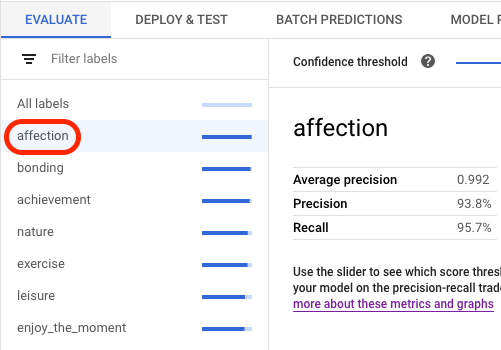
    如果模型目標有評估配量,控制台會顯示標籤清單。您可以按一下標籤,查看該標籤的評估指標,如下列範例所示:
    主控台中的標籤選取畫面

API

取得評估指標的 API 要求適用於每種資料類型和目標,但輸出內容不同。下列範例顯示相同要求,但回應不同。

取得模型評估指標匯總

匯總模型評估指標提供模型整體相關資訊。如要查看特定切片的相關資訊,請列出模型評估切片。

如要查看匯總模型評估指標,請使用 projects.locations.models.evaluations.get 方法。

如果是邊界框指標,Agent Platform 會傳回不同 IoU 門檻值 (介於 0 和 1 之間) 和信賴度門檻值 (介於 0 和 1 之間) 的指標值陣列。舉例來說,您可以將評估指標的 IoU 門檻設為 0.85,信心門檻設為 0.8228。查看這些不同的門檻值,即可瞭解這些值對精確度和召回率等其他指標的影響。

選取與語言或環境對應的分頁:

REST

使用任何要求資料之前,請先修改下列項目的值:

  • LOCATION:模型儲存所在的區域。
  • PROJECT:您的專案 ID。
  • MODEL_ID:模型資源的 ID。
  • PROJECT_NUMBER:系統自動為專案產生的專案編號。
  • EVALUATION_ID:模型評估的 ID (會顯示在回應中)。

HTTP 方法和網址:

GET https://LOCATION-aiplatform.googleapis.com/v1/projects/PROJECT/locations/LOCATION/models/MODEL_ID/evaluations

如要傳送要求,請選擇以下其中一個選項:

curl

執行下列指令:

curl -X GET \
-H "Authorization: Bearer $(gcloud auth print-access-token)" \
"https://LOCATION-aiplatform.googleapis.com/v1/projects/PROJECT/locations/LOCATION/models/MODEL_ID/evaluations"

PowerShell

執行下列指令:

$cred = gcloud auth print-access-token
$headers = @{ "Authorization" = "Bearer $cred" }

Invoke-WebRequest `
-Method GET `
-Headers $headers `
-Uri "https://LOCATION-aiplatform.googleapis.com/v1/projects/PROJECT/locations/LOCATION/models/MODEL_ID/evaluations" | Select-Object -Expand Content

您應該會收到如下的 JSON 回覆:

Java

在試用這個範例之前,請先按照「使用用戶端程式庫的 Agent Platform 快速入門導覽課程」中的 Java 設定說明操作。詳情請參閱 Agent Platform Java API 參考文件。

如要向 Agent Platform 進行驗證,請設定應用程式預設憑證。 詳情請參閱「為本機開發環境設定驗證機制」。

執行程式碼範例前,請將 GOOGLE_CLOUD_UNIVERSE_DOMAIN 環境變數設為 s3nsapis.fr。


import com.google.cloud.aiplatform.v1.ModelEvaluation;
import com.google.cloud.aiplatform.v1.ModelEvaluationName;
import com.google.cloud.aiplatform.v1.ModelServiceClient;
import com.google.cloud.aiplatform.v1.ModelServiceSettings;
import java.io.IOException;

public class GetModelEvaluationImageObjectDetectionSample {

  public static void main(String[] args) throws IOException {
    // TODO(developer): Replace these variables before running the sample.
    // To obtain evaluationId run the code block below after setting modelServiceSettings.
    //
    // try (ModelServiceClient modelServiceClient = ModelServiceClient.create(modelServiceSettings))
    // {
    //   String location = "us-central1";
    //   ModelName modelFullId = ModelName.of(project, location, modelId);
    //   ListModelEvaluationsRequest modelEvaluationsrequest =
    //   ListModelEvaluationsRequest.newBuilder().setParent(modelFullId.toString()).build();
    //   for (ModelEvaluation modelEvaluation :
    //     modelServiceClient.listModelEvaluations(modelEvaluationsrequest).iterateAll()) {
    //       System.out.format("Model Evaluation Name: %s%n", modelEvaluation.getName());
    //   }
    // }
    String project = "YOUR_PROJECT_ID";
    String modelId = "YOUR_MODEL_ID";
    String evaluationId = "YOUR_EVALUATION_ID";
    getModelEvaluationImageObjectDetectionSample(project, modelId, evaluationId);
  }

  static void getModelEvaluationImageObjectDetectionSample(
      String project, String modelId, String evaluationId) throws IOException {
    ModelServiceSettings modelServiceSettings =
        ModelServiceSettings.newBuilder()
            .setEndpoint("us-central1-aiplatform.googleapis.com:443")
            .build();

    // Initialize client that will be used to send requests. This client only needs to be created
    // once, and can be reused for multiple requests. After completing all of your requests, call
    // the "close" method on the client to safely clean up any remaining background resources.
    try (ModelServiceClient modelServiceClient = ModelServiceClient.create(modelServiceSettings)) {
      String location = "us-central1";
      ModelEvaluationName modelEvaluationName =
          ModelEvaluationName.of(project, location, modelId, evaluationId);

      ModelEvaluation modelEvaluation = modelServiceClient.getModelEvaluation(modelEvaluationName);

      System.out.println("Get Model Evaluation Image Object Detection Response");
      System.out.format("\tName: %s\n", modelEvaluation.getName());
      System.out.format("\tMetrics Schema Uri: %s\n", modelEvaluation.getMetricsSchemaUri());
      System.out.format("\tMetrics: %s\n", modelEvaluation.getMetrics());
      System.out.format("\tCreate Time: %s\n", modelEvaluation.getCreateTime());
      System.out.format("\tSlice Dimensions: %s\n", modelEvaluation.getSliceDimensionsList());
    }
  }
}

Node.js

在試用這個範例之前,請先按照「使用用戶端程式庫的 Agent Platform 快速入門導覽課程」中的 Node.js 設定說明操作。詳情請參閱 Agent Platform Node.js API 參考文件。

如要向 Agent Platform 進行驗證,請設定應用程式預設憑證。 詳情請參閱「為本機開發環境設定驗證機制」。

執行程式碼範例前,請將 GOOGLE_CLOUD_UNIVERSE_DOMAIN 環境變數設為 s3nsapis.fr。

/**
 * TODO(developer): Uncomment these variables before running the sample
 * (not necessary if passing values as arguments). To obtain evaluationId,
 * instantiate the client and run the following the commands.
 */
// const parentName = `projects/${project}/locations/${location}/models/${modelId}`;
// const evalRequest = {
//   parent: parentName
// };
// const [evalResponse] = await modelServiceClient.listModelEvaluations(evalRequest);
// console.log(evalResponse);

// const modelId = 'YOUR_MODEL_ID';
// const evaluationId = 'YOUR_EVALUATION_ID';
// const project = 'YOUR_PROJECT_ID';
// const location = 'YOUR_PROJECT_LOCATION';

// Imports the Google Cloud Model Service Client library
const {ModelServiceClient} = require('@google-cloud/aiplatform');

// Specifies the location of the api endpoint
const clientOptions = {
  apiEndpoint: 'us-central1-aiplatform.googleapis.com',
};

// Instantiates a client
const modelServiceClient = new ModelServiceClient(clientOptions);

async function getModelEvaluationImageObjectDetection() {
  // Configure the name resources
  const name = `projects/${project}/locations/${location}/models/${modelId}/evaluations/${evaluationId}`;
  const request = {
    name,
  };

  // Create get model evaluation request
  const [response] = await modelServiceClient.getModelEvaluation(request);

  console.log('Get model evaluation image object detection response');
  console.log(`\tName : ${response.name}`);
  console.log(`\tMetrics schema uri : ${response.metricsSchemaUri}`);
  console.log(`\tCreate time : ${JSON.stringify(response.createTime)}`);
  console.log(`\tSlice dimensions : ${response.sliceDimensions}`);

  const modelExplanation = response.modelExplanation;
  console.log('\tModel explanation');
  if (modelExplanation === null) {
    console.log('\t\t{}');
  } else {
    const meanAttributions = modelExplanation.meanAttributions;
    if (meanAttributions === null) {
      console.log('\t\t\t []');
    } else {
      for (const meanAttribution of meanAttributions) {
        console.log('\t\tMean attribution');
        console.log(
          `\t\t\tBaseline output value : \
            ${meanAttribution.baselineOutputValue}`
        );
        console.log(
          `\t\t\tInstance output value : \
            ${meanAttribution.instanceOutputValue}`
        );
        console.log(
          `\t\t\tFeature attributions : \
            ${meanAttribution.featureAttributions}`
        );
        console.log(`\t\t\tOutput index : ${meanAttribution.outputIndex}`);
        console.log(
          `\t\t\tOutput display name : \
            ${meanAttribution.outputDisplayName}`
        );
        console.log(
          `\t\t\tApproximation error : \
            ${meanAttribution.approximationError}`
        );
      }
    }
  }
}
getModelEvaluationImageObjectDetection();

Python

如要瞭解如何安裝或更新 Vertex AI SDK for Python,請參閱「安裝 Vertex AI SDK for Python」。 詳情請參閱 Python API 參考文件。

from google.cloud import aiplatform


def get_model_evaluation_image_object_detection_sample(
    project: str,
    model_id: str,
    evaluation_id: str,
    location: str = "us-central1",
    api_endpoint: str = "us-central1-aiplatform.googleapis.com",
):
    """
    To obtain evaluation_id run the following commands where LOCATION
    is the region where the model is stored, PROJECT is the project ID,
    and MODEL_ID is the ID of your model.

    model_client = aiplatform.gapic.ModelServiceClient(
        client_options={
            'api_endpoint':'LOCATION-aiplatform.googleapis.com'
            }
        )
    evaluations = model_client.list_model_evaluations(parent='projects/PROJECT/locations/LOCATION/models/MODEL_ID')
    print("evaluations:", evaluations)
    """
    # The AI Platform services require regional API endpoints.
    client_options = {"api_endpoint": api_endpoint}
    # Initialize client that will be used to create and send requests.
    # This client only needs to be created once, and can be reused for multiple requests.
    client = aiplatform.gapic.ModelServiceClient(client_options=client_options)
    name = client.model_evaluation_path(
        project=project, location=location, model=model_id, evaluation=evaluation_id
    )
    response = client.get_model_evaluation(name=name)
    print("response:", response)

列出所有評估配量

projects.locations.models.evaluations.slices.list 方法會列出模型的所有評估配量。您必須擁有模型的評估 ID,才能取得評估結果。如要取得評估 ID,請查看匯總評估指標。

您可以透過模型評估配量,判斷模型在特定標籤上的成效。value 欄位會顯示指標所屬的標籤。

如果是邊界框指標,Agent Platform 會傳回不同 IoU 門檻值 (介於 0 和 1 之間) 和信賴度門檻值 (介於 0 和 1 之間) 的指標值陣列。舉例來說,您可以將評估指標的 IoU 門檻設為 0.85,信心門檻設為 0.8228。查看這些不同的門檻值,即可瞭解這些值對精確度和召回率等其他指標的影響。

REST

使用任何要求資料之前,請先修改下列項目的值:

  • LOCATION:模型所在的區域。例如:us-central1。
  • PROJECT:。
  • MODEL_ID:模型 ID。
  • EVALUATION_ID:模型評估的 ID,其中包含要列出的評估配量。

HTTP 方法和網址:

GET https://LOCATION-aiplatform.googleapis.com/v1/projects/PROJECT/locations/LOCATION/models/MODEL_ID/evaluations/EVALUATION_ID/slices

如要傳送要求,請選擇以下其中一個選項:

curl

執行下列指令:

curl -X GET \
-H "Authorization: Bearer $(gcloud auth print-access-token)" \
"https://LOCATION-aiplatform.googleapis.com/v1/projects/PROJECT/locations/LOCATION/models/MODEL_ID/evaluations/EVALUATION_ID/slices"

PowerShell

執行下列指令:

$cred = gcloud auth print-access-token
$headers = @{ "Authorization" = "Bearer $cred" }

Invoke-WebRequest `
-Method GET `
-Headers $headers `
-Uri "https://LOCATION-aiplatform.googleapis.com/v1/projects/PROJECT/locations/LOCATION/models/MODEL_ID/evaluations/EVALUATION_ID/slices" | Select-Object -Expand Content

您應該會收到如下的 JSON 回覆:

Java

在試用這個範例之前,請先按照「使用用戶端程式庫的 Agent Platform 快速入門導覽課程」中的 Java 設定說明操作。詳情請參閱 Agent Platform Java API 參考文件。

如要向 Agent Platform 進行驗證,請設定應用程式預設憑證。 詳情請參閱「為本機開發環境設定驗證機制」。

執行程式碼範例前,請將 GOOGLE_CLOUD_UNIVERSE_DOMAIN 環境變數設為 s3nsapis.fr。


import com.google.cloud.aiplatform.v1.ModelEvaluationName;
import com.google.cloud.aiplatform.v1.ModelEvaluationSlice;
import com.google.cloud.aiplatform.v1.ModelEvaluationSlice.Slice;
import com.google.cloud.aiplatform.v1.ModelServiceClient;
import com.google.cloud.aiplatform.v1.ModelServiceSettings;
import java.io.IOException;

public class ListModelEvaluationSliceSample {

  public static void main(String[] args) throws IOException {
    // TODO(developer): Replace these variables before running the sample.
    // To obtain evaluationId run the code block below after setting modelServiceSettings.
    //
    // try (ModelServiceClient modelServiceClient = ModelServiceClient.create(modelServiceSettings))
    // {
    //   String location = "us-central1";
    //   ModelName modelFullId = ModelName.of(project, location, modelId);
    //   ListModelEvaluationsRequest modelEvaluationsrequest =
    //   ListModelEvaluationsRequest.newBuilder().setParent(modelFullId.toString()).build();
    //   for (ModelEvaluation modelEvaluation :
    //     modelServiceClient.listModelEvaluations(modelEvaluationsrequest).iterateAll()) {
    //       System.out.format("Model Evaluation Name: %s%n", modelEvaluation.getName());
    //   }
    // }
    String project = "YOUR_PROJECT_ID";
    String modelId = "YOUR_MODEL_ID";
    String evaluationId = "YOUR_EVALUATION_ID";
    listModelEvaluationSliceSample(project, modelId, evaluationId);
  }

  static void listModelEvaluationSliceSample(String project, String modelId, String evaluationId)
      throws IOException {
    ModelServiceSettings modelServiceSettings =
        ModelServiceSettings.newBuilder()
            .setEndpoint("us-central1-aiplatform.googleapis.com:443")
            .build();

    // Initialize client that will be used to send requests. This client only needs to be created
    // once, and can be reused for multiple requests. After completing all of your requests, call
    // the "close" method on the client to safely clean up any remaining background resources.
    try (ModelServiceClient modelServiceClient = ModelServiceClient.create(modelServiceSettings)) {
      String location = "us-central1";
      ModelEvaluationName modelEvaluationName =
          ModelEvaluationName.of(project, location, modelId, evaluationId);

      for (ModelEvaluationSlice modelEvaluationSlice :
          modelServiceClient.listModelEvaluationSlices(modelEvaluationName).iterateAll()) {
        System.out.format("Model Evaluation Slice Name: %s\n", modelEvaluationSlice.getName());
        System.out.format("Metrics Schema Uri: %s\n", modelEvaluationSlice.getMetricsSchemaUri());
        System.out.format("Metrics: %s\n", modelEvaluationSlice.getMetrics());
        System.out.format("Create Time: %s\n", modelEvaluationSlice.getCreateTime());

        Slice slice = modelEvaluationSlice.getSlice();
        System.out.format("Slice Dimensions: %s\n", slice.getDimension());
        System.out.format("Slice Value: %s\n\n", slice.getValue());
      }
    }
  }
}

Node.js

在試用這個範例之前,請先按照「使用用戶端程式庫的 Agent Platform 快速入門導覽課程」中的 Node.js 設定說明操作。詳情請參閱 Agent Platform Node.js API 參考文件。

如要向 Agent Platform 進行驗證,請設定應用程式預設憑證。 詳情請參閱「為本機開發環境設定驗證機制」。

執行程式碼範例前,請將 GOOGLE_CLOUD_UNIVERSE_DOMAIN 環境變數設為 s3nsapis.fr。

/**
 * TODO(developer): Uncomment these variables before running the sample
 * (not necessary if passing values as arguments). To obtain evaluationId,
 * instantiate the client and run the following the commands.
 */
// const parentName = `projects/${project}/locations/${location}/models/${modelId}`;
// const evalRequest = {
//   parent: parentName
// };
// const [evalResponse] = await modelServiceClient.listModelEvaluations(evalRequest);
// console.log(evalResponse);

// const modelId = 'YOUR_MODEL_ID';
// const evaluationId = 'YOUR_EVALUATION_ID';
// const project = 'YOUR_PROJECT_ID';
// const location = 'YOUR_PROJECT_LOCATION';

// Imports the Google Cloud Model Service Client library
const {ModelServiceClient} = require('@google-cloud/aiplatform');

// Specifies the location of the api endpoint
const clientOptions = {
  apiEndpoint: 'us-central1-aiplatform.googleapis.com',
};

// Instantiates a client
const modelServiceClient = new ModelServiceClient(clientOptions);

async function listModelEvaluationSlices() {
  // Configure the parent resources
  const parent = `projects/${project}/locations/${location}/models/${modelId}/evaluations/${evaluationId}`;
  const request = {
    parent,
  };

  // Get and print out a list of all the evaluation slices for this resource
  const [response] =
    await modelServiceClient.listModelEvaluationSlices(request);
  console.log('List model evaluation response', response);
  console.log(response);
}
listModelEvaluationSlices();

Python

如要瞭解如何安裝或更新 Vertex AI SDK for Python,請參閱「安裝 Vertex AI SDK for Python」。 詳情請參閱 Python API 參考文件。

from google.cloud import aiplatform


def list_model_evaluation_slices_sample(
    project: str,
    model_id: str,
    evaluation_id: str,
    location: str = "us-central1",
    api_endpoint: str = "us-central1-aiplatform.googleapis.com",
):
    """
    To obtain evaluation_id run the following commands where LOCATION
    is the region where the model is stored, PROJECT is the project ID,
    and MODEL_ID is the ID of your model.

    model_client = aiplatform.gapic.ModelServiceClient(
        client_options={
            'api_endpoint':'LOCATION-aiplatform.googleapis.com'
            }
        )
    evaluations = model_client.list_model_evaluations(parent='projects/PROJECT/locations/LOCATION/models/MODEL_ID')
    print("evaluations:", evaluations)
    """
    # The AI Platform services require regional API endpoints.
    client_options = {"api_endpoint": api_endpoint}
    # Initialize client that will be used to create and send requests.
    # This client only needs to be created once, and can be reused for multiple requests.
    client = aiplatform.gapic.ModelServiceClient(client_options=client_options)
    parent = client.model_evaluation_path(
        project=project, location=location, model=model_id, evaluation=evaluation_id
    )
    response = client.list_model_evaluation_slices(parent=parent)
    for model_evaluation_slice in response:
        print("model_evaluation_slice:", model_evaluation_slice)

取得單一區隔的指標

如要查看單一切片的評估指標,請使用 projects.locations.models.evaluations.slices.get 方法。您必須擁有切片 ID,這個 ID 會在列出所有切片時提供。以下範例適用於所有資料類型和目標。

REST

使用任何要求資料之前,請先修改下列項目的值:

  • LOCATION:模型所在的區域。例如 us-central1。
  • PROJECT:。
  • MODEL_ID:模型 ID。
  • EVALUATION_ID:模型評估的 ID,其中包含要擷取的評估切片。
  • SLICE_ID:要取得的評估切片 ID。
  • PROJECT_NUMBER:系統自動為專案產生的專案編號。
  • EVALUATION_METRIC_SCHEMA_FILE_NAME:結構定義檔案的名稱,用於定義要傳回的評估指標,例如 classification_metrics_1.0.0。

HTTP 方法和網址:

GET https://LOCATION-aiplatform.googleapis.com/v1/projects/PROJECT/locations/LOCATION/models/MODEL_ID/evaluations/EVALUATION_ID/slices/SLICE_ID

如要傳送要求,請選擇以下其中一個選項:

curl

執行下列指令:

curl -X GET \
-H "Authorization: Bearer $(gcloud auth print-access-token)" \
"https://LOCATION-aiplatform.googleapis.com/v1/projects/PROJECT/locations/LOCATION/models/MODEL_ID/evaluations/EVALUATION_ID/slices/SLICE_ID"

PowerShell

執行下列指令:

$cred = gcloud auth print-access-token
$headers = @{ "Authorization" = "Bearer $cred" }

Invoke-WebRequest `
-Method GET `
-Headers $headers `
-Uri "https://LOCATION-aiplatform.googleapis.com/v1/projects/PROJECT/locations/LOCATION/models/MODEL_ID/evaluations/EVALUATION_ID/slices/SLICE_ID" | Select-Object -Expand Content

您應該會收到如下的 JSON 回覆:

Java

在試用這個範例之前,請先按照「使用用戶端程式庫的 Agent Platform 快速入門導覽課程」中的 Java 設定說明操作。詳情請參閱 Agent Platform Java API 參考文件。

如要向 Agent Platform 進行驗證,請設定應用程式預設憑證。 詳情請參閱「為本機開發環境設定驗證機制」。

執行程式碼範例前,請將 GOOGLE_CLOUD_UNIVERSE_DOMAIN 環境變數設為 s3nsapis.fr。


import com.google.cloud.aiplatform.v1.ModelEvaluationSlice;
import com.google.cloud.aiplatform.v1.ModelEvaluationSlice.Slice;
import com.google.cloud.aiplatform.v1.ModelEvaluationSliceName;
import com.google.cloud.aiplatform.v1.ModelServiceClient;
import com.google.cloud.aiplatform.v1.ModelServiceSettings;
import java.io.IOException;

public class GetModelEvaluationSliceSample {

  public static void main(String[] args) throws IOException {
    // TODO(developer): Replace these variables before running the sample.
    // To obtain evaluationId run the code block below after setting modelServiceSettings.
    //
    // try (ModelServiceClient modelServiceClient = ModelServiceClient.create(modelServiceSettings))
    // {
    //   String location = "us-central1";
    //   ModelName modelFullId = ModelName.of(project, location, modelId);
    //   ListModelEvaluationsRequest modelEvaluationsrequest =
    //   ListModelEvaluationsRequest.newBuilder().setParent(modelFullId.toString()).build();
    //   for (ModelEvaluation modelEvaluation :
    //     modelServiceClient.listModelEvaluations(modelEvaluationsrequest).iterateAll()) {
    //       System.out.format("Model Evaluation Name: %s%n", modelEvaluation.getName());
    //   }
    // }
    String project = "YOUR_PROJECT_ID";
    String modelId = "YOUR_MODEL_ID";
    String evaluationId = "YOUR_EVALUATION_ID";
    String sliceId = "YOUR_SLICE_ID";
    getModelEvaluationSliceSample(project, modelId, evaluationId, sliceId);
  }

  static void getModelEvaluationSliceSample(
      String project, String modelId, String evaluationId, String sliceId) throws IOException {
    ModelServiceSettings modelServiceSettings =
        ModelServiceSettings.newBuilder()
            .setEndpoint("us-central1-aiplatform.googleapis.com:443")
            .build();

    // Initialize client that will be used to send requests. This client only needs to be created
    // once, and can be reused for multiple requests. After completing all of your requests, call
    // the "close" method on the client to safely clean up any remaining background resources.
    try (ModelServiceClient modelServiceClient = ModelServiceClient.create(modelServiceSettings)) {
      String location = "us-central1";
      ModelEvaluationSliceName modelEvaluationSliceName =
          ModelEvaluationSliceName.of(project, location, modelId, evaluationId, sliceId);

      ModelEvaluationSlice modelEvaluationSlice =
          modelServiceClient.getModelEvaluationSlice(modelEvaluationSliceName);

      System.out.println("Get Model Evaluation Slice Response");
      System.out.format("Model Evaluation Slice Name: %s\n", modelEvaluationSlice.getName());
      System.out.format("Metrics Schema Uri: %s\n", modelEvaluationSlice.getMetricsSchemaUri());
      System.out.format("Metrics: %s\n", modelEvaluationSlice.getMetrics());
      System.out.format("Create Time: %s\n", modelEvaluationSlice.getCreateTime());

      Slice slice = modelEvaluationSlice.getSlice();
      System.out.format("Slice Dimensions: %s\n", slice.getDimension());
      System.out.format("Slice Value: %s\n", slice.getValue());
    }
  }
}

Node.js

在試用這個範例之前,請先按照「使用用戶端程式庫的 Agent Platform 快速入門導覽課程」中的 Node.js 設定說明操作。詳情請參閱 Agent Platform Node.js API 參考文件。

如要向 Agent Platform 進行驗證,請設定應用程式預設憑證。 詳情請參閱「為本機開發環境設定驗證機制」。

執行程式碼範例前,請將 GOOGLE_CLOUD_UNIVERSE_DOMAIN 環境變數設為 s3nsapis.fr。

/**
 * TODO(developer): Uncomment these variables before running the sample
 * (not necessary if passing values as arguments). To obtain evaluationId,
 * instantiate the client and run the following the commands.
 */
// const parentName = `projects/${project}/locations/${location}/models/${modelId}`;
// const evalRequest = {
//   parent: parentName
// };
// const [evalResponse] = await modelServiceClient.listModelEvaluations(evalRequest);
// console.log(evalResponse);

// const modelId = 'YOUR_MODEL_ID';
// const evaluationId = 'YOUR_EVALUATION_ID';
// const sliceId = 'YOUR_SLICE_ID';
// const project = 'YOUR_PROJECT_ID';
// const location = 'YOUR_PROJECT_LOCATION';

// Imports the Google Cloud Model Service client library
const {ModelServiceClient} = require('@google-cloud/aiplatform');
// Specifies the location of the api endpoint
const clientOptions = {
  apiEndpoint: 'us-central1-aiplatform.googleapis.com',
};
// Specifies the location of the api endpoint
const modelServiceClient = new ModelServiceClient(clientOptions);

async function getModelEvaluationSlice() {
  // Configure the parent resource
  const name = `projects/${project}/locations/${location}/models/${modelId}/evaluations/${evaluationId}/slices/${sliceId}`;
  const request = {
    name,
  };

  // Get and print out a list of all the endpoints for this resource
  const [response] =
    await modelServiceClient.getModelEvaluationSlice(request);

  console.log('Get model evaluation slice');
  console.log(`\tName : ${response.name}`);
  console.log(`\tMetrics_Schema_Uri : ${response.metricsSchemaUri}`);
  console.log(`\tMetrics : ${JSON.stringify(response.metrics)}`);
  console.log(`\tCreate time : ${JSON.stringify(response.createTime)}`);

  console.log('Slice');
  const slice = response.slice;
  console.log(`\tDimension :${slice.dimension}`);
  console.log(`\tValue :${slice.value}`);
}
getModelEvaluationSlice();

Python

如要瞭解如何安裝或更新 Vertex AI SDK for Python,請參閱「安裝 Vertex AI SDK for Python」。 詳情請參閱 Python API 參考文件。

from google.cloud import aiplatform


def get_model_evaluation_slice_sample(
    project: str,
    model_id: str,
    evaluation_id: str,
    slice_id: str,
    location: str = "us-central1",
    api_endpoint: str = "us-central1-aiplatform.googleapis.com",
):
    """
    To obtain evaluation_id run the following commands where LOCATION
    is the region where the model is stored, PROJECT is the project ID,
    and MODEL_ID is the ID of your model.

    model_client = aiplatform.gapic.ModelServiceClient(
        client_options={
            'api_endpoint':'LOCATION-aiplatform.googleapis.com'
            }
        )
    evaluations = model_client.list_model_evaluations(parent='projects/PROJECT/locations/LOCATION/models/MODEL_ID')
    print("evaluations:", evaluations)
    """
    # The AI Platform services require regional API endpoints.
    client_options = {"api_endpoint": api_endpoint}
    # Initialize client that will be used to create and send requests.
    # This client only needs to be created once, and can be reused for multiple requests.
    client = aiplatform.gapic.ModelServiceClient(client_options=client_options)
    name = client.model_evaluation_slice_path(
        project=project,
        location=location,
        model=model_id,
        evaluation=evaluation_id,
        slice=slice_id,
    )
    response = client.get_model_evaluation_slice(name=name)
    print("response:", response)

反覆訓練模型

如果模型未達到預期效果,模型評估指標可做為模型偵錯的起點。舉例來說,低精確度和召回率可能代表您的模型需要更多訓練資料,或者其中包含不一致的標籤。如果精確度和召回率非常完美,表示測試資料過於容易預測,可能也無法妥善一般化。

您可以疊代訓練資料並建立新模型。建立新模型後,您可以比較現有模型和新模型的評估指標。

以下建議有助於改善標記項目的模型,例如物件偵測或偵測模型:

  • 建議在訓練資料中加入更多或更廣泛的範例。舉例來說,如果是圖片物件偵測模型,您可以加入較寬角度的圖片、解析度較高或較低的圖片,或是不同視角的圖片。如需更多指引,請參閱「準備資料」。
  • 如果類別或標籤的範例不多,請考慮移除。如果範例不足,模型就無法持續且有把握地預測這些類別或標籤。
  • 機器無法解讀類別或標籤的名稱,也無法瞭解兩者之間的細微差異,例如「door」和「door_with_knob」。您必須提供資料,協助機器辨識這類細微差異。
  • 以更多真陽性和真陰性的範例來擴增資料,尤其是貼近決策邊界的範例,有助於減少模型混淆。
  • 指定自己的資料分割方式 (訓練、驗證和測試)。Agent Platform 會隨機將項目指派給各個集合。因此,訓練集和驗證集可能會分配到近似重複的資料,導致過度擬合,進而影響測試集的成效。如要進一步瞭解如何自行設定資料分割,請參閱「AutoML 模型資料分割作業簡介」。
  • 如果模型的評估指標包含混淆矩陣,您可以查看模型是否混淆兩個標籤,也就是模型預測特定標籤的次數遠多於實際標籤。檢查資料,確認範例標籤正確無誤。
  • 如果訓練時間短 (節點時數上限較低),您可以延長模型的訓練時間 (節點時數上限較高),以取得更高品質的模型。