

本頁說明如何使用 Google 搜尋引擎的結果做為 Gemini 回覆的依據,這項引擎會使用公開的網路資料。此外,還會說明搜尋建議,這項功能也包含在回覆中。
以 Google 搜尋建立基準
如要將模型連結至網際網路中的世界知識、各種主題或最新資訊,請使用「以 Google 搜尋強化事實基礎」功能。
如要進一步瞭解 Gemini Enterprise Agent Platform 中的模型基礎,請參閱基礎簡介。
支援的模型
本節列出支援使用 Google 搜尋建立基準的模型。
按一下即可展開支援的機型
- Gemini Nano Banana 2.1
- Gemini 4 Argon Cyber Permissive
- Gemini 4 Argon
- Gemini 3.8 Live
- Gemini 3.8 Flash
- Gemini 3.7 Flash
- Gemini 3.6 Flash
- Gemini 3.5 Flash-Lite
- Gemini 3.5 Flash
- Gemini 3.1 Pro
- Gemini 3.1 Flash-Lite
- Gemini 3.1 Flash Image
- Gemini 3 Pro Image
- Gemini 3 Flash
- Gemini 2.5 Pro
- Gemini 2.5 Flash-Lite
- Gemini 2.5 Flash 搭配 Gemini Live API 原生音訊
- Gemini 2.5 Flash
支援的語言
如需支援語言清單,請參閱「語言」。
使用「以 Google 搜尋強化事實基礎」功能
請按照下列指示,以公開網路資料建立模型基準。
注意事項
如要使用「以 Google 搜尋強化事實基礎」功能,請務必啟用 Google 搜尋建議。詳情請參閱「使用 Google 搜尋建議」。
為獲得理想結果,請將 temperature 設為
1.0。如要進一步瞭解如何設定這項設定,請參閱模型參考資料中的 Gemini API 要求主體。以 Google 搜尋強化事實基礎的每日查詢次數上限為一百萬次。如需更多查詢,請與Cloud de Confiance by S3NS 支援團隊聯絡。
工具組合:Gemini API 不支援在同一個
generateContent要求中,合併使用搜尋工具 (例如googleSearch) 和非搜尋工具 (例如函式呼叫或 Gemini Enterprise Agent Platform RAG Engineretrieval工具)。只有在所有工具皆為搜尋工具時,才能同時使用多項工具。
您可以使用經緯度座標,根據使用者所在的特定地理位置自訂搜尋結果。詳情請參閱 Grounding API。
控制台
如要在 Gemini Enterprise Agent Platform 的 Agent Studio 使用「以 Google 搜尋強化事實基礎」功能,請按照下列步驟操作:
- 前往 Cloud de Confiance 控制台的「Agent Studio」頁面。
- 在側邊面板的「模型設定」下方,前往「基本事實檢查」部分,然後開啟「Google 搜尋」切換鈕。
- 在欄位中輸入提示,然後按一下「提交」。
現在,系統會使用「以 Google 搜尋強化事實基礎」功能,回覆提示。
Python
安裝
pip install --upgrade google-genai
詳情請參閱 SDK 參考文件。
設定環境變數,以便透過 Vertex AI 使用 Google Gen AI SDK:
# Replace the `GOOGLE_CLOUD_PROJECT` and `GOOGLE_CLOUD_LOCATION` values
# with appropriate values for your project.
export GOOGLE_CLOUD_PROJECT=GOOGLE_CLOUD_PROJECT
export GOOGLE_CLOUD_LOCATION=global
export GOOGLE_GENAI_USE_ENTERPRISE=True
Go
瞭解如何安裝或更新 Go。
詳情請參閱 SDK 參考文件。
設定環境變數,以便透過 Vertex AI 使用 Google Gen AI SDK:
# Replace the `GOOGLE_CLOUD_PROJECT` and `GOOGLE_CLOUD_LOCATION` values
# with appropriate values for your project.
export GOOGLE_CLOUD_PROJECT=GOOGLE_CLOUD_PROJECT
export GOOGLE_CLOUD_LOCATION=global
export GOOGLE_GENAI_USE_ENTERPRISE=True
Java
詳情請參閱 SDK 參考文件。
設定環境變數,以便透過 Vertex AI 使用 Google Gen AI SDK:
# Replace the `GOOGLE_CLOUD_PROJECT` and `GOOGLE_CLOUD_LOCATION` values
# with appropriate values for your project.
export GOOGLE_CLOUD_PROJECT=GOOGLE_CLOUD_PROJECT
export GOOGLE_CLOUD_LOCATION=global
export GOOGLE_GENAI_USE_ENTERPRISE=True
Node.js
安裝
npm install @google/genai
詳情請參閱 SDK 參考文件。
設定環境變數,以便透過 Vertex AI 使用 Google Gen AI SDK:
# Replace the `GOOGLE_CLOUD_PROJECT` and `GOOGLE_CLOUD_LOCATION` values
# with appropriate values for your project.
export GOOGLE_CLOUD_PROJECT=GOOGLE_CLOUD_PROJECT
export GOOGLE_CLOUD_LOCATION=global
export GOOGLE_GENAI_USE_ENTERPRISE=True
REST
使用任何要求資料之前,請先修改下列項目的值:
- LOCATION:處理要求的區域。如要使用全域端點,請從端點名稱中排除位置,並將資源位置設為全域。
- PROJECT_ID: 您的專案 ID。 。
- MODEL_ID:多模態模型的模型 ID。
- TEXT:要在提示中加入的文字指令。
- EXCLUDE_DOMAINS:選用:不應做為基礎的網域清單。
- LATITUDE:選用,使用者所在位置的緯度。舉例來說,緯度
37.7749代表舊金山。您可以使用 Google 地圖或其他地理編碼工具等服務取得經緯度座標。 - LONGITUDE:選用:使用者的位置經度。舉例來說,
-122.4194的經度代表舊金山。
HTTP 方法和網址:
POST https://LOCATION-aiplatform.googleapis.com/v1/projects/PROJECT_ID/locations/LOCATION/publishers/google/models/MODEL_ID:generateContent
JSON 要求主體:
{
  "contents": [{
    "role": "user",
    "parts": [{
      "text": "TEXT"
    }]
  }],
  "tools": [{
    "googleSearch": {
      "exclude_domains": [ "domain.com", "domain2.com" ]
    }
  }],
  "toolConfig": {
    "retrievalConfig": {
      "latLng": {
        "latitude": LATITUDE,
        "longitude": LONGITUDE
      }
    }
  },
  "model": "projects/PROJECT_ID/locations/LOCATION/publishers/google/models/MODEL_ID"
}
請展開以下其中一個選項,以傳送要求:
您應該會收到如下的 JSON 回覆:
{
"candidates": [
{
"content": {
"role": "model",
"parts": [
{
"text": "The weather in Chicago this weekend, will be partly cloudy. The temperature will be between 49°F (9°C) and 55°F (13°C) on Saturday and between 51°F (11°C) and 56°F (13°C) on Sunday. There is a slight chance of rain on both days.\n"
}
]
},
"finishReason": "STOP",
"groundingMetadata": {
"webSearchQueries": [
"weather in Chicago this weekend"
],
"searchEntryPoint": {
"renderedContent": "..."
},
"groundingChunks": [
{
"web": {
"uri": "https://www.google.com/search?q=weather+in+Chicago,+IL",
"title": "Weather information for locality: Chicago, administrative_area: IL",
"domain": "google.com"
}
},
{
"web": {
"uri": "...",
"title": "weatherbug.com",
"domain": "weatherbug.com"
}
}
],
"groundingSupports": [
{
"segment": {
"startIndex": 85,
"endIndex": 214,
"text": "The temperature will be between 49°F (9°C) and 55°F (13°C) on Saturday and between 51°F (11°C) and 56°F (13°C) on Sunday."
},
"groundingChunkIndices": [
0
],
"confidenceScores": [
0.8662828
]
},
{
"segment": {
"startIndex": 215,
"endIndex": 261,
"text": "There is a slight chance of rain on both days."
},
"groundingChunkIndices": [
1,
0
],
"confidenceScores": [
0.62836814,
0.6488607
]
}
],
"retrievalMetadata": {}
}
}
],
"usageMetadata": {
"promptTokenCount": 10,
"candidatesTokenCount": 98,
"totalTokenCount": 108,
"trafficType": "ON_DEMAND",
"promptTokensDetails": [
{
"modality": "TEXT",
"tokenCount": 10
}
],
"candidatesTokensDetails": [
{
"modality": "TEXT",
"tokenCount": 98
}
]
},
"modelVersion": "gemini-2.0-flash",
"createTime": "2025-05-19T14:42:55.000643Z",
"responseId": "b0MraIMFoqnf-Q-D66G4BQ"
}
以 Google 圖片搜尋建立基準
以 Google 圖片搜尋為基準,模型就能在生成圖像時,使用從 Google 圖片搜尋擷取的網路圖片做為視覺情境。Google 圖片搜尋是現有「使用 Google 搜尋做為工具 (建立基準)」工具中的新搜尋類型,與標準的 Google 網路搜尋並存。Gemini Nano Banana 2.1 和 Gemini 3.1 Flash Image 的 Google 圖片搜尋基準功能目前為預先發布版。
API 要求設定
如要啟用 Google 圖片搜尋,請在 API 要求中設定 googleSearch 工具,並在 searchTypes 物件中指定 imageSearch。您可以單獨使用 Google 圖片搜尋,也可以搭配 Google 網頁搜尋使用。
REST
使用任何要求資料之前,請先修改下列項目的值:
- LOCATION:處理要求的區域。如要使用 全域端點,請從端點名稱中排除位置,並將資源位置設為全域。
- PROJECT_ID:。
- MODEL_ID:多模態模型的模型 ID。
- SEARCH_TERM:圖片的搜尋字詞。
HTTP 方法和網址:
POST https://LOCATION-aiplatform.googleapis.com/v1/projects/PROJECT_ID/locations/LOCATION/publishers/google/models/MODEL_ID:generateContent
JSON 要求內文:
{
"contents": [
{
"role": "user",
"parts": [
{
"text": "SEARCH_TERM"
}
]
}
],
"tools": [
{
"googleSearch": {
"searchTypes": {
"imageSearch": {},
"webSearch": {}
}
}
}
],
"model": "projects/PROJECT_ID/locations/LOCATION/publishers/google/models/MODEL_ID"
}
如要傳送要求,請選擇以下其中一個選項:
curl
將要求主體儲存在名為 request.json 的檔案中,然後執行下列指令:
curl -X POST \
     -H "Authorization: Bearer $(gcloud auth print-access-token)" \
     -H "Content-Type: application/json; charset=utf-8" \
     -d @request.json \
     "https://LOCATION-aiplatform.googleapis.com/v1/projects/PROJECT_ID/locations/LOCATION/publishers/google/models/MODEL_ID:generateContent"
PowerShell
將要求主體儲存在名為 request.json 的檔案中,然後執行下列指令:
$cred = gcloud auth print-access-token
$headers = @{ "Authorization" = "Bearer $cred" }

Invoke-WebRequest `
    -Method POST `
    -Headers $headers `
    -ContentType: "application/json; charset=utf-8" `
    -InFile request.json `
    -Uri "https://LOCATION-aiplatform.googleapis.com/v1/projects/PROJECT_ID/locations/LOCATION/publishers/google/models/MODEL_ID:generateContent" | Select-Object -Expand Content
您應該會收到執行成功的狀態碼 (2xx) 和空白回應。
顯示規定
使用 Google 圖片搜尋搭配「以 Google 搜尋強化事實基礎」功能時,必須遵守下列條件:
來源出處:你必須提供網頁連結,該網頁包含來源圖片 (即「包含網頁」,而非圖片檔案本身),且使用者可辨識為連結。
直接導覽:如果選擇顯示來源圖片,必須提供從來源圖片到所含來源網頁的直接單點路徑。任何其他會延遲或阻礙使用者存取來源網頁的導入方式,包括但不限於任何多點擊路徑或使用中介圖片檢視器,均不允許。
回應
使用圖片搜尋建立基準的回覆時,API 會提供明確的來源和中繼資料,將輸出內容連結至經過驗證的來源。groundingMetadata 物件包含下列欄位:
imageSearchQueries:模型用於視覺背景資訊的特定查詢 (也稱為「圖片搜尋」)。groundingChunks:包含檢索結果的來源資訊。如果是圖片來源,系統會使用新的圖片區塊類型,以重新導向網址的形式傳回。區塊包含下列項目:url:用於歸因的網頁網址 (也稱為「到達網頁」)。image_url:直接圖片網址。
groundingSupports:提供具體對應,將產生的內容連結至相關的引用來源。searchEntryPoint:包含 Google 搜尋晶片,內含符合規範的 HTML 和 CSS,可顯示 Google 搜尋建議。
瞭解回覆內容
如果模型提示詞成功使用 Agent Studio 或 API 的「以 Google 搜尋強化事實基礎」功能,回覆就會包含中繼資料和來源連結 (網址)。不過,這項中繼資料可能因多種原因而未提供,導致提示回覆未根據來源資訊生成。包括來源關聯性低,或模型回覆中的資訊不完整。
文內引用
內嵌引用資料會使用 API 傳回的結構化 grounding_metadata,將生成的文字的特定區段連結至可驗證的來源。
這項功能支援所有基礎方法,包括 Google 搜尋、Google 地圖和 Agent Search,提供在應用程式中顯示準確互動式引文所需的精確來源詳細資料。
response = client.models.generate_content(
   model="gemini-3.5-flash",
   contents="Where will the next FIFA World Cup be held?",
   config=types.GenerateContentConfig(
       tools=[types.Tool(google_search=types.GoogleSearch())],
   ),
)

display(Markdown(response.text))
print(response.candidates[0].grounding_metadata.grounding_chunks)
display(HTML(response.candidates[0].grounding_metadata.search_entry_point.rendered_content))
輸出內容範例:
…

Citations:
Wikipedia. "2026 FIFA World Cup." Retrieved February 11, 2026. (https://en.wikipedia.org/wiki/2026_FIFA_World_Cup)
US Soccer Players. "2026 FIFA World Cup FAQ — Dates, Hosts, Tickets, Teams & More." (https://ussoccerplayers.com/2026-fifa-world-cup-faq)
Holafly. "2026 World Cup host cities and countries: Full list of stadiums." (https://travel.holafly.com/esims/2026-world-cup-host-cities/)
…
基礎支援
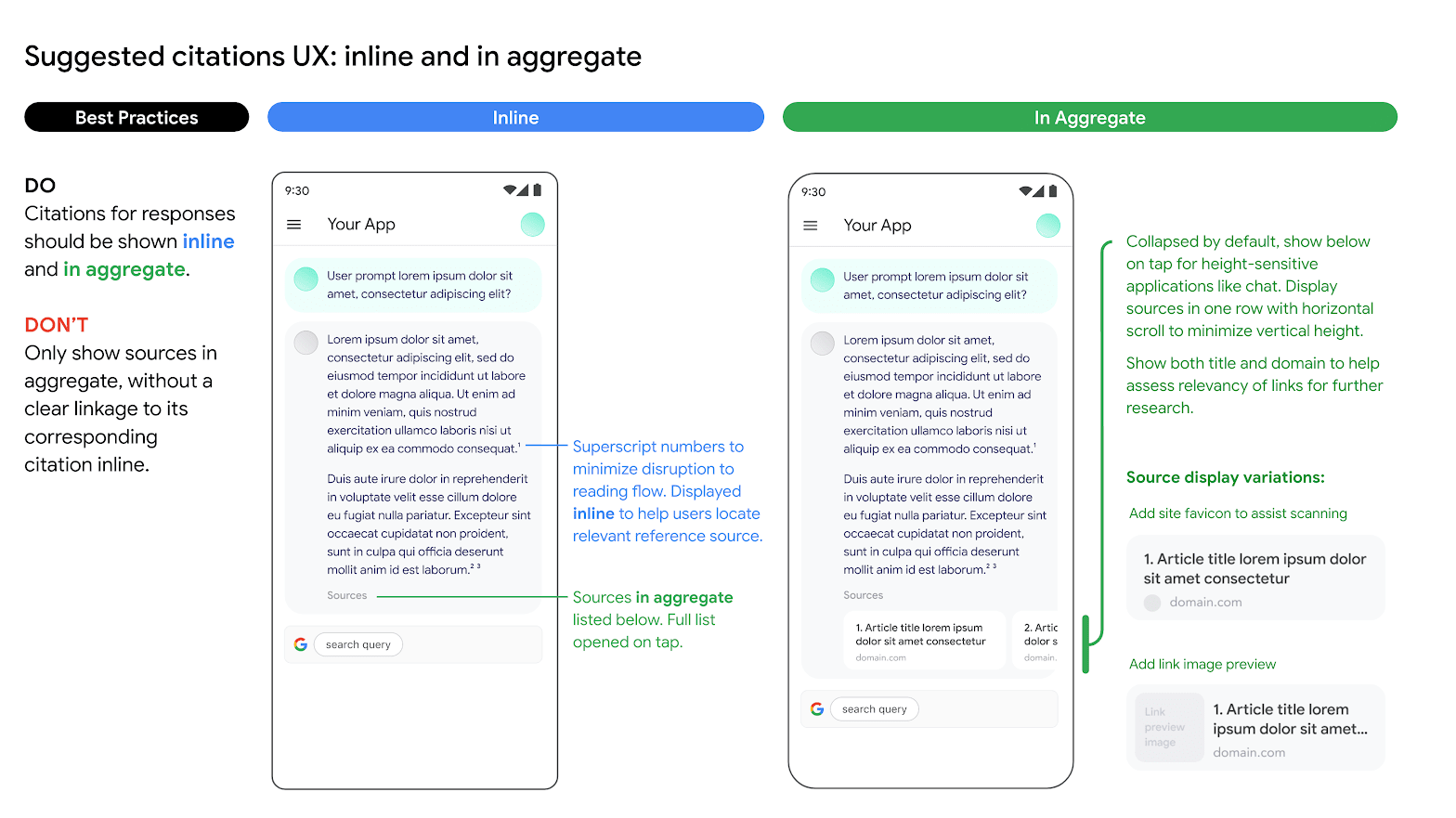
您必須顯示基準支援,因為這有助於驗證發布者的回覆,並提供進一步學習的途徑。
系統應以內嵌和匯總的方式,顯示網路來源回覆的基礎支援。舉例來說,請參考下圖建議的做法。
使用其他搜尋引擎選項
使用「以 Google 搜尋強化事實基礎」功能時,客戶應用程式可以:
- 提供其他搜尋引擎選項
- 將其他搜尋引擎設為預設選項
- 顯示自有或第三方搜尋建議或搜尋結果,但須符合下列條件:任何非 Google 的結果都必須與 Google 的基礎結果和搜尋建議分開顯示,且顯示方式不得誤導使用者,或暗示結果來自 Google。
優點
使用「以 Google 搜尋強化事實基礎」做為工具時,可以執行下列需要規劃、推論和思考的複雜提示詞和工作流程:
- 你可以設定回覆內容的依據,確保回覆內容是根據最新且最準確的資訊生成。
- 您可以從網路上擷取構件進行分析。
- 你可以尋找相關圖片、影片或其他媒體,輔助多模態推論或生成任務。
- 你可以執行編碼、技術疑難排解和其他專業工作。
- 你可以尋找特定區域的資訊,或協助準確翻譯內容。
- 你可以找到相關網站進行瀏覽。
使用 Google 搜尋建議
使用「以 Google 搜尋強化事實基礎」功能時,如果回覆中包含搜尋建議,您必須在正式版和應用程式中顯示搜尋建議。
具體來說,您必須顯示基準回覆中繼資料中的搜尋查詢。回覆內容包括:
"content":LLM 生成的回覆。"webSearchQueries":用於搜尋建議的查詢。
舉例來說,在下列程式碼片段中,Gemini 會回覆以搜尋結果為依據的提示詞,詢問某種熱帶植物。
"predictions": [
  {
    "content": "Monstera is a type of vine that thrives in bright indirect light…",
    "groundingMetadata": {
      "webSearchQueries": ["What's a monstera?"],
    }
  }
]
您可以取得這項輸出內容,並使用搜尋建議顯示。
搜尋建議的規定
搜尋建議功能的必要條件如下:
| 規定 | 說明 |
|---|---|
| 建議做法 |
|
| 錯誤做法 |
|
多媒體廣告規定
顯示規定如下:
- 請按照原樣顯示搜尋建議,不要修改顏色、字型或外觀。請確認搜尋建議會按照下列模擬圖 (例如淺色和深色模式) 顯示:
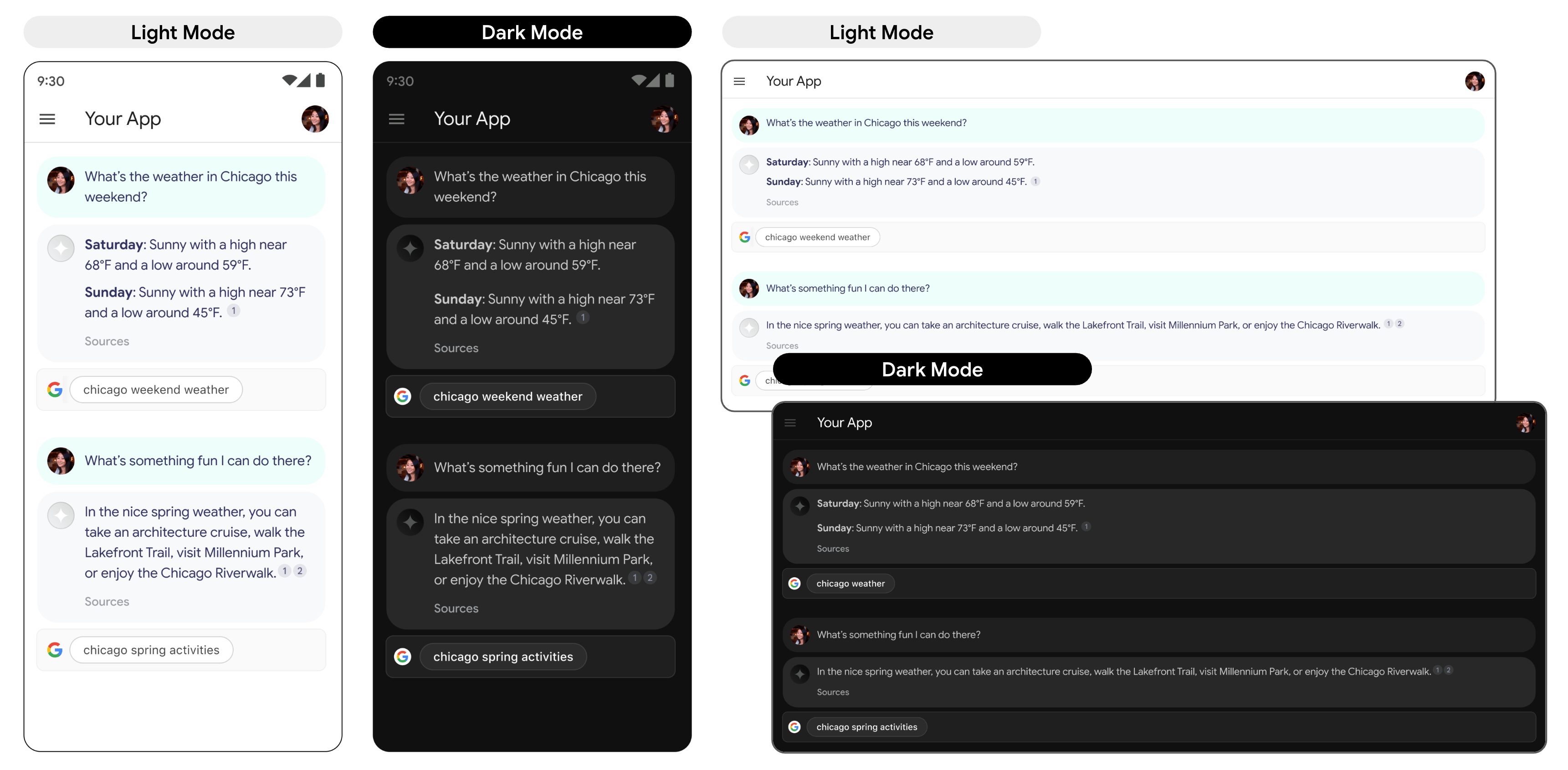
- 顯示以 Google 搜尋為依據的回覆時,對應的搜尋建議應保持顯示狀態。
- 在品牌宣傳方面,您必須嚴格遵守 Google 的第三方使用 Google 品牌特徵指南,詳情請參閱「歡迎使用品牌資源中心」。
- 使用「以 Google 搜尋建立基準」功能時, 系統會顯示搜尋建議方塊。包含「搜尋建議」資訊方塊的欄位寬度,必須與 LLM 提供的基準回覆相同。
輕觸時的行為
使用者輕觸方塊後,系統會直接將他們導向方塊中顯示搜尋字詞的搜尋結果網頁 (SRP)。搜尋結果頁面可以在應用程式內建瀏覽器或獨立瀏覽器應用程式中開啟。請務必不要以任何方式縮小、移除或遮蔽搜尋結果網頁的顯示畫面。以下動畫模擬圖說明輕觸前往搜尋結果網頁的互動。
輕觸時的行為

導入搜尋建議的程式碼
使用 API 以搜尋結果為基準生成回覆時,模型回覆會在 renderedContent 欄位中提供符合規定的 HTML 和 CSS 樣式,您可實作這些樣式,在應用程式中顯示搜尋建議。
此外,搜尋建議先前稱為搜尋進入點。雖然您可能會在某些 API 欄位中看到「搜尋進入點」一詞,但這兩個詞都是指您在 API 回應中收到的目前搜尋建議。
以下範例說明如何使用 curl,將回應建立在搜尋結果上:
curl -X POST \
  -H "Authorization: Bearer $(gcloud auth print-access-token)" \
  -H "Content-Type: application/json" \
  https://aiplatform.googleapis.com/v1/projects/PROJECT_ID/locations/global/publishers/google/models/gemini-3.5-flash:generateContent -d '{
    "contents": {
      "role": "user",
      "parts": {
        "text": "Why is the sky blue?"
      }
    },
    "tools": [
      {
        "googleSearch": {}
      }
    ]
  }'
Gemini 3 的計費異動
在 Gemini 3 模型上使用「以 Google 搜尋強化事實基礎」功能時,系統會針對 Gemini 生成並傳送至 Google 搜尋的每項搜尋查詢計費。單一提示可能會產生一或多個搜尋查詢。
範例
這個範例會顯示使用者提示和可能需要付費的搜尋查詢。
- 使用者提示:請告訴我愛因斯坦的生平。
- Gemini 可能會生成下列搜尋查詢:
- 愛因斯坦的出生和早期教育
- 愛因斯坦相對論
- 愛因斯坦在美國的生活
在這個例子中,這三筆搜尋查詢都會計費。
後續步驟
- 如要進一步瞭解基準建立功能,請參閱「基準建立總覽」。
- 瞭解如何傳送即時通訊提示要求。
- 瞭解負責任的 AI 最佳做法和 Gemini Enterprise Agent Platform 安全性篩選器。