
Sharing VPC Service Controls rules
This document describes the ingress and egress rules that you need to let publishers and subscribers in BigQuery sharing (formerly Analytics Hub) access data from projects that have VPC Service Controls perimeters. This document assumes you're familiar with VPC Service Controls perimeters, shared datasets, data exchanges, listings, and linked datasets.
A caller project is the network or client Cloud de Confiance project that initiates the request, such as a SQL query or a Google Cloud CLI command.
Create a data exchange
In the following diagram, the projects that contain the data exchange and the shared dataset are in different service perimeters:
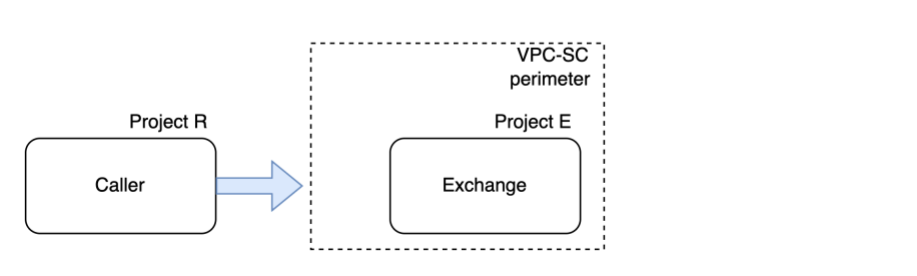
Figure 1. VPC Service Controls rules for creating a data exchange.
In figure 1, the following components are labeled:
- Caller: a BigQuery sharing administrator.
- Project R: the caller project.
- Project E: hosts the data exchange and listings.
As a BigQuery sharing administrator, when you create a data exchange in a different project than the caller project, you must add the following ingress and egress rules:
| Project | Rule |
|---|---|
| Project R | Egress rule for project E |
| Project E (data exchange) | Ingress rule for project R |
Create a listing
In the following diagram, the projects that contain the data exchange and the shared dataset are in different service perimeters:
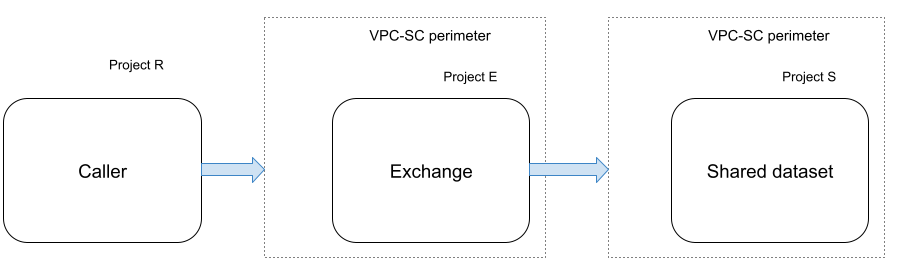
Figure 2. VPC Service Controls rules for creating a listing.
In figure 2, the following components are labeled:
- Caller: a BigQuery sharing administrator or publisher.
- Project R: the caller project.
- Project E: hosts the data exchange and listings.
- Project S: hosts the shared dataset.
When you create a listing in a data exchange that is in a different project than the shared dataset, you must add the following ingress and egress rules to let BigQuery sharing publishers create a listing:
| Project | Rule |
|---|---|
| Project R |
Egress rule for project E Egress rule for project S |
| Project E (data exchange) |
Egress rule for project S Ingress rule for project R |
| Project S (shared dataset) |
Egress rule for project E Ingress rule for project R |
Subscribe to a listing
In the following diagram, the projects that contain the listing and the linked dataset for that listing are in different service perimeters:
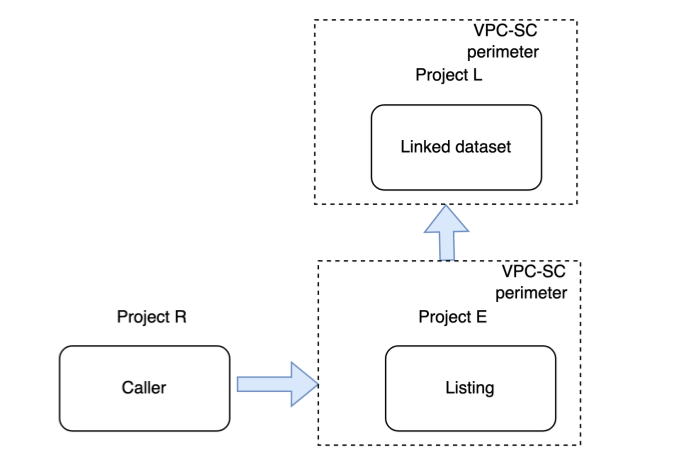
Figure 3. VPC Service Controls rules for subscribing to a listing.
In figure 3, the following components are labeled:
- Caller: a BigQuery sharing subscriber.
- Project R: the caller project.
- Project E: hosts the data exchange and listings.
- Project L: hosts the linked dataset.
As a BigQuery sharing subscriber, when you subscribe to a listing in a data exchange that is in a different project than your project, you must add the following ingress and egress rules:
| Project | Rule |
|---|---|
| Project R |
Egress rule for project E Egress rule for project L |
| Project E (listing) |
Egress rule for project L Ingress rule for project R |
| Project L (linked dataset) |
Egress rule for project E Ingress rule for project R |
Query tables in a linked dataset
In the following diagram, the caller project and the project that contain the linked dataset are in different service perimeters:
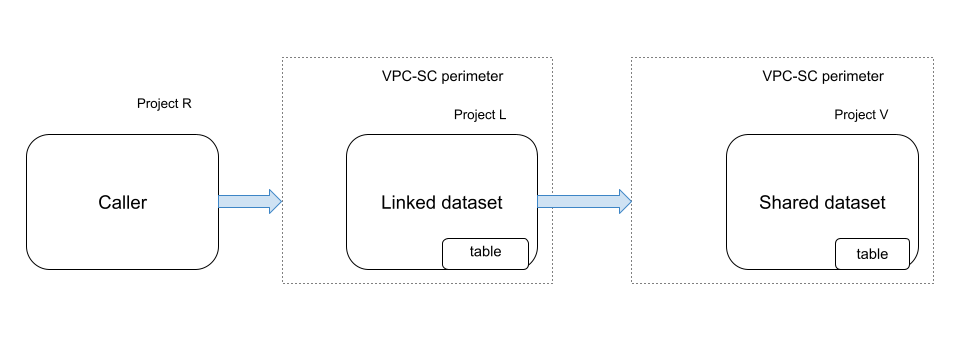
Figure 4. VPC Service Controls rules for querying a linked dataset.
In figure 4, the following components are labeled:
- Caller: a BigQuery sharing subscriber or any BigQuery job user of the linked dataset.
- Project R: the caller project.
- Project L: hosts the linked dataset.
- Project V: hosts the shared dataset that contains the table.
When you, as a BigQuery sharing subscriber, query a table in the linked dataset, you must add the following ingress and egress rules:
| Project | Rule |
|---|---|
| Project R | Egress rule for project L |
| Project L (linked dataset) | Ingress rule for project R |
Query views in a linked dataset
This section describes the required VPC Service Controls rules for querying a view in a linked dataset. The rules vary depending on whether the view and its underlying base tables are in the same project or in separate projects.
Scenario 1
In the following diagram, the projects that contain the linked dataset and the base tables associated with the view are in different service perimeters. The view (Project S) and the base table associated with the view (Project V) are in different projects:
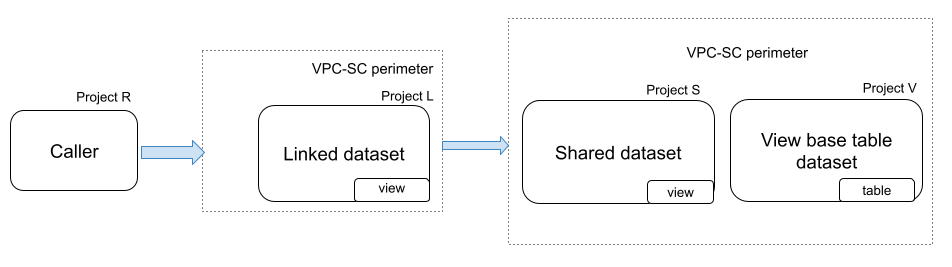
Figure 5. VPC Service Controls rules for querying a view in a linked dataset.
In figure 5, the following components are labeled:
- Caller: a BigQuery sharing subscriber or any BigQuery job user of the linked dataset.
- Project R: the caller project.
- Project L: hosts the linked dataset.
- Project S: hosts the shared dataset.
- Project V: hosts the dataset that contains the base tables associated with the view.
When you, as a BigQuery sharing subscriber, query a view in a linked dataset, you must add the following ingress and egress rules:
| Project | Rule |
|---|---|
| Project R |
Egress rule for project L Egress rule for project V |
| Project L (linked dataset) |
Ingress rule for project R Egress rule for project V |
| Project V |
Egress rule for project L Ingress rule for project R |
Scenario 2
In the following diagram, the view (Project V) and the base table associated with the view (Project V) are in the same project:
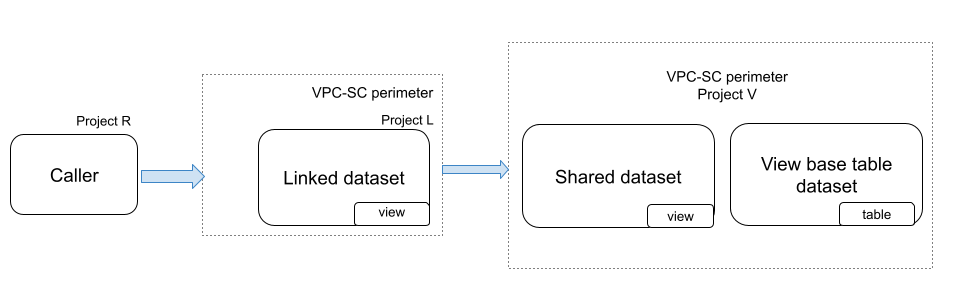
Figure 6. VPC Service Controls rules for querying a view in a linked dataset.
In figure 6, the following components are labeled:
- Caller: a BigQuery sharing subscriber or any BigQuery job user of the linked dataset.
- Project R: the caller project.
- Project L: hosts the linked dataset.
- Project V: hosts both the view and the base tables associated with the view.
When you, as a BigQuery sharing subscriber, query a view in a linked dataset, you must add the following ingress and egress rules:
| Project | Rule |
|---|---|
| Project R |
Egress rule for project L |
| Project L (linked dataset) |
Ingress rule for project R |
Query authorized views in a linked dataset
In the following diagram, the authorized view and the base table associated with the authorized view (Project V) are in the same project:
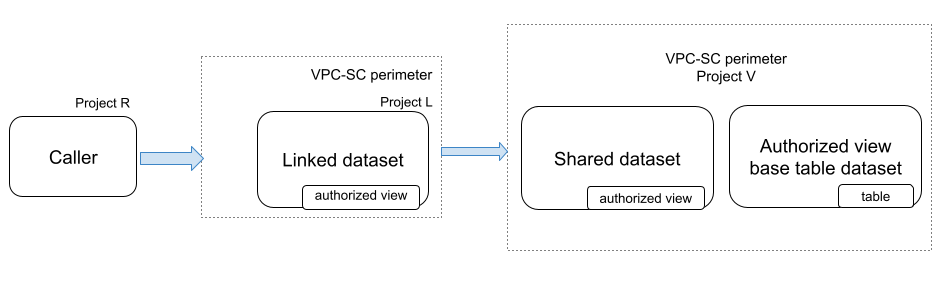
Figure 7. VPC Service Controls rules for querying a view in a linked dataset.
In figure 7, the following components are labeled:
- Caller: a BigQuery sharing subscriber or any BigQuery job user of the linked dataset.
- Project R: the caller project.
- Project L: hosts the linked dataset.
- Project V: hosts both the authorized view and the base tables associated with the view.
When you, as a BigQuery sharing subscriber, query a view in a linked dataset, you must add the following ingress and egress rules:
| Project | Rule |
|---|---|
| Project R |
Egress rule for project L |
| Project L (linked dataset) |
Ingress rule for project R |
Limitations
BigQuery sharing doesn't support method-based rules. You must allow all methods to enable method-based rules. For example:
          ingressTo:
            operations:
            - methodSelectors:
              - method: '*'
              serviceName: analyticshub.googleapis.com
            resources:
            - projects/PROJECT_ID
If BigQuery resources are also protected by service perimeters, you must allow ingress and egress rules for the BigQuery service. Allowing ingress and egress rules is not required when you create a data exchange. The ingress and egress rules for BigQuery are similar to those for BigQuery sharing. For example:
          ingressTo:
            operations:
            - methodSelectors:
              - method: '*'
              serviceName: bigquery.googleapis.com
            resources:
            - projects/PROJECT_ID
What's next
- Learn about troubleshooting VPC Service Controls problems.
- Learn about ingress and egress rules.
- Learn about configuring ingress and egress policies.
- Learn about creating a listing.
- Learn about subscribing to a listing.
- Learn about Sharing audit logging.