
Introduction to notebooks
Colab Enterprise notebooks in BigQuery let you perform end-to-end data science and machine learning workflows within a single, integrated interface. Unlike standard SQL editors, notebooks let you combine SQL queries with Python code, rich text, and visualizations to tell a comprehensive story with your data. Notebooks are ideal for the following use cases:
- End-to-end ML workflows: build, evaluate, and deploy a BigQuery ML model within a single notebook interface.
- Data exploration: clean and analyze large datasets using BigQuery DataFrames.
- Collaborative research: share notebooks with colleagues using IAM and track version history.
Notebooks are code assets in BigQuery Studio, alongside saved queries, and are powered by Dataform. These capabilities are available only in the Cloud de Confiance console.
Benefits
Notebooks in BigQuery offer the following benefits:
- Seamless Python integration: use the BigQuery DataFrames API without any additional setup.
- AI-powered development: use Gemini generative AI for assistive code development.
- Familiar editor features: use SQL auto-completion, similar to the BigQuery SQL editor.
- Integrated visualizations: use interactive DataFrame visualizations, or libraries like matplotlib and seaborn, to visualize data directly in your workflow.
- SQL-Python interoperability: execute SQL in cells that reference Python variables.
Notebook gallery
The notebook gallery is a central hub for discovering and using prebuilt notebook templates. These templates let you perform common tasks like data preparation, data analysis, and visualization. Notebook templates also help you explore BigQuery Studio features, manage workflows, and promote best practices.
You can use notebook gallery templates to streamline your entire intent-to-insights workflow across each stage of the data lifecycle—from ingestion and exploration to advanced analytics and BigQuery ML.
The notebook gallery provides templates for every skill level. The gallery includes fundamental templates for SQL, Python, Apache Spark, and DataFrames. You can also explore topics like generative AI and multimodal data analytics in BigQuery.
To get started with the notebook gallery, follow these steps:
Go to the BigQuery page.
Click Notebooks in the Explorer menu.
Click the New notebook drop-down and select All templates.
For more information on using notebook gallery templates, see Create a notebook using the notebook gallery.
Runtime management
BigQuery uses Colab Enterprise runtimes to run notebooks.
A notebook runtime is a Compute Engine virtual machine allocated to a particular user to enable code execution in a notebook. Multiple notebooks can share the same runtime. However, each runtime belongs to only one user and can't be used by others. Notebook runtimes are created based on templates, which are typically defined by users with administrative privileges. You can change to a runtime that uses a different template type at any time.
Notebook security
You control access to notebooks by using Identity and Access Management (IAM) roles. For more information, see Grant access to notebooks and Security considerations for notebooks.
To detect vulnerabilities in Python packages that you use in your notebooks, install and use Notebook Security Scanner (Preview).
Supported regions
BigQuery Studio lets you save, share, and manage versions of notebooks. The following table lists the regions where BigQuery Studio is available:
| Region description | Region name | Details | |
|---|---|---|---|
| Africa | |||
| Johannesburg | africa-south1 |
||
| Americas | |||
| Columbus | us-east5 |
||
| Dallas | us-south1 |
 Low CO2 Low CO2
|
|
| Iowa | us-central1 |
Low CO2
|
|
| Los Angeles | us-west2 |
||
| Las Vegas | us-west4 |
||
| Montréal | northamerica-northeast1 |
Low CO2
|
|
| N. Virginia | us-east4 |
||
| Oregon | us-west1 |
Low CO2 |
|
| São Paulo | southamerica-east1 |
Low CO2
|
|
| South Carolina | us-east1 |
||
| Asia Pacific | |||
| Hong Kong | asia-east2 |
||
| Jakarta | asia-southeast2 |
||
| Mumbai | asia-south1 |
||
| Seoul | asia-northeast3 |
||
| Singapore | asia-southeast1 |
||
| Sydney | australia-southeast1 |
||
| Taiwan | asia-east1 |
||
| Tokyo | asia-northeast1 |
||
| Europe | |||
| Belgium | europe-west1 |
Low CO2
|
|
| Finland | europe-north1 |
Low CO2
|
|
| Frankfurt | europe-west3 |
||
| London | europe-west2 |
Low CO2
|
|
| Madrid | europe-southwest1 |
Low CO2
|
|
| Milan | europe-west8 |
||
| Netherlands | europe-west4 |
Low CO2
|
|
| Turin | europe-west12 |
||
| Warsaw | europe-central2 |
||
| Zürich | europe-west6 |
Low CO2
|
|
| Middle East | |||
| Dammam | me-central2 |
||
| Doha | me-central1 |
||
| Tel Aviv | me-west1 |
||
Pricing
For pricing information about BigQuery Studio notebooks, see Notebook runtime pricing.
Monitor slot usage
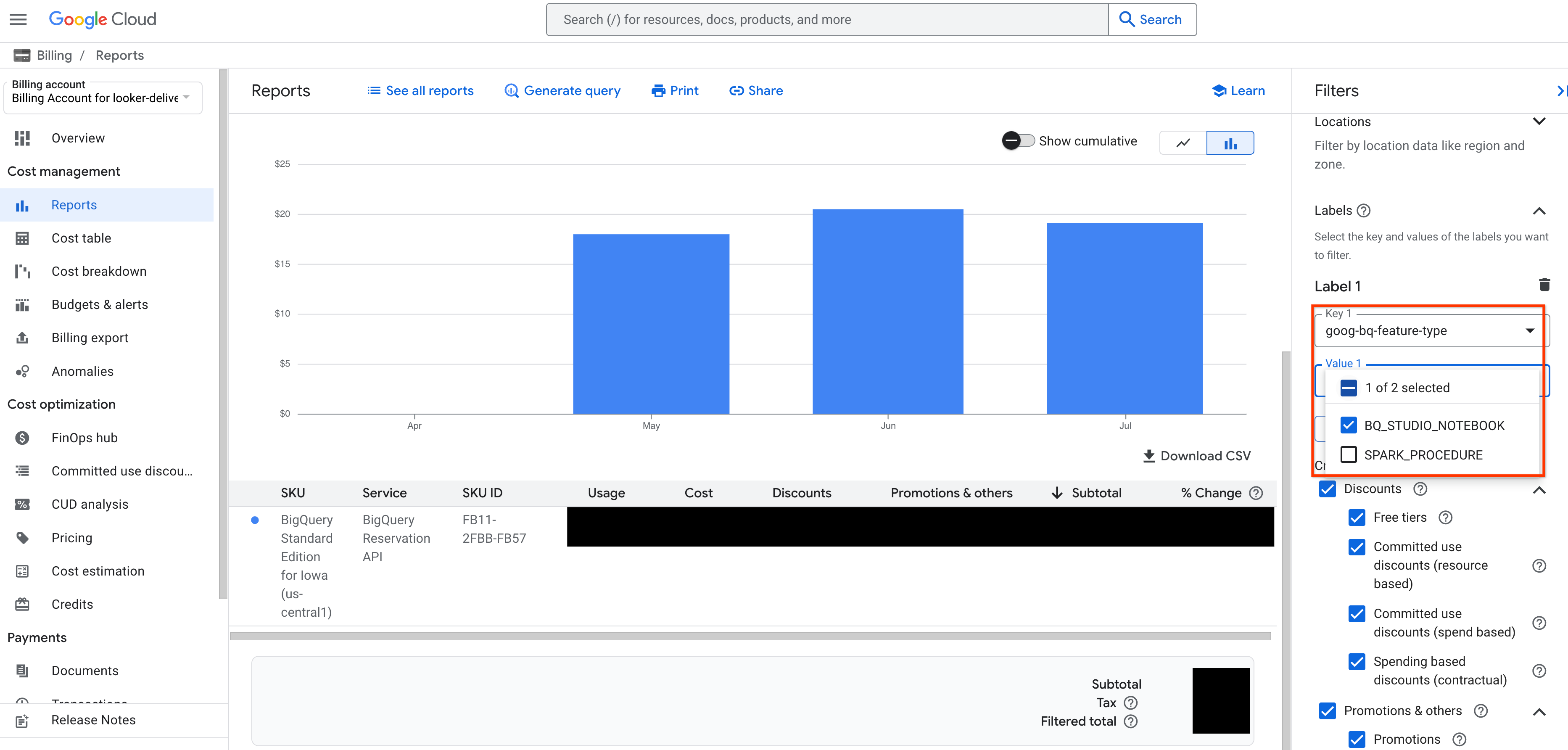
You can monitor your BigQuery Studio notebook slot usage by viewing your Cloud Billing report in the Cloud de Confiance console. In the Cloud Billing report, apply a filter with the label goog-bq-feature-type with the value BQ_STUDIO_NOTEBOOK to view slot usage and costs from BigQuery Studio notebooks.
Troubleshooting
For more information, see Troubleshoot Colab Enterprise.
What's next
- Learn how to create notebooks.
- Learn how to manage notebooks.