

與圖表對話
您可以使用對話式數據分析,詢問圖譜相關問題。代理可協助編寫 SQL 查詢,並以視覺化方式呈現輸出內容。代理也會使用圖譜中定義的說明、同義詞、擴充功能和測量指標,提升結果品質。代理會根據圖譜結構定義和您提出的問題,使用 Graph Query Language (GQL) 或 SQL 中的 GRAPH_EXPAND 資料表值函式查詢圖譜。GQL 查詢需要 BigQuery Enterprise 或 Enterprise Plus 版本預留項目。在採用隨選計價模式的專案中,GQL 查詢會失敗並顯示錯誤。包含 GRAPH_EXPAND 函式的查詢可使用「隨選」模式執行,但該函式不支援所有類型的圖表。如需瞭解相關規定和限制,請參閱 GRAPH_EXPAND。
圖表會編碼資料表之間的關係。提供圖表給代理,可消除資料表關聯性的模糊之處。這種明確性可減少幻覺,並提高對話效率。
舉例來說,如要向代理詢問公開的 Look Ecommerce 圖表,請按照下列步驟操作:
前往 Cloud de Confiance 控制台的「BigQuery Agents」頁面。
選取「Agent catalog」(代理目錄) 分頁標籤。
在「Google 的代理範例」部分,點選「The Look Graph」。
對話隨即開啟。您可以輸入有關
bigquery-public-data.thelook_ecommerce.graph圖表的問題。
與圖表對話
如要與圖表對話,您可以建立資料代理,並將圖表設為資料來源,也可以直接與圖表對話。如果不確定要問什麼,可以試著詢問 What questions can I ask about this data?。舉例來說,如果您詢問 Look Ecommerce 圖表,回覆會包含圖表結構定義總覽和建議問題。回覆中可能會出現下列問題:
業務成效
What is the total revenue for each product category, sorted from highest to lowest?What are the top 5 brands by total revenue among users from 'Brasil'?Rank the product categories based on their total revenue for each product department (Men/Women).
使用者與物流深入分析
How many users do we have in each country?What is the distribution of user ages in the United States?Which distribution centers handle the most orders with a 'Complete' status?
關係分析
Show the connection between users and the distribution centers their products are shipped from.Find all products that have been ordered by users who came from a 'Search' traffic source.
建立圖表查詢和圖表
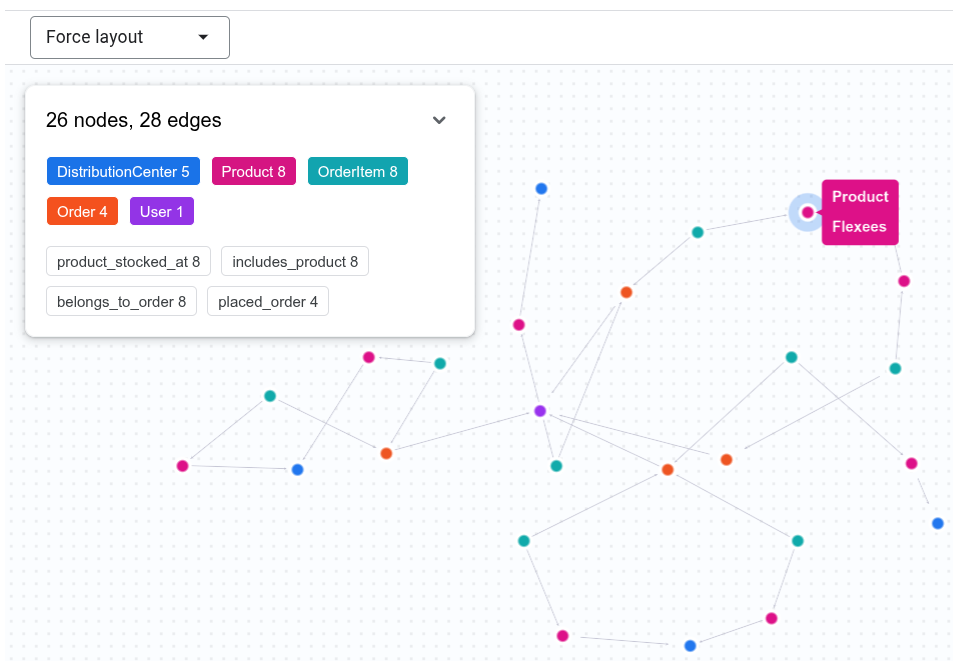
對話式數據分析可編寫 GQL 查詢,回答圖譜相關問題,並以視覺化方式呈現輸出內容。例如,您可以在對話中輸入 Show the connection between Tina Fletcher's orders and distribution centers。代理可能會執行類似以下的 GQL 查詢:
GRAPH `bigquery-public-data.thelook_ecommerce.graph`
MATCH p = (u:User {id: 32})
          <-[:placed_order]-(o:`Order`)
          <-[:belongs_to_order]-(oi:OrderItem)
          -[:includes_product]->(pr:Product)
          -[:product_stocked_at]->(dc:DistributionCenter)
RETURN TO_JSON(p) AS path;
代理也可能提供互動式視覺化圖表。
使用圖表測量
對話式數據分析可使用圖譜中定義的測量指標,準確回答涉及匯總的問題。例如,您可以向 Look Graph 代理提出下列問題:
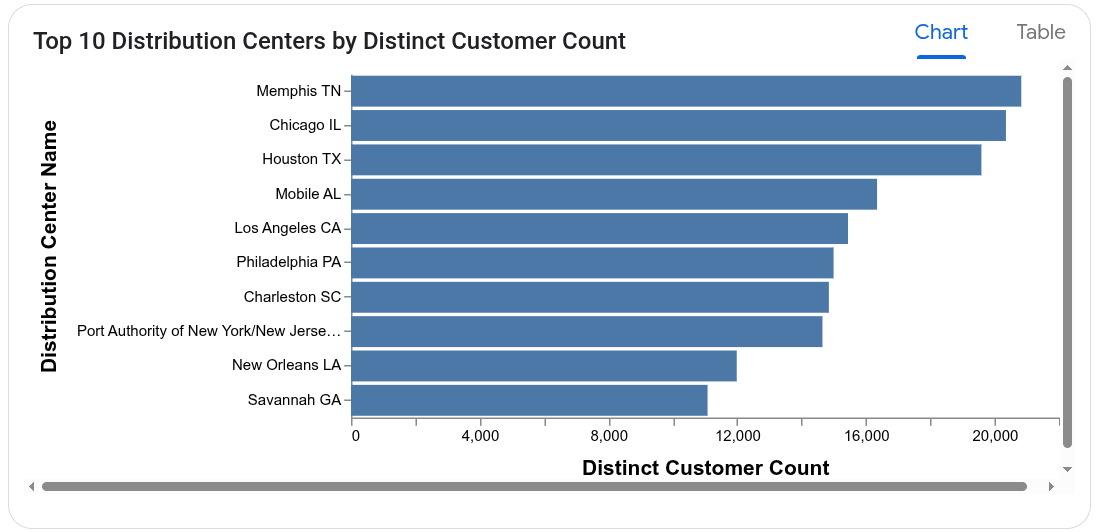
Which distribution centers process orders from the largest number of distinct customers?
代理會在 User 節點上使用 user_count 測量指標,避免重複計算顧客人數。用於計算回應的查詢可能如下所示:
SELECT
  DistributionCenter_id,
  DistributionCenter_name,
  AGG(User_user_count) AS distinct_customer_count
FROM
  GRAPH_EXPAND("bigquery-public-data.thelook_ecommerce.graph")
GROUP BY
  DistributionCenter_id,
  DistributionCenter_name
ORDER BY
  distinct_customer_count DESC;
代理也可能提供圖表。
後續步驟
- 進一步瞭解對話式數據分析。
- 進一步瞭解如何編寫圖表查詢。
- 進一步瞭解如何設計圖表結構定義。
- 進一步瞭解如何以視覺化方式呈現圖表。