
Understand window aggregation in continuous queries
To request support or provide feedback for this feature, send an email to bq-continuous-queries-feedback@google.com.
BigQuery continuous queries support aggregations and windowing as stateful operations. Stateful operations let continuous queries perform complex analysis that requires retaining information across multiple rows or time intervals. This capability lets you calculate metrics over time—such as a 30-minute average—by storing necessary data in memory while the query runs.
Windowing functions assign data into logical components, or windows, based on
system time, which indicates the commit time of the transaction that made the
change. In BigQuery, these functions are table-valued functions
(TVFs) that return a table that includes all original columns and two additional
columns: window_start and window_end. These columns identify the time
interval for each window. For more
information about stateful operations, see
Supported stateful operations.
Windowing TVFs are only supported with BigQuery continuous queries.
Windowing TVFs are distinct from window function calls.
Supported aggregation functions
The following aggregation functions are supported:
ANY_VALUEAPPROX_COUNT_DISTINCTAPPROX_QUANTILESAPPROX_TOP_COUNTAPPROX_TOP_SUMARRAY_AGGwith the following requirements:- A
LIMITclause is required, with a maximum value of 100. - An
ORDER BYclause is optional.
- A
ARRAY_CONCAT_AGGAVGBIT_ANDBIT_ORBIT_XORCORRCOUNTCOUNTIFCOVAR_POPCOVAR_SAMPLOGICAL_ANDLOGICAL_ORMAXMAX_BYMINMIN_BYSTDDEVSTDDEV_POPSTDDEV_SAMPSTRING_AGGwith the following requirements:- A
LIMITclause is required, with a maximum value of 100. - An
ORDER BYclause is optional.
- A
SUMVAR_POPVAR_SAMPVARIANCE
Unsupported aggregation functions
The following aggregation functions are unsupported:
AVG(Differential Privacy)COUNT(Differential Privacy)- Functions containing
DISTINCTexpressions. GROUPINGPERCENTILE_CONT(Differential Privacy)ST_CENTROID_AGGST_EXTENTST_UNION_AGGSUM(Differential Privacy)
The TUMBLE function
The TUMBLE function assigns data into non-overlapping time intervals (tumbling
windows) of specified size. For example, a 5-minute window groups events into
discrete intervals such as [2026-01-01 12:00:00, 2026-01-01 12:05:00) and
[2026-01-01 12:05:00, 2026-01-01 12:10:00). A row with a timestamp value
2026-01-01 12:03:18 is assigned to the first window. Because these windows are
disjoint and don't overlap, every element with a timestamp is assigned to
exactly one window.
The following diagram shows how the TUMBLE function assigns events into
non-overlapping time intervals:
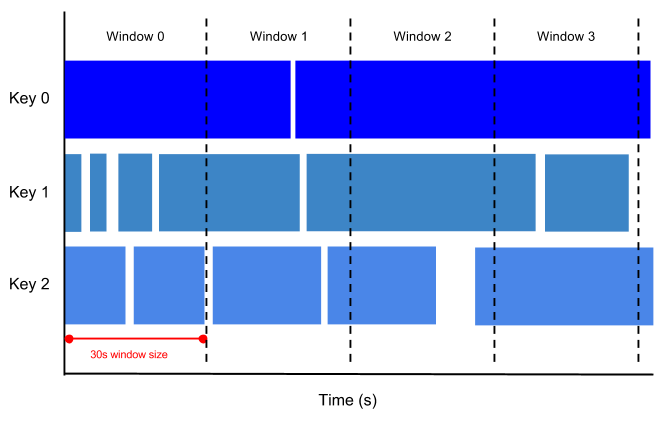
You can use this function in real-time event processing to group events by time ranges before you perform any aggregations.
Syntax
TUMBLE(TABLE table, "timestamp_column", window_size)
Definitions
table: The BigQuery table name. This must be a standard BigQuery table wrapped within theAPPENDSfunction. The wordTABLEmust precede this argument.timestamp_column: ASTRINGliteral that specifies the name of the column in the input table that contains the event time. The values in this column assign each row to a window. The_CHANGE_TIMESTAMPcolumn, which defines the BigQuery system time, is the only supportedtimestamp_column. User-defined columns aren't supported.window_size: AnINTERVALvalue that defines the duration of each tumbling window. Window sizes can be a maximum of 24 hours. For example:INTERVAL 30 SECOND.
Output
The TUMBLE function returns an output with the following columns:
All columns of the input table at the time the query runs.
window_start: ATIMESTAMPvalue that indicates the inclusive start time of the window to which the record belongs.window_end: ATIMESTAMPvalue that indicates the exclusive end time of the window to which the record belongs.
Output materialization
In a BigQuery continuous query, a windowed aggregation doesn't produce output for a specific time interval until BigQuery finalizes or closes that window. This behavior ensures that BigQuery emits the aggregated results only after it processes all relevant data for that window.
For example, if you perform a 5-minute TUMBLE window aggregation on a
user_clickstream table, the results for the interval [10:15; 10:20) are only
emitted after the query processes records with a _CHANGE_TIMESTAMP of 10:20 or
later. At that moment, BigQuery considers the window closed.
Additionally, a window opens and begins accumulating data the moment the first
record belonging to that specific time range appears.
While a window remains open, BigQuery must preserve the intermediate aggregation results. This requires storing the state, which means BigQuery must preserve the intermediate aggregation results. Because this state must remain in active memory until the window closes, using longer window durations or processing high-volume streams leads to higher slot utilization to manage the increased amount of stored context. For more information, see Pricing considerations.
Limitations
- The
TUMBLEfunction is supported only in BigQuery continuous queries. - When starting a continuous query with the
TUMBLEfunction, you can use only theAPPENDSfunction. TheCHANGESfunction isn't supported. - The BigQuery system time column defined by
_CHANGE_TIMESTAMPis the only supportedtimestamp_column. User-defined columns aren't supported. - Window sizes can be a maximum of 24 hours.
- When the
TUMBLEwindowing function runs, it produces two additional output columns:window_startandwindow_end. You must include at least one of these columns in theGROUP BYstatement within theSELECTstatement that performs the window aggregation. - When you use the
TUMBLEfunction with continuous query joins, you must follow all continuous query join limitations.
Pricing considerations
BigQuery continuous queries bill you based on the compute capacity (slots) consumed while the job runs. This compute-based model also applies to stateful operations like windowing. Because windowing requires BigQuery to store "state" while the query is active, it consumes additional slot resources. In general, the more context or data stored within a window—such as when using longer window durations—the more state BigQuery must preserve. This leads to higher slot utilization.
Examples
The following query shows you how to query a taxi rides table to get a streaming average number of rides, number of passengers, and average fare per taxi every 30 minutes, and export this data into a table in BigQuery:
INSERT INTO
 `real_time_taxi_streaming.driver_stats`

WITH ride_completions AS (
 SELECT
   _CHANGE_TIMESTAMP as bq_changed_ts,
   CAST(timestamp AS DATE) AS ride_date,
   taxi_id,
   meter_reading,
   passenger_count
 FROM
   APPENDS(TABLE `real_time_taxi_streaming.taxirides`,
     CURRENT_TIMESTAMP() - INTERVAL 10 MINUTE)
 WHERE
   ride_status = 'dropoff')

 SELECT
   ride_date,
   window_end,
   taxi_id,
   COUNT(taxi_id) AS total_rides_per_half_hour,
   ROUND(AVG(meter_reading),2) AS avg_fare_per_half_hour,
   SUM(passenger_count) AS total_passengers_per_half_hour
FROM
  tumble(TABLE ride_completions,"bq_changed_ts",INTERVAL 30 MINUTE)
GROUP BY
  window_end,
  ride_date,
  taxi_id
What's next
- Learn how to perform JOINs, aggregations, and windowing.
- Learn more about BigQuery continuous queries.
- Learn how to join data from multiple streams.