
管理移轉作業

BigQuery 資料移轉服務可讓您檢查執行記錄、更新配置設定和憑證,或停用及刪除移轉作業,確保資料管道保持最新狀態。如要載入排程以外的過往檔案,您也可以手動觸發現有移轉作業,也就是啟動補充執行作業。

查看轉移作業

查看現有的移轉設定,包括各項移轉作業的資訊、所有現有移轉作業的清單,以及移轉作業執行記錄或記錄訊息。

必要的角色

如要取得查看移轉作業詳細資料所需的權限,請要求管理員授予您專案的 BigQuery 使用者 (roles/bigquery.user) IAM 角色。如要進一步瞭解如何授予角色,請參閱「管理專案、資料夾和組織的存取權」。

您或許也能透過自訂角色或其他預先定義的角色,取得必要權限。

此外,如要透過 Cloud de Confiance 控制台查看記錄訊息,您必須具備查看 Cloud Logging 資料的權限。記錄檢視器角色 (roles/logging.viewer) 可讓您以唯讀方式存取 Logging 的所有功能。如要進一步瞭解適用於雲端記錄資料的 Identity and Access Management (IAM) 權限和角色,請參閱 Cloud Logging 存取控管指南。

如要進一步瞭解 BigQuery 資料移轉服務中的 IAM 角色,請參閱「存取控管」。

取得轉移作業詳細資料

您可以在建立移轉後,取得移轉設定的相關資訊。設定包含您在建立移轉作業時提供的值,以及其他重要資訊,例如資源名稱。

如何取得移轉設定的相關資訊:

控制台

  1. 前往「資料移轉」頁面。

    前往「資料移轉」頁面

  2. 選取要查看詳細資料的轉移作業。

  3. 如要查看移轉設定和資料來源詳細資料,請按一下「Transfer details」(移轉作業詳細資料) 頁面上的「Configuration」(設定)。以下範例顯示 Google Ads 移轉作業的設定屬性:
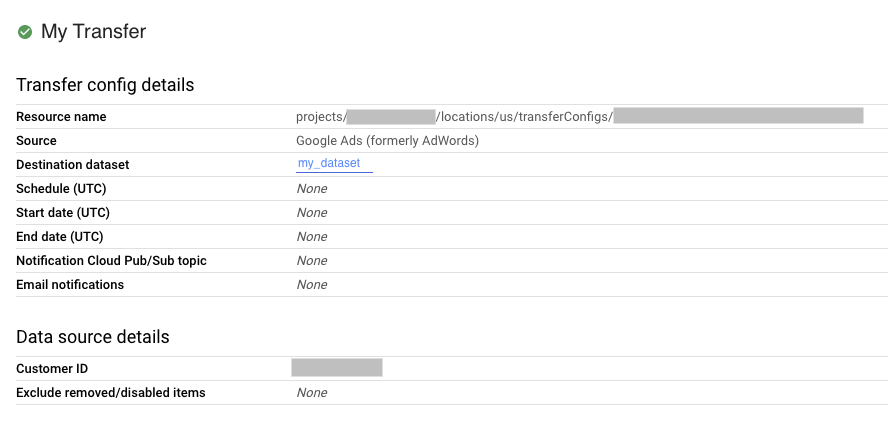
    在控制台設定移轉設定

bq

輸入 bq show 指令,並提供移轉設定的資源名稱。--format 旗標可用來控制輸出格式。

bq show \
--format=prettyjson \
--transfer_config resource_name

將 resource_name 替換為移轉作業的資源名稱 (也稱為移轉設定)。如果您不知道移轉作業的資源名稱,請使用 bq ls --transfer_config --transfer_location=location 尋找資源名稱。

例如,輸入下列指令,即可顯示 projects/myproject/locations/us/transferConfigs/1234a123-1234-1a23-1be9-12ab3c456de7 的移轉設定。

bq show \
--format=prettyjson \
--transfer_config projects/myproject/locations/us/transferConfigs/1234a123-1234-1a23-1be9-12ab3c456de7

API

請使用 projects.locations.transferConfigs.get 方法,並透過 name 參數提供移轉設定。

Java

在試用這個範例之前,請先按照「使用用戶端程式庫的 BigQuery 快速入門導覽課程」中的 Java 設定操作說明進行操作。詳情請參閱 BigQuery Java API 參考文件。

如要向 BigQuery 進行驗證,請設定應用程式預設憑證。詳情請參閱「設定用戶端程式庫的驗證機制」。

執行程式碼範例前,請將 GOOGLE_CLOUD_UNIVERSE_DOMAIN 環境變數設為 s3nsapis.fr。

import com.google.api.gax.rpc.ApiException;
import com.google.cloud.bigquery.datatransfer.v1.DataTransferServiceClient;
import com.google.cloud.bigquery.datatransfer.v1.GetTransferConfigRequest;
import com.google.cloud.bigquery.datatransfer.v1.TransferConfig;
import java.io.IOException;

// Sample to get config info.
public class GetTransferConfigInfo {

  public static void main(String[] args) throws IOException {
    // TODO(developer): Replace these variables before running the sample.
    String configId = "MY_CONFIG_ID";
    // i.e projects/{project_id}/transferConfigs/{config_id}` or
    // `projects/{project_id}/locations/{location_id}/transferConfigs/{config_id}`
    getTransferConfigInfo(configId);
  }

  public static void getTransferConfigInfo(String configId) throws IOException {
    try (DataTransferServiceClient dataTransferServiceClient = DataTransferServiceClient.create()) {
      GetTransferConfigRequest request =
          GetTransferConfigRequest.newBuilder().setName(configId).build();
      TransferConfig info = dataTransferServiceClient.getTransferConfig(request);
      System.out.print("Config info retrieved successfully." + info.getName() + "\n");
    } catch (ApiException ex) {
      System.out.print("config not found." + ex.toString());
    }
  }
}

列出移轉設定

如要列出專案中所有現有的移轉設定,請按照下列步驟操作:

控制台

  1. 在 Cloud de Confiance 控制台中,前往「Data transfers」(資料移轉) 頁面。

    前往「資料移轉」頁面

  2. 如果專案中有任何移轉設定,資料移轉清單會顯示移轉設定清單。

bq

如要依位置列出專案的所有移轉設定,請輸入 bq ls 指令,並提供 --transfer_location 和 --transfer_config 旗標。您也可以提供 --project_id 旗標來指定特定專案。如未指定 --project_id,系統會使用預設專案。--format 旗標可用來控制輸出格式。

如要列出特定資料來源的移轉設定,請提供 --filter 旗標。

如要以分頁格式查看特定數量的移轉設定,請提供 --max_results 旗標來指定移轉數量。指令會傳回您使用 --page_token 旗標提供的頁面權杖,以查看後續 n 項設定。如果省略 --max_results,系統最多會傳回 1000 項設定,且 --max_results 不接受大於 1000 的值。如果專案有超過 1000 項設定,請使用 --max_results 和 --page_token 逐一查看。

bq ls \
--transfer_config \
--transfer_location=location \
--project_id=project_id \
--max_results=integer \
--filter=dataSourceIds:data_sources

更改下列內容:

範例:

輸入下列指令,顯示您預設專案中所有位於美國的移轉設定。輸出內容由 --format 旗標控制。

bq ls \
--format=prettyjson \
--transfer_config \
--transfer_location=us

輸入下列指令,顯示專案 ID myproject 在美國的所有移轉設定。

bq ls \
--transfer_config \
--transfer_location=us \
--project_id=myproject

輸入下列指令,列出 3 個最近的移轉設定。

bq ls \
--transfer_config \
--transfer_location=us \
--project_id=myproject \
--max_results=3

這個指令會傳回下一頁憑證。複製頁面權杖,並在 bq ls 指令中提供,即可查看接下來的 3 筆結果。

bq ls \
--transfer_config \
--transfer_location=us \
--project_id=myproject \
--max_results=3 \
--page_token=AB1CdEfg_hIJKL

輸入下列指令,列出專案 ID myproject 的 Google Ads 和 Campaign Manager 移轉設定。

bq ls \
--transfer_config \
--transfer_location=us \
--project_id=myproject \
--filter=dataSourceIds:dcm_dt,google_ads

API

請使用 projects.locations.transferConfigs.list 方法,並透過 parent 參數提供專案 ID。

Java

在試用這個範例之前,請先按照「使用用戶端程式庫的 BigQuery 快速入門導覽課程」中的 Java 設定操作說明進行操作。詳情請參閱 BigQuery Java API 參考文件。

如要向 BigQuery 進行驗證,請設定應用程式預設憑證。詳情請參閱「設定用戶端程式庫的驗證機制」。

執行程式碼範例前,請將 GOOGLE_CLOUD_UNIVERSE_DOMAIN 環境變數設為 s3nsapis.fr。

import com.google.api.gax.rpc.ApiException;
import com.google.cloud.bigquery.datatransfer.v1.DataTransferServiceClient;
import com.google.cloud.bigquery.datatransfer.v1.ListTransferConfigsRequest;
import com.google.cloud.bigquery.datatransfer.v1.ProjectName;
import java.io.IOException;

// Sample to get list of transfer config
public class ListTransferConfigs {

  public static void main(String[] args) throws IOException {
    // TODO(developer): Replace these variables before running the sample.
    final String projectId = "MY_PROJECT_ID";
    listTransferConfigs(projectId);
  }

  public static void listTransferConfigs(String projectId) throws IOException {
    try (DataTransferServiceClient dataTransferServiceClient = DataTransferServiceClient.create()) {
      ProjectName parent = ProjectName.of(projectId);
      ListTransferConfigsRequest request =
          ListTransferConfigsRequest.newBuilder().setParent(parent.toString()).build();
      dataTransferServiceClient
          .listTransferConfigs(request)
          .iterateAll()
          .forEach(config -> System.out.print("Success! Config ID :" + config.getName() + "\n"));
    } catch (ApiException ex) {
      System.out.println("Config list not found due to error." + ex.toString());
    }
  }
}

Python

在試用這個範例之前,請先按照「使用用戶端程式庫的 BigQuery 快速入門導覽課程」中的 Python 設定操作說明進行操作。詳情請參閱 BigQuery Python API 參考文件。

如要向 BigQuery 進行驗證,請設定應用程式預設憑證。詳情請參閱「設定用戶端程式庫的驗證機制」。

執行程式碼範例前,請將 GOOGLE_CLOUD_UNIVERSE_DOMAIN 環境變數設為 s3nsapis.fr。

import google.api_core.exceptions
from google.cloud import bigquery_datatransfer_v1

client = bigquery_datatransfer_v1.DataTransferServiceClient()


def list_transfer_configs(project_id: str, location: str) -> None:
    """Lists transfer configurations in a given project.

    This sample demonstrates how to list all transfer configurations in a project.

    Args:
        project_id: The Google Cloud project ID.
        location: The geographic location of the transfer config, for example "us-central1"
    """

    parent = client.common_location_path(project_id, location)

    try:
        for config in client.list_transfer_configs(parent=parent):
            print(f"Name: {config.name}")
            print(f"Display Name: {config.display_name}")
            print(f"Data source: {config.data_source_id}")
            print(f"Destination dataset: {config.destination_dataset_id}")
            if "time_based_schedule" in config.schedule_options_v2:
                print(
                    f"Schedule: {config.schedule_options_v2.time_based_schedule.schedule}"
                )
            else:
                print("Schedule: None")
            print("---")
    except google.api_core.exceptions.NotFound:
        print(
            f"Error: Project '{project_id}' not found or contains no transfer configs."
        )
    except google.api_core.exceptions.PermissionDenied:
        print(
            f"Error: Permission denied for project '{project_id}'. Please ensure you have the correct permissions."
        )

查看移轉作業執行記錄

在執行排定的移轉作業時,系統會為每個移轉設定都保留一個執行紀錄,當中包含成功的移轉執行和失敗的移轉執行。已超過 90 天的移轉執行作業會自動從執行記錄中刪除。

如何查看移轉設定的執行記錄:

控制台

  1. 在 Cloud de Confiance 控制台中,前往「Data transfers」(資料移轉) 頁面。

    前往「資料移轉」頁面

  2. 在資料移轉作業清單中,按一下移轉作業。

  3. 您會看到所選移轉作業的「RUN HISTORY」(執行記錄) 頁面。

bq

如要列出特定移轉設定的移轉作業,請輸入 bq ls 指令並提供 --transfer_run 旗標。您也可以提供 --project_id 旗標來指定特定專案。如果 resource_name 不含專案資訊,則會使用 --project_id 值。如未指定 --project_id,系統會使用預設專案。--format 旗標可用來控制輸出格式。

如要查看特定數量的移轉作業,請提供 --max_results 旗標。指令會傳回您使用 --page_token 旗標提供的頁面權杖,以查看接下來的 n 個設定。

如要根據執行狀態列出移轉作業,請提供 --filter 旗標。

bq ls \
--transfer_run \
--max_results=integer \
--transfer_location=location \
--project_id=project_id \
--filter=states:state, ... \
resource_name

更改下列內容:

  • integer 是要傳回的結果數。
  • location 是移轉設定的位置。位置是在建立移轉作業時指定。
  • project_id 是您的專案 ID。
  • state, ... 是下列其中一項,或以半形逗號分隔的清單:
    • SUCCEEDED
    • FAILED
    • PENDING
    • RUNNING
    • CANCELLED
  • resource_name 是移轉作業的資源名稱 (也稱為移轉設定)。如果不知道移轉作業的資源名稱,請使用 bq ls --transfer_config --transfer_location=location 尋找資源名稱。

範例:

輸入下列指令,顯示移轉設定 projects/myproject/locations/us/transferConfigs/1234a123-1234-1a23-1be9-12ab3c456de7 最近 3 次的執行作業。輸出內容由 --format 旗標控制。

bq ls \
--format=prettyjson \
--transfer_run \
--max_results=3 \
--transfer_location=us \
projects/myproject/locations/us/transferConfigs/1234a123-1234-1a23-1be9-12ab3c456de7

這個指令會傳回下一頁憑證。複製頁面權杖,並在 bq ls 指令中提供,即可查看接下來的 3 筆結果。

bq ls \
--format=prettyjson \
--transfer_run \
--max_results=3 \
--page_token=AB1CdEfg_hIJKL \
--transfer_location=us \
projects/myproject/locations/us/transferConfigs/1234a123-1234-1a23-1be9-12ab3c456de7

輸入下列指令,顯示移轉設定 projects/myproject/locations/us/transferConfigs/1234a123-1234-1a23-1be9-12ab3c456de7 所有失敗的執行作業。

bq ls \
--format=prettyjson \
--transfer_run \
--filter=states:FAILED \
--transfer_location=us \
projects/myproject/locations/us/transferConfigs/1234a123-1234-1a23-1be9-12ab3c456de7

API

請使用 projects.locations.transferConfigs.runs.list 方法,並透過 parent 參數指定專案 ID。

Java

在試用這個範例之前,請先按照「使用用戶端程式庫的 BigQuery 快速入門導覽課程」中的 Java 設定操作說明進行操作。詳情請參閱 BigQuery Java API 參考文件。

如要向 BigQuery 進行驗證,請設定應用程式預設憑證。詳情請參閱「設定用戶端程式庫的驗證機制」。

執行程式碼範例前,請將 GOOGLE_CLOUD_UNIVERSE_DOMAIN 環境變數設為 s3nsapis.fr。

import com.google.api.gax.rpc.ApiException;
import com.google.cloud.bigquery.datatransfer.v1.DataTransferServiceClient;
import com.google.cloud.bigquery.datatransfer.v1.ListTransferRunsRequest;
import java.io.IOException;

// Sample to get run history from transfer config.
public class RunHistory {

  public static void main(String[] args) throws IOException {
    // TODO(developer): Replace these variables before running the sample.
    String configId = "MY_CONFIG_ID";
    // i.e projects/{project_id}/transferConfigs/{config_id}` or
    // `projects/{project_id}/locations/{location_id}/transferConfigs/{config_id}`
    runHistory(configId);
  }

  public static void runHistory(String configId) throws IOException {
    try (DataTransferServiceClient dataTransferServiceClient = DataTransferServiceClient.create()) {
      ListTransferRunsRequest request =
          ListTransferRunsRequest.newBuilder().setParent(configId).build();
      dataTransferServiceClient
          .listTransferRuns(request)
          .iterateAll()
          .forEach(run -> System.out.print("Success! Run ID :" + run.getName() + "\n"));
    } catch (ApiException ex) {
      System.out.println("Run history not found due to error." + ex.toString());
    }
  }
}

查看移轉作業執行詳細資料和記錄訊息

當移轉執行作業出現在執行記錄中時,即可查看執行作業的詳細資料,包括記錄訊息、警告和錯誤、執行作業名稱及開始和結束時間等。

如何查看移轉執行詳細資料:

控制台

  1. 在 Cloud de Confiance 控制台中,前往「Data transfers」(資料移轉) 頁面。

    前往「資料移轉」頁面

  2. 在資料移轉作業清單中,按一下移轉作業。

  3. 您會看到所選移轉作業的「RUN HISTORY」(執行記錄) 頁面。

  4. 按一下個別移轉作業執行,系統會開啟該移轉作業執行的「Run details」(執行詳細資料) 面板。

  5. 在「Run details」(執行作業詳細資料) 中,記下所有錯誤訊息。與 Cloud Customer Care 團隊聯絡時,您必須提供這項資訊。執行作業詳細資料也包含記錄訊息和警告。
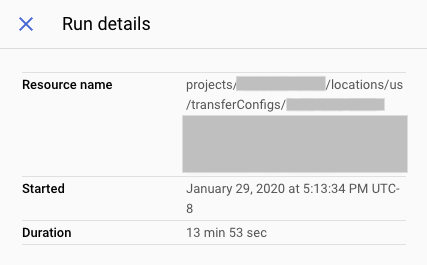
    控制台中的執行作業詳細資料

bq

如要查看移轉作業執行詳細資料,請輸入 bq show 指令,並使用 --transfer_run 旗標提供移轉作業的執行名稱。--format 旗標可用來控制輸出格式。

bq show \
--format=prettyjson \
--transfer_run run_name

將 run_name 替換為移轉作業執行的名稱。您可以使用 bq ls 指令擷取執行作業名稱。

範例:

輸入下列指令,顯示移轉作業 projects/myproject/locations/us/transferConfigs/1234a123-1234-1a23-1be9-12ab3c456de7/runs/1a2b345c-0000-1234-5a67-89de1f12345g 的詳細資料。

bq show \
--format=prettyjson \
--transfer_run \
projects/myproject/locations/us/transferConfigs/1234a123-1234-1a23-1be9-12ab3c456de7/runs/1a2b345c-0000-1234-5a67-89de1f12345g

如要查看轉移作業執行的轉移記錄訊息,請輸入 bq ls 指令並加上 --transfer_log 旗標。您可以使用 --message_type 標記,依類型篩選記錄訊息。

如要查看特定數量的記錄訊息,請提供 --max_results 旗標。指令會傳回您使用 --page_token 旗標提供的頁面權杖,以查看後續 n 則訊息。

bq ls \
--transfer_log \
--max_results=integer \
--message_type=messageTypes:message_type \
run_name

更改下列內容:

  • integer 是要傳回的記錄訊息數。
  • message_type 是要查看的記錄訊息類型 (單一值或以半形逗號分隔的清單):
    • INFO
    • WARNING
    • ERROR
  • run_name 是移轉執行的執行名稱。您可以使用 bq ls 指令擷取執行作業名稱。

範例:

輸入下列指令,查看移轉作業執行作業 projects/myproject/locations/us/transferConfigs/1234a123-1234-1a23-1be9-12ab3c456de7/runs/1a2b345c-0000-1234-5a67-89de1f12345g 的前 2 則記錄訊息。

bq ls \
--transfer_log \
--max_results=2 \
projects/myproject/locations/us/transferConfigs/1234a123-1234-1a23-1be9-12ab3c456de7/runs/1a2b345c-0000-1234-5a67-89de1f12345g

這個指令會傳回下一頁憑證。複製頁面權杖,並在 bq ls 指令中提供,即可查看接下來的 2 筆結果。

bq ls \
--transfer_log \
--max_results=2 \
--page_token=AB1CdEfg_hIJKL \
projects/myproject/locations/us/transferConfigs/1234a123-1234-1a23-1be9-12ab3c456de7/runs/1a2b345c-0000-1234-5a67-89de1f12345g

輸入下列指令,僅查看移轉作業 projects/myproject/locations/us/transferConfigs/1234a123-1234-1a23-1be9-12ab3c456de7/runs/1a2b345c-0000-1234-5a67-89de1f12345g 的錯誤訊息。

bq ls \
--transfer_log \
--message_type=messageTypes:ERROR \
projects/myproject/locations/us/transferConfigs/1234a123-1234-1a23-1be9-12ab3c456de7/runs/1a2b345c-0000-1234-5a67-89de1f12345g

API

請使用 projects.transferConfigs.runs.transferLogs.list 方法,並透過 parent 參數提供移轉作業的執行作業名稱。

Java

在試用這個範例之前,請先按照「使用用戶端程式庫的 BigQuery 快速入門導覽課程」中的 Java 設定操作說明進行操作。詳情請參閱 BigQuery Java API 參考文件。

如要向 BigQuery 進行驗證,請設定應用程式預設憑證。詳情請參閱「設定用戶端程式庫的驗證機制」。

執行程式碼範例前,請將 GOOGLE_CLOUD_UNIVERSE_DOMAIN 環境變數設為 s3nsapis.fr。

import com.google.api.gax.rpc.ApiException;
import com.google.cloud.bigquery.datatransfer.v1.DataTransferServiceClient;
import com.google.cloud.bigquery.datatransfer.v1.GetTransferRunRequest;
import com.google.cloud.bigquery.datatransfer.v1.TransferRun;
import java.io.IOException;

// Sample to get run details from transfer config.
public class RunDetails {

  public static void main(String[] args) throws IOException {
    // TODO(developer): Replace these variables before running the sample.
    // runId examples:
    // `projects/{project_id}/transferConfigs/{config_id}/runs/{run_id}` or
    // `projects/{project_id}/locations/{location_id}/transferConfigs/{config_id}/runs/{run_id}`
    String runId = "MY_RUN_ID";
    runDetails(runId);
  }

  public static void runDetails(String runId) throws IOException {
    try (DataTransferServiceClient dataTransferServiceClient = DataTransferServiceClient.create()) {
      GetTransferRunRequest request = GetTransferRunRequest.newBuilder().setName(runId).build();
      TransferRun run = dataTransferServiceClient.getTransferRun(request);
      System.out.print("Run details retrieved successfully :" + run.getName() + "\n");
    } catch (ApiException ex) {
      System.out.print("Run details not found." + ex.toString());
    }
  }
}

修改轉移作業

您可以修改現有移轉作業,方法包括編輯移轉設定中的資訊、更新附加至移轉設定的使用者憑證,以及停用或刪除移轉作業。

必要的角色

如要取得修改移轉作業所需的權限,請要求管理員授予您專案的 BigQuery 管理員 (roles/bigquery.admin) IAM 角色。如要進一步瞭解如何授予角色,請參閱「管理專案、資料夾和組織的存取權」。

您或許也能透過自訂角色或其他預先定義的角色,取得必要權限。

更新移轉

建立移轉設定後,您可以編輯下列欄位:

  • 目的地資料集
  • 顯示名稱
  • 任何為特定移轉類型指定的參數
  • 執行作業通知設定
  • 服務帳戶

轉移作業建立後,即無法編輯來源。

如何更新移轉:

控制台

  1. 在 Cloud de Confiance 控制台中,前往「Data transfers」(資料移轉) 頁面。

    前往「資料移轉」頁面

  2. 在資料移轉作業清單中,按一下移轉作業。

  3. 按一下「EDIT」(編輯),更新移轉設定。

bq

輸入 bq update 指令,使用 --transfer_config 旗標提供移轉設定的資源名稱,並提供 --display_name、--params、--refresh_window_days、--schedule 或 --target_dataset 旗標。您可以視需要為排定的查詢或 Cloud Storage 移轉作業提供 --destination_kms_key 旗標。

bq update \
--display_name='NAME' \
--params='PARAMETERS' \
--refresh_window_days=INTEGER \
--schedule='SCHEDULE'
--target_dataset=DATASET_ID \
--destination_kms_key="DESTINATION_KEY" \
--transfer_config \
--service_account_name=SERVICE_ACCOUNT \
RESOURCE_NAME

更改下列內容:

  • NAME:移轉設定的顯示名稱。
  • PARAMETERS:JSON 格式的移轉設定參數。例如:--params='{"param1":"param_value1"}'。如要瞭解支援的參數,請參閱資料來源的移轉指南。
  • INTEGER:介於 0 到 30 之間的值。如要瞭解如何設定重新整理時間範圍,請參閱移轉類型的說明文件。
  • SCHEDULE:週期性排程,例如 --schedule="every 3 hours"。如需 schedule 語法的說明,請參閱「設定 schedule 格式」。
  • DATASET_ID:移轉設定的目標資料集。
  • DESTINATION_KEY:Cloud KMS 金鑰資源 ID,例如 projects/project_name/locations/us/keyRings/key_ring_name/cryptoKeys/key_name。CMEK 僅適用於排定的查詢或 Cloud Storage 移轉作業。
  • SERVICE_ACCOUNT:指定要與這項移轉作業搭配使用的服務帳戶。
  • RESOURCE_NAME:移轉作業的資源名稱 (也稱為移轉設定)。如果不知道轉移作業的資源名稱,請使用 bq ls --transfer_config --transfer_location=location 找出資源名稱。

範例:

下列指令會更新 Google Ads 移轉作業 projects/myproject/locations/us/transferConfigs/1234a123-1234-1a23-1be9-12ab3c456de7 的顯示名稱、目標資料集、更新時間範圍和參數:

bq update \
--display_name='My changed transfer' \
--params='{"customer_id":"123-123-5678"}' \
--refresh_window_days=3 \
--target_dataset=mydataset2 \
--transfer_config \
 projects/myproject/locations/us/transferConfigs/1234a123-1234-1a23-1be9-12ab3c456de7

下列指令會更新排定查詢移轉作業 projects/myproject/locations/us/transferConfigs/5678z567-5678-5z67-5yx9-56zy3c866vw9 的參數和時間表:

bq update \
--params='{"destination_table_name_template":"test", "write_disposition":"APPEND"}' \
--schedule="every 24 hours" \
--transfer_config \
projects/myproject/locations/us/transferConfigs/5678z567-5678-5z67-5yx9-56zy3c866vw9

API

請使用 projects.transferConfigs.patch 方法,並透過 transferConfig.name 參數提供移轉作業的資源名稱。如果不知道移轉作業的資源名稱,請使用 bq ls --transfer_config --transfer_location=location 尋找資源名稱。您也可以呼叫下列方法,並使用 parent 參數提供專案 ID,列出所有移轉作業:projects.locations.transferConfigs.list。

Java

在試用這個範例之前,請先按照「使用用戶端程式庫的 BigQuery 快速入門導覽課程」中的 Java 設定操作說明進行操作。詳情請參閱 BigQuery Java API 參考文件。

如要向 BigQuery 進行驗證,請設定應用程式預設憑證。詳情請參閱「設定用戶端程式庫的驗證機制」。

執行程式碼範例前,請將 GOOGLE_CLOUD_UNIVERSE_DOMAIN 環境變數設為 s3nsapis.fr。

import com.google.api.gax.rpc.ApiException;
import com.google.cloud.bigquery.datatransfer.v1.DataTransferServiceClient;
import com.google.cloud.bigquery.datatransfer.v1.TransferConfig;
import com.google.cloud.bigquery.datatransfer.v1.UpdateTransferConfigRequest;
import com.google.protobuf.FieldMask;
import com.google.protobuf.util.FieldMaskUtil;
import java.io.IOException;

// Sample to update transfer config.
public class UpdateTransferConfig {

  public static void main(String[] args) throws IOException {
    // TODO(developer): Replace these variables before running the sample.
    String configId = "MY_CONFIG_ID";
    TransferConfig transferConfig =
        TransferConfig.newBuilder()
            .setName(configId)
            .setDisplayName("UPDATED_DISPLAY_NAME")
            .build();
    FieldMask updateMask = FieldMaskUtil.fromString("display_name");
    updateTransferConfig(transferConfig, updateMask);
  }

  public static void updateTransferConfig(TransferConfig transferConfig, FieldMask updateMask)
      throws IOException {
    try (DataTransferServiceClient dataTransferServiceClient = DataTransferServiceClient.create()) {
      UpdateTransferConfigRequest request =
          UpdateTransferConfigRequest.newBuilder()
              .setTransferConfig(transferConfig)
              .setUpdateMask(updateMask)
              .build();
      TransferConfig updateConfig = dataTransferServiceClient.updateTransferConfig(request);
      System.out.println("Transfer config updated successfully :" + updateConfig.getDisplayName());
    } catch (ApiException ex) {
      System.out.print("Transfer config was not updated." + ex.toString());
    }
  }
}

Python

在試用這個範例之前,請先按照「使用用戶端程式庫的 BigQuery 快速入門導覽課程」中的 Python 設定操作說明進行操作。詳情請參閱 BigQuery Python API 參考文件。

如要向 BigQuery 進行驗證,請設定應用程式預設憑證。詳情請參閱「設定用戶端程式庫的驗證機制」。

執行程式碼範例前,請將 GOOGLE_CLOUD_UNIVERSE_DOMAIN 環境變數設為 s3nsapis.fr。

import google.api_core.exceptions
from google.cloud import bigquery_datatransfer_v1
from google.protobuf import field_mask_pb2


client = bigquery_datatransfer_v1.DataTransferServiceClient()


def update_transfer_config(
    project_id: str,
    location: str,
    transfer_config_id: str,
) -> None:
    """Updates a data transfer configuration.

    This sample shows how to update the display name for a transfer
    configuration.

    Args:
        project_id: The Google Cloud project ID.
        location: The geographic location of the transfer config, for example "us-central1"
        transfer_config_id: The transfer configuration ID
    """
    transfer_config_name = client.transfer_config_path(
        project=f"{project_id}/locations/{location}",
        transfer_config=transfer_config_id,
    )

    transfer_config = bigquery_datatransfer_v1.types.TransferConfig(
        name=transfer_config_name,
        display_name="My New Transfer Config display name",
    )
    update_mask = field_mask_pb2.FieldMask(paths=["display_name"])

    try:
        response = client.update_transfer_config(
            transfer_config=transfer_config,
            update_mask=update_mask,
        )

        print(f"Updated transfer config: {response.name}")
        print(f"New display name: {response.display_name}")
    except google.api_core.exceptions.NotFound:
        print(f"Error: Transfer config '{transfer_config_name}' not found.")

更新憑證

移轉使用的憑證為建立該移轉的使用者的憑證。如您需要變更移轉設定所連結的使用者,您可以更新移轉的憑證。當建立移轉的使用者已不在您的組織時,這個方法十分實用。

如何更新移轉的憑證:

控制台

  1. 在 Cloud de Confiance 控制台中,以要轉移擁有權的使用者身分登入。

  2. 前往「資料移轉」頁面。

    前往「資料移轉」頁面

  3. 在資料移轉作業清單中,按一下要查看的移轉作業。

  4. 按一下「更多」選單,然後選取「更新憑證」。

  5. 按一下「Allow」(允許),授予 BigQuery 資料移轉服務權限,以便查看報表資料,以及存取和管理 BigQuery 中的資料。

bq

輸入 bq update 指令,使用 --transfer_config 旗標提供移轉設定的資源名稱,並提供 --update_credentials 旗標。

bq update \
--update_credentials=boolean \
--transfer_config \
resource_name

更改下列內容:

  • boolean 是布林值,指出是否應更新移轉設定的憑證。
  • resource_name 是移轉作業的資源名稱 (也稱為移轉設定)。如果不知道移轉作業的資源名稱,請使用 bq ls --transfer_config --transfer_location=location 尋找資源名稱。

範例:

輸入下列指令,更新 Google Ads 移轉作業 projects/myproject/locations/us/transferConfigs/1234a123-1234-1a23-1be9-12ab3c456de7 的憑證。

bq update \
--update_credentials=true \
--transfer_config \
projects/myproject/locations/us/transferConfigs/1234a123-1234-1a23-1be9-12ab3c456de7

API

請使用 projects.transferConfigs.patch 方法,並提供 authorizationCode 和 updateMask 參數。

Java

在試用這個範例之前,請先按照「使用用戶端程式庫的 BigQuery 快速入門導覽課程」中的 Java 設定操作說明進行操作。詳情請參閱 BigQuery Java API 參考文件。

如要向 BigQuery 進行驗證,請設定應用程式預設憑證。詳情請參閱「設定用戶端程式庫的驗證機制」。

執行程式碼範例前,請將 GOOGLE_CLOUD_UNIVERSE_DOMAIN 環境變數設為 s3nsapis.fr。

import com.google.api.gax.rpc.ApiException;
import com.google.cloud.bigquery.datatransfer.v1.DataTransferServiceClient;
import com.google.cloud.bigquery.datatransfer.v1.TransferConfig;
import com.google.cloud.bigquery.datatransfer.v1.UpdateTransferConfigRequest;
import com.google.protobuf.FieldMask;
import com.google.protobuf.util.FieldMaskUtil;
import java.io.IOException;

// Sample to update credentials in transfer config.
public class UpdateCredentials {

  public static void main(String[] args) throws IOException {
    // TODO(developer): Replace these variables before running the sample.
    String configId = "MY_CONFIG_ID";
    String serviceAccount = "MY_SERVICE_ACCOUNT";
    TransferConfig transferConfig = TransferConfig.newBuilder().setName(configId).build();
    FieldMask updateMask = FieldMaskUtil.fromString("service_account_name");
    updateCredentials(transferConfig, serviceAccount, updateMask);
  }

  public static void updateCredentials(
      TransferConfig transferConfig, String serviceAccount, FieldMask updateMask)
      throws IOException {
    try (DataTransferServiceClient dataTransferServiceClient = DataTransferServiceClient.create()) {
      UpdateTransferConfigRequest request =
          UpdateTransferConfigRequest.newBuilder()
              .setTransferConfig(transferConfig)
              .setUpdateMask(updateMask)
              .setServiceAccountName(serviceAccount)
              .build();
      dataTransferServiceClient.updateTransferConfig(request);
      System.out.println("Credentials updated successfully");
    } catch (ApiException ex) {
      System.out.print("Credentials was not updated." + ex.toString());
    }
  }
}

Python

在試用這個範例之前,請先按照「使用用戶端程式庫的 BigQuery 快速入門導覽課程」中的 Python 設定操作說明進行操作。詳情請參閱 BigQuery Python API 參考文件。

如要向 BigQuery 進行驗證,請設定應用程式預設憑證。詳情請參閱「設定用戶端程式庫的驗證機制」。

執行程式碼範例前,請將 GOOGLE_CLOUD_UNIVERSE_DOMAIN 環境變數設為 s3nsapis.fr。

from google.cloud import bigquery_datatransfer
from google.protobuf import field_mask_pb2

transfer_client = bigquery_datatransfer.DataTransferServiceClient()

service_account_name = "abcdef-test-sa@abcdef-test.iam.gserviceaccount.com"
transfer_config_name = "projects/1234/locations/us/transferConfigs/abcd"

transfer_config = bigquery_datatransfer.TransferConfig(name=transfer_config_name)

transfer_config = transfer_client.update_transfer_config(
    {
        "transfer_config": transfer_config,
        "update_mask": field_mask_pb2.FieldMask(paths=["service_account_name"]),
        "service_account_name": service_account_name,
    }
)

print("Updated config: '{}'".format(transfer_config.name))

停用移轉

停用移轉作業後,移轉作業名稱會加上 disabled。停用移轉作業後,系統不會排定新的移轉作業,也不允許新的補充作業。正在進行中的移轉執行將會如常完成。

停用移轉並不會移除任何已經移轉至 BigQuery 的資料。先前移轉的資料會產生標準 BigQuery 儲存空間費用,直到您刪除資料集或刪除資料表為止。

如何停用移轉:

控制台

  1. 前往 Cloud de Confiance 控制台的「BigQuery」頁面。

    前往「BigQuery」

  2. 按一下 [Transfers] (傳輸作業)。

  3. 在「Transfers」(移轉作業) 頁面中,按一下清單中要停用的移轉作業。

  4. 按一下「停用」。如要重新啟用移轉作業,請按一下「啟用」。

bq

CLI 不支援停用移轉。

API

請使用 projects.locations.transferConfigs.patch 方法,並在 projects.locations.transferConfig 資源中將 disabled 設為 true。

Java

在試用這個範例之前,請先按照「使用用戶端程式庫的 BigQuery 快速入門導覽課程」中的 Java 設定操作說明進行操作。詳情請參閱 BigQuery Java API 參考文件。

如要向 BigQuery 進行驗證,請設定應用程式預設憑證。詳情請參閱「設定用戶端程式庫的驗證機制」。

執行程式碼範例前,請將 GOOGLE_CLOUD_UNIVERSE_DOMAIN 環境變數設為 s3nsapis.fr。

import com.google.api.gax.rpc.ApiException;
import com.google.cloud.bigquery.datatransfer.v1.DataTransferServiceClient;
import com.google.cloud.bigquery.datatransfer.v1.TransferConfig;
import com.google.cloud.bigquery.datatransfer.v1.UpdateTransferConfigRequest;
import com.google.protobuf.FieldMask;
import com.google.protobuf.util.FieldMaskUtil;
import java.io.IOException;

// Sample to disable transfer config.
public class DisableTransferConfig {

  public static void main(String[] args) throws IOException {
    // TODO(developer): Replace these variables before running the sample.
    String configId = "MY_CONFIG_ID";
    TransferConfig transferConfig =
        TransferConfig.newBuilder().setName(configId).setDisabled(true).build();
    FieldMask updateMask = FieldMaskUtil.fromString("disabled");
    disableTransferConfig(transferConfig, updateMask);
  }

  public static void disableTransferConfig(TransferConfig transferConfig, FieldMask updateMask)
      throws IOException {
    try (DataTransferServiceClient dataTransferServiceClient = DataTransferServiceClient.create()) {
      UpdateTransferConfigRequest request =
          UpdateTransferConfigRequest.newBuilder()
              .setTransferConfig(transferConfig)
              .setUpdateMask(updateMask)
              .build();
      TransferConfig updateConfig = dataTransferServiceClient.updateTransferConfig(request);
      System.out.println("Transfer config disabled successfully :" + updateConfig.getDisplayName());
    } catch (ApiException ex) {
      System.out.print("Transfer config was not disabled." + ex.toString());
    }
  }
}

如要重新啟用轉移作業,請按照下列步驟操作:

在試用這個範例之前,請先按照「使用用戶端程式庫的 BigQuery 快速入門導覽課程」中的 Java 設定操作說明進行操作。詳情請參閱 BigQuery Java API 參考文件。

如要向 BigQuery 進行驗證,請設定應用程式預設憑證。詳情請參閱「設定用戶端程式庫的驗證機制」。

執行程式碼範例前,請將 GOOGLE_CLOUD_UNIVERSE_DOMAIN 環境變數設為 s3nsapis.fr。

/*
 * Copyright 2020 Google LLC
 *
 * Licensed under the Apache License, Version 2.0 (the "License");
 * you may not use this file except in compliance with the License.
 * You may obtain a copy of the License at
 *
 * http://www.apache.org/licenses/LICENSE-2.0
 *
 * Unless required by applicable law or agreed to in writing, software
 * distributed under the License is distributed on an "AS IS" BASIS,
 * WITHOUT WARRANTIES OR CONDITIONS OF ANY KIND, either express or implied.
 * See the License for the specific language governing permissions and
 * limitations under the License.
 */

package com.example.bigquerydatatransfer;

import com.google.api.gax.rpc.ApiException;
import com.google.cloud.bigquery.datatransfer.v1.DataTransferServiceClient;
import com.google.cloud.bigquery.datatransfer.v1.TransferConfig;
import com.google.cloud.bigquery.datatransfer.v1.UpdateTransferConfigRequest;
import com.google.protobuf.FieldMask;
import com.google.protobuf.util.FieldMaskUtil;
import java.io.IOException;

// Sample to disable transfer config.
public class DisableTransferConfig {

  public static void main(String[] args) throws IOException {
    // TODO(developer): Replace these variables before running the sample.
    String configId = "MY_CONFIG_ID";
    TransferConfig transferConfig =
        TransferConfig.newBuilder().setName(configId).setDisabled(true).build();
    FieldMask updateMask = FieldMaskUtil.fromString("disabled");
    disableTransferConfig(transferConfig, updateMask);
  }

  public static void disableTransferConfig(TransferConfig transferConfig, FieldMask updateMask)
      throws IOException {
    try (DataTransferServiceClient dataTransferServiceClient = DataTransferServiceClient.create()) {
      UpdateTransferConfigRequest request =
          UpdateTransferConfigRequest.newBuilder()
              .setTransferConfig(transferConfig)
              .setUpdateMask(updateMask)
              .build();
      TransferConfig updateConfig = dataTransferServiceClient.updateTransferConfig(request);
      System.out.println("Transfer config disabled successfully :" + updateConfig.getDisplayName());
    } catch (ApiException ex) {
      System.out.print("Transfer config was not disabled." + ex.toString());
    }
  }
}

刪除移轉

刪除移轉時,您將無法排程新的移轉執行。任何正在進行中的移轉執行將會停止。

刪除移轉並不會移除任何已經移轉至 BigQuery 的資料。先前移轉的資料會產生標準 BigQuery 儲存空間費用,直到您刪除資料集或刪除資料表為止。

如何刪除移轉:

控制台

  1. 前往 Cloud de Confiance 控制台的「BigQuery」頁面。

    前往「BigQuery」

  2. 按一下 [Transfers] (傳輸作業)。

  3. 在「Transfers」(移轉作業) 頁面中,按一下清單中要刪除的移轉作業。

  4. 按一下「刪除」。為安全起見,您必須在方塊中輸入「delete」一詞,確認您的意圖。

bq

輸入 bq rm 指令,並提供移轉設定的資源名稱。您可以使用 -f 旗標,直接刪除移轉設定,不需確認。

bq rm \
-f \
--transfer_config \
resource_name

其中:

例如,輸入下列指令,刪除移轉設定 projects/myproject/locations/us/transferConfigs/1234a123-1234-1a23-1be9-12ab3c456de7。

bq rm \
--transfer_config \
projects/myproject/locations/us/transferConfigs/1234a123-1234-1a23-1be9-12ab3c456de7

API

請使用 projects.locations.transferConfigs.delete 方法,並透過 name 參數提供要刪除的資源。

Java

在試用這個範例之前,請先按照「使用用戶端程式庫的 BigQuery 快速入門導覽課程」中的 Java 設定操作說明進行操作。詳情請參閱 BigQuery Java API 參考文件。

如要向 BigQuery 進行驗證,請設定應用程式預設憑證。詳情請參閱「設定用戶端程式庫的驗證機制」。

執行程式碼範例前,請將 GOOGLE_CLOUD_UNIVERSE_DOMAIN 環境變數設為 s3nsapis.fr。

import com.google.api.gax.rpc.ApiException;
import com.google.cloud.bigquery.datatransfer.v1.DataTransferServiceClient;
import com.google.cloud.bigquery.datatransfer.v1.DeleteTransferConfigRequest;
import java.io.IOException;

// Sample to delete a transfer config
public class DeleteTransferConfig {

  public static void main(String[] args) throws IOException {
    // TODO(developer): Replace these variables before running the sample.
    // i.e projects/{project_id}/transferConfigs/{config_id}` or
    // `projects/{project_id}/locations/{location_id}/transferConfigs/{config_id}`
    String configId = "MY_CONFIG_ID";
    deleteTransferConfig(configId);
  }

  public static void deleteTransferConfig(String configId) throws IOException {
    try (DataTransferServiceClient dataTransferServiceClient = DataTransferServiceClient.create()) {
      DeleteTransferConfigRequest request =
          DeleteTransferConfigRequest.newBuilder().setName(configId).build();
      dataTransferServiceClient.deleteTransferConfig(request);
      System.out.println("Transfer config deleted successfully");
    } catch (ApiException ex) {
      System.out.println("Transfer config was not deleted." + ex.toString());
    }
  }
}

Python

在試用這個範例之前,請先按照「使用用戶端程式庫的 BigQuery 快速入門導覽課程」中的 Python 設定操作說明進行操作。詳情請參閱 BigQuery Python API 參考文件。

如要向 BigQuery 進行驗證,請設定應用程式預設憑證。詳情請參閱「設定用戶端程式庫的驗證機制」。

執行程式碼範例前,請將 GOOGLE_CLOUD_UNIVERSE_DOMAIN 環境變數設為 s3nsapis.fr。

import google.api_core.exceptions
from google.cloud import bigquery_datatransfer_v1

client = bigquery_datatransfer_v1.DataTransferServiceClient()


def delete_transfer_config(
    project_id: str, location: str, transfer_config_id: str
) -> None:
    """Deletes a data transfer configuration, including any associated transfer runs and logs.

    Args:
        project_id: The Google Cloud project ID.
        location: The geographic location of the transfer configuration, for example, "us-central1".
        transfer_config_id: The transfer configuration ID, for example, "1234a-5678-90b1-2c3d-4e5f67890g12".
    """

    name = client.transfer_config_path(
        project=f"{project_id}/locations/{location}",
        transfer_config=transfer_config_id,
    )
    request = bigquery_datatransfer_v1.DeleteTransferConfigRequest(name=name)

    try:
        client.delete_transfer_config(request=request)
        print(f"Deleted transfer config {name}")
    except google.api_core.exceptions.NotFound:
        print(f"Error: Transfer config '{name}' not found.")

刪除含有網路連結的資料移轉作業後,可能需要幾天才能刪除與該資料移轉作業相關聯的網路連結。詳情請參閱「一般問題」。

手動觸發移轉作業

您可以手動觸發移轉作業 (也稱為「補充執行作業」),在自動排定的移轉作業以外載入其他資料檔案。如果資料來源支援執行階段參數,您也可以手動觸發移轉作業,方法是指定日期或日期範圍,載入過去的資料。

您可以隨時手動啟動資料補充作業。除了來源限制外,BigQuery 資料移轉服務支援的補充要求上限為 180 天。不支援同時提出回填要求。

如要瞭解可回填的資料量,請參閱資料來源的移轉指南。

必要的角色

如要取得修改移轉作業所需的權限,請要求管理員授予您專案的 BigQuery 管理員 (roles/bigquery.admin) IAM 角色。如要進一步瞭解如何授予角色,請參閱「管理專案、資料夾和組織的存取權」。

您或許也能透過自訂角色或其他預先定義的角色,取得必要權限。

手動觸發移轉或回填

您可以透過下列方法,手動觸發移轉或補充作業:

  • 使用 Cloud de Confiance 控制台選取移轉作業,然後按一下「Run transfer now」(立即執行移轉作業) 或「Schedule backfill」(安排補充作業)。
  • 使用 bq 指令列工具執行 bq mk --transfer run 指令
  • 呼叫 projects.locations.transferConfigs.startManualRuns method API 方法

如需各方法的詳細操作說明,請選取對應的分頁:

控制台

  1. 在 Cloud de Confiance 控制台中,前往「Data transfers」(資料移轉) 頁面。

    前往「資料移轉」頁面

  2. 從清單中選取轉移作業。

  3. 按一下「立即執行移轉作業」或「排定補充作業」。視移轉設定類型而定,只能選擇其中一個選項。

    • 如果點選「Run transfer now」(立即執行移轉作業),請視情況選取「Run one time transfer」(執行一次性移轉作業) 或「Run for specific date」(執行特定日期的移轉作業)。如果選取「Run for specific date」(在特定日期執行),請選取特定日期和時間:
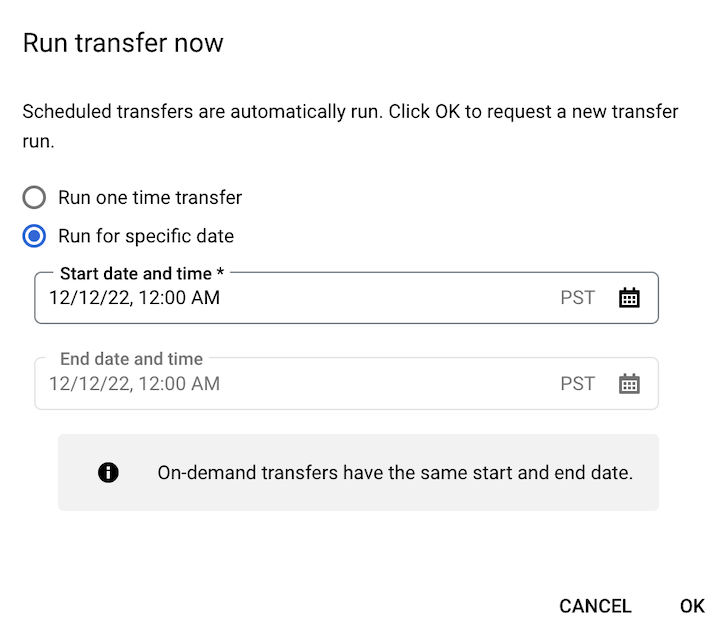
      立即執行移轉作業

    • 如果按一下「Schedule backfill」(安排補充作業),請視情況選取「Run one time transfer」(執行一次性移轉作業) 或「Run for a date range」(在指定的日期範圍內執行)。如果選取「Run for a date range」(在指定的日期範圍內執行),請選取開始和結束日期與時間:
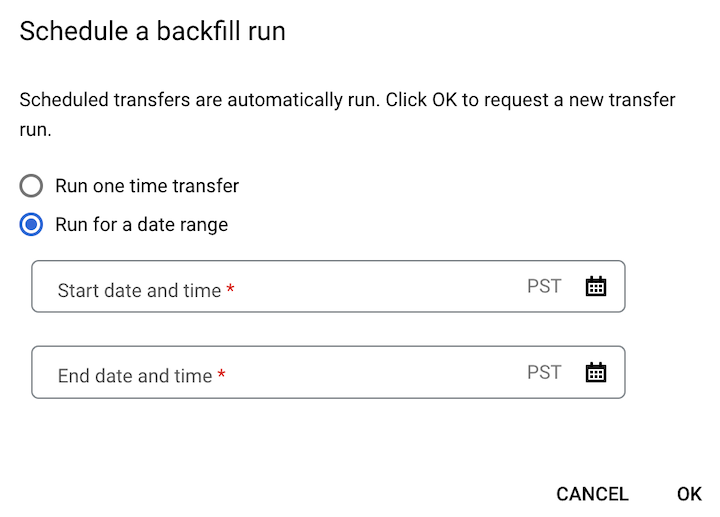
      排程補充作業

  4. 按一下 [確定]。

bq

如要手動啟動移轉作業,請輸入 bq mk 指令並加上 --transfer_run 旗標:

bq mk \
--transfer_run \
--run_time='RUN_TIME' \
RESOURCE_NAME

更改下列內容:

  • RUN_TIME 是時間戳記,用於指定過去轉移作業的日期。請使用以 Z 結尾或包含有效時區偏移的時間戳記,例如 2022-08-19T12:11:35.00Z 或 2022-05-25T00:00:00+00:00。
    • 如果移轉作業沒有執行階段參數,或者您只想立即觸發移轉作業,而不指定過去的移轉作業,請在這個欄位中輸入目前時間。
  • RESOURCE_NAME 是移轉設定中列出的資源名稱,例如 projects/myproject/locations/us/transferConfigs/1234a123-1234-1a23-1be9-12ab3c456de7。

如要手動啟動特定日期範圍的移轉作業,請輸入 bq mk 指令,並加上 --transfer_run 旗標和日期範圍:

bq mk \
--transfer_run \
--start_time='START_TIME' \
--end_time='END_TIME' \
RESOURCE_NAME

更改下列內容:

  • START_TIME 和 END_TIME 是以 Z 結尾或包含有效時區偏移的時間戳記。這些值會指定時間範圍,其中包含您要從中回填的先前移轉作業,例如 2022-08-19T12:11:35.00Z 或 2022-05-25T00:00:00+00:00
  • RESOURCE_NAME 是移轉設定中列出的資源名稱,例如 projects/myproject/locations/us/transferConfigs/1234a123-1234-1a23-1be9-12ab3c456de7

API

如要手動啟動移轉作業,請使用 projects.locations.transferConfigs.startManualRuns 方法,並透過 parent 參數提供移轉設定資源名稱。如要查看移轉設定的資源名稱,請參閱「取得移轉作業詳細資料」一節。

  "requestedRunTime": "RUN_TIME"

更改下列內容:

  • RUN_TIME 是時間戳記,用於指定過去轉移作業的日期。請使用以 Z 結尾或包含有效時區偏移的時間戳記,例如 2022-08-19T12:11:35.00Z 或 2022-05-25T00:00:00+00:00。
    • 如果移轉作業沒有執行階段參數,或者您只想立即觸發移轉作業,而不指定過去的移轉作業,請在這個欄位中輸入目前時間。

如要手動啟動特定日期範圍的移轉作業,請提供日期範圍:

"requestedTimeRange": {
  "startTime": "START_TIME",
  "endTime": "END_TIME"
}

更改下列內容:

  • START_TIME 和 END_TIME 是以 Z 結尾或包含有效時區偏移的時間戳記。這些值會指定時間範圍,其中包含您要從中回填的先前移轉作業,例如 2022-08-19T12:11:35.00Z 或 2022-05-25T00:00:00+00:00

Java

在試用這個範例之前,請先按照「使用用戶端程式庫的 BigQuery 快速入門導覽課程」中的 Java 設定操作說明進行操作。詳情請參閱 BigQuery Java API 參考文件。

如要向 BigQuery 進行驗證,請設定應用程式預設憑證。詳情請參閱「設定用戶端程式庫的驗證機制」。

執行程式碼範例前,請將 GOOGLE_CLOUD_UNIVERSE_DOMAIN 環境變數設為 s3nsapis.fr。

import com.google.api.gax.rpc.ApiException;
import com.google.cloud.bigquery.datatransfer.v1.DataTransferServiceClient;
import com.google.cloud.bigquery.datatransfer.v1.ScheduleTransferRunsRequest;
import com.google.cloud.bigquery.datatransfer.v1.ScheduleTransferRunsResponse;
import com.google.protobuf.Timestamp;
import java.io.IOException;
import org.threeten.bp.Clock;
import org.threeten.bp.Instant;
import org.threeten.bp.temporal.ChronoUnit;

// Sample to run schedule back fill for transfer config
public class ScheduleBackFill {

  public static void main(String[] args) throws IOException {
    // TODO(developer): Replace these variables before running the sample.
    String configId = "MY_CONFIG_ID";
    Clock clock = Clock.systemDefaultZone();
    Instant instant = clock.instant();
    Timestamp startTime =
        Timestamp.newBuilder()
            .setSeconds(instant.minus(5, ChronoUnit.DAYS).getEpochSecond())
            .setNanos(instant.minus(5, ChronoUnit.DAYS).getNano())
            .build();
    Timestamp endTime =
        Timestamp.newBuilder()
            .setSeconds(instant.minus(2, ChronoUnit.DAYS).getEpochSecond())
            .setNanos(instant.minus(2, ChronoUnit.DAYS).getNano())
            .build();
    scheduleBackFill(configId, startTime, endTime);
  }

  public static void scheduleBackFill(String configId, Timestamp startTime, Timestamp endTime)
      throws IOException {
    try (DataTransferServiceClient client = DataTransferServiceClient.create()) {
      ScheduleTransferRunsRequest request =
          ScheduleTransferRunsRequest.newBuilder()
              .setParent(configId)
              .setStartTime(startTime)
              .setEndTime(endTime)
              .build();
      ScheduleTransferRunsResponse response = client.scheduleTransferRuns(request);
      System.out.println("Schedule backfill run successfully :" + response.getRunsCount());
    } catch (ApiException ex) {
      System.out.print("Schedule backfill was not run." + ex.toString());
    }
  }
}

Python

在試用這個範例之前,請先按照「使用用戶端程式庫的 BigQuery 快速入門導覽課程」中的 Python 設定操作說明進行操作。詳情請參閱 BigQuery Python API 參考文件。

如要向 BigQuery 進行驗證,請設定應用程式預設憑證。詳情請參閱「設定用戶端程式庫的驗證機制」。

執行程式碼範例前,請將 GOOGLE_CLOUD_UNIVERSE_DOMAIN 環境變數設為 s3nsapis.fr。

import datetime

from google.cloud.bigquery_datatransfer_v1 import (
    DataTransferServiceClient,
    StartManualTransferRunsRequest,
)

# Create a client object
client = DataTransferServiceClient()

# Replace with your transfer configuration name
transfer_config_name = "projects/1234/locations/us/transferConfigs/abcd"
now = datetime.datetime.now(datetime.timezone.utc)
start_time = now - datetime.timedelta(days=5)
end_time = now - datetime.timedelta(days=2)

# Some data sources, such as scheduled_query only support daily run.
# Truncate start_time and end_time to midnight time (00:00AM UTC).
start_time = datetime.datetime(
    start_time.year, start_time.month, start_time.day, tzinfo=datetime.timezone.utc
)
end_time = datetime.datetime(
    end_time.year, end_time.month, end_time.day, tzinfo=datetime.timezone.utc
)

requested_time_range = StartManualTransferRunsRequest.TimeRange(
    start_time=start_time,
    end_time=end_time,
)

# Initialize request argument(s)
request = StartManualTransferRunsRequest(
    parent=transfer_config_name,
    requested_time_range=requested_time_range,
)

# Make the request
response = client.start_manual_transfer_runs(request=request)

# Handle the response
print("Started manual transfer runs:")
for run in response.runs:
    print(f"backfill: {run.run_time} run: {run.name}")

記錄和監控

BigQuery 資料移轉服務會將記錄和指標匯出至 Cloud Monitoring 和 Cloud Logging,讓您觀測移轉作業。您可以使用 Monitoring 設定資訊主頁,監控移轉作業、評估移轉作業執行效能,以及查看錯誤訊息,排解移轉失敗的問題。您可以使用 Logging,查看與移轉作業或移轉設定相關的記錄。

您也可以查看 BigQuery 資料移轉服務提供的稽核記錄,瞭解移轉活動和資料存取記錄。

排解移轉設定問題

如要瞭解如何解決 BigQuery 資料移轉服務的問題,請參閱「排解移轉設定問題」。