
Mask column data
This document shows you how to implement data masking in order to selectively obscure sensitive data. By implementing data masking, you can provide different levels of visibility to different groups of users. For general information, see Introduction to data masking.
You implement data masking by adding a data policy to a column. To add a data masking policy to a column, you must complete the following steps :
- Create a taxonomy with at least one policy tag.
- Optional: Grant the Data Catalog Fine-Grained Reader role to one or more principals on one or more of the policy tags you created.
- Create up to three data policies for the policy tag, to map masking rules and principals (which represent users or groups) to that tag.
- Set the policy tag on a column. That maps the data policies associated with the policy tag to the selected column.
- Assign users who should have access to masked data to the BigQuery Masked Reader role. As a best practice, assign the BigQuery Masked Reader role at the data policy level. Assigning the role at the project level or higher grants users permissions to all data policies under the project, which can lead to issues caused by excess permissions.
You can use the Cloud de Confiance console or the BigQuery Data Policy API to work with data policies.
When you have completed these steps, users running queries against the column get unmasked data, masked data, or an access denied error, depending on the groups that they belong to and the roles that they have been granted. For more information, see How Masked Reader and Fine-Grained Reader roles interact.
Alternatively, you can apply data policies directly on a column. For more information, see Mask data with data policies directly on a column.
Mask data with policy tags
Use policy tags to selectively obscure sensitive data.
Before you begin
-
In the Cloud de Confiance console, on the project selector page, select or create a Cloud de Confiance project.
Roles required to select or create a project
- Select a project: Selecting a project doesn't require a specific IAM role—you can select any project that you've been granted a role on.
-
Create a project: To create a project, you need the Project Creator role
(
roles/resourcemanager.projectCreator), which contains theresourcemanager.projects.createpermission. Learn how to grant roles.
-
Verify that billing is enabled for your Cloud de Confiance project.
Enable the Data Catalog and BigQuery Data Policy APIs, if any are not already enabled.
Roles required to enable APIs
To enable APIs, you need the
serviceusage.services.enablepermission. If you created the project, then you likely already have this permission through the Owner role (roles/owner). Otherwise, you can get this permission through the Service Usage Admin role (roles/serviceusage.serviceUsageAdmin). Learn how to grant roles.- BigQuery is automatically enabled in new projects, but you
might need to activate it in a pre-existing project.
Enable the BigQuery API, if it is not already enabled.
Roles required to enable APIs
To enable APIs, you need the
serviceusage.services.enablepermission. If you created the project, then you likely already have this permission through the Owner role (roles/owner). Otherwise, you can get this permission through the Service Usage Admin role (roles/serviceusage.serviceUsageAdmin). Learn how to grant roles. - If you are creating a data policy that references a custom masking routine, create the associated masking UDF so that it is available in the following steps.
Create taxonomies
The user or service account that creates a taxonomy must be granted the Data Catalog Policy Tag Admin role.
Console
- In the Cloud de Confiance console, go to the Policy tag taxonomies page.
- Click Create taxonomy.
On the New taxonomy page:
- For Taxonomy name, enter the name of the taxonomy that you want to create.
- For Description, enter a description.
- If needed, change the project listed under Project.
- If needed, change the location listed under Location.
- Under Policy Tags, enter a policy tag name and description.
- To add a child policy tag for a policy tag, click Add subtag.
- To add a new policy tag at the same level as another policy tag, click + Add policy tag.
- Continue adding policy tags and child policy tags as needed for your taxonomy.
- When you are done creating policy tags for your hierarchy, click Create.
API
To use existing taxonomies, call
taxonomies.import
in place of the first two steps of the following procedure.
- Call
taxonomies.createto create a taxonomy. - Call
taxonomies.policyTags.createto create a policy tag.
Work with policy tags
For more information about how to work with policy tags, such as how to view or update them, see Work with policy tags. For best practices, see Best practices for using policy tags in BigQuery.
Create data policies
The user or service account that creates a data policy must have the
bigquery.dataPolicies.create, bigquery.dataPolicies.setIamPolicy, and
datacatalog.taxonomies.get permissions.
The bigquery.dataPolicies.create and bigquery.dataPolicies.setIamPolicy
permissions are included in the
BigQuery Data Policy Admin, BigQuery Admin and BigQuery Data Owner roles.
The datacatalog.taxonomies.get permission is included in the
Data Catalog Admin and Data Catalog Viewer roles.
If you are creating a data policy that references a custom masking routine, you also need routine permissions.
In case of custom masking, grant users the BigQuery Admin or BigQuery Data Owner roles to ensure they have the necessary permissions for both routines and data policies.
You can create up to nine data policies for a policy tag. One of these policies is reserved for column-level access control settings.
Console
- In the Cloud de Confiance console, go to the Policy tag taxonomies page.
- Click the name of the taxonomy to open.
- Select a policy tag.
- Click Manage Data Policies.
- For Data Policy Name, type a name for the data policy. The data policy name must be unique within the project that data policy resides in.
- For Masking Rule, choose a predefined masking rule or a custom
masking routine. If you are selecting a custom masking routine, ensure
that you have both the
bigquery.routines.getand thebigquery.routines.listpermissions at the project level. - For Principal, type the name of one or more users or groups to whom you want to grant masked access to the column. Note that all users and groups you enter here are granted the BigQuery Masked Reader role.
- Click Submit.
API
Call the
createmethod. Pass in aDataPolicyresource that meets the following requirements:- The
dataPolicyTypefield is set toDATA_MASKING_POLICY. - The
dataMaskingPolicyfield identifies the data masking rule or routine to use. - The
dataPolicyIdfield provides a name for the data policy that is unique within the project that data policy resides in.
- The
Call the
setIamPolicymethod and pass in aPolicy. ThePolicymust identify the principals who are granted access to masked data, and specifyroles/bigquerydatapolicy.maskedReaderfor therolefield.
Node.js
Before trying this sample, follow the Node.js setup instructions in the BigQuery quickstart using client libraries. For more information, see the BigQuery Node.js API reference documentation.
To authenticate to BigQuery, set up Application Default Credentials. For more information, see Set up authentication for client libraries.
Before running code samples, set the GOOGLE_CLOUD_UNIVERSE_DOMAIN environment
variable to s3nsapis.fr.
Python
Before trying this sample, follow the Python setup instructions in the BigQuery quickstart using client libraries. For more information, see the BigQuery Python API reference documentation.
To authenticate to BigQuery, set up Application Default Credentials. For more information, see Set up authentication for client libraries.
Before running code samples, set the GOOGLE_CLOUD_UNIVERSE_DOMAIN environment
variable to s3nsapis.fr.
Set policy tags on columns
Set a data policy on a column by attaching the policy tag associated with the data policy to the column.
The user or service account that sets a policy tag needs the
datacatalog.taxonomies.get and bigquery.tables.setCategory permissions.
datacatalog.taxonomies.get is included in the
Data Catalog Policy Tags Admin and Project Viewer roles.
bigquery.tables.setCategory is included in the
BigQuery Admin (roles/bigquery.admin) and
BigQuery Data Owner (roles/bigquery.dataOwner) roles.
To view taxonomies and policy tags across all projects in an organization in
Cloud de Confiance console, users need the resourcemanager.organizations.get
permission, which is included in the Organization Viewer role. This permission
is not required when using the API or the bq command-line tool.
Console
Set the policy tag by modifying a schema using the Cloud de Confiance console.
Open the BigQuery page in the Cloud de Confiance console.
In the BigQuery Explorer, locate and select the table that you want to update. The table schema for that table opens.
Click Edit Schema.
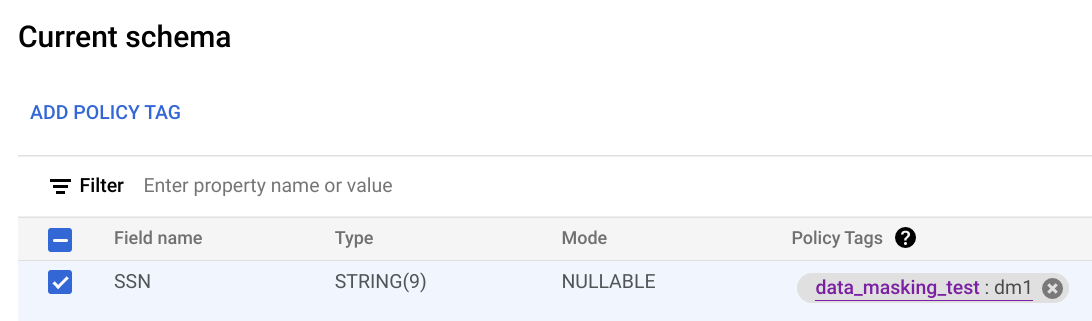
In the Current schema screen, select the target column and click Add policy tag.
In the Add a policy tag screen, locate and select the policy tag that you want to apply to the column.
Click Select. Your screen should look similar to the following:
Click Save.
bq
Write the schema to a local file.
bq show --schema --format=prettyjson \
   project-id:dataset.table > schema.json
where:
- project-id is your project ID.
- dataset is the name of the dataset that contains the table you're updating.
- table is the name of the table you're updating.
Modify schema.json to set a policy tag on a column. For the value of the
namesfield ofpolicyTags, use the policy tag resource name.[ ... { "name": "ssn", "type": "STRING", "mode": "REQUIRED", "policyTags": { "names": ["projects/project-id/locations/location/taxonomies/taxonomy-id/policyTags/policytag-id"] } }, ... ]
Update the schema.
bq update \
   project-id:dataset.table schema.json
API
For existing tables, call tables.patch, or for new tables call
tables.insert. Use the
schema property of the Table object that you pass in
to set a policy tag in your schema definition. See the command-line example
schema to see how to set a policy tag.
When working with an existing table, the tables.patch method is preferred,
because the tables.update method replaces the entire table resource.
Enforce access control
When you create a data policy for a policy tag, access control is automatically enforced. All columns that have that policy tag applied return masked data in response to queries from users who have the Masked Reader role.
To stop enforcement of access control, you must first delete all data policies associated with the policy tags in the taxonomy. For more information, see Enforce access control.
Get a data policy
Follow these steps to get information about a data policy:
Node.js
Before trying this sample, follow the Node.js setup instructions in the BigQuery quickstart using client libraries. For more information, see the BigQuery Node.js API reference documentation.
To authenticate to BigQuery, set up Application Default Credentials. For more information, see Set up authentication for client libraries.
Before running code samples, set the GOOGLE_CLOUD_UNIVERSE_DOMAIN environment
variable to s3nsapis.fr.
Python
Before trying this sample, follow the Python setup instructions in the BigQuery quickstart using client libraries. For more information, see the BigQuery Python API reference documentation.
To authenticate to BigQuery, set up Application Default Credentials. For more information, see Set up authentication for client libraries.
Before running code samples, set the GOOGLE_CLOUD_UNIVERSE_DOMAIN environment
variable to s3nsapis.fr.
Check IAM permissions on a data policy
Follow these steps to get the IAM policy for a data policy:
API
Call the
testIamPermissions method.
Node.js
Before trying this sample, follow the Node.js setup instructions in the BigQuery quickstart using client libraries. For more information, see the BigQuery Node.js API reference documentation.
To authenticate to BigQuery, set up Application Default Credentials. For more information, see Set up authentication for client libraries.
Before running code samples, set the GOOGLE_CLOUD_UNIVERSE_DOMAIN environment
variable to s3nsapis.fr.
Python
Before trying this sample, follow the Python setup instructions in the BigQuery quickstart using client libraries. For more information, see the BigQuery Python API reference documentation.
To authenticate to BigQuery, set up Application Default Credentials. For more information, see Set up authentication for client libraries.
Before running code samples, set the GOOGLE_CLOUD_UNIVERSE_DOMAIN environment
variable to s3nsapis.fr.
List data policies
Follow these steps to list data policies:
Node.js
Before trying this sample, follow the Node.js setup instructions in the BigQuery quickstart using client libraries. For more information, see the BigQuery Node.js API reference documentation.
To authenticate to BigQuery, set up Application Default Credentials. For more information, see Set up authentication for client libraries.
Before running code samples, set the GOOGLE_CLOUD_UNIVERSE_DOMAIN environment
variable to s3nsapis.fr.
Python
Before trying this sample, follow the Python setup instructions in the BigQuery quickstart using client libraries. For more information, see the BigQuery Python API reference documentation.
To authenticate to BigQuery, set up Application Default Credentials. For more information, see Set up authentication for client libraries.
Before running code samples, set the GOOGLE_CLOUD_UNIVERSE_DOMAIN environment
variable to s3nsapis.fr.
Update data policies
The user or service account that updates a data policy must have the
bigquery.dataPolicies.update permission.
If you are updating the policy tag the data policy is associated with, you also
require the datacatalog.taxonomies.get permission.
If you are updating the principals associated with the data policy, you
require the bigquery.dataPolicies.setIamPolicy permission.
The bigquery.dataPolicies.update and bigquery.dataPolicies.setIamPolicy
permissions are included in the
BigQuery Data Policy Admin, BigQuery Admin and BigQuery Data Owner roles.
The datacatalog.taxonomies.get permission is included in the
Data Catalog Admin and Data Catalog Viewer roles.
Console
- In the Cloud de Confiance console, go to the Policy tag taxonomies page.
- Click the name of the taxonomy to open.
- Select a policy tag.
- Click Manage Data Policies.
- Optionally, change the masking rule.
- Optional: Add or remove principals.
- Click Submit.
API
To change the data masking rule, call the
patch
method and pass in a
DataPolicy
resource with an updated dataMaskingPolicy field.
To change the principals associated with a data policy, call the
setIamPolicy
method and pass in a
Policy that updates
the principals that are granted access to masked data.
Node.js
Before trying this sample, follow the Node.js setup instructions in the BigQuery quickstart using client libraries. For more information, see the BigQuery Node.js API reference documentation.
To authenticate to BigQuery, set up Application Default Credentials. For more information, see Set up authentication for client libraries.
Before running code samples, set the GOOGLE_CLOUD_UNIVERSE_DOMAIN environment
variable to s3nsapis.fr.
Python
Before trying this sample, follow the Python setup instructions in the BigQuery quickstart using client libraries. For more information, see the BigQuery Python API reference documentation.
To authenticate to BigQuery, set up Application Default Credentials. For more information, see Set up authentication for client libraries.
Before running code samples, set the GOOGLE_CLOUD_UNIVERSE_DOMAIN environment
variable to s3nsapis.fr.
Delete data policies
The user or service account that creates a data policy must have the
bigquery.dataPolicies.delete permission. This permission is included in the
BigQuery Data Policy Admin, BigQuery Admin and BigQuery Data Owner roles.
Console
- In the Cloud de Confiance console, go to the Policy tag taxonomies page.
- Click the name of the taxonomy to open.
- Select a policy tag.
- Click Manage Data Policies.
- Click next to the data policy to delete.
- Click Submit.
- Click Confirm.
API
To delete a data policy, call the
delete
method.
Node.js
Before trying this sample, follow the Node.js setup instructions in the BigQuery quickstart using client libraries. For more information, see the BigQuery Node.js API reference documentation.
To authenticate to BigQuery, set up Application Default Credentials. For more information, see Set up authentication for client libraries.
Before running code samples, set the GOOGLE_CLOUD_UNIVERSE_DOMAIN environment
variable to s3nsapis.fr.
Python
Before trying this sample, follow the Python setup instructions in the BigQuery quickstart using client libraries. For more information, see the BigQuery Python API reference documentation.
To authenticate to BigQuery, set up Application Default Credentials. For more information, see Set up authentication for client libraries.
Before running code samples, set the GOOGLE_CLOUD_UNIVERSE_DOMAIN environment
variable to s3nsapis.fr.
Mask data by applying data policies to a column
As an alternative to creating policy tags, you can create data policies and apply them directly on a column.
You can also implement data masking through data governance tags. For more information, see Control access with data governance tags.
Work with data policies
You can create, update, and delete data policies using the BigQuery Data Policy API. To apply a data policy directly on a column, you can't use the Policy tag taxonomies page in the Cloud de Confiance console.
To work with data policies, use the
v2.projects.locations.datapolicies
resource.
Create data policies
The user or service account that creates a data policy must have the
bigquery.dataPolicies.create permission.
The bigquery.dataPolicies.create permission is included in the
BigQuery Data Policy Admin, BigQuery Admin and BigQuery Data Owner roles.
The datacatalog.taxonomies.get permission is included in the
Data Catalog Admin and Data Catalog Viewer roles.
If you are creating a data policy that references a custom masking routine, you also need routine permissions.
If you use custom masking, grant users the BigQuery Data Owner role to ensure they have the necessary permissions for both routines and data policies.
API
To create a data policy, call the
create
method. Pass in a
DataPolicy
resource that meets the following requirements:
- The
dataPolicyTypefield is set toDATA_MASKING_POLICYorRAW_DATA_ACCESS_POLICY. - The
dataMaskingPolicyfield identifies the data masking rule or routine to use. - The
dataPolicyIdfield provides a name for the data policy that is unique within the project that the data policy resides in.
SQL
To create a data policy with masked access, use the CREATE DATA_POLICY
statement and set the value of data_policy_type to DATA_MASKING_POLICY:
    CREATE[ OR REPLACE] DATA_POLICY [IF NOT EXISTS] `myproject.region-us.data_policy_name`
    OPTIONS (
      data_policy_type="DATA_MASKING_POLICY",
      masking_expression="ALWAYS_NULL"
    );
To create a data policy with raw access, use the CREATE DATA_POLICY statement
and set the value of data_policy_type to RAW_DATA_ACCESS_POLICY:
    CREATE[ OR REPLACE] DATA_POLICY [IF NOT EXISTS] `myproject.region-us.data_policy_name`
    OPTIONS (data_policy_type="RAW_DATA_ACCESS_POLICY");
If the value of data_policy_type isn't specified, the default value is RAW_DATA_ACCESS_POLICY.
CREATE[ OR REPLACE] DATA_POLICY [IF NOT EXISTS] myproject.region-us.data_policy_name;- The
data_policy_typefield is set toDATA_MASKING_POLICYorRAW_DATA_ACCESS_POLICY. You can't update this field once the data policy has been created. - The
masking_expressionfield identifies the data masking rule or routine to use.
Update data policies
The user or service account that updates a data policy must have the
bigquery.dataPolicies.update permission.
The bigquery.dataPolicies.update permission is included in the
BigQuery Data Policy Admin, BigQuery Admin and BigQuery Data Owner roles.
API
To change the data masking rule, call the
patch
method and pass in a
DataPolicy
resource with an updated dataMaskingPolicy field.
SQL
Use the ALTER DATA_POLICY statement to update the data masking rules. For example:
    ALTER DATA_POLICY `myproject.region-us.data_policy_name`
    SET OPTIONS (
      data_policy_type="DATA_MASKING_POLICY",
      masking_expression="SHA256"
    );
You can also grant fine-grained access control access to data policies.
The permissions to grant fine-grained access control access to data policies and manage data
policies are different. To control fine-grained access control permissions, you must update
the grantees field of the data policy. To control access to the data policies,
set the IAM roles using the
setIamPolicy
method.
To set grantees on a data policy, use the v2 patch
method. To manage data policy permissions, use the v1
setIamPolicy
method.
API
To grant fine-grained access control access to data policies, call the
patch
method and pass in a
DataPolicy
resource with an updated grantees field.
SQL
To grant fine-grained access control access to data policies, use the
GRANT FINE_GRAINED_READ statement to add grantees.
For example:
    GRANT FINE_GRAINED_READ ON DATA_POLICY `myproject.region-us.data_policy_name`
    TO "principal://goog/subject/user1@example.com","principal://goog/subject/user2@example.com"
To revoke fine-grained access control access from data policies, use the
REVOKE FINE_GRAINED_READ statement to remove grantees.
For example:
    REVOKE FINE_GRAINED_READ ON DATA_POLICY `myproject.region-us.data_policy_name`
    FROM "principal://goog/subject/user1@example.com","principal://goog/subject/user2@example.com"
Delete data policies
The user or service account that creates a data policy must have the
bigquery.dataPolicies.delete permission. This permission is included in the
BigQuery Data Policy Admin, BigQuery Admin and BigQuery Data Owner roles.
API
To delete a data policy, call the
delete
method.
SQL
Use DROP DATA_POLICY statement to delete a data policy:
DROP DATA_POLICY `myproject.region-us.data_policy_name`;
Assign a data policy directly on a column
You can assign a data policy directly on a column without using policy tags.
Before you begin
To get the permissions that
you need to assign a data policy directly on a column,
ask your administrator to grant you the
BigQuery Data Policy Admin (roles/bigquerydatapolicy.admin) IAM role on your table.
For more information about granting roles, see Manage access to projects, folders, and organizations.
This predefined role contains the permissions required to assign a data policy directly on a column. To see the exact permissions that are required, expand the Required permissions section:
Required permissions
The following permissions are required to assign a data policy directly on a column:
-
bigquery.tables.update -
bigquery.tables.setColumnDataPolicy -
bigquery.dataPolicies.attach
You might also be able to get these permissions with custom roles or other predefined roles.
Assign a data policy
To assign a data policy directly on a column, do one of the following:
SQL
To attach a data policy to a column, use the CREATE
TABLE,
ALTER TABLE ADD
COLUMN,
or ALTER COLUMN SET
OPTIONS
DDL statements.
The following example uses the CREATE TABLE statement and sets data policies
on a column:
CREATE TABLE myproject.table1 ( name INT64 OPTIONS (data_policies=["{'name':'myproject.region-us.data_policy_name1'}", "{'name':'myproject.region-us.data_policy_name2'}"]) );
The following example uses the ALTER COLUMN SET OPTIONS to add a data policy
to an existing column on a table:
ALTER TABLE myproject.table1 ALTER COLUMN column_name SET OPTIONS ( data_policies += ["{'name':'myproject.region-us.data_policy_name1'}", "{'name':'myproject.region-us.data_policy_name2'}"]);
API
To assign a data policy to a column, call the
patch method on the table
and update the table schema with the applicable data policies.
Unassign a data policy
To unassign a data policy directly on a column, do one of the following:
SQL
To detach a data policy to a column, use the
ALTER COLUMN SET
OPTIONS
DDL statement.
The following example uses the ALTER COLUMN SET OPTIONS to remove all data policies
from an existing column on a table:
ALTER TABLE myproject.table1 ALTER COLUMN column_name SET OPTIONS ( data_policies = []);
The following example uses the ALTER COLUMN SET OPTIONS to replace data policies
from an existing column on a table:
ALTER TABLE myproject.table1 ALTER COLUMN column_name SET OPTIONS ( data_policies = ["{'name':'myproject.region-us.new_data_policy_name'}"]);
API
To unassign a data policy to a column, call the
patch method on the table
and update the table schema empty or updated data policies.
Limitations
Assigning a data policy directly on a column is subject to the following limitations:
- You must use the
v2.projects.locations.datapoliciesresource. - You can't apply both policy tags and data policies to the same column.
- You can attach a maximum of eight data policies to a column.
- A table can reference a maximum of 1,000 unique data policies through its columns.
- A query can reference a maximum of 2,000 data policies.
- You can delete a data policy only if no table column references it.
- If a user only has the
maskedAccessrole, thetabledata.listAPI call fails. - Table copy operations fail on tables protected by column data policies if the user lacks raw data access.
- Cross-region table copy operations don't support tables protected by column data policies.
- Column data policies are unavailable in BigQuery Omni regions.
- Legacy SQL fails if the target table has column data policies.
- Load jobs don't support user-specified schemas with column data policies.
- If you overwrite a destination table, the system removes any existing policy
tags from the table, unless you use the
--destination_schemaflag to specify a schema with column data policies. - By default, data masking does not support partitioned or clustered columns. This is a general limitation of data masking, not specific to column data policies. Data masking on partitioned or clustered columns can significantly increase query costs.
- You can't assign a data policy directly on a column in object tables, non-BigLake external tables, Apache Iceberg external tables and Delta Lake.
- Fine Grained Access can be granted only at the data policy level. For more information, see Update data policies.
- You can't unassign the last remaining data policy on a column using the BigQuery Data Policy API. You can unassign the last remaining data policy on a column using the
ALTER COLUMN SET
OPTIONS
DDL statement.