
Introduction to materialized views
BigQuery materialized views are precomputed tables that optimize query performance and reduce execution costs for frequently run, predictable queries. By periodically storing the results of a query, materialized views solve query latency and high scanning costs when repeatedly querying large datasets with predictable aggregation patterns. By automatically merging precomputed data with recent changes in the base tables, materialized views guarantee fresh query results without requiring manual data pipelines.
This document is for data engineers, database administrators, and business intelligence (BI) developers who design high-performance analytics pipelines. To successfully implement materialized views, you should be familiar with BigQuery dataset structures, GoogleSQL aggregation functions, and query cost structures.
Benefits of materialized views
The following use cases highlight the value of materialized views:
- Pre-process data. Improve query performance by preparing aggregates, filters, joins, and clusters.
- Dashboard acceleration. Empower BI tools like Looker that frequently query the same aggregate metrics—for example, daily active users.
- Real-time analytics on large streams. Can provide faster responses on tables that receive high-velocity streaming data.
- Cost management. Reduce the cost of repetitive, expensive queries over large datasets.
Key characteristics
Key characteristics of materialized views include the following:
- Zero maintenance. BigQuery precomputes materialized views in the background when base tables change. BigQuery automatically adds incremental data changes from base tables to materialized views, with no user action required.
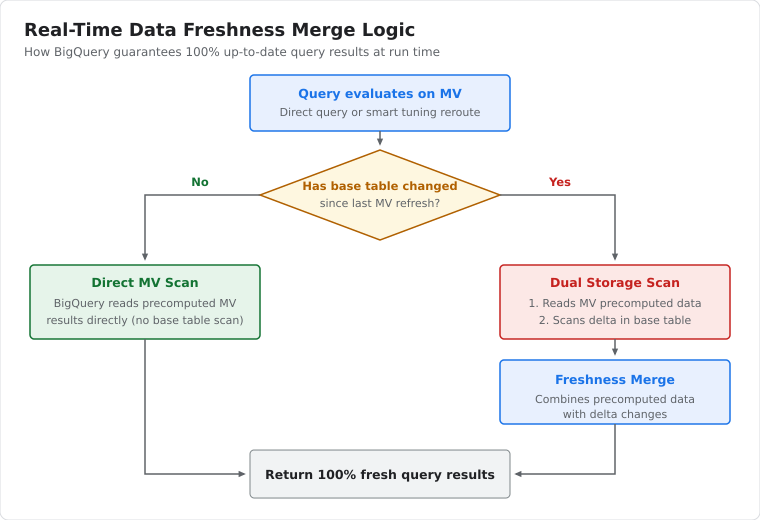
Fresh data. Materialized views return fresh data. If changes to base tables might invalidate the materialized view, then BigQuery reads the data directly from the base tables. If the changes to the base tables don't invalidate the materialized view, then BigQuery reads the rest of the data from the materialized view and reads only the changes from the base tables.
The following diagram shows the logic used to merge real-time data changes:
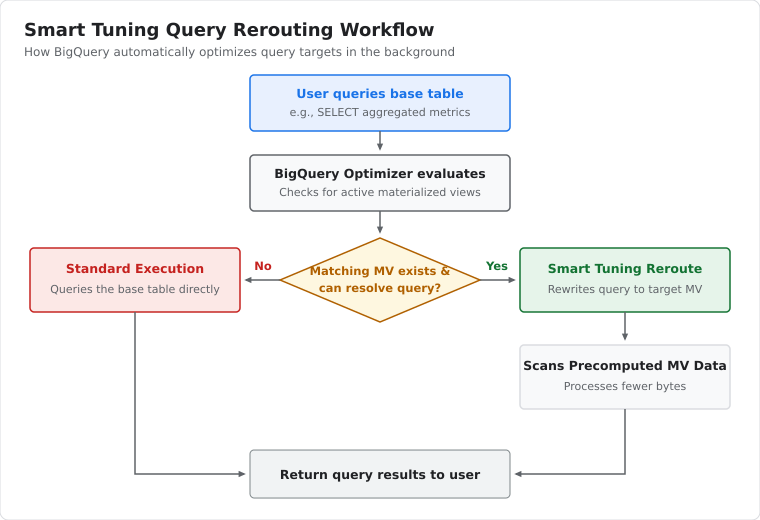
Smart tuning. If any part of a query against a base table can be resolved by querying the materialized view, then BigQuery reroutes the query to use the materialized view for improved performance and efficiency. For information about how and when smart tuning can improve queries, see Use materialized views.
The following diagram shows the query rerouting workflow of smart tuning:
Types of materialized views
There are two basic kinds of materialized views:
- Incremental materialized views support a limited set of features. To learn more about supported SQL syntax for materialized views, see Create materialized views. Only incremental materialized views can take advantage of smart tuning.
- Non-incremental materialized views support most of the syntaxes that incremental materialized views don't support.
When you create materialized views, by default BigQuery only lets you create
views based on incremental queries. To create a non-incremental view, you can
specify allow_non_incremental_definition = true in the materialized view's
definition.
The best type of materialized view to use depends on your situation. The following table compares the features of incremental and non-incremental materialized views:
| Category | Incremental | Non-incremental |
|---|---|---|
| Query supported | Limited | Most queries |
| Maintenance cost | Can reduce the cost of frequently used queries. To learn how materialized views are updated, see incremental updates. | Every refresh runs the full query. |
| Smart tuning support | Supported for most views queries. | No |
| Always fresh results | Supported. Incremental views return fresh query results even when the base tables have changed since the last refresh. | No |
Authorized materialized views
You can create an authorized materialized view to share a subset of data from a source dataset to a view in a secondary dataset. You can then share this view with specific users and groups (principals). Principals can query the data you provide in a view, but they can't access the source dataset directly.
Authorized views and authorized materialized views are authorized in the same way. For details, see Authorized views.
Interaction with other BigQuery features
The following BigQuery features work transparently with materialized views:
Query plan explanation. The query plan shows which materialized views are scanned (if any), and how many bytes are read from the materialized views and base tables combined.
Query caching. The results of a query that BigQuery rewrites using a materialized view can be cached subject to the usual limitations (using deterministic functions, no streaming into the base tables, etc.).
Cost restriction. If you specify maximum bytes billed, and a query reads data beyond that limit, the query fails without incurring a charge whether the query uses materialized views, the base tables, or both.
Cost estimation using dry run. A dry run repeats query rewrite logic using the available materialized views and provides a cost estimate. You can use this feature as a way to test whether a specific query uses any materialized views.
Cross-region data replication. Materialized views can be created over BigQuery tables that have cross-region replication enabled, but only on the primary region. If you use the secondary region, you can encounter the following error message:
The dataset replica of the cross region dataset {PROJECT}:{DATASET} in region {REGION} is read-only because it's not the primary replica.
In addition to these features, you can create materialized views over tables with specific features, as described in the following sections.
Tables with active change data capture
You can create materialized views over tables with active
change data capture (CDC)—a pattern used
to continuously ingest database or table changes. These materialized
views function like materialized views over BigQuery tables,
including the benefits of automatic refresh. Materialized views can't perform
runtime merge queries,
so you must configure materialized views with a sufficient max_staleness to
avoid runtime merge jobs. For more information, see
Limitations of materialized views over tables with active change data capture.
Materialized views pricing
Materialized views incur costs in the following ways:
- Querying materialized views.
- Maintaining materialized views, such as when materialized views are refreshed. The cost for automatic refresh is billed to the project where the view resides. The cost for manual refresh is billed to the project in which the manual refresh job is run. For more information about controlling maintenance cost, see Refresh job maintenance.
- Storing materialized view tables.
The following table outlines the pricing components for materialized views:
| Component | On-demand pricing | Capacity-based pricing |
|---|---|---|
| Querying | Bytes processed by materialized views and any necessary portions of the base tables.1 | Slots are consumed during query time. |
| Maintenance | Bytes processed during refresh time. | Slots are consumed during refresh time. |
| Storage | Bytes stored in materialized views. | Bytes stored in materialized views. |
1Where possible, BigQuery reads only the changes since the last time the view was refreshed. For more information, see Incremental updates.
Storage cost details
The way that BigQuery stores certain aggregate values affects
how storage size is calculated. For AVG, ARRAY_AGG, and
APPROX_COUNT_DISTINCT aggregate values in a
materialized view, the final value isn't stored directly. Instead,
BigQuery internally stores a materialized view as an intermediate
sketch, which is used to produce the final value.
As an example, consider a materialized view that's created with the following command:
CREATE MATERIALIZED VIEW project-id.my_dataset.my_mv_table AS
SELECT date, AVG(net_paid) AS avg_paid
FROM project-id.my_dataset.my_base_table
GROUP BY date
While the avg_paid column appears as NUMERIC or FLOAT64,
internally it is stored as BYTES, with its content being an intermediate
sketch in a proprietary format. For data size calculation,
the column is treated as BYTES.
Get started workflow
Setting up materialized views involves the following workflow:
- Design and verify query. Draft your aggregation query using the GoogleSQL guidelines.
- Create materialized view. Execute the
CREATE MATERIALIZED VIEWstatement using the Cloud de Confiance console, bq command-line tool, or BigQuery API. - Let smart tuning run. BigQuery automatically redirects queries against the base table to use the materialized view—no queries or applications need to rewrite targets.
To begin creating, see Create materialized views.