
Instance flexibility in managed instance groups (MIGs) lets you specify multiple machine types for the virtual machine (VM) instances in the group, rather than being limited to a single machine type. If a machine type is unavailable, the MIG can automatically select another compatible type from your list based on the current resource availability. This flexibility helps to improve resource obtainability, particularly for applications that can operate on different machine types and that require large-scale capacity or hardware with high demand.
This document describes how instance flexibility works in a MIG and its limitations. To know how to configure a MIG to use instance flexibility, see Add instance flexibility.
Instance flexibility
A MIG creates all its VMs based on the instance template that you select. The instance template specifies the machine type to use for each VM. With instance flexibility, you can list all the machine types that are compatible with your application.
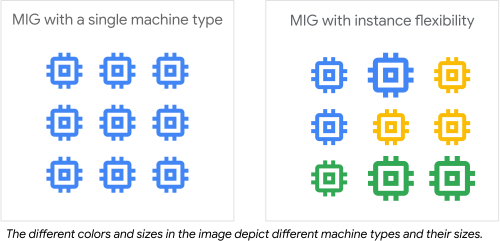
The following image compares a MIG that uses a single machine type with a MIG that uses instance flexibility. As depicted in the image, a MIG with a single machine type creates identical VMs based on an instance template, whereas a MIG with instance flexibility can create VMs with different machine types and sizes.
How instance flexibility works
By default, a MIG creates all VMs using a single machine type from the instance
template. You can set multiple machine types in a MIG by configuring an instance
selection (instanceSelections) in the instance flexibility policy
(instanceFlexibilityPolicy).
You can also specify machine types that run on different CPU platforms and those
with different architectures, such as x86 and Arm architectures. To use machine
types with different requirements for minimum CPU platform or disks, use the
instance flexibility policy to override corresponding properties from the
instance template. For more information, see
How minCpuPlatform and disks overrides work.
Examples for machine type selections
The following examples demonstrate how to configure instance flexibility policies, ranging from basic configurations with equal preference to advanced scenarios that use ranks and property overrides.
Example 1: Single instance selection with equal preference
If your workload can run on multiple machine types that share the same configuration, such as the same disk type and CPU architecture, then you can list them in a single instance selection. All machine types in an instance selection have equal preference. The MIG chooses among them based on real-time resource availability and reservations.
The following example shows a single instance selection that gives equal
preference to all selected machine types. If your instance template specifies a
different machine type, such as n4-standard-8, this instance selection
overrides it. The MIG never attempts to use n4-standard-8 because it is not
included in the list.
  "instanceFlexibilityPolicy": {
    "instanceSelections": {
      "instance-selection-1": {
        "machineTypes": ["c4-standard-8","c3-standard-8", "c3d-standard-8"]
      }
    }
  }
Example 2: Multiple instance selections with ranks for ordered preference
If you want the MIG to choose machine types in a specific order, then you can configure multiple instance selections and assign a rank to each selection. A lower value of rank represents a higher preference. For example, machine types in rank 1 are preferred over machine types in rank 2. Machine types within the same instance selection share equal preference.
When you assign ranks, the MIG concurrently checks the real-time availability of all machine types across instance selections. The MIG then provisions instances using the available machine types with the highest preference (lowest rank number).
The following example shows multiple instance selections with ordered preference:
  "instanceFlexibilityPolicy": {
    "instanceSelections": {
      "higher-preference": {
        "rank": 1,
        "machineTypes": ["n4-standard-8","c4-standard-8"]
      },
      "lower-preference": {
        "rank": 2,
        "machineTypes": ["c3-standard-8", "c3d-standard-8"]
      }
    }
  }
Your application needs to be ready to run on any of the listed machine types as the availability of hardware changes over time and specific hardware is not assured unless you use reservations.
For large-scale requests, the MIG might fulfill a portion of the requested instances with a highly preferred machine type and fulfill the remainder with alternative types based on real-time availability. If the MIG cannot immediately find capacity for the remaining instances, then those instances might enter a pending state while the MIG continues to check availability across your selections.
Example 3: Multiple instance selections with overrides for incompatible configurations
If you want to mix machine types that have different specifications or requirements that are incompatible with each other or with the instance template, then you must configure property overrides.
For example, your instance template uses Persistent Disk, and you want to mix N4 machine types that only support Google Cloud Hyperdisk, and N2 machine types that only support Persistent Disk. Because an instance selection applies its properties to all machine types listed within it, you can't place machine types with conflicting requirements in the same instance selection.
Instead, place those machine types in separate instance selections and define
property overrides, such as disks or minCpuPlatform, for each selection:
- Equal preference: If you want the MIG to treat these machine types with equal preference, assign the same rank to each instance selection.
- Ordered preference: If you prefer one machine type over another, assign different ranks.
The following example shows two instance selections with equal preference, both assigned a rank of 1, and overrides the boot disk configuration for N4 machine type:
  "instanceFlexibilityPolicy": {
    "instanceSelections": {
      "n4-selection": {
        "rank": 1,
        "machineTypes": [
          "n4-standard-8"
        ],
        "disks": [
          {
            "deviceName": "boot",
            "boot": true,
            "initializeParams": {
              "diskType": "hyperdisk-balanced"
            }
          }
        ]
      },
      "n2-selection": {
        "rank": 1,
        "machineTypes": [
          "n2-standard-8"
        ]
      }
    }
  }
In addition to disk configurations, instance selections can also override
minimum CPU platform (minCpuPlatform). For more information about how property
overrides work and how they merge with the instance template, see the following
section about
How minCpuPlatform and disks overrides work.
How minCpuPlatform and disks overrides work
In an instance selection, you can specify additional instance properties, such
as minimum CPU platform (minCpuPlatform) and disks (disks), to override
those defined in the instance template. When a MIG selects a machine type from
an instance selection, the MIG creates a VM by using the instance properties
specified in that instance selection. If you don't specify any of these
properties for an instance selection, the MIG uses the corresponding properties
from the template for that selection.
Overriding these properties at the instance selection level provides more control and flexibility, especially when using different hardware in a MIG.
If an instance selection includes a machine type incompatible with the instance template's disk or CPU platform configuration, then the Cloud de Confiance console displays a validation message prompting you to override the disks or CPU platform. In gcloud CLI, the REST API, or Terraform, the operation fails or VM creations fail if the effective configuration is not supported by the selected machine types.
To learn about the limitations when using instance selection overrides, see the Limitations section in this document.
Override minimum CPU platform
You can override the instance template's
minimum CPU platform
for specific machine types. This override lets you mix machine types that run on
different CPU platforms by selectively applying CPU platform requirements. Each
machine type in a selection must support the minimum CPU platform
(minCpuPlatform) that you specify in the selection or inherited from the
instance template if not overridden.
Alternatively, you can set the minCpuPlatform field to AUTOMATIC. This
automatic setting overrides the instance template's minimum CPU
platform setting and allows the MIG to use any compatible CPU platform for the
selected machine types.
To mix machine types where only one series supports a specific CPU platform,
place them in separate instance selections. For example, N4 machine types
support the Emerald Rapids platform, while N2 machine types with fewer than 96
vCPUs support Intel Ice Lake and Intel Cascade Lake. To mix N4 and N2 in a MIG
but require N2 to run on Intel Ice Lake, put them in different selections. Set
the minCpuPlatform field to Intel Ice Lake for N2, and leave it unset or set
to AUTOMATIC for N4. You can set equal preference for both machine types by
assigning the same rank to both instance selections.
Override disks
You can override disks when mixing machine types that have different architectures or require different disk types. By specifying a custom disk configuration, you can override the boot disk or additional disks specified in the instance template, or to attach specific disks. This override helps to ensure that each machine type uses its compatible boot image or required disk type.
For example, you can use separate instance selections to override disks for different requirements:
- Different architectures: You can mix C4 (x86 architecture) and C4A (Arm architecture) machine types. As x86 and Arm machines require different boot images, you can override the boot disk to specify the correct image for each architecture.
- Different disk types: You can mix N2 and N4 machine types. Because N2 only supports Persistent Disk as a boot disk and N4 only supports Google Cloud Hyperdisk, you can override the disk configuration to specify the supported disk type for each machine series.
In either scenario, you can set equal preference for both machine types by assigning the same rank to the instance selections.
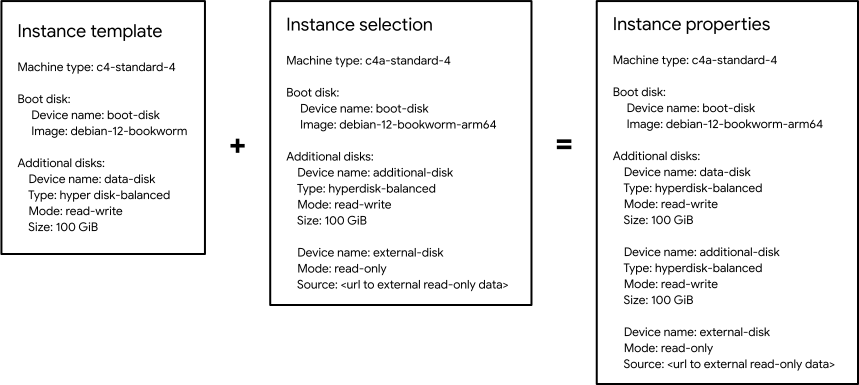
As shown in the following diagram, if a disk in an instance selection has a
deviceName that matches a disk in the instance template, then the MIG
overrides the template's disk configuration. If the deviceName doesn't match
any disk in the template, then the MIG attaches it as an additional disk. You
must ensure that the effective disk configuration is compatible with all machine
types in the instance selection.
For information about machine series support for disks, see Machine series support for Persistent Disk and Machine series support for Google Cloud Hyperdisk.
Example for minimum CPU platform and disk overrides
Consider an instance template with the following configuration:
  {
    ...
      "disks": [
        {
          "autoDelete": true,
          "deviceName": "boot",
          "boot": true,
          "diskEncryptionKey": {},
          "initializeParams": {
            "sourceImage": "projects/debian-cloud/global/images/family/debian-12",
            "diskSizeGb": "10",
            "diskType": "pd-balanced"
          }
        }
      ],
      "machineType": "n2-standard-2",
      ...
    }
The following example of an instance flexibility policy overrides the template configuration by specifying a minimum CPU platform and disk configuration.
  "instanceFlexibilityPolicy": {
    "instanceSelections": {
      "first-preference": {
        "rank": 1,
        "machineTypes": ["n4-standard-4"],
        "disks": [
          {
            "autoDelete": true,
            "deviceName": "boot",
            "boot": true,
            "diskEncryptionKey": {},
            "initializeParams": {
              "sourceImage": "projects/debian-cloud/global/images/family/debian-12",
              "diskSizeGb": "10",
              "diskType": "hyperdisk-balanced"
            }
          }
        ]
      },
      "second-preference": {
        "rank": 2,
        "machineTypes": ["n2-standard-4"],
        "minCpuPlatform": "Intel Ice Lake",
        "disks": [
          {
            "autoDelete": true,
            "deviceName": "boot",
            "boot": true,
            "initializeParams": {
              "sourceImage": "projects/debian-cloud/global/images/family/debian-12",
              "diskSizeGb": "10",
              "diskType": "pd-ssd"
            }
          }
        ]
      },
      "third-preference": {
        "rank": 3,
        "machineTypes": ["n1-standard-4"],
        "minCpuPlatform": "Intel Skylake"
      }
    }
  }
How a MIG selects machine types
When you configure multiple machine types, the MIG selects a machine type based on current resource availability and prioritizes unused reservations. If you configure ranks, then the MIG checks resource availability and reservations across all configured machine types and zones simultaneously. From the machine types with available capacity, the MIG selects the machine types with the highest preference (lowest rank number). Among those selected machine types, the MIG prioritizes the types that have unused reservations.
The zones in the MIG's region might also impact the machine type selection because resource availability varies across zones. For more information, see the following section about how a MIG selects zones.
Capacity evaluation and error logging
Before a MIG attempts to create VMs, it checks capacity across your configured instance selections. If a higher-preference machine type is unavailable during this check, then the MIG selects an available lower-preference machine type without attempting to create VMs with the unavailable type.
Compute Engine logs ZONE_RESOURCE_POOL_EXHAUSTED (stockout) errors
only when a VM creation attempt fails—for example, when a MIG attempts to repair
a failed VM by using its original, unavailable machine type. During capacity
checks, because the MIG skips unavailable higher-preference machine types
without attempting VM creation, you won't see stockout errors for them in
Cloud Logging.
How a MIG selects zones
You can configure instance flexibility in a regional MIG that has a BALANCED,
ANY, or ANY_SINGLE_ZONE target distribution shape. Instance flexibility
doesn't support EVEN target distribution shape.
With instance flexibility, when a regional MIG creates a VM, the MIG selects a zone depending on the selected target distribution shape as follows:
BALANCED: The MIG selects a zone with available resources that can balance the VM distribution across zones as evenly as possible. Within a selected zone, the MIG prioritizes machine types based on ranks, if configured, and available reservations.ANY: The MIG selects a zone with available resources and reservations. If ranks are configured, then the MIG prioritizes the zone in which a machine type based on ranks is available.ANY_SINGLE_ZONE: The MIG selects a zone which has the most machine types based on the ranks, if configured, and where the MIG can create most VMs out of unused reservations.
For more information about how a target distribution shape works, see Regional MIG target distribution shape.
Observability and monitoring
A MIG with instance flexibility dynamically selects machine types and zones based on real-time availability. You can monitor how instances are distributed across machine types and zones in real time. Tracking this data helps you verify high availability, see how fallback machine types are allocated, and diagnose capacity distribution. For instructions on viewing this data for a specific MIG or aggregated across multiple MIGs, see Monitor instance distribution in MIGs.
How instance flexibility works with other features
The following sections describe how instance flexibility works with other Compute Engine features, such as reservations, Spot VMs, VM repairs, and autoscaling.
Reservations
You can use instance flexibility with reservations. Based on the reservation affinity property you set in the instance template, a MIG uses reservations as follows:
ANY_RESERVATION(recommended for instance flexibility): When using any reservation, the MIG selects the machine type with unused reservation first. If you want to change the order in which the MIG selects machine types, you can configure multiple instance selections and specify your preference using ranks. From the machine types with available capacity, the MIG selects the machine types with the highest preference (lowest rank number) and prioritizes available reservations within that rank.SPECIFIC: When using a specific reservation, the MIG selects the machine type that matches the reservation properties. If your instance selections don't include the machine type that matches the specific reservation properties, then instance creation fails.
For more information about reservations, see About reservations.
Spot VMs
If your MIG with instance flexibility uses Spot VMs, then the MIG automatically selects a machine type with the lowest observed preemption rate to help ensure the least disruption for your workload. If you want to override this behavior, then complete the following steps:
View resource availability. Before you create a MIG with Spot VMs, you can view resource availability in the region or zone where you want to create your MIG. This action helps reduce your chances of encountering resource availability errors.
For instructions, see View the availability of Spot VMs.
Configure multiple instance selections. You can specify the machine type and zones in which to create Spot VMs by using ranks. From the machine types with available capacity, the MIG selects the machine types with the highest preference (lowest rank number) and considers the reliability of Spot VMs within that selection.
For instructions, see Create a MIG with multiple machine types, preferences, and overrides.
For more information about using Spot VMs in a MIG, see Spot VMs in a managed instance group.
VM repairs
By default, if a VM in a MIG fails, the MIG repairs the VM by recreating it using the same configuration, including the machine type. If you configure instance flexibility and enable updates on repair, then you can improve the chances to obtain resources if a stockout occurs.
When a MIG attempts to repair a failed VM, it first tries to recreate the VM
using its original machine type. If that machine type is unavailable,
Compute Engine logs a ZONE_RESOURCE_POOL_EXHAUSTED error. If you
enable update on repair, the
MIG concurrently checks availability across all your configured instance
selections and recreates the VM using an available alternative machine type.
Because the MIG keeps trying to recreate the VM using its original machine type
while checking alternatives, you might still see stockout errors logged for the
original machine type. Enabling update on repair also helps to ensure that the
recreated VM uses the latest instance flexibility configuration.
For more information about repairs, see About repairing VMs for high availability.
Autoscaling
When you configure autoscaling in a MIG that has multiple machine types, the following happens:
When an autoscaler scales out a MIG, the MIG creates VMs by selecting machine types in the same manner as in a non-autoscaled MIG. For more information, see the How a MIG selects machine types in this document.
When an autoscaler scales in a MIG, the MIG selects the VMs to delete as follows:
- The MIG first prioritizes deleting VMs that best preserve the target distribution shape.
- If you configured ranks, then among the prioritized VMs, the MIG prioritizes deleting VMs that use lower-ranked machine types.
- Finally, the MIG checks the autoscaler recommendation to select the VMs to delete.
Autoscaling works effectively when your MIG has machine types of similar performance—for example, machines with the same vCPU count. Otherwise, when the MIG scales out or scales in, the autoscaler might attempt to add or remove the highest-performing machine type more frequently. This behavior can happen regardless of the rank that you configured for that machine type.
For more information about autoscaling, see Autoscaling groups of instances.
Observability and monitoring
Because a MIG with instance flexibility dynamically selects machine types and zones based on real-time availability, you can observe this runtime behavior using a Cloud Monitoring dashboard.
Cloud de Confiance by S3NS provides a preconfigured dashboard, GCE MIG Instance Distribution Monitoring, which visualizes the instance distribution by machine type and zone in real-time. This observability helps you confirm high availability, track fallback machine type allocations, and diagnose capacity distribution in your MIG.
To learn how to access the monitoring dashboard, see Monitor instance distribution in MIGs.
Use cases
The following sections describe some use cases of instance flexibility in MIGs.
Improve obtainability
You can configure MIG instance flexibility to improve resource obtainability:
Machine types: The basic setup is to configure multiple machine types within a single rank. This single rank gives them equal preference, letting the MIG select any of them based on resource availability. However, if you have preferences, then you can assign different ranks to specify a preference order for the machine types.
Location: You can further increase the chance of obtaining the resources by choosing all zones when creating your MIG and using the
ANYtarget distribution shape. TheANYshape allows the MIG to search for capacity across all zones.Spot VMs and preemption: When you use Spot VMs, to maximize the chances of obtaining the VMs and to minimize their preemptions, Google recommends that you include as many compatible machine types as possible within the same rank. This configuration lets MIG choose machine types with the lowest preemption rates to minimize disruption for your workload. If you configure machine types with different ranks, then MIG prioritizes machine types based on rank instead of preemption rates, which might result in selecting a machine type with a higher preemption rate.
Optimize costs
A MIG can automatically provision the most cost-effective instances for your infrastructure when you configure the instance flexibility settings of your MIG as follows:
Machine types: Select the machine types that offer the preferred cost-performance ratio for your workload. You don't need to specify all the available sizes of each machine type; specify only the sizes that are most cost-optimal for your needs.
Rank: Assign ranks to instance selections according to your cost preferences, with the lowest-cost machine type as most preferred. This helps to ensure that you obtain the lowest-cost machine type based on availability.
Location: When creating the MIG, select all zones and the
ANYtarget distribution shape. This increases the chances of obtaining the lowest-cost machine types in zones where they are available.
Based on your instance flexibility settings, the MIG automatically provisions the best possible combination of available machine types to meet your cost criteria and the total capacity requested. This ensures the lowest possible cost at a given time.
Maximize performance
You can configure MIG instance flexibility to maximize performance. To do so, select machine families and sizes that best serve your workload. Then rank the machine types based on performance, from highest to lowest, using the most preferred size within each family. Based on the ranking and the machine types, the MIG selects the highest-performing machines from all available resources.
Because newer machine generations typically offer higher per-core performance,
you need not limit the machine selection to use the same size (vCPU count)
across different families to achieve equivalent performance. For example, when
selecting across machine families, you can mix different CPU counts, such as
mixing n1-standard-32 with n2-standard-16.
Additionally, specifying a minCpuPlatform for the instance selection can
ensure that the MIG selects a high-performing CPU platform.
Seamless transition to latest machine types
You can configure MIG instance flexibility to prioritize the adoption of latest generation machine types while using older generation machine types as a fallback for capacity. To do so, create an instance selection containing the latest generation machine types and assign a lower rank (higher preference). If these machine types require different disk configurations, use the disk overrides within this instance selection to define the specific disk properties. Create a second instance selection containing the older generation machine types to serve as a fallback. Assign a higher rank (lower preference) to this instance selection.
When you create the MIG, select all zones in the region and the ANY target
distribution shape. This configuration ensures that the MIG checks capacity
across all configured selections and zones, and prioritizes provisioning the
latest generation machines where capacity is available. If the MIG can't find
enough latest generation capacity, it provisions older generation machine types.
This approach ensures that your requested total capacity is always met while
maximizing the share of the newest hardware.
Limitations
Instance flexibility has the following limitations:
Zonal MIGs don't support instance flexibility. You can use a regional MIG with a single zone instead.
Flex-start VMs don't support instance flexibility.
Instance flexibility doesn't support the following MIG features:
- Regional MIGs with target distribution shape
set to
EVEN - Automatic updating of VM configuration and canary updates (two instance templates)
- Suspending or stopping VMs
- Resize requests that create GPU VMs all at once
- Regional MIGs with target distribution shape
set to
When overriding
minCpuPlatformanddisks, the following limitations also apply:You must enable updates on repairs.
When configuring the
minCpuPlatformordisksfor an existing instance selection, you must also include themachineTypesfield. Without themachineTypesfield, the operation fails with an error.You can't apply stateful policy or per-instance configuration to disks overridden through an instance selection.
You can override Local SSD disks only for those machine types that require you to choose a number of Local SSD disks. You can't override Local SSD disks for
-lssdvariants of machine types, which automatically attach Local SSD disks.You must specify unique machine type across all instance selections. For example, you cannot specify
n1-standard-2in one selection with aSkylakeCPU and also in another selection with aBroadwellCPU.
To help ensure effective load balancing or autoscaling in a MIG that has instance flexibility, use machine types with similar performance—for example, the same vCPU count. However, "similar performance" is not limited to using the same size across different families; because newer machine generations typically have higher performance per vCPU, you can mix different vCPU counts (for example, mixing
n1-standard-32withn2-standard-28).In Cloud Load Balancing, similar performance machine types can prevent over-utilization of smaller hardware and under-utilization of faster machines.
In autoscaling, similar performance machine types can prevent addition or deletion of the highest-performing machine type.
What's next?
- Learn more about different machine types.
- Add instance flexibility to a MIG.
- View instance flexibility in a MIG.
- Monitor instance distribution in MIGs.