
- For conceptual information on Compute Reliability Insights, see Compute Reliability Insights overview.
Find recommendations
Compute Reliability Insights provides a list of Compute Engine risks and recommendations in the following locations:
The Active Assist, accessible using the console,
gcloud, and API.The Risk Insights APIs give you direct access to Compute Engine reliability risks, impact details, and remediation steps for your workload.
Compute Reliability Insights uses recommender services on Cloud de Confiance by S3NS to provide you with the recommendations for Cloud de Confiance resources.
Get started
This section explains how to get started using Compute Reliability Insights, including the prerequisite steps and common tasks you can perform.
Before you begin
To view reliability risks and recommendations, you must complete the following prerequisite steps.
Confirm API access
To use the Compute Engine Reliability Risks APIs you need API access.
Access is provided on a project level and requires that you enable the Compute Engine API in a given project.
Enable the Recommender service
See Enable the Recommender API to enable the Recommender service using the Cloud de Confiance console or the gcloud CLI.
Set permissions
To use Compute Reliability Insights for risk mitigation, you must have the necessary IAM permissions depending on the task.
Manage recommendation states
These general permissions are required to view, dismiss, or update the states of any reliability recommendations within Active Assist.
| Task | Recommended predefined role | Granular permissions (for custom roles) |
|---|---|---|
| Dismiss project-level recommendations in Active Assist. | roles/recommender.editor |
roles/recommender.editor |
| Update project-level recommendations in Active Assist. | roles/recommender.editor |
recommender.computeReliabilityRiskRecommendations.update |
| Access to browse Cloud de Confiance by S3NS resources. | At least roles/viewer ( or roles with more permissions like roles/editor, roles/owner ) |
|
| View Compute Engine resources, without being able to edit the data stored on them. | roles/compute.viewer |
|
| View project level recommendations in Recommendations Hub. | roles/recommender.viewer |
|
| View Global DNS metrics log | roles/logging.viewer |
Apply risk-specific mitigations
Applying a recommendation requires specific permissions depending on the risk type. To allow Active Assist to execute the actual mitigation changes on your resources, make sure that you have the following permissions.
| Task | Recommended predefined role | Granular permissions (for custom roles) |
|---|---|---|
| Set common instance metadata to mitigate global DNS reliability risk. | roles/compute.admin |
compute.projects.setCommonInstanceMetadataiam.serviceAccounts.actAs |
Custom role example
gcloud iam roles create UseComputeReliabilityInsight --project=my-project \
--description="Grant permissions for Compute Reliability Insight" \
--permissions=serviceusage.services.use,\
iam.serviceAccounts.actAs,\
compute.projects.setCommonInstanceMetadata,\
recommender.computeReliabilityRiskRecommendations.update,\
compute.reliabilityRisks.get
View and act on recommendations
Active Assist is powered by different recommenders. Recommendations are generated automatically based on system scans that occur once daily. If you dismiss a recommendation, it won't appear again, even if the configuration has not changed since the last scan. For details about all recommenders available, see What is Active Assist and the Active Assist quickstart guide.
In Active Assist, the Compute reliability risks recommender
refers to risks found by Compute Reliability Insights. You can view these
risks using the API, gcloud, and UI. You can take the following
actions in Active Assist:
- View all risks (only the Global DNS risk is available).
- View details for a specific risk.
- Apply or dismiss the risk recommendation.
View risks in Compute Engine
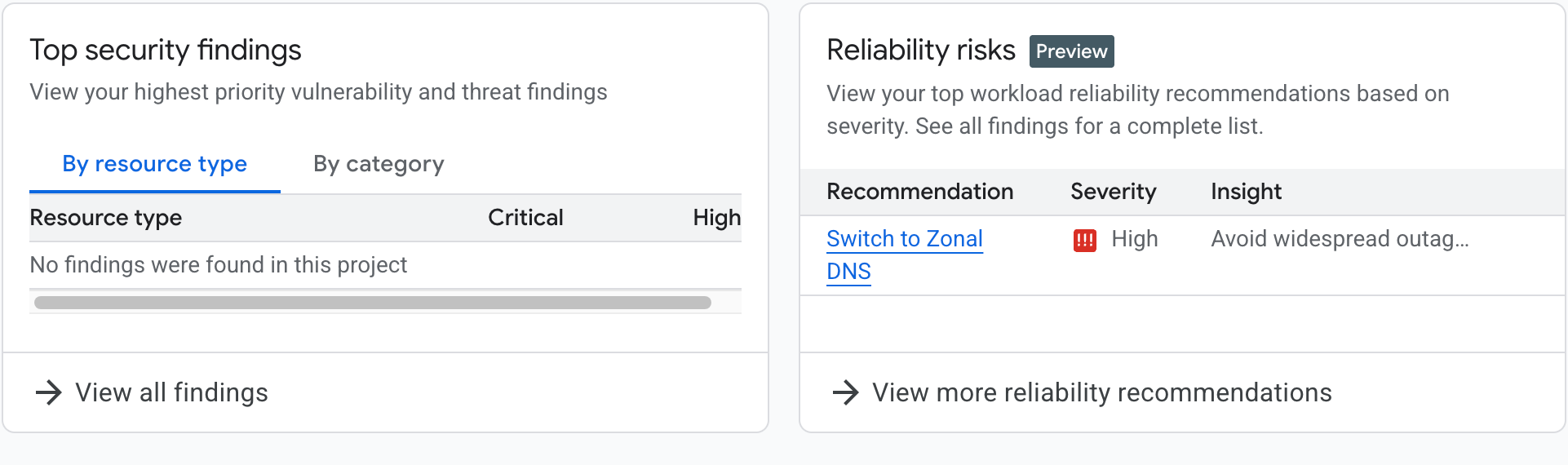
At the Compute Engine home page ( Overview page ), within the Optimization Recommendations section, a Reliability Risk card appears. If your project has the internal DNS setting set to global DNS, the card contains information about the global DNS risk and a call for action.
From the card, you can click Switch to Zonal DNS to learn more about the risk or View more reliability recommendations to see all reliability risks (which is only the global DNS risk) as shown in the following image.
View all recommendations
You can view risks found by Compute Engine Reliability Insights by using the Cloud de Confiance console or the gcloud CLI.
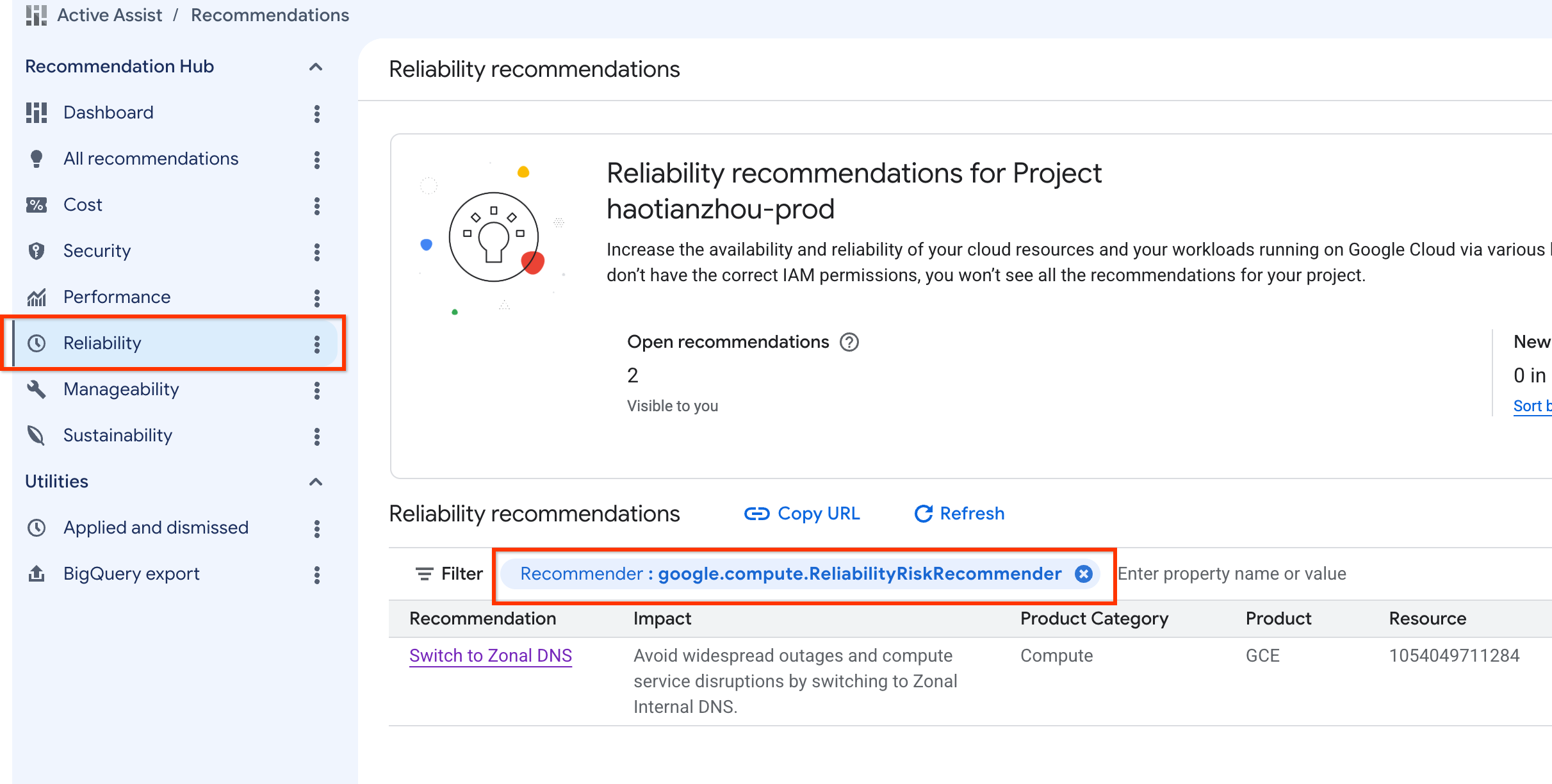
Use the Cloud de Confiance console
- Navigate to Active Assist.
- Make sure the correct project, folder, or organization is selected that you want to view.
- In the right navigation panel, select Reliability.
- To view all Compute Reliability Insights, set the Recommender
filter to
google.compute.ReliabilityRiskRecommender.
Use gcloud
Use the
gcloud recommender recommendations list
command and specify the Compute Reliability Insights recommender to view all
risks, using the following syntax:
gcloud recommender recommendations list \
      --recommender=google.compute.ReliabilityRiskRecommender\
      --project=[PROJECT_ID] \
      --location=global \
      (--format=[yaml/json/text])
For example:
gcloud recommender recommendations list --project=foo --location=global --recommender=google.compute.ReliabilityRiskRecommender
The response includes the following fields for each recommendation (using different form):
| Field | Description |
|---|---|
RECOMMENDATION_ID |
Unique identifier for the displayed recommendation. For example, e3762bcb-421f-42d6-9ecf-9c0bd8262014 |
PRIMARY_IMPACT_CATEGORY |
The main category of the recommendation: For example, RELIABILITY. |
RECOMMENDATION_STATE |
The current status of the recommendation. For example, ACTIVE |
LAST_REFRESH_TIME |
The last time the recommendation was refreshed. For example, 2025-03-10T06:59:59Z |
PRIORITY |
The priority level assigned to the recommendation. For example, P1. |
RECOMMENDER_SUBTYPE |
The specific subtype of the recommender that generated the recommendation. For example, GLOBAL_DNS |
DESCRIPTION |
A human-readable description of the recommendation. For example, Improve workload reliability by addressing misconfigurations on Compute Engine resources |
Response
RECOMMENDATION_ID                     PRIMARY_IMPACT_CATEGORY  RECOMMENDATION_STATE  LAST_REFRESH_TIME     PRIORITY  RECOMMENDER_SUBTYPE  DESCRIPTION
e3762bcb-421f-42d6-9ecf-9c0bd8262014  RELIABILITY              ACTIVE                2025-03-10T06:59:59Z  P1        GLOBAL_DNS           Improve workload reliability by addressing misconfigurations on Compute Engine resources.
Use the API
curl \
    -H "Authorization: Bearer $(gcloud auth print-access-token)"  \
    -H "x-goog-user-project: [PROJECT_ID]" \
    "https://recommender.googleapis.com/v1/projects/[PROJECT_ID]/locations/global/recommenders/google.compute.ReliabilityRiskRecommender/recommendations"
For example: API Request
curl \
    -H "Authorization: Bearer $(gcloud auth print-access-token)"  \
    -H "x-goog-user-project: foo" \
    "https://recommender.googleapis.com/v1/projects/foo/locations/global/recommenders/google.compute.ReliabilityRiskRecommender/recommendations"
The response includes the following fields for each recommendation:
| Field | Description |
|---|---|
| name | Unique name for recommendation. For example, projects/1054049711284/locations/global/recommenders/google.compute.ReliabilityRiskRecommender/recommendations/e3762bcb-421f-42d6-9c0bd8262014 |
| description | A human-readable description of the recommendation. For example, Improve workload reliability by addressing misconfigurations on Compute Engine resources |
| lastRefreshTime | The last time the recommendation was refreshed. For example, 2025-03-10T06:59:59Z |
| primaryImpact | The main category of the recommendation: For example, RELIABILITY. |
| content | Detailed recommendation content. |
| stateInfo | The current status of the recommendation. For example, ACTIVE |
| recommenderSubtype | The specific subtype of the recommender that generated the recommendation. For example, GLOBAL_DNS |
| associatedInsights | Reliability risk Insight linked with this recommendation. |
| priority | The priority level assigned to the recommendation. For example, P1 |
| targetResources | resource targeted by this recommendation. |
For more information, see the Recommender documentation.
API Response
{
  "recommendations": [
    {
      "name": "projects/1054049711284/locations/global/recommenders/google.compute.ReliabilityRiskRecommender/recommendations/e3762bcb-421f-42d6-9ecf-9c0bd8262014",
      "description": "Improve workload reliability by addressing misconfigurations on Compute Engine resources.",
      "lastRefreshTime": "2025-03-10T06:59:59Z",
      "primaryImpact": {
        "category": "RELIABILITY"
      },
      "content": {
        "overview": {
          "RecommendationMessage": "Your compute engine instances are vulnerable to cross-regional outages because they use global internal dns names by default. Google recommends migrating to zonal DNS to isolate registration failures to a single zone. Based on the last 30 days of DNS usage, your project is ready to migrate. %nMore information at: /compute/docs/networking/migrate-to-zonal-dns#migrate-ready-projects",
          "totalQueriesIncompatibleWithZonalDns": 0
        }
      },
      "stateInfo": {
        "state": "ACTIVE"
      },
      "etag": "\"19bbb3610996035f\"",
      "recommenderSubtype": "GLOBAL_DNS",
      "associatedInsights": [
        {
          "insight": "projects/1054049711284/locations/global/insightTypes/google.compute.ReliabilityRiskInsight/insights/74506608-5104-4aa6-a4e4-5ffd4dbb55cc"
        }
      ],
      "priority": "P1",
      "targetResources": [
        "//cloud.googleapis.com/projects/1054049711284"
      ]
    }
  ]
}
View details for a specific recommendation
You can view details for a specific risk by using the Cloud de Confiance console or
gcloud.
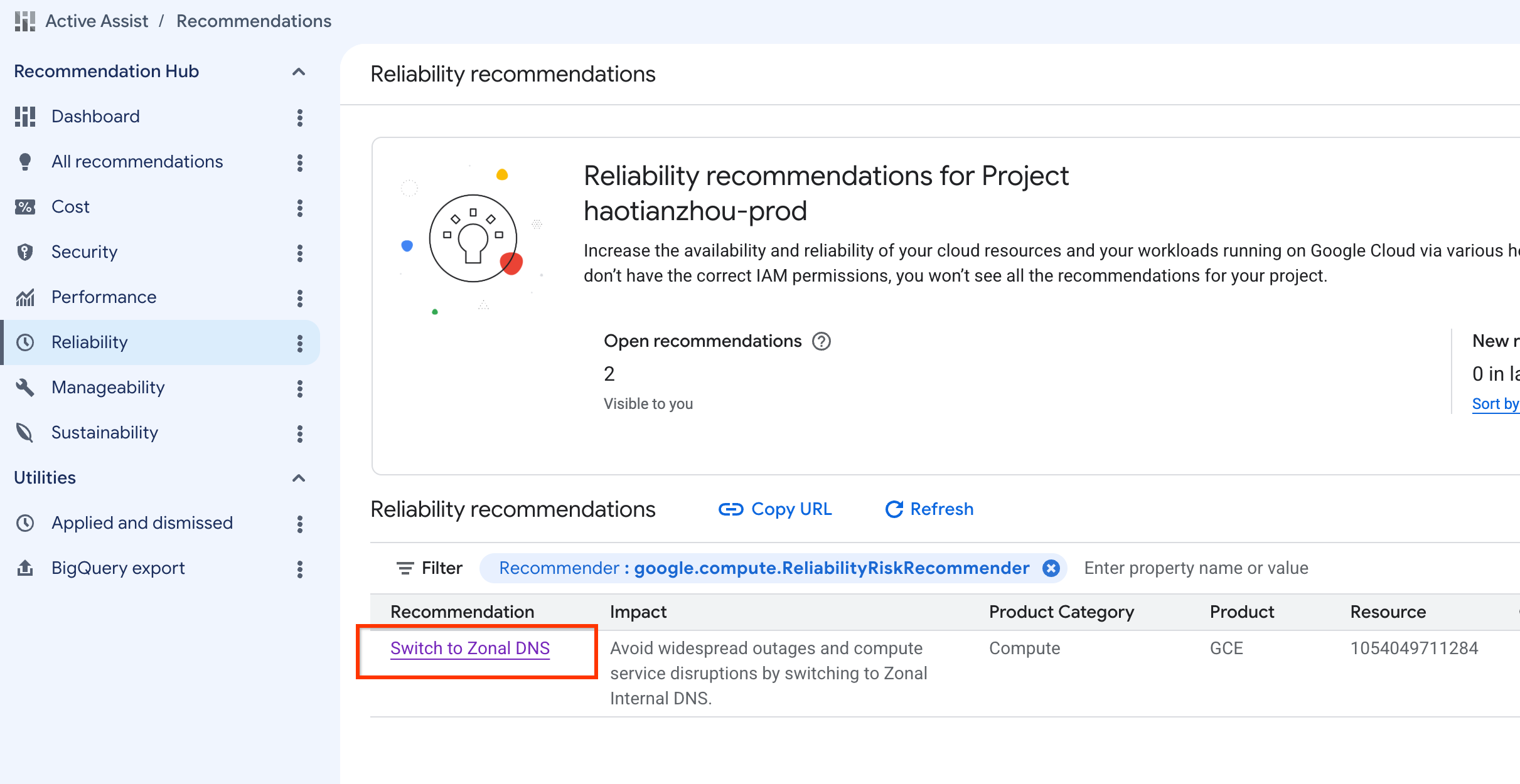
Use the Cloud de Confiance console
- Navigate to Active Assist.
- Make sure the correct project, folder, or organization is selected that you want to view.
- In the right navigation panel, select Reliability.
- To view all Compute Reliability Insights, set the Recommender
filter to
google.compute.ReliabilityRiskRecommender. - Select the recommendation title to view details.
DNS usage logs
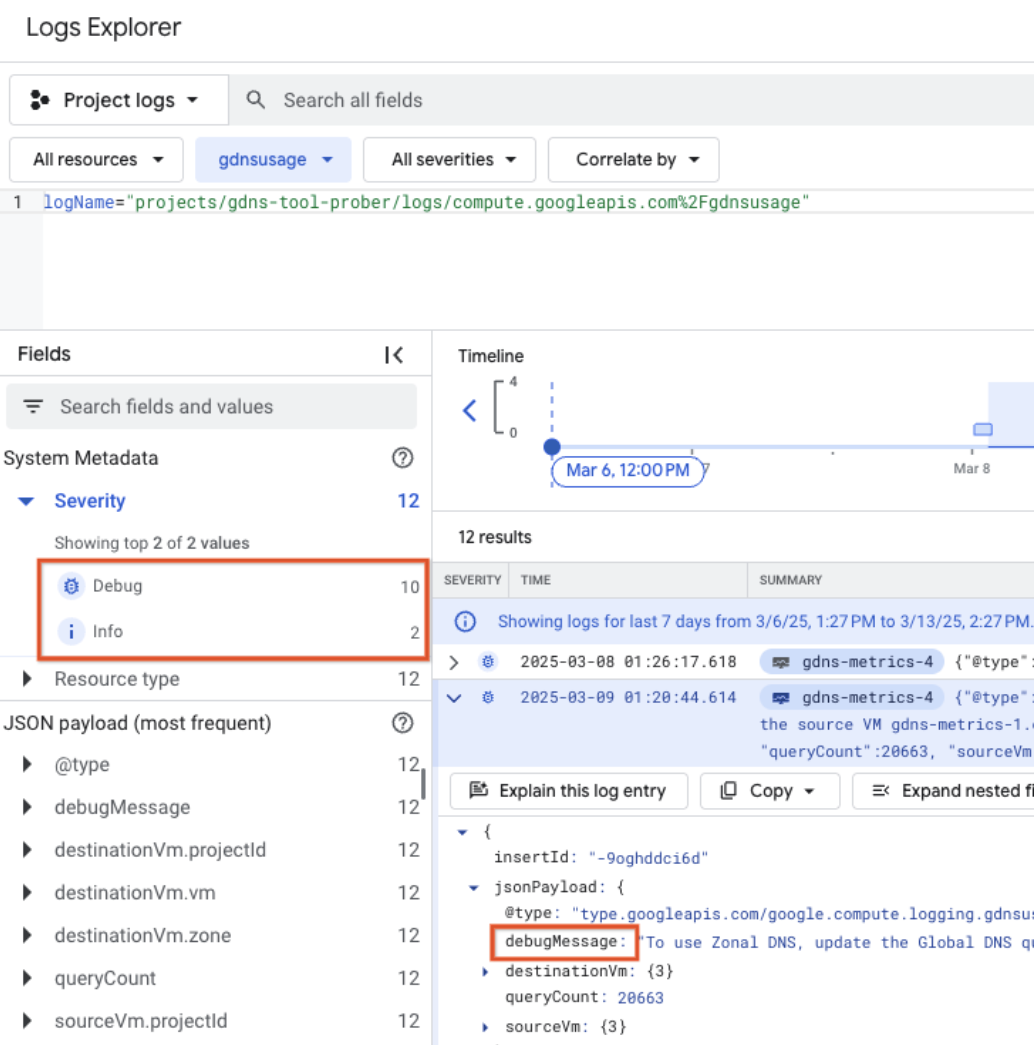
DNS query logs (1-30 days) show debugging (queries at risk of failure post migration) and informational entries. You must resolve all debugging entries to enable zonal DNS migration.
Use gcloud
Use the
gcloud recommender recommendations describe
command to specify:
- The Compute Reliability Insights recommender
- The recommendation ID for the risk you want details on.
gcloud recommender recommendations describe \
      [RECOMMENDATION_ID] \
      --recommender=google.compute.ReliabilityRiskRecommender \
      --project=[PROJECT_ID] \
      --location=global \
      (--format=[yaml/json/text])
gcloud recommender recommendations describe e3762bcb-421f-42d6-9ecf-9c0bd8262014 --project=foo --location=global --recommender=google.compute.ReliabilityRiskRecommender
The response includes the following fields for each recommendation:
| Field | Description |
|---|---|
| insight | Reliability risk Insight linked with this recommendation. |
| content | Detailed recommendation content (IncludeRecommendationMessage). |
| description | A human-readable description of the recommendation. For example, Improve workload reliability by addressing misconfigurations on Compute Engine resources |
| etag | etag of the recommendation |
| lastRefreshTime | The last time the recommendation was refreshed. For
example, 2025-03-10T06:59:59Z |
| name | Unique name for recommendation. For
example, projects/1054049711284/locations/global/recommenders/google.compute.ReliabilityRiskRecommender/recommendations/e3762bcb-421f-42d6-9ecf-9c0bd8262014 |
| primaryImpact | The main category of the recommendation: For
example, RELIABILITY. |
| priority | The priority level assigned to the recommendation. For example, P1 |
| recommenderSubtype | The specific subtype of the recommender that generated the recommendation. For example, GLOBAL_DNS |
| stateInfo | The current status of the recommendation. For example, ACTIVE |
| targetResources | resource targeted by this recommendation. |
Response
associatedInsights:
- insight: projects/1054049711284/locations/global/insightTypes/google.compute.ReliabilityRiskInsight/insights/74506608-5104-4aa6-a4e4-5ffd4dbb55cc
content:
  overview:
    RecommendationMessage: 'Your compute engine instances are vulnerable to cross-regional
      outages because they use global internal dns names by default. Google recommends
      migrating to zonal DNS to isolate registration failures to a single zone. Based
      on the last 30 days of DNS usage, your project is ready to migrate. %nMore information
      at: /compute/docs/networking/migrate-to-zonal-dns#migrate-ready-projects'
    totalQueriesIncompatibleWithZonalDns: 0
description: Improve workload reliability by addressing misconfigurations on Compute
  Engine resources.
etag: '"19bbb3610996035f"'
lastRefreshTime: '2025-03-10T06:59:59Z'
name: projects/1054049711284/locations/global/recommenders/google.compute.ReliabilityRiskRecommender/recommendations/e3762bcb-421f-42d6-9ecf-9c0bd8262014
primaryImpact:
  category: RELIABILITY
priority: P1
recommenderSubtype: GLOBAL_DNS
stateInfo:
  state: ACTIVE
targetResources:
- //cloud.googleapis.com/projects/1054049711284
Use the API
curl \
    -H "Authorization: Bearer $(gcloud auth print-access-token)"  \
    -H "x-goog-user-project: [PROJECT_ID]" \
    "https://recommender.googleapis.com/v1/projects/[PROJECT_ID]/locations/global/recommenders/google.compute.ReliabilityRiskRecommender/recommendations/[RECOMMENDATION_ID]"
For more information, see the Recommender documentation. For example:
- Use the identifier at the end of the name field captured in the View all risks API operation at the end of the request.
API Request
curl \
    -H "Authorization: Bearer $(gcloud auth print-access-token)"  \
    -H "x-goog-user-project: foo" \
    "https://recommender.googleapis.com/v1/projects/foo/locations/global/recommenders/google.compute.ReliabilityRiskRecommender/recommendations/e3762bcb-421f-42d6-9ecf-9c0bd8262014"
The response includes the following fields for each recommendation:
| Field | Description |
|---|---|
| name | Unique name for recommendation. For example, projects/1054049711284/locations/global/recommenders/google.compute.ReliabilityRiskRecommender/recommendations/e3762bcb-421f-42d6-9ecf-9c0bd8262014 |
| description | A human-readable description of the recommendation. For example, Improve workload reliability by addressing misconfigurations on Compute Engine resources |
| lastRefreshTime | The last time the recommendation was refreshed. For example, 2025-03-10T06:59:59Z |
| primaryImpact | The main category of the recommendation: For example, RELIABILITY. |
| content | Detailed recommendation content. |
| stateInfo | The current status of the recommendation. For example, ACTIVE |
| etag | etag of the recommendation |
| recommenderSubtype | The specific subtype of the recommender that generated the recommendation. For example, GLOBAL_DNS |
| associatedInsights | Reliability risk Insight linked with this recommendation. |
| priority | The priority level assigned to the recommendation. For example, P1 |
| targetResources | resource targeted by this recommendation. |
API Response
{
  "name": "projects/1054049711284/locations/global/recommenders/google.compute.ReliabilityRiskRecommender/recommendations/e3762bcb-421f-42d6-9ecf-9c0bd8262014",
  "description": "Improve workload reliability by addressing misconfigurations on Compute Engine resources.",
  "lastRefreshTime": "2025-03-10T06:59:59Z",
  "primaryImpact": {
    "category": "RELIABILITY"
  },
  "content": {
    "overview": {
      "RecommendationMessage": "Your compute engine instances are vulnerable to cross-regional outages because they use global internal dns names by default. Google recommends migrating to zonal DNS to isolate registration failures to a single zone. Based on the last 30 days of DNS usage, your project is ready to migrate. %nMore information at: /compute/docs/networking/migrate-to-zonal-dns#migrate-ready-projects",
      "totalQueriesIncompatibleWithZonalDns": 0
    }
  },
  "stateInfo": {
    "state": "ACTIVE"
  },
  "etag": "\"19bbb3610996035f\"",
  "recommenderSubtype": "GLOBAL_DNS",
  "associatedInsights": [
    {
      "insight": "projects/1054049711284/locations/global/insightTypes/google.compute.ReliabilityRiskInsight/insights/74506608-5104-4aa6-a4e4-5ffd4dbb55cc"
    }
  ],
  "priority": "P1",
  "targetResources": [
    "//cloud.googleapis.com/projects/1054049711284"
  ]
}
Apply or dismiss recommendations
To apply or dismiss risk recommendations, you can use the Cloud de Confiance console or the gcloud CLI and API.
Use the Cloud de Confiance console
- Navigate to the Risk Insight page by completing View details for a specific risk.
- Select APPLY RECOMMENDATION or DISMISS at the bottom of the screen.
- For projects that are ready to migrate, APPLY RECOMMENDATION will directly switch your project to Zonal DNS.
- If you choose to DISMISS this recommendation, you can still restore it using the RESTORE button in the applied and dismissed section.
Use gcloud and API
To take action on a risk recommendation and gcloud API
instructions, see
Change the state of a recommendation.
See the Frequently asked questions for common states of the recommendation.
Following example will only show how to mark recommendation as dismissed
Use gcloud
***RECOMMENDATION_IDand*** ETAG can be found using the
gcloud describe
or
recommender api get
gcloud recommender recommendations mark-dismissed [RECOMMENDATION_ID] --project=foo --location=global --recommender=google.compute.ReliabilityRiskRecommender --etag=[ETAG]
For example:
gcloud recommender recommendations mark-dismissed e3762bcb-421f-42d6-9ecf-9c0bd8262014 --project=foo --location=global --recommender=google.compute.ReliabilityRiskRecommender --etag='"19bbb3610996035f"'
Response
stateInfo.state changed to DISMISSED

- insight: projects/1054049711284/locations/global/insightTypes/google.compute.ReliabilityRiskInsight/insights/74506608-5104-4aa6-a4e4-5ffd4dbb55cc
content:
  overview:
    RecommendationMessage: 'Your compute engine instances are vulnerable to cross-regional outages because they use global internal dns names by default. Google recommends migrating to zonal DNS to isolate registration failures to a single zone. Based on the last 30 days of DNS usage, your project is ready to migrate. %nMore information at: /compute/docs/networking/migrate-to-zonal-dns#migrate-ready-projects'
    totalQueriesIncompatibleWithZonalDns: 0
description: Improve workload reliability by addressing misconfigurations on Compute
  Engine resources.
etag: '"288946d3c1b931ca"'
lastRefreshTime: '2025-03-10T06:59:59Z'
name: projects/1054049711284/locations/global/recommenders/google.compute.ReliabilityRiskRecommender/recommendations/e3762bcb-421f-42d6-9ecf-9c0bd8262014
primaryImpact:
  category: RELIABILITY
priority: P1
recommenderSubtype: GLOBAL_DNS
stateInfo:
  state: DISMISSED
targetResources:
- //cloud.googleapis.com/projects/1054049711284
Use the API
curl -X POST \
   -H "Content-Type: application/json" \
   -H "Authorization: Bearer $(gcloud auth print-access-token)"  \
   -H "x-goog-user-project: [PROJECT_ID]" \
   --data-binary @- \
   https://recommender.googleapis.com/v1/projects/[PROJECT_ID]/locations/global/recommenders/google.compute.ReliabilityRiskRecommender/recommendations/[RECOMMENDATION_ID]:markDismissed \
<< EOM
{
 "etag": "[ETAG]"
}
EOM
API Request
curl -X POST \
   -H "Content-Type: application/json" \
   -H "Authorization: Bearer $(gcloud auth print-access-token)"  \
   -H "x-goog-user-project: foo" \
   --data-binary @- \
   https://recommender.googleapis.com/v1/projects/foo/locations/global/recommenders/google.compute.ReliabilityRiskRecommender/recommendations/e3762bcb-421f-42d6-9ecf-9c0bd8262014:markDismissed \
<< EOM
{
 "etag": "\"82897e60f606f71b\""
}
EOM
API Response
{
  "name": "projects/1054049711284/locations/global/recommenders/google.compute.ReliabilityRiskRecommender/recommendations/e3762bcb-421f-42d6-9ecf-9c0bd8262014",
  "description": "Improve workload reliability by addressing misconfigurations on Compute Engine resources.",
  "lastRefreshTime": "2025-03-10T06:59:59Z",
  "primaryImpact": {
    "category": "RELIABILITY"
  },
  "content": {
    "overview": {
      "RecommendationMessage": "Your compute engine instances are vulnerable to cross-regional outages because they use global internal dns names by default. Google recommends migrating to zonal DNS to isolate registration failures to a single zone. Based on the last 30 days of DNS usage, your project is ready to migrate. %nMore information at: /compute/docs/networking/migrate-to-zonal-dns#migrate-ready-projects",
      "totalQueriesIncompatibleWithZonalDns": 0
    }
  },
  "stateInfo": {
    "state": "DISMISSED"
  },
  "etag": "\"410b7e8d4f682979\"",
  "recommenderSubtype": "GLOBAL_DNS",
  "associatedInsights": [
    {
      "insight": "projects/1054049711284/locations/global/insightTypes/google.compute.ReliabilityRiskInsight/insights/74506608-5104-4aa6-a4e4-5ffd4dbb55cc"
    }
  ],
  "priority": "P1",
  "targetResources": [
    "//cloud.googleapis.com/projects/1054049711284"
  ]
}
View Compute Reliability Insights using Compute ReliabilityRisks APIs
The Compute ReliabilityRisks APIs lets you to do two things:
- Retrieve a list of reliability risks: You can specify parameters to filter the list according to your needs.
- Get details on a specific risk present in your workload: This helps you understand the impact of a particular risk.
- State persistence: The Compute ReliabilityRisks API reports the actual risk status of your project resources. Even if you dismiss a recommendation in Active Assist, the risk continues to be returned by the Compute ReliabilityRisks API until it is mitigated.
- Scan frequency: Risks are not evaluated in real time; system scans occur once daily. If you take action to mitigate a risk, the updated status will appear following the next day's scan.
The following name identifies the first exposed reliability risk:global-dns
Get risk
Retrieve details on a specified risk in your project.
Use the API
curl -H "Authorization: Bearer $(gcloud auth print-access-token)" https://compute.googleapis.com/compute/projects/[PROJECT_ID]/global/reliabilityRisks/[RISK_NAME]
| Field | Description |
|---|---|
PROJECT_ID |
User-specified project name. |
RISK_NAME |
Name of risk (for now only support global-dns) |
API Request
curl -H "Authorization: Bearer $(gcloud auth print-access-token)" https://compute.googleapis.com/compute/projects/foo/global/reliabilityRisks/global-dns
API Response
{
   "kind": "compute#reliabilityRisk",
   "name": "global-dns",
   "id": "4799391202061532594",
   "details": {
       "globalDnsInsight": {
           "projectDefaultIsGlobalDns": true,
           "totalQueryCount": "0",
           "incompatibleQueryCount": "0",
           "queryObservationWindow": "2592000s"
       },
       "type": "GLOBAL_DNS",
       "severity": "HIGH",
       "lastUpdateTimestamp": "2025-02-24T07:59:59Z",
       "duration": "893857.067964s"
   },
   "recommendation": {
       "content": "Your compute engine instances are vulnerable to cross-regional outages because they use global internal dns names by default. Google recommends migrating to zonal DNS to isolate registration failures to a single zone. Based on the last 30 days of DNS usage, your project is ready to migrate.",
       "referenceUrl": "/compute/docs/networking/migrate-to-zonal-dns#migrate-ready-projects"
   }
}
Your compute engine instances are vulnerable to cross-regional outages because
they use global internal dns names by default. Google recommends migrating to
zonal DNS to isolate registration failures to a single zone. Based on the last
30 days of DNS usage, your project recently made DNS queries that are
incompatible with zonal DNS. Fix those queries and then migrate your project
to zonal dns.
/compute/docs/networking/migrate-to-zonal-dns#fix-queries
If you don't have required permissions to get or list reliability risks, you
will get a PERMISSION_DENIEDerror.
The response includes the following fields:
| Field | Subfield | Description |
|---|---|---|
name |
Name of the risk. | |
id |
Unique identifier of the risk. | |
details |
globalDnsInsight |
globalDns specific risk insights. |
type |
Type of the risk. | |
severity |
Compute Engine-determined risk level to your workload. | |
lastupdateTimestamp |
Timestamp the risk information was last updated. | |
duration |
Duration of the risk. | |
recommendation |
content |
Recommendation on how to mitigate the risk. |
referenceUrl |
Link for detailed risk recommendation or mitigation guide. |
List risks
Retrieve list of all risks present within a workload.
Use the API
API Request:
curl -H "Authorization: Bearer $(gcloud auth print-access-token)" https://compute.googleapis.com/compute/projects/[PROJECT_ID]/global/reliabilityRisks
| Field | Description |
|---|---|
PROJECT_ID |
User-specified project name. |
API Request:
curl -H "Authorization: Bearer $(gcloud auth print-access-token)" https://compute.googleapis.com/compute/projects/foo/global/reliabilityRisks
If you don't have required permissions to list events, you will get a
PERMISSION_DENIEDerror.
API Response:
{
   "id": "projects/foo/global/reliabilityRisks",
   "items": [
       {
           "kind": "compute#reliabilityRisk",
           "name": "global-dns",
           "id": "4799391202061532594",
           "details": {
               "globalDnsInsight": {
                   "projectDefaultIsGlobalDns": true,
                   "totalQueryCount": "0",
                   "incompatibleQueryCount": "0",
                   "queryObservationWindow": "2592000s"
               },
               "type": "GLOBAL_DNS",
               "severity": "HIGH",
               "lastUpdateTimestamp": "2025-02-24T07:59:59Z",
               "duration": "893857.067964s"
           },
           "recommendation": {
               "content": "Your compute engine instances are vulnerable to cross-regional outages because they use global internal dns names by default. Google recommends migrating to zonal DNS to isolate registration failures to a single zone. Based on the last 30 days of DNS usage, your project is ready to migrate.",
               "referenceUrl": "/compute/docs/networking/migrate-to-zonal-dns#migrate-ready-projects"
           }
       }
   ],
   "selfLink": "https://www.googleapis.com/compute/projects/panourgias-prod/global/reliabilityRisks",
   "etag": "YYYY"
}
Risk severity and priority
This section provides more details on how Compute Engine determines the severity and priority of reliability risks.
After applying the recommendation, all instances (existing, new and across all services) within your project will use zonal DNS names and use DNS resolution specific to the zone.
Frequently asked questions
Why do my projects have two different messages in the Reliability Risk card?
There are different messages that appear in the card based on migration readiness.
If a project is ready to migrate, a button appears in the Active Assist details panel that lets you migrate to zonal DNS. If a project is not ready to migrate, you must view your DNS logs to see the debugging message for incompatible queries that you must update prior to migration.
What does each field mean on the details page of the risk recommendation?
| Field | Description |
|---|---|
Resources impacted |
Project resources that are affected by the displayed risk |
Project internal DNS default is global DNS |
True if the project is set to global DNS, false if the project is already set to zonal DNS |
Total global DNS query count |
Global DNS query count from the past 30 days. |
Severity |
Rating based on impact of risk if an event were to occur. |
Total global DNS queries incompatible with zonal DNS |
Count of internal dns queries from the last 30 days that wouldn't be able to be resolved using zonal DNS |
DNS usage logs |
30 days of internal dns logs within the selected project. These logs are aggregated based on source and destination vm pairs and include a debug message for each. |
For more information about Severity, see
Risk severity and priority.
How do I confirm that applying the recommendation has been successful?
In Active Assist, after you apply the recommendation, you can verify the change by checking the internal DNS setting.
You should see VmDnsSetting set to the ZonalOnly value.
How do I monitor if the recommendation has impacted my project?
The Google internal DNS infrastructure does not include a service for providing DNS resolution logs. However, you can validate successful DNS resolution after migration by observing application-level behavior.
**Why is APPLY_RECOMMENDATION button grey and unclickable?**
You need permission for compute.projects.setCommonInstanceMetadata and
recommender.computeReliabilityRiskRecommendations.update. Try to
create a custom role using the gcloud command.
What are the various options for recommendation states?
| State | Description |
|---|---|
| Active | Active recommendations (original state) |
| Claimed | Mark a recommendation as claimed to indicate that you intend to apply the recommended changes to the associated resource. |
| Dismissed | Mark a recommendation as dismissed to indicate that you don't intend to apply the recommended changes to the associated resource or that you don't want to continue to see the recommendation |
| Failed | The application of the recommendation failed. |
| Succeeded | The application of the recommendation succeeded. |
Why is the reliability recommendations dashboard empty?
If no reliability risks are detected in your project, folder, or organization, the list of recommendations is empty. The dashboard might also be empty for projects created in the last 7 days or projects with inactive VMs, because the pipeline requires more telemetry data to generate recommendations.
Why do recommendations still appear after I mitigate a risk?
After you mitigate a risk, the Cloud de Confiance console and API might continue to display the recommendation for up to 24 hours. This is because the ingestion pipeline runs every 24 hours to clear resolved recommendations.
Why do I see a 403 or PERMISSION_DENIED error when using the API?
During the initial rollout, the API might return Error 403 or
PERMISSION_DENIED if standard roles (Viewer or Editor) are not fully updated.
To resolve this, create a custom IAM role that includes the
compute.reliabilityRisks.get permission, and grant it to the user or service
account.