
מניעת מחיקה לא מכוונת של מכונות וירטואליות

במאמר הזה נסביר איך להגן על מכונות וירטואליות ספציפיות מפני מחיקה על ידי הגדרת המאפיין deletionProtection במשאב Instance. מידע נוסף על מופעי VM זמין במאמר בנושא מופעים.

יכול להיות שחלק מהמכונות הווירטואליות בעומס העבודה שלכם קריטיות להפעלת האפליקציה או השירותים, כמו מכונה וירטואלית שמריצה שרת SQL, שרת שמשמש כמנהל רישיונות וכו'. יכול להיות שיהיה צורך להשאיר את מופעי מכונות ה-VM האלה פועלים ללא הגבלת זמן, ולכן צריך דרך להגן על מכונות ה-VM האלה מפני מחיקה.

הגדרת הדגל deletionProtection מאפשרת להגן על מופע של מכונה וירטואלית מפני מחיקה לא מכוונת. אם משתמש מנסה למחוק מופע של מכונה וירטואלית (VM) שהגדרתם עבורה את הדגל deletionProtection, הבקשה נכשלת. רק משתמש שקיבל תפקיד עם הרשאה compute.instances.create יכול לאפס את הדגל כדי לאפשר את מחיקת המשאב.

לפני שמתחילים

מפרטים

  • מניעת מחיקה לא מונעת את הפעולות הבאות:

  • אפשר להחיל הגנה מפני מחיקה גם על מכונות וירטואליות רגילות וגם על מכונות וירטואליות שניתנות להפסקה.

  • אי אפשר להחיל הגנה מפני מחיקה על מכונות וירטואליות שנכללות בקבוצת מופעים מנוהלת, אבל אפשר להחיל אותה על מופעים שנכללים בקבוצות מופעים לא מנוהלות.

  • אי אפשר לציין מניעת מחיקה בתבניות של מופעים.

הרשאות

כדי לבצע את המשימה הזו, אתם צריכים את ההרשאות הבאות או אחד מתפקידי ה-IAM הבאים במשאב.

הרשאות

  • compute.instances.create

תפקידים

  • compute.admin
  • compute.instanceAdmin.v1

הגדרת הגנה מפני מחיקה במהלך יצירת מופע

כברירת מחדל, ההגנה מפני מחיקה מושבתת במופע שלכם. מפעילים את ההגנה מפני מחיקה לפי ההוראות שבהמשך.

המסוף

  1. נכנסים לדף Create an instance במסוף Cloud de Confiance .

    כניסה לדף Create an instance

  2. מרחיבים את הקטע אפשרויות מתקדמות ומבצעים את הפעולות הבאות:

    1. מרחיבים את הקטע ניהול.
    2. מסמנים את תיבת הסימון הפעלת הגנה מפני מחיקה.
  3. ממשיכים בתהליך יצירת מכונת ה-VM.

gcloud

כשיוצרים מכונה וירטואלית, צריך לכלול את הדגלים --deletion-protection או no-deletion-protection. ההגנה מפני מחיקה מושבתת כברירת מחדל, לכן כדי להפעיל אותה:

gcloud compute instances create [INSTANCE_NAME] --deletion-protection

כאשר [INSTANCE_NAME] הוא השם של המופע הרצוי.

כדי להשבית את ההגנה מפני מחיקה במהלך היצירה:

gcloud compute instances create [INSTANCE_NAME] --no-deletion-protection

המשך

import (
	"context"
	"fmt"
	"io"

	compute "cloud.google.com/go/compute/apiv1"
	computepb "cloud.google.com/go/compute/apiv1/computepb"
	"google.golang.org/protobuf/proto"
)

// createInstance sends an instance creation request to the Compute Engine API
// and waits for it to complete.
func createInstance(w io.Writer, projectID, zone, instanceName string, deleteProtection bool) error {
	// projectID := "your_project_id"
	// zone := "europe-central2-b"
	// instanceName := "your_instance_name"
	// deleteProtection := true

	ctx := context.Background()
	instancesClient, err := compute.NewInstancesRESTClient(ctx)
	if err != nil {
		return fmt.Errorf("NewInstancesRESTClient: %w", err)
	}
	defer instancesClient.Close()

	req := &computepb.InsertInstanceRequest{
		Project: projectID,
		Zone:    zone,
		InstanceResource: &computepb.Instance{
			Name: proto.String(instanceName),
			// Set the delete protection bit.
			DeletionProtection: proto.Bool(deleteProtection),
			Disks: []*computepb.AttachedDisk{
				{
					// Describe the size and source image of the boot disk to attach to the instance.
					InitializeParams: &computepb.AttachedDiskInitializeParams{
						DiskSizeGb:  proto.Int64(10),
						SourceImage: proto.String("projects/debian-cloud/global/images/family/debian-12"),
					},
					AutoDelete: proto.Bool(true),
					Boot:       proto.Bool(true),
					Type:       proto.String(computepb.AttachedDisk_PERSISTENT.String()),
				},
			},
			MachineType: proto.String(fmt.Sprintf("zones/%s/machineTypes/e2-small", zone)),
			NetworkInterfaces: []*computepb.NetworkInterface{
				{
					// Use the default VPC network.
					Name: proto.String("default"),
				},
			},
		},
	}

	op, err := instancesClient.Insert(ctx, req)
	if err != nil {
		return fmt.Errorf("unable to create instance: %w", err)
	}

	if err = op.Wait(ctx); err != nil {
		return fmt.Errorf("unable to wait for the operation: %w", err)
	}

	fmt.Fprintf(w, "Instance created\n")

	return nil
}

Java


import com.google.cloud.compute.v1.AttachedDisk;
import com.google.cloud.compute.v1.AttachedDiskInitializeParams;
import com.google.cloud.compute.v1.InsertInstanceRequest;
import com.google.cloud.compute.v1.Instance;
import com.google.cloud.compute.v1.InstancesClient;
import com.google.cloud.compute.v1.NetworkInterface;
import com.google.cloud.compute.v1.Operation;
import java.io.IOException;
import java.util.concurrent.ExecutionException;
import java.util.concurrent.TimeUnit;
import java.util.concurrent.TimeoutException;

public class CreateInstanceDeleteProtection {

  public static void main(String[] args)
      throws IOException, ExecutionException, InterruptedException, TimeoutException {
    // TODO(developer): Replace these variables before running the sample.
    // project: project ID or project number of the Cloud project you want to use.
    // zone: name of the zone you want to use. For example: “us-west3-b”
    // instanceName: name of the new virtual machine.
    // deleteProtection: boolean value indicating if the new virtual machine should be
    // protected against deletion or not.
    String projectId = "your-project-id-or-number";
    String zone = "zone-name";
    String instanceName = "instance-name";
    boolean deleteProtection = true;
    createInstanceDeleteProtection(projectId, zone, instanceName, deleteProtection);
  }

  // Send an instance creation request to the Compute Engine API and wait for it to complete.
  public static void createInstanceDeleteProtection(String projectId, String zone,
      String instanceName, boolean deleteProtection)
      throws IOException, ExecutionException, InterruptedException, TimeoutException {

    String machineType = String.format("zones/%s/machineTypes/e2-small", zone);
    String sourceImage = String
        .format("projects/debian-cloud/global/images/family/%s", "debian-11");
    long diskSizeGb = 10L;
    String networkName = "default";

    // Instance creation requires at least one persistent disk and one network interface.
    try (InstInstancesClienttancesClient = InstInstancesClientate()) {

      AttaAttachedDiskk =
          AttaAttachedDiskBuilder()
              .setBoot(true)
              .setAutoDelete(true)
              .setType(AttaAttachedDiske.PERSISTENT.toString())
              .setIsetInitializeParams                // Describe the size and source image of the boot disk to attach to the instance.
                  AttaAttachedDiskInitializeParamsBuilder()
                      .setSourceImage(sourceImage)
                      .setDiskSizeGb(diskSizeGb)
                      .build())
              .build();

      // Use the default VPC network.
      NetwNetworkInterfaceworkInterface = NetwNetworkInterfaceBuilder()
          .setName(networkName)
          .build();

      // Collect information into the Instance object.
      InstInstancetanceResource =
          InstInstanceBuilder()
              .setName(instanceName)
              .setMachineType(machineType)
              .addDisks(disk)
              .addNetworkInterfaces(networkInterface)
              // Set the "Delete protection" bit.
              .setDeletionProtection(deleteProtection)
              .build();

      System.out.printf("Creating instance: %s at %s %n", instanceName, zone);

      // Prepare the request to insert an instance.
      InseInsertInstanceRequestertInstanceRequest = InseInsertInstanceRequestBuilder()
          .setProject(projectId)
          .setZone(zone)
          .setInstanceResource(instanceResource)
          .build();

      // Wait for the create operation to complete.
      OperOperationponse = instancesClient.insertAsync(insertInstanceRequest)
          .get(3, TimeUnit.MINUTES);
      ;

      if (respresponse.hasError()        System.out.println("Instance creation failed ! ! " + response);
        return;
      }
      System.out.printf("Instance created : %s", instanceName);
      System.out.println("Operation Status: " + respresponse.getStatus()   }
  }
}

Node.js

/**
 * TODO(developer): Uncomment and replace these variables before running the sample.
 */
// const projectId = 'YOUR_PROJECT_ID';
// const zone = 'europe-central2-b';
// const instanceName = 'YOUR_INSTANCE_NAME';
// const deleteProtection = true;

const compute = require('@google-cloud/compute');

// Send an instance creation request to the Compute Engine API and wait for it to complete.
async function createInstance() {
  const instancesClient = new compute.InstancesClient();

  const [response] = await instancesClient.insert({
    project: projectId,
    zone,
    instanceResource: {
      name: instanceName,
      // Set the delete protection bit.
      deletionProtection: deleteProtection,
      disks: [
        {
          // Describe the size and source image of the boot disk to attach to the instance.
          initializeParams: {
            diskSizeGb: '10',
            sourceImage:
              'projects/debian-cloud/global/images/family/debian-11',
          },
          autoDelete: true,
          boot: true,
          type: 'PERSISTENT',
        },
      ],
      machineType: `zones/${zone}/machineTypes/e2-small`,
      networkInterfaces: [
        {
          // Use the default VPC network.
          name: 'default',
        },
      ],
    },
  });
  let operation = response.latestResponse;
  const operationsClient = new compute.ZoneOperationsClient();

  // Wait for the create operation to complete.
  while (operation.status !== 'DONE') {
    [operation] = await operationsClient.wait({
      operation: operation.name,
      project: projectId,
      zone: operation.zone.split('/').pop(),
    });
  }

  console.log('Instance created.');
}

createInstance();

Python

from __future__ import annotations

import re
import sys
from typing import Any
import warnings

from google.api_core.extended_operation import ExtendedOperation
from google.cloud import compute_v1


def get_image_from_family(project: str, family: str) -> compute_v1.Image:
    """
    Retrieve the newest image that is part of a given family in a project.

    Args:
        project: project ID or project number of the Cloud project you want to get image from.
        family: name of the image family you want to get image from.

    Returns:
        An Image object.
    """
    image_client = compute_v1.ImagesClient()
    # List of public operating system (OS) images: https://cloud.google.com/compute/docs/images/os-details
    newest_image = image_client.get_from_family(project=project, family=family)
    return newest_image


def disk_from_image(
    disk_type: str,
    disk_size_gb: int,
    boot: bool,
    source_image: str,
    auto_delete: bool = True,
) -> compute_v1.AttachedDisk:
    """
    Create an AttachedDisk object to be used in VM instance creation. Uses an image as the
    source for the new disk.

    Args:
         disk_type: the type of disk you want to create. This value uses the following format:
            "zones/{zone}/diskTypes/(pd-standard|pd-ssd|pd-balanced|pd-extreme)".
            For example: "zones/us-west3-b/diskTypes/pd-ssd"
        disk_size_gb: size of the new disk in gigabytes
        boot: boolean flag indicating whether this disk should be used as a boot disk of an instance
        source_image: source image to use when creating this disk. You must have read access to this disk. This can be one
            of the publicly available images or an image from one of your projects.
            This value uses the following format: "projects/{project_name}/global/images/{image_name}"
        auto_delete: boolean flag indicating whether this disk should be deleted with the VM that uses it

    Returns:
        AttachedDisk object configured to be created using the specified image.
    """
    boot_disk = compute_v1.AttachedDisk()
    initialize_params = compute_v1.AttachedDiskInitializeParams()
    initialize_params.source_image = source_image
    initialize_params.disk_size_gb = disk_size_gb
    initialize_params.disk_type = disk_type
    boot_disk.initialize_params = initialize_params
    # Remember to set auto_delete to True if you want the disk to be deleted when you delete
    # your VM instance.
    boot_disk.auto_delete = auto_delete
    boot_disk.boot = boot
    return boot_disk


def wait_for_extended_operation(
    operation: ExtendedOperation, verbose_name: str = "operation", timeout: int = 300
) -> Any:
    """
    Waits for the extended (long-running) operation to complete.

    If the operation is successful, it will return its result.
    If the operation ends with an error, an exception will be raised.
    If there were any warnings during the execution of the operation
    they will be printed to sys.stderr.

    Args:
        operation: a long-running operation you want to wait on.
        verbose_name: (optional) a more verbose name of the operation,
            used only during error and warning reporting.
        timeout: how long (in seconds) to wait for operation to finish.
            If None, wait indefinitely.

    Returns:
        Whatever the operation.result() returns.

    Raises:
        This method will raise the exception received from `operation.exception()`
        or RuntimeError if there is no exception set, but there is an `error_code`
        set for the `operation`.

        In case of an operation taking longer than `timeout` seconds to complete,
        a `concurrent.futures.TimeoutError` will be raised.
    """
    result = operation.result(timeout=timeout)

    if operation.error_code:
        print(
            f"Error during {verbose_name}: [Code: {operation.error_code}]: {operation.error_message}",
            file=sys.stderr,
            flush=True,
        )
        print(f"Operation ID: {operation.name}", file=sys.stderr, flush=True)
        raise operation.exception() or RuntimeError(operation.error_message)

    if operation.warnings:
        print(f"Warnings during {verbose_name}:\n", file=sys.stderr, flush=True)
        for warning in operation.warnings:
            print(f" - {warning.code}: {warning.message}", file=sys.stderr, flush=True)

    return result


def create_instance(
    project_id: str,
    zone: str,
    instance_name: str,
    disks: list[compute_v1.AttachedDisk],
    machine_type: str = "n1-standard-1",
    network_link: str = "global/networks/default",
    subnetwork_link: str = None,
    internal_ip: str = None,
    external_access: bool = False,
    external_ipv4: str = None,
    accelerators: list[compute_v1.AcceleratorConfig] = None,
    preemptible: bool = False,
    spot: bool = False,
    instance_termination_action: str = "STOP",
    custom_hostname: str = None,
    delete_protection: bool = False,
) -> compute_v1.Instance:
    """
    Send an instance creation request to the Compute Engine API and wait for it to complete.

    Args:
        project_id: project ID or project number of the Cloud project you want to use.
        zone: name of the zone to create the instance in. For example: "us-west3-b"
        instance_name: name of the new virtual machine (VM) instance.
        disks: a list of compute_v1.AttachedDisk objects describing the disks
            you want to attach to your new instance.
        machine_type: machine type of the VM being created. This value uses the
            following format: "zones/{zone}/machineTypes/{type_name}".
            For example: "zones/europe-west3-c/machineTypes/f1-micro"
        network_link: name of the network you want the new instance to use.
            For example: "global/networks/default" represents the network
            named "default", which is created automatically for each project.
        subnetwork_link: name of the subnetwork you want the new instance to use.
            This value uses the following format:
            "regions/{region}/subnetworks/{subnetwork_name}"
        internal_ip: internal IP address you want to assign to the new instance.
            By default, a free address from the pool of available internal IP addresses of
            used subnet will be used.
        external_access: boolean flag indicating if the instance should have an external IPv4
            address assigned.
        external_ipv4: external IPv4 address to be assigned to this instance. If you specify
            an external IP address, it must live in the same region as the zone of the instance.
            This setting requires `external_access` to be set to True to work.
        accelerators: a list of AcceleratorConfig objects describing the accelerators that will
            be attached to the new instance.
        preemptible: boolean value indicating if the new instance should be preemptible
            or not. Preemptible VMs have been deprecated and you should now use Spot VMs.
        spot: boolean value indicating if the new instance should be a Spot VM or not.
        instance_termination_action: What action should be taken once a Spot VM is terminated.
            Possible values: "STOP", "DELETE"
        custom_hostname: Custom hostname of the new VM instance.
            Custom hostnames must conform to RFC 1035 requirements for valid hostnames.
        delete_protection: boolean value indicating if the new virtual machine should be
            protected against deletion or not.
    Returns:
        Instance object.
    """
    instance_client = compute_v1.InstancesClient()

    # Use the network interface provided in the network_link argument.
    network_interface = compute_v1.NetworkInterface()
    network_interface.network = network_link
    if subnetwork_link:
        network_interface.subnetwork = subnetwork_link

    if internal_ip:
        network_interface.network_i_p = internal_ip

    if external_access:
        access = compute_v1.AccessConfig()
        access.type_ = compute_v1.AccessConfig.Type.ONE_TO_ONE_NAT.name
        access.name = "External NAT"
        access.network_tier = access.NetworkTier.PREMIUM.name
        if external_ipv4:
            access.nat_i_p = external_ipv4
        network_interface.access_configs = [access]

    # Collect information into the Instance object.
    instance = compute_v1.Instance()
    instance.network_interfaces = [network_interface]
    instance.name = instance_name
    instance.disks = disks
    if re.match(r"^zones/[a-z\d\-]+/machineTypes/[a-z\d\-]+$", machine_type):
        instance.machine_type = machine_type
    else:
        instance.machine_type = f"zones/{zone}/machineTypes/{machine_type}"

    instance.scheduling = compute_v1.Scheduling()
    if accelerators:
        instance.guest_accelerators = accelerators
        instance.scheduling.on_host_maintenance = (
            compute_v1.Scheduling.OnHostMaintenance.TERMINATE.name
        )

    if preemptible:
        # Set the preemptible setting
        warnings.warn(
            "Preemptible VMs are being replaced by Spot VMs.", DeprecationWarning
        )
        instance.scheduling = compute_v1.Scheduling()
        instance.scheduling.preemptible = True

    if spot:
        # Set the Spot VM setting
        instance.scheduling.provisioning_model = (
            compute_v1.Scheduling.ProvisioningModel.SPOT.name
        )
        instance.scheduling.instance_termination_action = instance_termination_action

    if custom_hostname is not None:
        # Set the custom hostname for the instance
        instance.hostname = custom_hostname

    if delete_protection:
        # Set the delete protection bit
        instance.deletion_protection = True

    # Prepare the request to insert an instance.
    request = compute_v1.InsertInstanceRequest()
    request.zone = zone
    request.project = project_id
    request.instance_resource = instance

    # Wait for the create operation to complete.
    print(f"Creating the {instance_name} instance in {zone}...")

    operation = instance_client.insert(request=request)

    wait_for_extended_operation(operation, "instance creation")

    print(f"Instance {instance_name} created.")
    return instance_client.get(project=project_id, zone=zone, instance=instance_name)


def create_protected_instance(
    project_id: str, zone: str, instance_name: str
) -> compute_v1.Instance:
    """
    Create a new VM instance with Debian 10 operating system and delete protection
    turned on.

    Args:
        project_id: project ID or project number of the Cloud project you want to use.
        zone: name of the zone to create the instance in. For example: "us-west3-b"
        instance_name: name of the new virtual machine (VM) instance.

    Returns:
        Instance object.
    """
    newest_debian = get_image_from_family(project="debian-cloud", family="debian-11")
    disk_type = f"zones/{zone}/diskTypes/pd-standard"
    disks = [disk_from_image(disk_type, 10, True, newest_debian.self_link)]
    instance = create_instance(
        project_id, zone, instance_name, disks, delete_protection=True
    )
    return instance

REST

ב-API, כשיוצרים מכונה וירטואלית, צריך לכלול את המאפיין deletionProtection בגוף הבקשה. לדוגמה:

POST https://compute.googleapis.com/compute/v1/projects/[PROJECT_ID]/zones/[ZONE]/instances

{
  "name": "[INSTANCE_NAME]",
  "deletionProtection": "true",
  ...
}

כדי להשבית את ההגנה מפני מחיקה, מגדירים את deletionProtection לערך false.

בדיקה אם ההגנה מפני מחיקה מופעלת במופע

אפשר לקבוע אם ההגנה מפני מחיקה מופעלת במופע באמצעות gcloud tool או באמצעות ה-API.

המסוף

  1. נכנסים לדף VM instances.

    כניסה לדף VM instances

  2. אם מוצגת בקשה לעשות זאת, בוחרים פרויקט ולוחצים על המשך.

  3. בדף VM instances (מכונות וירטואליות), פותחים את התפריט Columns (עמודות) ומפעילים את האפשרות Deletion protection (הגנה מפני מחיקה).
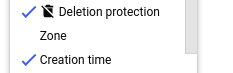
    אפשרות למחיקת מכונה וירטואלית.

  4. עמודה חדשה מופיעה עם סמל ההגנה מפני מחיקה. אם ההגנה מפני מחיקה מופעלת במכונה וירטואלית, הסמל מופיע לצד שם המכונה.

gcloud

ב-CLI של gcloud, מריצים את הפקודה instances describe ומחפשים את השדה deletion protection (הגנה מפני מחיקה). לדוגמה:

gcloud compute instances describe example-instance | grep "deletionProtection"

הכלי מחזיר את הערך של הנכס deletionProtection, שמוגדר כ-true או כ-false:

deletionProtection: false

המשך

import (
	"context"
	"fmt"
	"io"

	compute "cloud.google.com/go/compute/apiv1"
	computepb "cloud.google.com/go/compute/apiv1/computepb"
)

// getDeleteProtection prints the state of delete protection flag of given instance.
func getDeleteProtection(w io.Writer, projectID, zone, instanceName string) error {
	// projectID := "your_project_id"
	// zone := "europe-central2-b"
	// instanceName := "your_instance_name"

	ctx := context.Background()
	instancesClient, err := compute.NewInstancesRESTClient(ctx)
	if err != nil {
		return fmt.Errorf("NewInstancesRESTClient: %w", err)
	}
	defer instancesClient.Close()

	req := &computepb.GetInstanceRequest{
		Project:  projectID,
		Zone:     zone,
		Instance: instanceName,
	}

	instance, err := instancesClient.Get(ctx, req)
	if err != nil {
		return fmt.Errorf("unable to get instance: %w", err)
	}

	fmt.Fprintf(w, "Instance %s has DeleteProtection value: %v", instanceName, instance.GetDeletionProtection())

	return nil
}

Java


import com.google.cloud.compute.v1.Instance;
import com.google.cloud.compute.v1.InstancesClient;
import java.io.IOException;

public class GetDeleteProtection {

  public static void main(String[] args) throws IOException {
    // TODO(developer): Replace these variables before running the sample.
    // project: project ID or project number of the Cloud project you want to use.
    // zone: name of the zone you want to use. For example: “us-west3-b”
    // instanceName: name of the new virtual machine.
    String projectId = "your-project-id-or-number";
    String zone = "zone-name";
    String instanceName = "instance-name";
    getDeleteProtection(projectId, zone, instanceName);
  }

  // Returns the state of delete protection flag of given instance.
  public static boolean getDeleteProtection(String projectId, String zone,
      String instanceName) throws IOException {

    try (InstInstancesClienttancesClient = InstInstancesClientate()) {
      InstInstancetance = instancesClient.get(projectId, zone, instanceName);
      boolean deleteProtection = instinstance.getDeletionProtection()    System.out.printf("Retrieved Delete Protection setting for instance: %s : %s", instanceName,
          deleteProtection);

      return deleteProtection;
    }
  }
}

Node.js

/**
 * TODO(developer): Uncomment and replace these variables before running the sample.
 */
// const projectId = 'YOUR_PROJECT_ID';
// const zone = 'europe-central2-b';
// const instanceName = 'YOUR_INSTANCE_NAME';

const compute = require('@google-cloud/compute');

// Print the state of delete protection flag of given instance.
async function getDeleteProtection() {
  const instancesClient = new compute.InstancesClient();

  const [instance] = await instancesClient.get({
    project: projectId,
    zone,
    instance: instanceName,
  });

  console.log(
    `Instance ${instanceName} has deletionProtection value: ${instance.deletionProtection}`
  );
}

getDeleteProtection();

Python

from google.cloud import compute_v1


def get_delete_protection(project_id: str, zone: str, instance_name: str) -> bool:
    """
    Returns the state of delete protection flag of given instance.
    Args:
        project_id: project ID or project number of the Cloud project you want to use.
        zone: name of the zone you want to use. For example: “us-west3-b”
        instance_name: name of the virtual machine to check.
    Returns:
        The boolean value of the delete protection setting.
    """
    instance_client = compcompute_v1tInstancesClient   instance = instinstance_client.get      project=project_id, zone=zone, instance=instance_name
    )
    return instance.deletion_protection

REST

ב-API, שולחים בקשת GET ומחפשים את השדה deletionProtection:

GET https://compute.googleapis.com/compute/v1/projects/[PROJECT_ID]/zones/[ZONE]/instances/[INSTANCE_NAME]

הפעלה או השבתה של הגנה מפני מחיקה במופעים קיימים

אפשר להפעיל או להשבית את ההגנה מפני מחיקה של מופע קיים, בלי קשר לסטטוס הנוכחי של המופע. במילים אחרות, לא צריך להפסיק את המופע כדי להפעיל או להשבית את ההגנה מפני מחיקה.

המסוף

  1. נכנסים לדף VM instances.

    כניסה לדף VM instances

  2. אם מוצגת בקשה לעשות זאת, בוחרים פרויקט ולוחצים על המשך.

  3. לוחצים על שם המופע שרוצים להפעיל או להשבית בו את ההגנה מפני מחיקה. יוצג דף הפרטים של המופע.

  4. בדף פרטי המופע, מבצעים את השלבים הבאים:

    1. לוחצים על הלחצן עריכה בחלק העליון של הדף.
    2. בקטע הגנה מפני מחיקה, מסמנים את התיבה כדי להפעיל את ההגנה מפני מחיקה או מבטלים את הסימון כדי להשבית אותה.

      תיבת הסימון למחיקת מכונה וירטואלית.

    3. שומרים את השינויים.

gcloud

מריצים את הפקודה update באמצעות ה-CLI של gcloud עם הדגל --deletion-protection או --no-deletion-protection:

gcloud compute instances update [INSTANCE_NAME] \
    [--deletion-protection | --no-deletion-protection]

לדוגמה, כדי להפעיל הגנה מפני מחיקה של מופע בשם example-vm:

gcloud compute instances update example-vm --deletion-protection

המשך

import (
	"context"
	"fmt"
	"io"

	compute "cloud.google.com/go/compute/apiv1"
	computepb "cloud.google.com/go/compute/apiv1/computepb"
	"google.golang.org/protobuf/proto"
)

// setDeleteProtection updates the delete protection setting of given instance.
func setDeleteProtection(w io.Writer, projectID, zone, instanceName string, deleteProtection bool) error {
	// projectID := "your_project_id"
	// zone := "europe-central2-b"
	// instanceName := "your_instance_name"
	// deleteProtection := true

	ctx := context.Background()
	instancesClient, err := compute.NewInstancesRESTClient(ctx)
	if err != nil {
		return fmt.Errorf("NewInstancesRESTClient: %w", err)
	}
	defer instancesClient.Close()

	req := &computepb.SetDeletionProtectionInstanceRequest{
		Project:            projectID,
		Zone:               zone,
		Resource:           instanceName,
		DeletionProtection: proto.Bool(deleteProtection),
	}

	op, err := instancesClient.SetDeletionProtection(ctx, req)
	if err != nil {
		return fmt.Errorf("unable to set deletion protection: %w", err)
	}

	if err = op.Wait(ctx); err != nil {
		return fmt.Errorf("unable to wait for the operation: %w", err)
	}

	fmt.Fprintf(w, "Instance updated\n")

	return nil
}

Java


import com.google.cloud.compute.v1.InstancesClient;
import com.google.cloud.compute.v1.SetDeletionProtectionInstanceRequest;
import java.io.IOException;
import java.util.concurrent.ExecutionException;
import java.util.concurrent.TimeUnit;
import java.util.concurrent.TimeoutException;

public class SetDeleteProtection {

  public static void main(String[] args)
      throws IOException, ExecutionException, InterruptedException, TimeoutException {
    // TODO(developer): Replace these variables before running the sample.
    // project: project ID or project number of the Cloud project you want to use.
    // zone: name of the zone you want to use. For example: “us-west3-b”
    // instanceName: name of the new virtual machine.
    // deleteProtection: boolean value indicating if the new virtual machine should be
    // protected against deletion or not.
    String projectId = "your-project-id-or-number";
    String zone = "zone-name";
    String instanceName = "instance-name";
    boolean deleteProtection = true;
    setDeleteProtection(projectId, zone, instanceName, deleteProtection);
  }

  // Updates the "Delete Protection" setting of given instance.
  public static void setDeleteProtection(String projectId, String zone,
      String instanceName, boolean deleteProtection)
      throws IOException, ExecutionException, InterruptedException, TimeoutException {

    try (InstInstancesClienttancesClient = InstInstancesClientate()) {

      SetDSetDeletionProtectionInstanceRequestuest =
          SetDSetDeletionProtectionInstanceRequestBuilder()
              .setProject(projectId)
              .setZone(zone)
              .setResource(instanceName)
              .setDeletionProtection(deleteProtection)
              .build();

      instancesClient.setDsetDeletionProtectionAsyncuest).get(3, TimeUnit.MINUTES);
      ;
      // Retrieve the updated setting from the instance.
      System.out.printf("Updated Delete Protection setting: %s",
          instancesClient.get(projectId, zone, instanceName).getDeletionProtection());
    }
  }
}

Node.js

/**
 * TODO(developer): Uncomment and replace these variables before running the sample.
 */
// const projectId = 'YOUR_PROJECT_ID';
// const zone = 'europe-central2-b';
// const instanceName = 'YOUR_INSTANCE_NAME';
// const deleteProtection = True;

const compute = require('@google-cloud/compute');

// Update the delete protection setting of given instance.
async function setDeleteProtection() {
  const instancesClient = new compute.InstancesClient();

  const [response] = await instancesClient.setDeletionProtection({
    project: projectId,
    zone,
    // Set the delete protection bit.
    deletionProtection: deleteProtection,
    resource: instanceName,
  });
  let operation = response.latestResponse;
  const operationsClient = new compute.ZoneOperationsClient();

  // Wait for the create operation to complete.
  while (operation.status !== 'DONE') {
    [operation] = await operationsClient.wait({
      operation: operation.name,
      project: projectId,
      zone: operation.zone.split('/').pop(),
    });
  }

  console.log('Instance updated.');
}

setDeleteProtection();

Python

from __future__ import annotations

import sys
from typing import Any

from google.api_core.extended_operation import ExtendedOperation
from google.cloud import compute_v1


def wait_for_extended_operation(
    operation: ExtendedOperation, verbose_name: str = "operation", timeout: int = 300
) -> Any:
    """
    Waits for the extended (long-running) operation to complete.

    If the operation is successful, it will return its result.
    If the operation ends with an error, an exception will be raised.
    If there were any warnings during the execution of the operation
    they will be printed to sys.stderr.

    Args:
        operation: a long-running operation you want to wait on.
        verbose_name: (optional) a more verbose name of the operation,
            used only during error and warning reporting.
        timeout: how long (in seconds) to wait for operation to finish.
            If None, wait indefinitely.

    Returns:
        Whatever the operation.result() returns.

    Raises:
        This method will raise the exception received from `operation.exception()`
        or RuntimeError if there is no exception set, but there is an `error_code`
        set for the `operation`.

        In case of an operation taking longer than `timeout` seconds to complete,
        a `concurrent.futures.TimeoutError` will be raised.
    """
    result = operation.result(timeout=timeout)

    if operation.error_code:
        print(
            f"Error during {verbose_name}: [Code: {operation.error_code}]: {operation.error_message}",
            file=sys.stderr,
            flush=True,
        )
        print(f"Operation ID: {operation.name}", file=sys.stderr, flush=True)
        raise operation.exception() or RuntimeError(operation.error_message)

    if operation.warnings:
        print(f"Warnings during {verbose_name}:\n", file=sys.stderr, flush=True)
        for warning in operation.warnings:
            print(f" - {warning.code}: {warning.message}", file=sys.stderr, flush=True)

    return result


def set_delete_protection(
    project_id: str, zone: str, instance_name: str, delete_protection: bool
) -> None:
    """
    Updates the delete protection setting of given instance.
    Args:
        project_id: project ID or project number of the Cloud project you want to use.
        zone: name of the zone you want to use. For example: “us-west3-b”
        instance_name: name of the instance to update.
        delete_protection: boolean value indicating if the virtual machine should be
            protected against deletion or not.
    """
    instance_client = compcompute_v1tInstancesClient    request = compcompute_v1DSetDeletionProtectionInstanceRequest   request.project = project_id
    request.zone = zone
    request.resource = instance_name
    request.deletion_protection = delete_protection

    operation = instinstance_client.set_deletion_protectionuest)
    wait_for_extended_operation(operation, "changing delete protection setting")

REST

ב-API, שולחים בקשת POST ל-method‏ setDeletionProtection עם פרמטר השאילתה deletionProtection. לדוגמה:

POST https://compute.googleapis.com/compute/v1/projects/[PROJECT_ID]/zones/[ZONE]/instances/[INSTANCE_NAME]/setDeletionProtection?deletionProtection=true

כדי להשבית את ההגנה מפני מחיקה, מגדירים את deletionProtection לערך false. אל תספקו תוכן בקשה עם הבקשה.

המאמרים הבאים