
This document describes the reservation types that you can use to reserve capacity for creating Compute Engine instances. To learn more about the resources that you need to create compute instances, see Compute Engine instances.
Reservations give your project a very high assurance that zonal resources are available when you need them to create compute instances. You can reserve core hardware (vCPUs and memory) and attached resources (GPUs, TPUs, Local SSD disks, and Hyperdisk pools). If you share a reservation, then up to 100 projects in your Cloud de Confiance by S3NS organization get this same capacity assurance. You can use your reserved resources at any time to create compute instances with properties that match your reservation.
Reservations offer the following benefits:
High capacity assurance: you hold resources in a specific zone to prepare for future increases in demand, such as growth, traffic spikes, large database migrations, or disaster recovery.
Exclusive access: you restrict access to your reserved resources so that other projects, both inside and outside of your Cloud de Confiance organization, can't use them. Restricting access helps ensure that your workloads have the resources they need to run.
Capacity retention: you keep your vCPUs, memory, GPUs, TPUs, Local SSD disks, and storage capacity (if your reservation includes it) even if you stop compute instances. You can then restart those compute instances without running into resource availability errors.
Consistent configurations: the compute instances that you create by using your reserved resources have identical hardware and storage setups. This approach helps ensure consistent performance and avoids processing delays across your compute instances.
After Compute Engine provisions your reserved resources, you pay for them whether you use them or not, and for as long as the reservation exists. When you create compute instances by consuming your reserved resources, you don't incur additional costs. You only pay for resources that aren't part of the reservation, such as IP addresses.
Limitations
All reservation types have the following limitations:
Reservations are zone-specific resources.
You can't use your reserved capacity to create the following Compute Engine resources:
Compute instances with
f1-microorg1-smallmachine typesFlex-start VMs
Sole-tenant nodes
Spot VMs or preemptible instances
Choose a reservation type
The following diagram helps you choose the type of reservation that best fits your workload requirements. If you want to compare features across reservation types, then see the comparison table in this document.
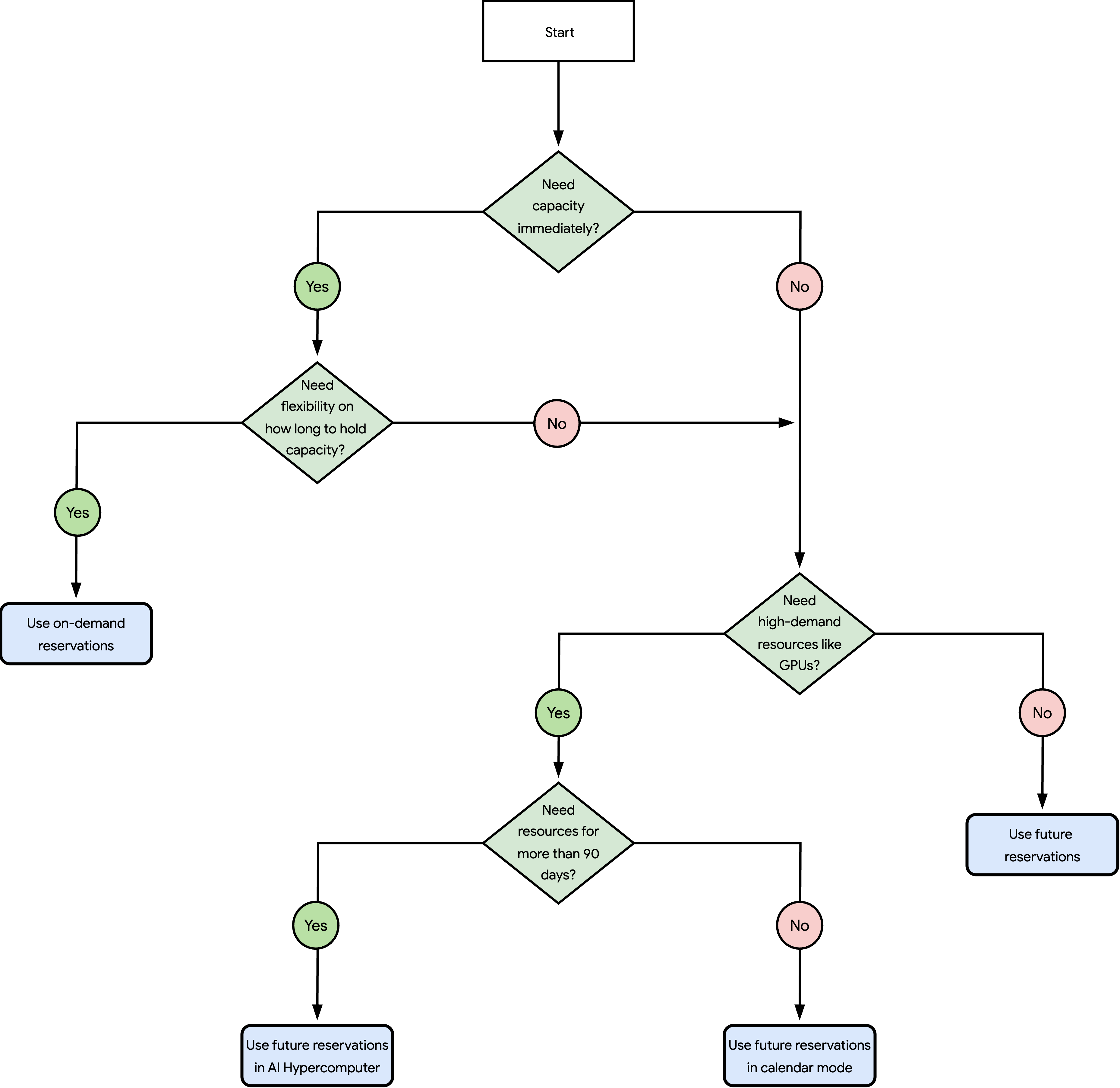
The questions in the preceding diagram are as follows:
Do you need capacity immediately?
Yes: go to the next question.
No: skip to question 3.
Do you need flexibility on how long to hold capacity?
Yes: see Use on-demand reservations.
No: go to the next question.
Do you need high-demand resources like GPUs?
Yes: go to the next question.
No: see Use future reservations.
Do you need resources for more than 90 days?
Use on-demand reservations
With on-demand reservations, you request to reserve vCPUs, memory, and attached resources (GPUs, TPUs, and Local SSD disks) to create compute instances. If your request succeeds, then Compute Engine does the following:
Compute Engine creates an on-demand reservation with your requested resources within a few minutes.
Compute Engine closely allocates your reserved resources on a best-effort basis. To place compute instances in close proximity to minimize network latency, you can optionally specify a compact placement policy when you create the reservation.
To consume the reservation, create compute instances that match the properties of the reservation and by using the standard provisioning model. You can consume, modify, or delete the reservation at any time.
For more information, see About reservations.
Use future reservations
With future reservations, you request to reserve vCPUs, memory, and attached resources (GPUs, TPUs, and Local SSD disks) to create compute instances for a future date and time. After you create a reservation request, you submit the request to Cloud de Confiance by S3NS for review. If Cloud de Confiance approves your request, then Compute Engine does the following:
Compute Engine creates on-demand reservations with your requested capacity on your chosen delivery date and time.
Compute Engine closely allocates your reserved resources on a best-effort basis.
To consume the reservations, create compute instances that match the properties of the reservations and by using the standard provisioning model. You can modify or delete the reservations at any time. Any compute instances that you created by using the reservation continue to run even after the reservation period ends or you delete it.
For more information, see About future reservation requests.
Use future reservations in calendar mode
With future reservations in calendar mode, you can request to reserve vCPUs, memory, and attached resources (GPUs, TPUs, and Local SSD disks) for a future date and time, and for up to 90 days. To create this reservation type, you first view when your chosen number and type of resources are available in a region. Then, you create and submit a reservation request with the properties that you confirmed as available. If you submit a valid request, then Cloud de Confiance approves the request within one minute. After Cloud de Confiance approves the request, Compute Engine does the following:
Compute Engine creates an on-demand reservation on your chosen delivery date and time.
Compute Engine reserves your requested resources in close physical proximity to minimize network latency, which is useful for tightly coupled artificial intelligence (AI), machine learning (ML), or high performance computing (HPC) workloads.
Compute Engine reserves resources with cluster management capabilities, which is optimal for multi-node, large-scale workloads.
To consume the reservation at the start of your reservation period, create GPU, H4D, or TPU instances that match the properties of the reservation and by using the reservation-bound provisioning model. At the end of the reservation period, Compute Engine deletes the reservation, and stops or deletes any compute instances that consume the reservation based on the termination action that you specified for the compute instances.
For more information, see About future reservation requests in calendar mode.
Use future reservations for capacity blocks
With future reservations for capacity blocks, you can request to reserve vCPUs, memory, and attached resources (GPUs, TPUs, Local SSD disks, and Hyperdisk pools) for a future date and time, and for an unlimited duration. To create this reservation type, you contact your account team and request capacity. After Google creates a draft reservation request for you, you review and submit the request. Cloud de Confiance approves the request within a few minutes, and then Compute Engine does the following:
Compute Engine creates on-demand reservations on your chosen delivery date and time.
Compute Engine reserves your requested resources in close physical proximity to minimize network latency, which is useful for tightly coupled AI, ML, or HPC workloads.
Compute Engine reserves resources with cluster management capabilities, which is optimal for multi-node, large-scale workloads.
To consume the reservations at the start of your reservation period, create GPU, TPU, or H4D instances that match the properties of the reservations and by using the reservation-bound provisioning model. At the end of the reservation period, Compute Engine deletes the reservation, and stops or deletes any compute instances that consume the reservation based on the termination action that you for the compute instances.
For more information, see any of the following documents:
For GPU instances:
To reserve capacity for A4X Max, A4X, A4, A3 Ultra, A3 Mega, A3 High (8 GPUs), or A3 Edge instances to create compute instances or cluster in Cluster Toolkit, Compute Engine, or Google Kubernetes Engine (GKE), see Reserve capacity through your account team in the AI Hypercomputer documentation.
To reserve capacity for A4X, A4, A3 Ultra, or A3 Mega instances to create clusters in Cluster Director, see Reserve capacity through your account team in the Cluster Director documentation.
For TPU instances:
- To reserve capacity for TPU7x, TPU v6e, or TPU v5p instances, see Request a future reservation for one year or longer in the Cloud TPU documentation.
For H4D instances:
- To reserve capacity for H4D instances, see Reserve capacity through your account team in the Compute Engine documentation.
Compare reservation types
To identify the reservation type that fits your workload, compare technical capabilities across reservation types in the following table:
| On-demand reservations | Future reservations | Future reservations in calendar mode | Future reservations for capacity blocks | |
|---|---|---|---|---|
| Supported machine series | All machine families (except A4X Max, A4X, A4, A3 Ultra, and A3 High with less than 8 GPUs) | A3 Mega*, A3 High (with 8 GPUs)*, A3 Edge*, C4, C4A, C4D, C4N, C3, C3D, G4*, H4D*, H3, M4, M4N, M3, N4, N4A, N4D, TPU7x, TPU v6e, TPU v5p, X5, X4, Z4D, and Z3 | A4, A3 Ultra, A3 Mega, A3 High (8 GPUs), A3 Edge, H4D, TPU7x, TPU v6e, and TPU v5p | A4X Max, A4X, A4, A3 Ultra, A3 Mega, A3 High (8 GPUs), A3 Edge, H4D, TPU7x, TPU v6e, and TPU v5p |
| Storage reservations | No | No | No | Optional (Hyperdisk pool) |
| Maximum number of compute instances per request | 1,000‡ | No limit# | 80 for GPU instances, 256 for H4D instances, and 1,024 for TPU chips | No limit# |
| Maximum duration | Unlimited (until you delete it) | Unlimited (until you delete it) | Up to 90 days | Unlimited (contract period) |
| View future availability | No | No | Yes (up to 60 days for GPU and H4D instances; up to 120 days for TPU chips) | Yes (contact your account team) |
| Creation method | You create the reservation | You create the reservation request | You create the reservation request | You contact your account team, and then Google creates the reservation request for you |
| Delivery time | Immediate | Specific future date and time | Specific future date and time | Specific future date and time |
| Resource allocation | Best-effort (compact placement policies optional) | Best-effort | Dense | Dense |
| Cluster management capabilities | No | No | Yes | Yes |
| Provisioning model | Standard | Standard | Reservation-bound | Reservation-bound |
| Quota | Requires standard quota | Requires standard quota | Requires no quota for GPU instances or TPU chips; requires standard quota for H4D instances | Google automatically increases your quota before delivery |
| Pricing | Standard pricing (discounted with commitments) | Standard pricing (discounted with commitments) | Discounted up to 53% (DWS pricing) | Standard pricing (discounted with commitments) |
| End of reservation period | Manual deletion | Manual deletion | Automatic reservation deletion; compute instances stop or delete based on their termination action | Automatic reservation and Hyperdisk pool deletion; compute instances stop or delete based on their termination action |
* Before you submit a future reservation request for A3 Mega, A3 High (with 8 GPUs), A3 Edge, G4, or H4D instances, you must contact your account team or the sales team. Otherwise, Cloud de Confiance is likely to decline your request.
‡ If you apply a compact placement policy with a maximum distance
value of 2 to an on-demand reservation, then you can reserve a
maximum of 256 A3 Mega, A3 High with 8 GPUs, or A3 Edge instances, or a maximum
of 150 compute instances for all other supported machine families. For more
information, see
About compact placement policies.
# If you request to reserve more than 1,000 compute instances in a single reservation request, then Compute Engine delivers your requested capacity by creating multiple on-demand reservations at your chosen delivery date and time.