
This document provides an overview of global VM extension policies in VM Extension Manager. Global extension policies let you deploy and manage extensions across all zones and regions within a project, folder, or organization to maintain consistent fleet configurations without managing per-zone policies.
For more information about hierarchy levels for extension policies, see Resource hierarchy scopes.
The following diagram illustrates how global extension policies apply extensions to VMs across zones and regions at the organization, folder, and project levels:
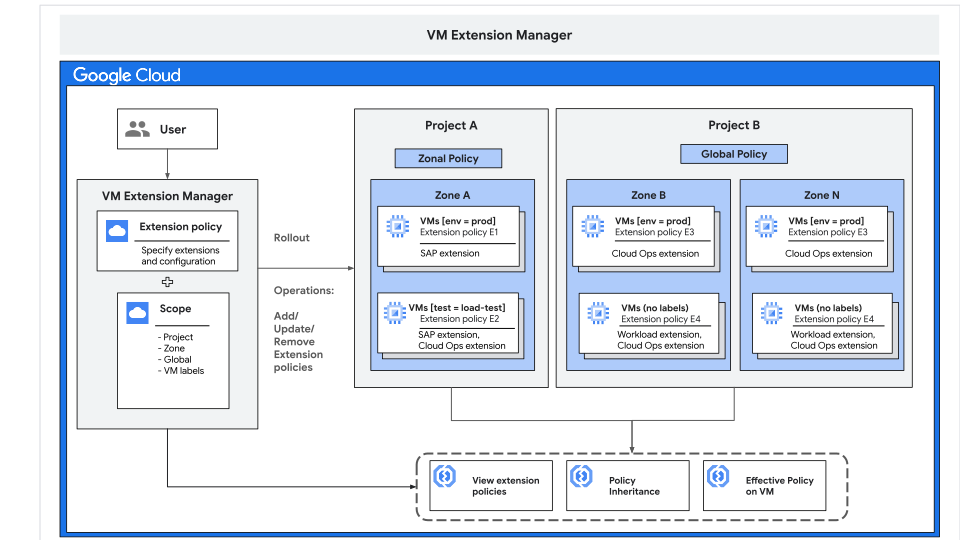
As shown in the preceding diagram, you can define global extension policies at the organization, folder, or project level. VM Extension Manager applies each policy to matching VMs across all zones within that hierarchy scope.
Rollout plans for global policies
Global policies use rollout plans to deploy extensions across zones and regions. A rollout plan lets you define the order and timing of updates to ensure a gradual, controlled rollout and minimize the risk of widespread issues.
When you create or update a global policy, you can specify one of the following rollout plans:
- Slow rollout. Deploys extensions gradually across zones over a default five-day period. Use this rollout plan to identify and resolve issues in early deployment waves before they affect your entire fleet.
- Fast rollout. Deploys extensions to all targeted VMs across all zones and regions immediately. Use this rollout plan when you need to quickly deploy an extension or patch in non-production environments.
You can also define custom rollout plans to specify the deployment waves by zone
or region and the wait time between waves. For more information, see the
rolloutPlans.insert
method.
Rollout conflict behavior
When you create or update a global extension policy, a conflict with an existing zonal policy can occur in the following situations:
- When you create a global policy. If a zonal policy with the same name already exists in a zone, a name conflict occurs.
- When you update a global policy. If you modify an existing zonal policy independently—for example, by using a zonal API call—and a subsequent global policy rollout attempts to update that zonal policy, a content conflict occurs.
To resolve rollout conflicts, you can specify a conflict behavior for the rollout. This setting determines whether the global policy overwrites conflicting zonal policies during a rollout. You can specify one of the following behaviors:
- Don't overwrite (default). If you don't specify a conflict behavior, the global policy rollout doesn't overwrite conflicting zonal policies. The zonal policy's configuration takes precedence in that zone.
- Overwrite. If you set the conflict behavior to
overwrite, the global policy overwrites conflicting zonal policies, and VM Extension Manager applies the global policy's configuration in that zone.
Rollout conflicts and policy priority are distinct features that work independently. For more information about policy priority, see Policy priority and conflict resolution.
For more information about rollout conflict settings, see the conflictBehavior
parameter in the globalVmExtensionPolicies.insert
method.
Retry a rollout
When you update or delete a global extension policy, VM Extension Manager starts a new rollout to apply the changes according to the rollout plan. If a rollout fails or new zones become available, you can retry the operation by starting a new rollout for the same policy.
When you retry an update or delete rollout, you must provide a universally
unique identifier (UUID) in 32-character hexadecimal format (for example,
a1a2a3a4-b1b2-c1c2-d1d2-d3d4d5d6d7d8) to identify the retry request. You can
use any standard UUID generator to create this value.
Retry an update policy rollout
The following list describes scenarios where you might need to retry an update policy rollout:
- New zones added. If new Cloud de Confiance zones become available after you roll out a global policy, VM Extension Manager doesn't automatically apply existing policies to VMs in the new zones. You can retry the update rollout to apply the extension policy to VMs in those zones.
- Revert zonal policy changes. If you modify a zonal policy
independently—for example, by using a zonal API call—you can retry an update
rollout with
conflictBehaviorset tooverwrite. This setting re-applies the global policy's configuration and overwrites the zonal policy changes. - Interrupted rollout. If a previous rollout fails before completing, you can start a new rollout to retry the update.
- Accelerate a rollout. If an ongoing rollout progresses too slowly, you
can start a new rollout by using a
FAST_ROLLOUTplan or a custom rollout plan to accelerate the update process.
For more information, see the retryUuid parameter in the
globalVmExtensionPolicies.update method.
Retry a delete policy rollout
The following list describes scenarios where you might need to retry a delete policy rollout:
- Interrupted rollout. If a previous delete rollout fails before completing, you can start a new rollout to retry the deletion.
- Accelerate a rollout. If an ongoing delete rollout progresses too
slowly, you can start a new rollout by using a
FAST_ROLLOUTplan or a custom rollout plan to accelerate the deletion process.
For more information, see the retryUuid parameter in the
globalVmExtensionPolicies.delete method.
What's next
- To deploy supported agents across your fleet at the organization, folder, or project level, see Install VM extensions by creating extension policies.
- To modify configuration settings, change pinned versions, or remove deployed agents, see Manage VM extensions by using extension policies.
- To inspect rollout progress and extension health status, see View VM extension details and status.
- To build Cloud Monitoring dashboards and set up alerts for agent health, CPU, and memory usage, see Monitor VM extensions.